Menu

Posts tagged “technology”

Create a dedicated project news feed with Trello and Hipchat

I’m always looking for ways to make our workflows more efficient, often to the frustration of my colleagues. I admittedly make them test out way too many tools. But I think I finally found a winning integration that everyone can get behind. First, a bit of background.

We use HipChat as our group chat and IM tool. We have a general room where we all hang out (but I’ll be honest with you, it mostly contains gifs), and then we also set up dedicated project rooms where we discuss project-specific issues. We use Trello to track our tasks and progress on projects. I love Trello, but I wanted to find a way to turn HipChat into the canonical record of what happens on our projects. For that, I turned to a service called Zapier.

Zapier is a tool that connects the web apps you use on a daily basis, and move data between them. Think of it as If This Then That for business use. We have quite a few Zapier automations set up, but my favorites are the ones that post a message to HipChat whenever something specific happens in Trello.

The first step is to set up the connection between Trello and HipChat. To do that, start with this Zapier automation: Create HipChat Alert from new Trello Activity.

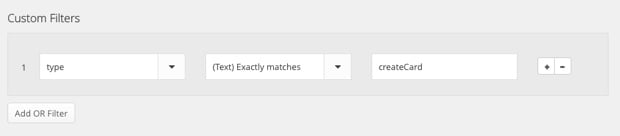
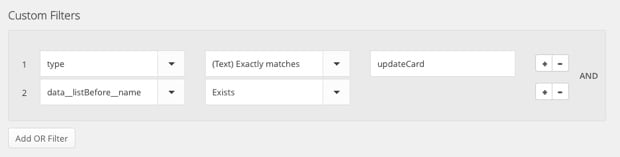
Now, the problem is that this default integration posts a message whenever anything happens in Trello, so it gets overwhelming really quickly. I only want to post a message to HipChat when (1) someone creates a new Trello card, or (2) when someone moves a card from one column (like To Do) to another (like Doing). Trello’s API documentation isn’t very clear, so it took quite a bit of playing around, but I eventually figured out how to make it work. The trick is that you have to create some custom filters to weed out the non-essential stuff. So, once you’ve set up the basic automation, here’s what to do.

To send a message to HipChat when a new card is created in Trello, add the following custom filter:
Zapier Hipchat Trello

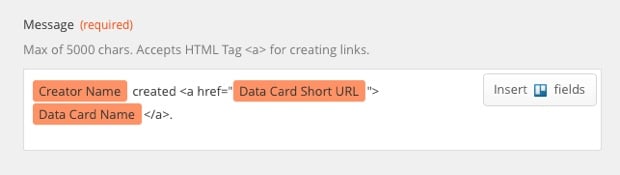
And then use the following variables for the HipChat message:
Zapier Hipchat Trello

To send a message to HipChat when a card is moved from one column to another, create the following custom filter:
Zapier Hipchat Trello

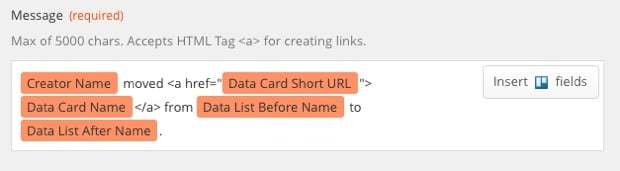
And use the following variables for the HipChat message:
Zapier Hipchat Trello

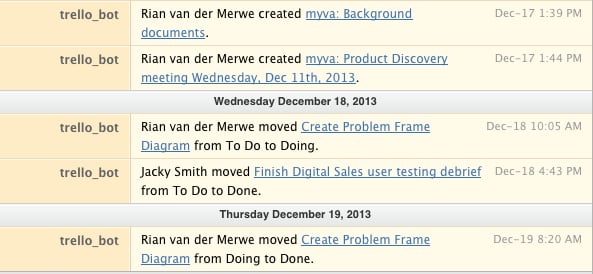
The result looks like this in HipChat:
Zapier Hipchat Trello

I like this message format because it lets you know who did what, and it also links directly to the Trello card if you’d like add a comment or look at other activity.

This integration basically turned HipChat into a dedicated project news feed, which I find extremely useful. If you only work on one project at a time this whole thing might seem like overkill, but we often have 3 or more projects on the go, so it’s great to enter a HipChat room and immediately be able to get a sense of what’s going on.

So, give Zapier a try. Even if you don’t use HipChat and Trello, I’m sure you’ll have fun playing around with the services you do use.
Adding meaning to digital music

Dancing Bale

Khoi Vinh wrote a great essay exploring What Streaming Music Can Be. He starts by describing some of the things that made buying CDs and albums a meaningful experience:

This is all trivia, to be sure, but it’s the kind of stuff that used to be such a meaningful part of owning music — and that makes one a fan for life. Having a record in your collection meant that you could spend time poring over its liner notes: familiarizing yourself with the names of musicians, producers, engineers, and managers; memorizing lyrics; and studying photos of musicians’ faces, stances and attire. These were the intangible qualities that made music more than just a service, but something to be collected.

But Khoi doesn’t just want streaming music services like Spotify and Rdio to copy the days of physical liner notes. Instead, he makes some suggestions on how these services can use metadata in fascinating ways to add meaning to digital music.

I’ve been a happy Spotify customer for a few months now, but everything Khoi says in his post makes sense to me. I’ve discovered some great music — and some great albums — but I tend to listen to those albums a lot less than when I used to buy CDs. The turnover is just too fast — there’s always something new to discover. And I’m hungry for it, incapable of resisting the lure of the next great song.

Apart from the missing metadata, there is something else that bugs me about streaming services (and digital music in general). Janko Jovanovic discusses this in the context of eBooks in his post Digital and physical, but it’s just as applicable to digital music:

When I buy a physical book, it starts to live a life of its own. After reading it for days or weeks, the book changes. It’s not brand new anymore. Edges of papers lose their sharpness. The cover becomes slightly bent and you can tell it was read just by looking at it. When I put a book on a shelf it becomes a part of the space I live in and it continues to change over time. This transience and decay of things around me remind me that I should use every moment of my life since I will go through the same lifecycle as that book. […]

All digital goods, be it ebooks, software, documents or images give me a sense of permanency and immutability. They are sterile. And that sterility prevents me from getting in touch with transience and gives me a sense of timelessness. Which is just an illusion.

I’m not going to end my Spotify subscription, but I do miss glancing over my CDs, observing the wear and tear of albums that have gone through so much with me. Those CD covers become more than the music they contain. They become reminders of a life well lived. And I do fear that I’m losing that now that I mainly listen to my (admittedly awesome) Spotify playlists.

The screen isn't going away, and that's ok

Robert McGinley Myers wrote a good post called Misunderstood or Double-edged? about the new Apple holiday ad. He starts off with familiar arguments about faces stuck in phones and blah blah blah — but wait, don’t roll your eyes because of yet another “technology is bad” post. It doesn’t end like you think it will:

That screen is not going away anytime soon, but we don’t have to be passive viewers of it, merely consuming and feeling vaguely guilty about what we consume from it. There’s immense creative power behind the screen. Instead of worrying about it, lamenting it, and disparaging it, we should focus on learning how best to use it — to gather, understand, shape, and share the information around us.

Agreed.

[Sponsor] Webydo: professional design software

My thanks to Webydo for sponsoring Elezea’s RSS feed this week.

Webydo enables professional web and graphic designers to create, publish, and manage websites without having to write a single line of code, and provides them with the freedom of creativity to focus on what’s important — the DESIGN.

Webydo is made by designers, for designers and is the only solution for website creation with a built in CMS (content management system) and DMS (design management system). Webydo also gives you the option to directly bill your clients, brand Webydo as your own, and provide full cross-browser capabilities. What’s more, with Webydo, you can efficiently create a responsive website with complete cross-browser capabilities as well.

Experience the freedom of creativity with Webydo’s professional online design software today for free.

Sponsorship by The Syndicate.

The case for progressive enhancement

Alex Maughan gives some great front-end design and development tips in his article Mobile-first, semantic, and modular front-end design. If any part of your work touches front-end development, I highly recommend this piece. In addition to walking through the tools he uses (and his reasoning), Alex also makes a strong case for progressive enhancement:

Designs should be approached with a content-first and mobile-first mindset. Following this, CSS breakpoints should always be mobile-first. All JavaScript should be progressively enhanced and should be used at a conscientious minimum where possible. Therefore, the concept of progressive enhancement happens from all aspects, from design to development and back again.

All of this translates into websites that are much more future-friendly within a disruptive device and browser marketplace. It also has the added benefit of improving performance and guarding against fatal runtime errors that stop pages from working.

I haven’t yet linked to many pieces on progressive enhancement. As I went through my Pinboard links just now I realized that 2013 has been a big year for this topic. These are all the articles I know about that came out this year in strong defense of progressive enhancement:

I don’t know, it sounds like it’s not dead yet…

A good reason to read science fiction

Finally, I have a legitimate excuse for my obsession with sci-fi and post-apocalyptic literature. Apparently it’s going to make me a better designer. I’ll take it! Rebecca J. Rosen explains Why Today’s Inventors Need to Read More Science Fiction:

Once any sort of technology has users, it becomes extremely difficult to change it — even if you know it should or must be changed. […] How is that affecting our social structure and values? How is that changing the way we view ourselves and even the way we understand our own mental functioning? […]

Reading science fiction is like an ethics class for inventors, and engineers and designers should be trying to think like science fiction authors when they approach their own work. […] I feel with great urgency that we need to very thoughtfully consider what we build as well as encourage that same thoughtfulness out in the world.

Healthcare.gov is all our projects

Healthcare.gov

So much has been written about the disastrous launch of healthcare.gov. But Sheryl Solberg and Michael Shear’s Inside the Race to Rescue a Health Care Site, and Obama hit especially close to home. Much of it reads like any number of software development projects I’ve been involved in over the years:

In Herndon, as engineers tried to come to grips with repeated crashes, a host of problems were becoming apparent: inadequate capacity in its data center and sloppy computer code, partly the result of rushed work amid the rapidly changing specifications issued by the government. […]

The website had barely been tested before it went live, so a large number of software and hardware defects had not been uncovered. Fixing the account creation software simply exposed other problems; people still could not register to buy insurance. A system intended to handle 50,000 simultaneous users was fundamentally unstable, unable to handle even a tiny fraction of that. As few as 500 users crippled it, according to people involved.

Rushed work amid rapidly changing specifications… No testing before going live…

Let him who has never experienced issues like that on a project cast the first negative blog post.

Unplug all you want — it won't help

In The Disconnectionists Nathan Jurgenson takes to task those who speak about digital detoxes and the negative social effects of being online:

Op-eds, magazine articles, news programs, and everyday discussion frames logging off as reclaiming real social interaction with your real self and other real people. The R in IRL. When the digital is misunderstood as exclusively “virtual,” then pushing back against the ubiquity of connection feels like a courageous re-embarking into the wilderness of reality. When identity performance can be regarded as a by-product of social media, then we have a new solution to the old problem of authenticity: just quit. Unplug — your humanity is at stake! Click-bait and self-congratulation in one logical flaw.

Which reminds me of this tweet of the picture below and the caption, “All this technology is making us antisocial. Before everyone used to talk to each other.”

Distraction

There is nothing new under the sun… I also love this line from the article:

Disconnect. Take breaks. Unplug all you want. You’ll have different experiences and enjoy them, but you won’t be any more healthy or real.

It turns out our anti-social behavior comes not from technology, but from who we are.

Language is changing, because Internet.

I read two really great articles this week about a couple of recent language shifts. The first is Megan Garber’s English Has a New Preposition, Because Internet, all about the “because-noun”:

However it originated, though, the usage of “because-noun” (and of “because-adjective” and “because-gerund”) is one of those distinctly of-the-Internet, by-the-Internet movements of language. It conveys focus (linguist Gretchen McCulloch: “It means something like ‘I’m so busy being totally absorbed by X that I don’t need to explain further, and you should know about this because it’s a completely valid incredibly important thing to be doing’”). It conveys brevity (Carey: “It has a snappy, jocular feel, with a syntactic jolt that allows long explanations to be forgone”).

But it also conveys a certain universality. When I say, for example, “The talks broke down because politics,” I’m not just describing a circumstance. I’m also describing a category. I’m making grand and yet ironized claims, announcing a situation and commenting on that situation at the same time. I’m offering an explanation and rolling my eyes — and I’m able to do it with one little word. Because variety. Because Internet. Because language. 

And then there’s Ben Crair’s exploration of SMS-speak in The Period Is Pissed — When did our plainest punctuation mark become so aggressive?:

The period was always the humblest of punctuation marks. Recently, however, it’s started getting angry. I’ve noticed it in my text messages and online chats, where people use the period not simply to conclude a sentence, but to announce “I am not happy about the sentence I just concluded.” […]

“In the world of texting and IMing … the default is to end just by stopping, with no punctuation mark at all,” Liberman wrote me. “In that situation, choosing to add a period also adds meaning because the reader(s) need to figure out why you did it. And what they infer, plausibly enough, is something like ‘This is final, this is the end of the discussion or at least the end of what I have to contribute to it.’”

If you have an interest in language, you’ll enjoy both articles very much.

Removing the Word shackles: getting started with plain text

Escape

I hate Microsoft Word. I want Microsoft Word to die. I hate Microsoft Word with a burning, fiery passion. I hate Microsoft Word the way Winston Smith hated Big Brother.

Charlie Stross

There is a growing uprising against word processors and WYSIWYG editors of late. This is partly because of how bad most of those products are, and partly because other alternatives — particularly plain text — have become so intriguing. In fact, please allow me a moment to declare my undying love for plain text.

I love that with plain text the focus is on the words, not the formatting. I love that it’s portable and can be used anywhere and everywhere, in any piece of software that edits or displays words. I love how easy it is to create beautifully formatted documents when needed. Most of all, I love how fast it is. I simply work more efficiently since switching to plain text.

And yet I haven’t been able to convince many people to join me in uninstalling Microsoft Word and moving most (if not all) of their writing to plain text. You wouldn’t believe how hard it is to find people at a party who are willing to listen to me rant about word processors. So, you know. To the internet!

This is a short post about the tools I use to do the vast majority of my writing (business as well as personal). I hope that it will convince at least some of you to take the plunge with me.

To move your note-taking and writing to plain text you need three things:

  • A format to write in
  • A place to write in
  • A central place to store it all

With those three things in place you’ll be all set to free yourself from the shackles of word processors and WYSIWYG editors. If you want more efficiency and clarity in your writing, this is the way to do it1.

A format to write in

I cannot sing the praises of Markdown enough. Markdown is an easy-to-learn, inconspicuous syntax that lets you focus on what you’re writing without getting bogged down in what it’s going to look like once you’re done. At the same time, it’s a powerful system for formatting documents automatically when you need to print them out, or send something to a colleague or client. The syntax remains easily readable without getting in the way of your words.

I write pretty much everything in Markdown now, and as more and more applications start to support it natively, I only see its popularity growing. The latest email app to take the Mac world by storm, Airmail, has native Markdown support. So does MarsEdit, the software I use to write and publish to this site. The PHP Markdown WordPress plugin further allows any WordPress site to publish with Markdown.

Trust me, it’s really easy to learn. Here’s another Markdown syntax guide to get you going.

A place to write in

Once you’ve settle on the Markdown format, you’re ready for the most difficult stage of the switch: figuring out which of the hundreds of great applications to write and edit plain text files works best for you. On the Mac I’ve tried iA Writer and Byword, but I now spend most of my time in Brett Terpstra’s nvALT. It is a fork of the original Notational Velocity text editor that adds some really great features. What makes it great? Nothing beats nvALT when it comes to speed and efficiency:

  • Modeless operation in which searching for notes and creating new notes happen in the same part of the interface. It’s highly efficient and there’s zero lag.
  • Powerful keyboard shortcuts for mouseless operation, which further speeds up your writing.
  • Native Markdown support, of course.

Even though nvALT has preview functionality built in, I prefer Marked 2 to view formatted text files. Yet another Brett Terpstra project, it’s a powerful previewer for Markdown files, and it works with any text editor. So even if you use something other than nvALT, or open a text file in another app, you can still use Marked. You can add custom CSS and export to a variety of file formats. So when you’re ready to move from words to formatting, this is the app to do it in.

On iOS I’ve gone through tons of text editor apps, but I currently use Notesy, and I’m really happy with it. It’s incredibly fast, which is, as I keep mentioning, one of the main reasons to switch to plain text. There are a few additional things about Notesy that make it one of the apps I use most on my iOS devices:

  • You can use it to quickly jot down some thoughts you don’t want to forget, and the file will be waiting for you on nvALT when you get back to your desk. So you can just keep going where you left off.
  • It has a URL structure and good support from other apps you may already be using. For example, if you read something in Instapaper that you want to reference in a blog post or an email, you can easily create a note with the selected text.

Send to Notesy

If you need a more comprehensive overview of iOS text editors, check out this extensive comparison (by — who else — Brett Terpstra).

A central place to store it all.

The last thing to figure out is how to make it all work together so your files are always synced and always available for use on any device. Of course, this is where Dropbox comes in. You’ll need to make a couple of simple settings changes in nvALT to accomplish this. In the Notes preference pane, do the following:

  • Change the “Read notes from folder” destination to a folder in Dropbox.
  • Change the “Store and read notes on disk as:” setting to Plain Text Files

nvALT storage

And just like that, you’re all set. Now you can access your text files from any computer that has internet access and an application that can read text files. Notesy on iOS works directly off Dropbox, so you just have to point it to the folder you set up for your plain text files in nvALT.

“But wait,” I hear you say, “what about folders and things?” Well, that’s what’s so great about using nvALT and Notesy. Everything is search-based. I’ve never had a problem finding a file/note I’m looking for. And since these applications are built for speed, even on a vast amount of text files, it’s much faster than trolling through folders looking for the right file. Getting out of the folders mindset is a bit uncomfortable at first, but it really does start to feel natural after a while.

If you really struggle with the idea, nvALT does support tagging (similar to Gmail’s tags), so you can use that as a crutch for a while. But a better option is to come up with a file naming system, and stick with it. See, for example, Michael Schechter’s excellent overview of the system he uses.

“But wait,” I hear you say again (you’re nothing if not persistent), “what about collaborating on documents?” Don’t worry, there’s an app for that. Once you’re at a point where you need to get feedback or collaborate on a document, you can just import your text file into the brilliant new service Editorially, and keep going from there. It supports Markdown (of course it does), version control, tracked changes, and comments. No sweat.

I won’t deny that there are still some circumstances where word processors are useful. I’m writing a book at the moment, and I’m using Pages for that (mainly because Editorially didn’t exist when I started writing it). But for the majority of everyday writing — meeting notes, emails, business documents — there is simply nothing better than plain text. Go ahead. Get rid of Word. You can do it.


  1. I’m making these recommendations from the perspective of an Apple user, but I’m sure there are good alternatives on other platforms.