Menu

Posts tagged “product management”

The potential and dangers of 'squirrel projects'

In one of his characteristically brilliant essays, Paul Graham recently wrote:

I think most people have one top idea in their mind at any given time. That’s the idea their thoughts will drift toward when they’re allowed to drift freely. And this idea will thus tend to get all the benefit of that type of thinking, while others are starved of it. Which means it’s a disaster to let the wrong idea become the top one in your mind.

The importance of focus in a startup, or any other business for that matter, is such a basic principle that no one disagrees with it, but it is still such a difficult thing to get right.  One of the reasons is that you don’t want to stifle innovation, and some of the best ideas can come from a completely random project you went off to do in your spare time.

Whatever your feelings are about side projects that take you off your main focus, it is important to recognize them for what they are: distractions.  This doesn’t necessarily mean it’s bad, but let’s call it what it is — these projects distract you from your “top idea.”

For the products I’m responsible for at Yola, we have name for such distractions.  We call them “squirrel projects.”  If you’ve seen the movie Up, you’ll probably immediately know what I’m talking about.  If not, here’s a refresher:

I don’t think “squirrel projects” need more definition than that video…  So, when one of your team members go off on a sometimes-random-but-always-guaranteed-to-be-cool tangent, it’s important to do two things:

  • Call it out as a squirrel project
  • Determine whether or not it’s a squirrel worth hunting

Figuring out if it’s a squirrel worth hunting depends mainly on:

  • The timing of the project
  • The potential value of the idea

I’d say that 2 days before release day is a pretty bad time to go squirrel hunting.  But what if you’re in the beginning of a sprint and something great comes along?  Adjust.  Reprioritize. Throw some things on the backlog, and make room.  Because sometimes, it’s worth it.

It’s also important to note that “value” doesn’t necessarily mean immediate ROI.  There are different ways to get value out of a squirrel project.  Sometimes it’s the potential for revenue down the road.  Sometimes it’s the time spent now on automation tasks that will save you a bunch of time later.  And sometimes, it’s just plain cool (two words and a hint for something you should try on Yola: Konami Code).

Squirrel projects aren’t bad.  But they can be devastating to your focus and momentum if they happen at the wrong time, and/or they have no potential for value.  So go hunt the good ones, and let the bad ones go.

Software development and product management: Part 1 (Overview)

Almost a year ago I wrote a post to propose/summarize a universal model for product development.  I’ve now refined that model into what I believe is much closer to what the original intention was: a product development framework that is detailed enough to be practically usable, but generic enough to fit on top of any development paradigm (Agile, Waterfall, etc.).

I’ve decided to start a series of posts on software development and the Product Manager’s role in that process.  The first, this one, is a very general overview — it’s basic, yes, but necessary to lay the groundwork.  After that, I want to spend time writing down my thoughts on each of these stages in detail.

Why do this? Because I think the Product Management profession is finally starting to come into its own, and I’m hoping that through discussion we can, together, evolve a practical guide to what we do from day to day, something that is both flexible enough and rigid enough to be helpful without being constricting.  And maybe also just to force myself to think through this in detail and become more deliberate and focused on each of these steps.  I hope you’ll join the discussion!

I won’t be talking about scheduling, scrum methodology, or team organization in these posts.  The goal is to focus on the work that needs to be done — whether it’s being done by an individual or a core team is not the focus here, and will be different depending on the company, the philosophy, and the team.

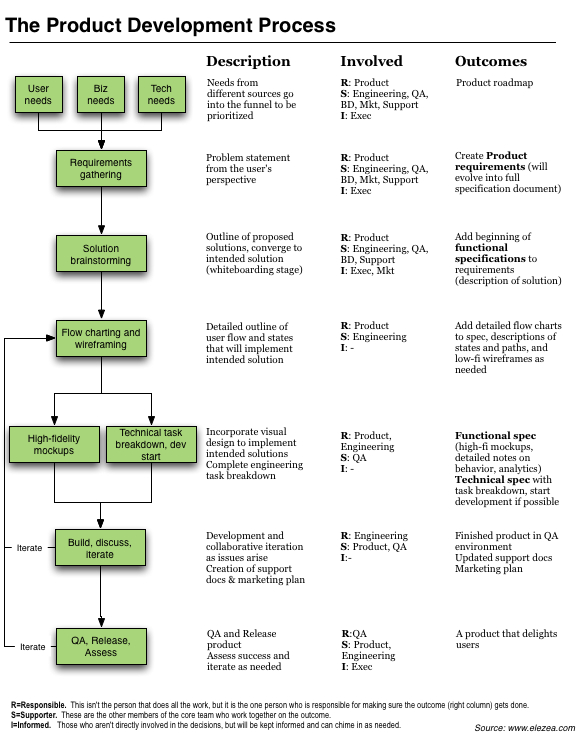
So let’s start here — a diagram of a proposed universal model for software product development:

Borrowing from and expanding on my original post, I want to make a few observations. First, there are a few assumptions that are important to note about this model:

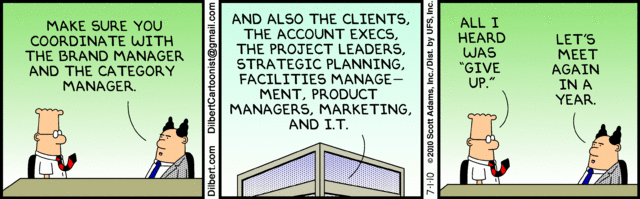
  • Regardless of the development methodology, representatives from Product, Marketing, Business, Design, and Engineering should be involved to some extent from the very beginning of the process. Once detailed requirements are being written, it largely becomes an Engineering and Product effort to ensure momentum and avoid the dangers of design by committee, best summed up by Dilbert:

  • Having said that, it is important for one person to own this process (i.e. be accountable for its success) from start to finish, and that person should be the Product Manager/Product Owner. A good product manager is not a dictator. He/she is a facilitator between all the different stakeholders of a product, and the really good ones are able to get through this model on time and on budget, every time and with as much consensus between groups as possible.
  • The roles of the Responsible (R), Supporter (S), and Informed (I) are important to define for each of these steps.  Most important is that there should be only one “R” for each step.  This doesn’t necessarily mean it’s the person who does all the work, but it’s the person who is ultimately responsible to get the work done (with help from the “S”es).
  • This model is designed to work for any organizational structure, project size, and timeline. If the project is large, more time can be spent on each step. If the project has a tight timeline, it doesn’t mean that you will skip the “Iterate” part of “Design + Iterate.” It just means that you will spend less time on it (more on that later).

Summary of the different aspects of the model

The rest of this series will be devoted to detailed discussions about this model. My goal with this post is to be general and make one or two points about each aspect. So let’s look at some definitions and implications of the model:

  • The starting point - identifying needs. At the beginning of any project (new or iterative), it is important to gather and synthesize input from three different sources:
    • User needs. Everyone needs to have a good understand of the market, the target segments, and their behaviors and attitudes. There’s not enough room to go into detail here, but it is important to look at four sources of user input: market research (segmentation, etc.), user experience research (usability studies, ethnographic explorations), site analytics (behavioral analysis), and customer support (call transcripts, interviews with CS reps, etc.). Having this common understanding allows the organization to build products that matter to users.
    • Business needs. User experience practitioners too often neglect the fact that well, your site has to make money! Revenue goals are not a good excuse for bad design, and that attainable revenue goals are essential to push the organization to design good product.
    • Technology needs. Engineering needs to be at the table from the start. They know the limitations of the product, they know what needs to be fixed, they know what technical debt needs to be paid down. Having engineering and product working together is essential in good product development.
  • Requirements gathering. Pragmatic Marketing, in a post entitled “On Reqs and Specs: The Roles and Behaviors for Effective Product Definition,” proposes some solid definitions for the three different documentation outcomes in this model: Requirements, Functional specifications, and Technical specifications. The first outcome from the discussion and synthesis of needs is a common understanding of the problem statement you are trying to address, which takes the form of Requirements. A requirement is simply a short statement of the problem, and Pragmatic Marketing recommends the following format: “Our preference is the Requirements That Work format: [Persona] has [problem] with [frequency]. It forces product managers to explore the problem, not the solution, and helps the design team understand the context of the problem.”
  • Solution brainstorming. Once the problem has been defined and agreed upon, the team starts thinking about solutions, usually through some form of design thinking or abductive reasoning. There are three important aspects of this phase, which is often called Product Discovery:
    • Start with blue sky ideation (divergent thinking). At this point, don’t limit solutions by what is technically or otherwise feasible. Spend time dreaming about the product - this is where innovation happens!
    • Relentlessly prioritize (convergent thinking). This is the part of the process where nonsensical ideas are thrown out, and the team consolidates around a few possible solutions to the problem that can be further explored. Remember: there is no commitment to implementation or specific designs yet at this phase.
    • Apply the technology filter only after the ideation phase. There is a very important technology filter that needs to be applied during prioritization. What is technically feasible? If something is currently not feasible, what would it cost to build the right architecture? Those early inputs can save a lot of headache down the road.
  • Flow charting and wireframing. This phase starts to put some flesh around the second output document, Functional specifications, which Joel Spolsky defines as follows: “A functional specification describes how a product will work entirely from the user’s perspective. It doesn’t care how the thing is implemented. It talks about features. It specifies screens, menus, dialogs, and so on.” At this point visual design is still left out of the picture, all you are doing is defining flows and interactions.
  • High-fidelity mockups. In this phase, visual design gets involved to design the experience as it will look on the screen.  If there are pre-defined patterns and standards (as is hopefully this case), this could be a pretty light step, but I do believe it is important, even in an agile environment, not to leave this part up to chance.
  • Technical specifications. Development can start before the full designs have been completed.  Once the flow and interaction are sorted out, you do in most cases have enough information to start task breakdown and implementation.  Quoting Joel Spolsky again, “A technical specification describes the internal implementation of the program. It talks about data structures, relational database models, choice of programming languages and tools, algorithms, etc.”
  • Build, discuss, iterate. Everyone designs a product, but it is sad to see that when time/budget gets tight, iterating on it before it goes live is often the first part of the process to fly out the window. It cannot be overstated how important it is to prototype and test your designs before they go live. And not having time is really no excuse. If you have no time, make a paper prototype and test it with three of your friends over coffee in the evening. You’d be surprised how much value this can add. Boxes and Arrows has a great article on prototyping and how to integrate it with your design process that’s well worth the read.
  • QA, release, assess. After the thrill of releasing, the assessment phase is extremely important and often overlooked. It is important to define your measures of success upfront, and then follow up to see if you’ve met those goals. How do users respond to the product? Are we meeting revenue/engagement goals? What can we learn from how users interact with the product to give us ideas for new products? I’m also an advocate for using the same four sources of input we discussed earlier (market research, user experience research, site analytics, and customer support), as opposed to relying on only one methodology, like a 3-week A/B test. More on the dangers of that in one of my earlier posts.

Where we go from here

So now that the stage is set, what happens next?  Over the next weeks and months, I’d like to write a detailed post on each of these phases, particularly from a Product Management perspective, and what the role of the PM/PO is during each of the phases.

There are, of course, lots of resources out there for Product Managers, but I’m hoping to talk more practice than theory here, and hopefully generate some discussion (and disagreements!) to help us reflect on our chosen profession.

PS Big hat tip to @justinspratt who gave me the nudge I needed to start this series.  He is the real deal, despite being Australian.

Favorite UX / Product Management posts of the week (2010-07-10)

I read quite a few excellent UX/PM posts this week, and wanted to make sure you don’t miss out.  So here are some excerpts from my favorite posts of the week.

User Experience Design in the Agile context

In Agile UX and The One Change That Changes Everything, Anders Ramsy writes about how user experience design can be adopted to fit the agile mold a little better.  He calls for less design up-front to basically embrace the MVP approach instead of fighting it:

The first and probably most fundamental change to flow out of starting to build earlier is that of chopping your up-front design phase down to a fraction of what it might be in a traditional model to allow for establishing a foundation of working software, and then evolving the rest of the product on top of that foundation. In other words, we go from Big Design Up Front to Just Enough Design Up Front.

The rest of the post is devoted to how to do that, including thoughts on lighter, conversation-centered documentation, and the importance of collaborative design.

Enough with the “chicken & pig” story

Speaking of Agile, David Bland wrote an impassioned post arguing that Our Divisive Scrum Terminology Needs to be Deprecated:

Scrum teams succeed or fail as a, well, a team.

If the Product Owner is confused about the role or not living up to expectations, it is the ScrumMaster who should be helping them along the way. If the ScrumMaster is failing at coaching up the Product Owner on the framework, then wouldn’t the ScrumMaster be to blame? But wait, since the team has appointed the ScrumMaster, would they not have failed by choosing one who is incompetent?

W’ll just run in circles pointing fingers because there is no easy answer, and using the Product Owner as the scape goat does nothing to help resolve the situation.

Measurement-driven Product Management

The always brilliant Pragmatic Marketing has a post entitled Measurement-Driven Product Management that should make all of us a little uncomfortable.  But good uncomfortable.  Getting better at your job uncomfortable.  Read the post for details on the proposed ways to measure the success of PM, but this is why they make the case for it:

The long term benefit of Product Management becoming measurement-driven is higher team performance, improved predictability and increased credibility. The ultimate benefit is developing the ability to reliably create outstanding products and market breakthroughs.

Can Product Management operate with this high level of maturity, using a reliable measurements and metrics system with more predictable results in a company?

This “holy grail” of product management performance is doable, but often many cultural and process gaps must be addressed first. An organization fosters a measurement-driven culture by reinforcing other aspects of the process, such as tightly coupling rewards, recognition, compensation and promotion to attainment of operational results. Does yours?

Research and Design, sitting in a tree…

In The product of a healthy relationship, Paul Golden discusses the sometimes rocky relationship between researchers and designers:

Hana Thomas of design consultancy Smallfry agrees that while market research can play a crucial role in product design and development, there are dangers. “There can be an over-reliance on market research, which leads to it being used either as a scapegoat for poor decisions or employed too soon in the creative process, stopping ideas in their tracks before they have even had the chance to be realised.”

Thomas refers to the value of ethnographic research to her company’s work in product development and describes studying people in their own environment, under a relevant context, as the “ideal way” to truly unearth latent needs and desires.

According to Reon Brand, the responsive and listening brand that engages its audiences in the creative process as well as in dialogue has a major advantage in our increasingly social-media driven world. However, all research methodologies have their limitations. While consumers can react to what exists and relate back to what they know, some of the designers surveyed by the Design Council felt that consumers were less able to contribute to the development of completely new product or service concepts for the future.

I just became the mayor of someplace you’ve never heard of

On a slightly different note, I found this RWW called Why We Check In: The Reasons People Use Location-Based Social Networks very interesting.  It presents some research on why we use services like Foursquare and Gowalla, and there are definitely some surprises, like using it to keep track of history:

The thing that surprised me most when I asked people why they use location-based social networks is how many of them say they use it primarily to track their own personal history. It’s a lazy diary, people say.  Some people say they use it to help with their expense tracking on business travels.

Happy reading!

Why the Kindle is a better e-reader than the iPad

I just read an interesting New York Times article on “social reading” (Yes, People Still Read, but Now It’s Social), and it got me thinking about the future of reading, and the e-reader battle that’s currently going on, particularly between the iPad and Amazon’s Kindle.  And then I upgraded my Kindle software to v2.5 this morning, and it made it clear to me why I think the Kindle is a far superior reader to the iPad.

No one will deny that the iPad’s iBooks app has a nicer user experience than the Kindle.  It’s colorful and pretty, it has a nice bookshelf, you can turn the pages with your fingers, and, uh…  Well, that’s where it stops.  The two major issues with iBooks are:

  • Since it’s a back lit display, it starts hurting your eyes when you read for too long.
  • The battery life is, you know, not ideal…

Now consider the Kindle.  Though not as pretty to look at, you can tell that Amazon decided to focus on the reading experience.  You don’t have to plug it in all the time, and you can read it for hours without hurting your eyes.  But it is v2.5’s forays into social reading that really starts to set the device apart.  There are two features in particular that I think are brilliant:

  • First, Amazon allows you to opt in to viewing popular highlights. This allows you to see when passages of a book you’re reading were highlighted by others who have read the same book.  It’s like a virtual book club, but instead of trying to get 6 people to agree on a book to read, you can connect with 100’s of readers who are already reading the same book.  This kind of connection really is where the Internet is at its most useful.
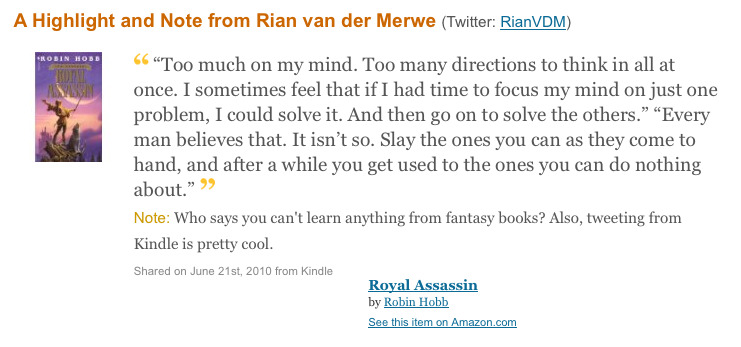
  • Amazon also allows you to link your Twitter and Facebook accounts to your Kindle.  This means that you can highlight a passage that you’re reading, and share it with your followers, like I did this morning:

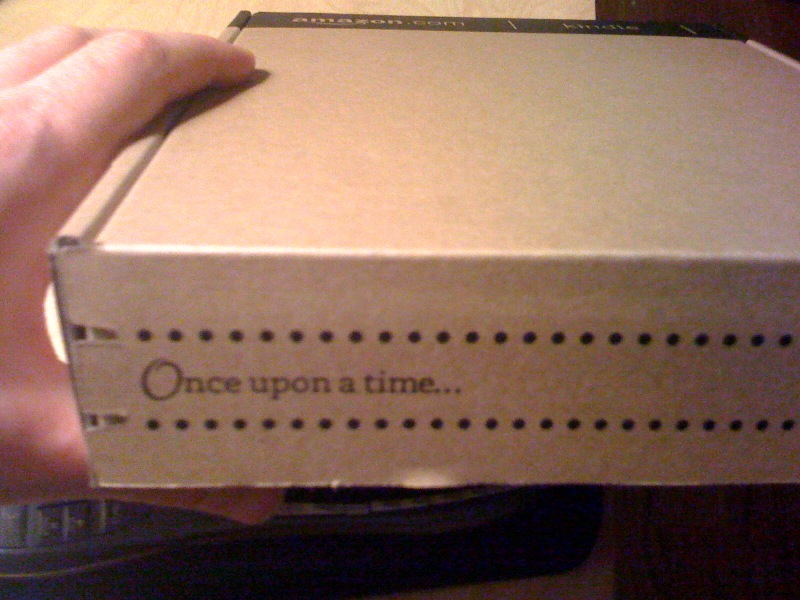
That is powerful.  It not only allows you to share what you’re reading and thinking about in real time, but it’s also great business for Amazon, since it provides a way for your followers to purchase the book right away.  Of course, even the Kindle packaging tells you that this is an experience built around passionate readers:

The differences between the iPad and the Kindle have larger implication as well, particularly in the field of Product Management.  Look, the iPad is gorgeous, it really is.  But it is an experience designed to contain so many different uses, that it is not possible to focus on doing one particular thing (like reading a book) extremely well.  The Kindle is singularly focused on readers, and that is why it beats the iPad hands down as an e-reader.

Dropbox did exactly the same thing to beat out their competitors — they focused on making file sharing as easy and convenient as possible.  They didn’t have all the features, but they made sure the features they do have has a superior user experience.  On that note, if you haven’t watched this 23-minute talk by Dropbox’s CEO where he discusses their business model, you really should.  It is inspiring and well worth it.

How to make a 2-week Agile sprint

One of the hardest parts of Agile development, but also one of the most powerful and rewarding, is figuring out how to make the process work for the team you’re part of.  Even though the guidelines are clear, there is simply no “one size fits all” approach when it comes to Agile.

We as Product Owners need to loosen up a little when it comes to pre-determined process, and work with our development teams to design an Agile process that works for everyone involved.  With this in mind, developer @darb and I evolved the following sprint guidelines for one of the applications we are responsible for here at Yola.

The ingredients of a good sprint

Every two weeks we sit down and discuss the next sprint, and we make sure the following ingredients are included:

  • 1 x silly name. Darb is partial to automatic Linux-generated names like Thundering Tuatara.  I am partial to non-silly names like “Sprint 3”.  But he won this argument — it’s all a game of give-and-take.
  • 1 x revenue-related. Every sprint has to include at least one bug fix, enhancement or feature that will improve our top-line revenue.  We are a business, after all, and this part is too often neglected by Product Owners.
  • 1 x front-end maintenance. With every sprint we have to make an improvement that customers will notice.  This can be small visual tweaks to increase usability, or bigger overhauls of the interface based on customer feedback and analytics.
  • 1 x back-end maintenance. Performance improvements and general back-end maintenance get put on the back burner way too easily - and as Product Owners we are often very guilty of deprioritizing maintenance because you can’t immediately see the effects of working on this.  But balance is extremely important, and paying down technical debt needs to be part of every sprint.
  • 1 x error messaging/UX improvement. This is related to front-end maintenance but different in that these tickets aim to address user experience and usability improvements mainly through changes in the interaction, not necessarily the visual design.

It’s important to note that these buckets aren’t mutually exclusive, so some tickets will address more than one issue — and that’s even better.  This is also the minimum requirement, usually we try to get a good balance of all kinds of tickets into a sprint.

The recipe for a good sprint

In addition to these minimum requirements of what should go into each sprint, we put together the following guidelines:

- Leave time for ad hoc planning and work.  Other stuff will always come up.  Don’t let it make you miss your deadlines — leave room for it so that you have “planned outages” in your sprint work.

  • Make sure there is a good mix of big and small size/complexity tickets.  Momentum is so important.  Seth Godin talks often about the importance of shipping often, and to do that, you have to bite off manageable chunks of work.  Make that small text edit that’s been on the backlog for months because it’s just too small to schedule.  And couple that with bigger tasks that get you closer to your overall product vision.
  • Make effective use of priority. We use Jira to track our projects, and we use Priority to schedule the order of work.  We have to get P2 and P3 projects done in the sprint.  P4 and P5 projects are nice to have, and we do them if there is time.  For P1 work, see the first bullet…
  • Stir Rian into vitriol. I’m not sure why it is important for Darb to find new ways to freak me out every week, but he seems to thrive on it, so this remains in the recipe for now.
  • Simmer in QA by mid 2nd week.  It’s such a simple thing, but so many organizations forget that for something to release on Thursday, it doesn’t mean that first round development is completed by Thursday morning.  It means that at least some first round development needs to be completed by Tuesday morning so that QA can start.
  • Rinse and repeat.  And then we do it all over again.

The “ingredients” and recipe are very specific to the application that Darb is the lead developer on, which is our payment system — with all its many back-end and front-end complexities.  Obviously different applications need different ingredients.  On our website, for example, we place a lot more focus on front-end than back-end.

And I think that’s the point I’m trying to make — that the best product development process is the one that Product and Engineering agrees on, and it never looks exactly the same across all applications.

GeekDinner Presentation: The highs and horrors of website redesigns

Last night I attended my first Cape Town GeekDinner, and I have to say that I will definitely be back next time.  Good food, good wine (thanks Delheim!), great atmosphere and discussions, and a few 10-minute geeky talks sprinkled in between… yes, this is an idea I can get behind.

I also got to do a short talk on 5 things I’ve learned about website redesigns from being involved in various projects at eBay and Yola.com.  The slides are posted below.  As I mentioned in my talk — since you can’t say a whole lot in 10 minutes, I went with breadth over depth here.  There are obviously a lot more that goes into redesign projects (and yes, I know Content Strategy is about more than not using Lorem Ipsum in your designs…).  But these are a some things I’ve learned going through the process a few times:

The highs and horrors of website redesigns

View more presentations from Rian van der Merwe.

It's 2010. Isn't it time to start demanding good user experience design?

I should probably get up, walk around, and have a cup of coffee before I write this post.  Or maybe a little righteous anger over something small is good for the soul?  I’ll go with the latter…  I recently ordered a 2010 calender from Runner’s World.  A few days ago I received the calendar, along with the invoice.  Their payment is handled through a company called Rodale.  I just went to pay my invoice at www.rodalequickpay.com, and the experience left me frustrated, and incidentally still in debt to Runner’s World.

I know this shouldn’t bother me that much, but let me walk you through the experience, and then make a couple of observations.

The Rodale order process

I typed in www.rodalequickpay.com (yes, the irony of the “quickpay” part of the URL is pretty thick), and arrived at this screen:

Immediately, this bugs me.  I just want to pay an invoice, I don’t want to have to create an account.  There’s also so much wrong about this design:

  • There are two calls to action, and the affordance is all wrong.  The first text you see is “If you are a new visitor…”, but the “Create New Login” button is too far away, making it look like you should log in if you are a new visitor.
  • The “Login” button… first of all, it’s “Log in” (action), not “Login” (noun), but let’s ignore that pet peeve for now.  The button looks different from the top button, and is also much smaller, resulting in a pretty confusing experience on this first screen.
  • I don’t understand the text “Please use this site to pay orders in full” at the bottom.  Not sure why it’s needed, and not sure why it’s not at the top of the screen.  Who is going to read that far down?

But ok, since I am a new visitor, I decided to create a new Login:

Ok, this is where things get really out of control.

  • I’m not even going to begin to talk about the copy.  “eMail” in one spot, “E-Mail” in another?  And “Thank you!”?  But I digress.
  • The first big problem here is that account creation and invoice detail information happen on the same screen.  I should enter my account level information first, and then move on to my transaction level information.  Especially considering that…
  • …It is extremely difficult to find your account number and invoice number on the paper statement.  First, the microcopy about where to find it is not useful at all.  There is no “appropriate button” to click, and the clickable text “On My Invoice” and “On My Statement” don’t look like links and actually don’t go anywhere when you click on them.  (Read this post at Polon, and this one by Joshua Porter about the importance of writing good microcopy on forms)

So anyway, I start typing in random numbers from my paper invoice just to see if I can get somewhere, and this is the error message I get:

Ok, now we’re getting somewhere.  Don’t know why it’s a browser error, but fine.  So I know I’m looking for an Account number of >10 characters and an Order number of >12 characters.  Turns out that’s not entirely accurate though.  The form doesn’t let you enter more than 10 or 12 characters depending on the field.  So those numbers should actually be exactly 10 and 12 characters.  Why doesn’t the error message say that?  “Can not be less than”?  But hey, we’re making progress.  Off I go to look for those numbers.  It appears I got my Account number right, because next I got this error message:

Ok, now we have in-line messaging, not browser error messaging.  But whatever.  I verified the crap out of that number, but I couldn’t get past this screen.  It actually makes me sad because I’m sure the payment page would have been a real treat to write about.  I tried to call the toll free number but no one’s there, so as of this moment I still owe Runner’s World $21.75.  I’m really sorry guys, I will pay you as soon as you let me.

The point I’m trying to make

So here’s the problem.  The Rodale website was put together to accept payment.  This is how they make money.  But there was absolutely 0 thought put into the user experience, so I was simply unable to pay them.  And look, I know it’s much easier to take a design apart than it is to create a good one, I get that.  But UX design is becoming a mature field now.  It’s 2010.  Shouldn’t we be able to get rid of designs like this, and demand something better? It’s not rocket science, it’s a methodical thought processes to design a good experience.  Form design is difficult to get right, but it doesn’t have to look like Apple, it just has to get you through the process without friction.

What do you think?  Is it too early to rise up in anger against designs like this?  If not, what can we do to “spread the UX”, so to speak?

4 design lessons we can learn from U2 concerts

If you’re a designer (or just into good design) and a music fan, I’d like to recommend the book U2 Show. The book is about how the various U2 tours were designed — from Boy all the way through Elevation. It explains the countless hours that go into stage design, lighting design, sound & speaker stack design, and a whole bunch of other areas (and it has some great photos too). I really enjoyed the window this book provides into what goes into the design of a large rock concert, and it showed me again that basic principles of good design translate to all media forms.

Here are some things I believe the design community can learn from the way U2 design their shows:

1. Don’t place limits on the design in the beginning

U2 tour manager Willie Williams on how the PopMart tour came into being:

There was also a very direct (and very rare) brief to me that this tour would be “˜design-led’, rather than being intimidated by scale or logistics. Having proved to themselves and to the world with ZooTV that, in terms of what can be toured, “˜anything is possibl’, U2 were of a mind that the only limits to be placed on the creative ambitions of this tour were to be financial ones.

This is a really good principle.  The time for realism and feasibility will come — but in the beginning, think big

2. Challenge the limits of possibility

On the impossible design requirements given to the sound engineers:

Mark Fisher’s frustration with years of stage design constrained by traditional loudspeaker stacks led him to propose that we should keep the huge video screen free from clutter by placing the entire sound system in one central ball. Most sound engineers would have resigned on the spot, but Joe O’Herlihy rose to the challenge of mixing a live show through what would essentially be a mono PA.

Even during feasibility discussions, it is important to challenge your beliefs on what is possible.  Involve the engineering team in the product discussion — and challenge them to test the limits too!

3. Let the content shine through

I like how they talk about the huge differences between the PopMart tour and the Elevation tour:

After the broad, churchy strokes of the Lovetown show and the sensory assault of Zoo TV and the garish, high-concept japery of PopMart, here are U2 playing their songs hard, straight and in your face.

If you’ve seen the Elevation tour, you know what they mean.  The show was tastefully designed, but without distractions.  Just like a web site should be.  Design’s ultimate goal is to get users to the content and functionality they need as easily and pleasantly as possible.

4. Don’t design in silos

The book goes into detail on the simplicity of the Elevation stage and lighting design:

Video is not something that can simply be added to a show, a fact that is the downfall of many otherwise potentially interesting stage productions. We are so conditioned to look at television that moving camera pictures automatically become the focus of attention.

Because of this they went with what they call “Unmediated iMag”, which means that the screens showing the band members would be static cameras, showing everything in black-and-white to avoid distraction from what is happening on stage:

This is why it’s so important for Product Managers to include all parts of the organization during design, and why holistic design is so important.  You don’t want your company’s organizational structure to shine through in your design.

Pick up this book at Amazon if you’re interested — with more than just pretty pictures it brings a great design perspective to the enormous live concert industry.

In defense of compliance

There is a very interesting and healthy debate going on in the Agile Development world about Minimum Viable Product (particularly in startups).  Before I get into the topic I’d like to address today, I just want to do some positioning and say that in this debate, I currently (but am open to being convinced otherwise) side with writers like Andrew Chen (read his excellent post, Minimum Desirable Product) and Jason Cohen (read Releasing Early Is Not Always Good? Heresy!).  The other side is represented by posts like this one by Jeff Atwood: Version 1 Sucks, But Ship It Anyway.

While the debate is still ongoing, I’d like to write about a very specific related aspect, namely product development process (and those of us who would like to argue for fairly strict compliance to it).  Two recent blog posts address the topic of compliance directly, and I wanted to reference them and then write a quick response on why I think process is so important, especially in agile development.

The first is Seth Godin’s Dancing with entropy.  His rant on compliance actually inadvertently includes a pretty good description of what Product Managers do:

People are often paid to enforce compliance. The job is to ensure that everything is in its place, that errors are zero, that things are delivered on time and as expected. The random event is a problem, something to be feared and extinguished.

His main point seems to be that you should embrace the unknown, and “dance with it”:

Most people, though, the ones with great jobs, are in the business of dancing with entropy, not creating it. Take what comes, sort it, leverage it, improvise and make something worthwhile out of it.

I’m assuming he refers here to the definition of entropy as “a measure of the disorder or randomness in a closed system.” This is a great sentiment and we should all be able to deal with the unknown, but in practice, creating Ordo ab Chao during development can only happen effectively with proper product process behind it.  You can’t dance with entropy without bug tracking, if you catch my drift.

The second is a post by Aslam Khan entitled Forced compliance is an obstruction to discipline.  I respect him a lot for his forceful call for self-discipline in development, and I don’t doubt his sincerity at all when he writes:

Surely, we have learned enough from spectacular failures that governance does not give people an opportunity to exercise self discipline. When you give a person a chance to develop personal discipline, then forced compliance is unnecessary. With forced compliance, we force people into ignoring their own discipline because the system will “sort” it out for you. It breeds an attitude of “the system failed me and it’s not my fault”.

This is an ideal situation, and I agree with Aslam that personal responsibility is an essential quality for any developer — and PM, and designer, and human being, for that matter.  But personal responsibility is just not going to get you all the way there.  And by there I mean a product that is successful in the eyes of the company and its users.  I’m not arguing for the perfect product — there is no such thing.  But there is such a thing as desirable products that work the way they are supposed to and meet customer needs.  And for that, you need more than personal responsibility.

It is a mistake to think that process/compliance slows down development or inhibits innovation.  Compliance puts boundaries around what is within scope, and allows you to know when the product you’re working on is ready to launch.  Compliance also doesn’t mean that you don’t trust your team, or that you think people aren’t capable of working on their own.  It’s not about keeping tabs on people, it’s about making sure the product doesn’t get out of control.

By compliance I don’t mean an inability to roll with the punches and remain agile, but that a certain degree of process is needed.  In an earlier post on the software product development lifecycle I go into more detail on what I believe is a good process for product development.  I also discuss three outcomes recommended by Pragmatic Marketing: Requirements, Functional Specifications, and Technical Specifications.  I do believe we need this level of process, and compliance to it, to build great product.  We should embrace it, not fight it.  You know, dance with it.

3 Product Management lessons from Comcast's new sign-in pages

As a Product Manager, I understand the Minimum Viable Product (MVP) concept, decisions to de-scope rather than delay, etc.  But too often MVP’s go out into the wild missing that all-important middle “V”, so you end up with, well, minimum products.

An example I came across recently is the sign-in process on Comcast.com.  First, a little background.  Comcast recently deployed a product they call mySIGN-IN.  According to their FAQ page:

mySIGN-IN is a unified sign-in system that lets you use your existing email address and password to access participating Comcast sites. When you sign in to any participating Comcast site, you’ll be conveniently signed in to the other sites that you use.

That all seems well and good, but the actual sign-in experience shows what happens when features go out without proper integration.  The sign-in process now happens on two separate pages:

Step 1: Enter email address

Step 2: Enter password

Two things struck me immediately about this experience:

  • There is no reason to split the sign-in process into two screens.
  • The visual design of the two pages are completely different.

Wanting to give Comcast the benefit of the doubt, I started looking into this a little more (because, you know, what else am I going to do on a Sunday afternoon apart from listening to Amos Lee on vinyl).  I thought that maybe this was an acquisition, and they are just taking some time on the integration.  But no, as far as I can tell, mySIGN-IN is not an acquisition — it is an internally developed product.  So I think this is what happened:

  • A separate Comcast division designed and developed the mySIGN-IN feature
  • The different Comcast properties started implementing the feature onto their sign-in pages
  • Due to technical reasons, the pages had to be split for Comcast.com
  • There was no UX oversight to ensure design consistency (or no resources available to make necessary changes)

Now, it does appear that someone at Comcast realized that this is not an ideal experience, and decided that explaining the changes to users is in order.  It’s a noble idea, but as we know, most users don’t read anything that’s not inside or next to a text box.  Either way, here are some of the tool tips that were added:

That first tool tip really bugs me:

Due to some recent security improvements, we now require you to enter your user name and password in two separate steps.

That just doesn’t seem right to me.  Due to “security improvements”?  I may be missing something from a security perspective, but I just don’t see why the sign-in information can’t be passed through securely without splitting up the pages.

What this means for product managers

I don’t mean to pick on Comcast.  This type of thing is very common, and I’m sure I’ve made similar decisions in the past that results in a user experience that’s not ideal.  But I do think this example can teach us a few things about product management:

  1. Product owners (those responsible for individual features) need Product Strategists to ensure UX consistency (see this article from Pragmatic Marketing about different Product Management roles).  mySIGN-IN was clearly design in a vacuum, which could have been ok if there was someone who made sure the user experience stayed consistent across properties.
  2. Don’t leave out the “V” in the MVP.  I believe that Comcast didn’t launch a minimum viable product.  Splitting the login pages into two screens is unnecessary and confusing to users.  The MVP might be an incomplete product, but it should never feel incomplete to users.  Users shouldn’t be able to notice that something is missing.  There is clearly something missing here.
  3. Tool tips won’t solve everything.  If I had a penny for every time I heard the phrase “We’ll just add some content to explain that to users…”  As a general rule, if you need a tool tip which links to an FAQ page to explain something to users, your design is probably not intuitive enough.  It cannot be stressed enough that users really don’t pay attention to a lot of text.  The average user sees a form field, and starts typing.  Your user experience should support that behavior, not try to change it.

I have no doubt that Comcast had the best of intentions here, and that mySIGN-in is probably a cool feature.  But without proper product management, even inherently cool features can become frustrating user experiences.  Let’s be the users’ champions when it comes to launching new features.