Menu

Posts tagged “product management”

The balance we need to move the web forward

This is a great post by Anil Dash. There’s so much to learn from the Foursquare story, but my favorite part is the last paragraph. In Foursquare: Today’s best-executing startup he writes:

But perhaps most importantly, I think we need more stories that celebrate the success of what seem like small, iterative product launches, but actually reflect triumphs in unsung disciplines such as systems operations, design process, business development and product management. There are lots of loud, pointless headlines about companies getting money from venture capitalists or angel investors. What I’d love to see more of in 2012 (and beyond!) is headlines about how a few small successes with users are a demonstration of a small company outperforming and out-innovating the biggest companies in the tech industry by being focused and disciplined in their execution.

This is why I hope all the cynics are wrong when they publicly wonder when Facebook will buy Path’s design team. I’m done with Path because I couldn’t find a use for it, but some people have found a place for it. I’d much rather see Path succeed as a small, niche social network that continues to push the design envelope, than have them be gobbled up as a “talent acquisition” move.

When we design for the web we often find ourselves balancing the use of established UI patterns with trying out new ways to solve existing problems. Facebook Timeline is tilted towards the former, while Path bet heavily on the latter. Yet both approaches are important. If we’re going to move the web forward we can’t get stuck in the existing ways of doing things without also experimenting with possible better ways. If we shine a bigger spotlight on those small companies that “outperform and out-innovate the biggest companies”, then maybe we can maintain this necessary balance between design status quo and new ideas indefinitely.

Case study: the user experience of kalahari.com, one year later

When I arrived at kalahari.com in December 2010 the site hasn’t seen any significant UI improvements during the 10+ years of its existence. My job description was pretty straightforward: do something about that.

In this post I’d like to talk about the work our team did over the past 12 months to get where we are today. When I look at the site now I still see so much wrong with it - there are way too many things that we still need to fix. So this isn’t an attempt to hold up our work as some kind of standard. I’m doing this in the interest of sharing our methods and lessons learned with the larger design community. I’ve learned so much from others who have shared their stories that it seems only fair that I do the same. So here’s our journey so far.

Making sense of the landscape

Here’s what kalahari.com looked like on December 1, 2010:
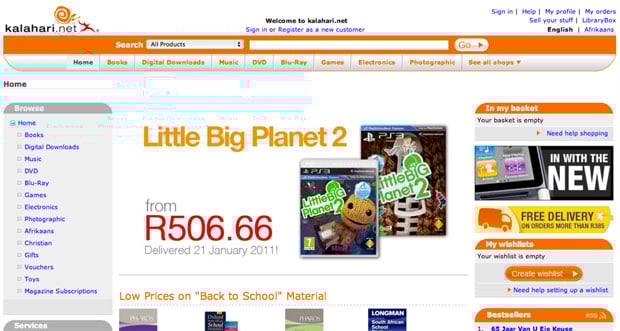
Kalahari.com home page - old

If you stepped through the site back then you probably would have felt as overwhelmed as I did. Where do we start? What order should we do things in? After the first few days of having too much coffee and talking to people all over the organization I realized that we had two primary challenges:

  • No formal prioritization or product development process. It was the same situation I’ve seen many times before. Requirements went straight from “The Business” to developers. That kicked off an endless back and forth about what was needed, with only a cursory nod to Design. The “First In First Out” approach to prioritization was also quite common. The result was, well, not ideal. We needed to fix this.
  • No formal user experience design. This was no surprise, and it was the reason I took the job in the first place. There was no user research, no content strategy, no interaction design, and no visual design beyond marketing and merchandizing materials. This is the part that really excited me: the opportunity to introduce User Experience Design into an organization that was (to their enormous credit) hungry for it but didn’t know where to start.

So we immediately got to work on both those problems.

Hello, I’m a Product Manager

Introducing a Product Management layer into an organization that’s used to working without it is tricky. If you do it wrong it can become a political nightmare and end up ruining your chances of shipping anything good. You might have the best of intentions, but there is always the danger that the only thing people will think when they look at a Product Manager is, “Hey, I used to be responsible for that, jackass!”

We certainly didn’t make this transition perfectly, but I believe the key is to make sure that you talk to as many people as possible about what their organizational issues are, and how they think it can be done better. You have to take the time to explain the benefits of having a Product Team that takes responsible for strategy, vision, and execution of a product (and takes the fall if it fails). And then, most importantly, you have to make the development process fair[1].

We now have a team of Product Managers who are responsible for delivering measurable business results through product solutions that meet both market needs and company goals. They work closely with their teams to develop the strategy and vision for their products. They ensure that designers and developers are included throughout the process. And most importantly: they make sure we ship.

The Intergalactic Product Force

One concept we introduced that I think is worth talking about is the Product Council[2] - a formalized way to deal with prioritization.

The Product Council is made up of the heads (VPs) of every department in the organization: Engineering, Marketing, Support, Category, etc. We have a weekly meeting where we discuss the current product roadmap and priorities. We ask ourselves, Are we still working on the most important things? If something more important comes up, we prioritize it higher in the roadmap, and something else shifts down. If w’re happy with the direction, we do nothing. If a new opportunity arises we ask ourselves, Is this more important than what w’re working on right now? Or is this something we should work on next? If so, what moves down in the priority list?

From here, I communicate any changes to the Product Team, and we discuss this to make sure no one missed anything. But then — and this is important — the Product Manager has complete autonomy and ownership over the implementation of his or her roadmap. The Product Council sets the priorities (with input from all parts of the organization), but the Product Managers work with their development teams (and others) to set the timeline, the implementation details, the design, everything.

Ther’s more to it, but in the interest of brevity I’ll stop there. This process has three main advantages:

  • It gives the management team complete transparency into what the Product team is working on, and it allows for anyone to make the case for a change in priorities. Why this kind of transparency is so essential is a subject for a different blog post, but in short, it takes away a vast majority of the politics you see in many organizations, and it frees up the teams to do what they do best — execute.
  • It prevents scope creep. Nothing can go on the roadmap without something else moving out or down. As anyone who ever worked at a large organization knows, this is an absolutely critical part of a successful development cycle.
  • It gives the Product Manager and their teams what they need to be successful: direction and autonomy. As Jocelyn Glei says: “Give your team members what they need to thrive, and then get out of the way.”

Hello, I’m a User Experience Designer

I knew that we needed to build a great team if we were going to follow a user-centered approach to identifying and addressing the main issues on the kalahari.com site. But building a team takes time and money, and it’s hard to justify a large headcount request before you’ve proven that you can have a real impact on the business.

So we started small. I fulfilled the UX Design role, and we hired one visual designer since that was the primary need at that stage. Then we got stuck in. On a site of this size, and with the pressure we had to make improvements quickly, we decided on a dual approach:

  • Make some initial and obvious changes to the visual design to improve hierarchy and the general aesthetic.
  • At the same time, work on a long-term UX strategy to address some of the more fundamental user experience issues on the site.

The goal was to show quickly that we know what we are doing, and then use those successes to build out the team further and attack the areas where we can have the biggest effect on conversion rates.

Building a roadmap

We started this process with a small team of three Product Managers and two Designers, so we didn’t initially have the luxury of user research and a long period of product discovery to build out a roadmap. Instead, we went offsite for a day and built a customer experience map for our different user journeys. It was a great way to focus on what the core experience is that we need to improve.

We also went a bit further. Based on a heuristic evaluation of the site we annotated each of the steps in the user journey with obvious improvements we could make. This gave us a flexible framework for the year, and guided our roadmap throughout.
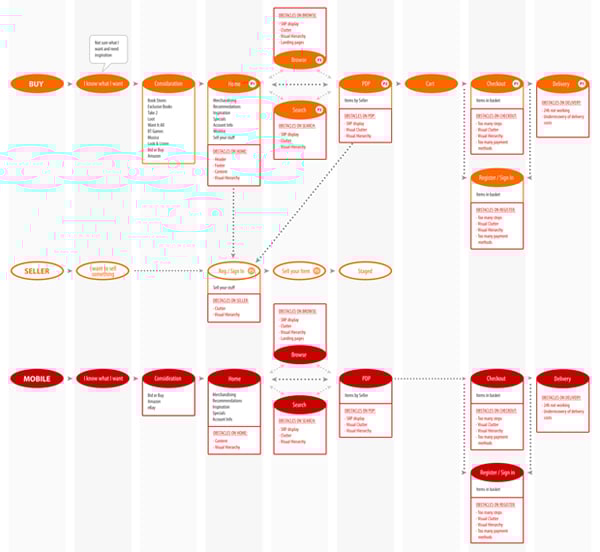
Kalahari customer journey

We decided early on to realign, not redesign. Our approach was to make relentless incremental progress as opposed to doing a 6-9 month project with a big bang release[3]. Our goal was to release every 3-4 weeks, depending on the size of the project.

In our first two releases we took care of some basics. I won’t bore you with the whole list, but here are the highlights:

  • Released a new header and footer.
  • Shifted from heavy reliance on orange to a more muted color scheme that allows products to draw more attention.
  • Removed several links in the header and footer that didn’t get much use.
  • Increased the visual hierarchy of Search.
  • Decreased the visual hierarchy of several non-important features.
  • Introduced a formal button strategy (primary=orange, secondary=silver).
  • Moved from liquid width to a 960px 16-column fixed width design (including the ability to do single-column or two-column designs - every page used to be three columns).
  • Started to separate CSS from HTML (better late than never, right?).
  • Started to build a UI component library.

Kalahari new home page

These changes had exactly the desired effect. User response was immediate and universally positive. In combination with some good specials, traffic started to increase. And most importantly: we were able to start growing our team to add designers, a researcher, and a front-end developer. Game on.

We spent the rest of the year systematically working through our customer experience map, starting with the most important areas where improved UX can have the biggest effects (Registration, Checkout, Product Details Page, etc.). Our process grew organically and ended up hitting a good stride towards the middle of the year:

  • Define the area we’re working on, and define what success looks like (what are the metrics we’re trying to improve?).
  • Work in small teams of PM’s, Designers, and Developers to sketch out new flows and develop wireframes.
  • Test wireframes with users, utilizing the RITE method so that the outcome is improved designs, not PowerPoint decks with recommendations.
  • Refine the designs as they evolve into high-fidelity visual designs (with more user testing as required), and deliver high quality HTML and CSS as the final output.

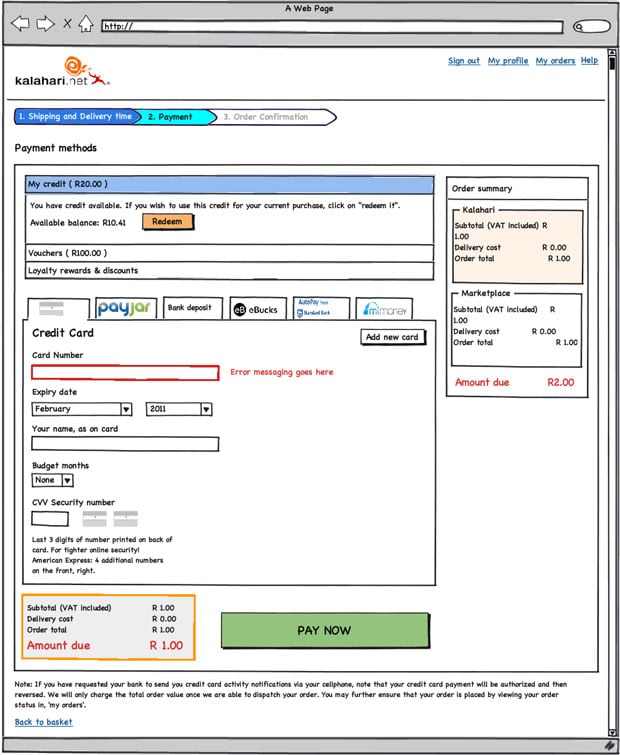
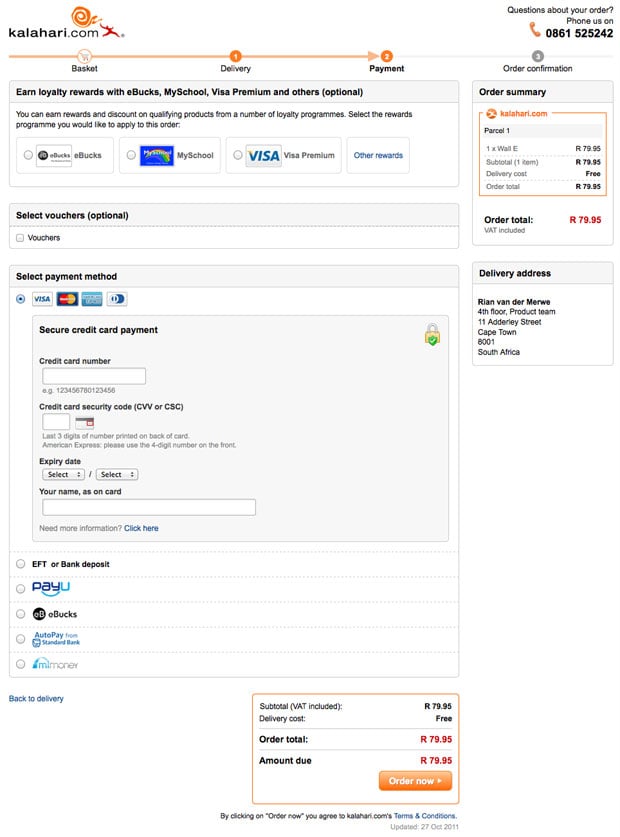
The outcome is a site that is drastically different from where we were a year ago, with real improvements in the success metrics we set for ourselves (% conversion on registration, checkout, and other flows). The changes include not just the main site, but also a brand new mobile-optimized version, as well as some significant changes to our Marketplace for 3rd party sellers. Here’s just one sample of our Checkout redesign, including one of the initial wireframes[4].

Old Checkout:
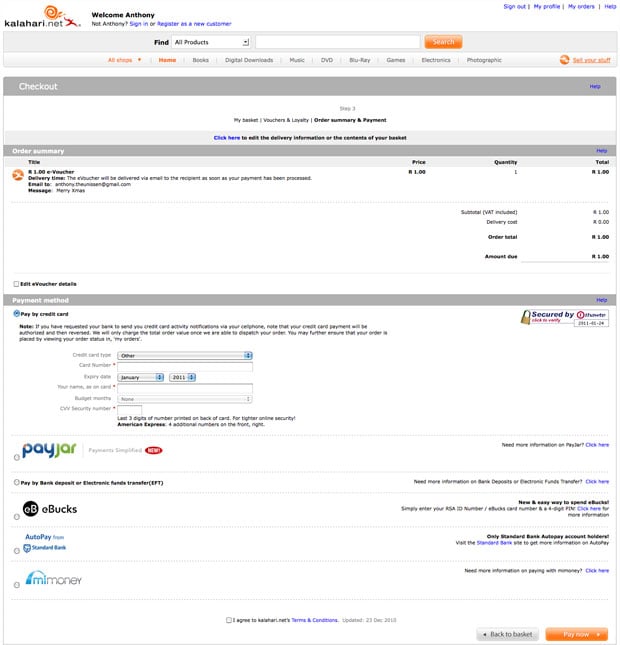
Checkout old

New Checkout:

Initial wireframe:

Checkout wireframe

Final design:

Kalahari new checkout

Three more things

My biggest regret about this year is that we couldn’t do more. We made some great improvements to the site, but it is still so far from where it needs to be. And I know everyone on the team feels this way. We set out to build a culture of quality above all else, and it physically hurts when you have to make compromises and do something that’s counter to that culture. Before you jump in and say that there’s never an excuse to compromise, let me remind you of something Erin Kissane said in What I Learned About the Web in 2011:

If a single idea has followed me around this year, from politics to art and work to friendships, it’s been this one: “it’s more complicated than that.”

It’s centrally important to seek simplicity, and especially to avoid making things hard to use or understand. But if we want to make things that are usefully simple without being truncated or simplistic, we have to recognize and respect complexity — both in the design problems we address, and in the way we do our work.

So, yes, I agree with you - you should never compromise on quality. But it’s complicated. You sometimes run into technical and business complexities that force you to say, “We’ll have to do this later.” It sucks, but that’s life.

I’m exiting this year with three major takeaways - lessons learned and re-learned through our successes and failures:

  • Love your developers. Too many companies see their developers as “resources” whose only reason for existence is to make The Codes. When you pull developers into product planning and design, everything changes. You build better products, and everyone has more fun.
  • User Experience Design is a real thing. I saw way too many dismissive comments about UX this year. If you do it right, it will improve conversion rates and/or make more money. If you don’t believe me, come sign an NDA and I’ll show you our metrics.
  • Culture is everything. In one story out of the Steve Jobs biography, Bud Tribble (one of the Macintosh team members) is quoted as saying, “Hey, if w’re going to make things in our lives, we might as well make them beautiful.” You need a team that has a relentless focus on quality. A team that cares enough to fight for moving that button 3px to the left. It’s the only way to find real meaning in your work.

We have a lot of work to do on our site (sorry, did I mention that already?). But I’m happy that we’ve been able to introduce a fair and effective product development process into the organization. We made user experience an intricate part of how we build product. And we now have a 14-person team of brilliant and dedicated Product Managers and User Experience Designers who care deeply about the product.

It was a good year.


  1. I wrote more about this in The most important characteristic of a good Product Manager  â†©
  2. No one liked my “Intergalactic Product Force” suggestion â†©
  3. I wrote more about this for Smashing Magazine in The Data-Pixel Approach To Improving User Experience  â†©
  4. I’ll spend some time over the break putting together some more before-and-after shots, including stories about the process we followed (if anyone is interested) ↩
Software version numbers: a neglected opportunity to improve customer experience

I love opening the App Store to see what updates are available for my iOS apps. Sometimes I forget to go there for a week or so and as the loading spinner comes up I play a little guessing game - will there be four updates? Seven? Double figures!?

Yes, I know I need to get out more. But I do believe my irrational excitement about something so inane points to an underutilized product marketing opportunity: Software version numbers as part of a delightful customer experience.

Before SaaS and the ease of over-the-air updates, version numbers made sense. In most cases v2.0 came after v1.0, and it was followed by v3.0, or maybe v2.1 for a non-significant update. Companies like Microsoft went a little more granular, but that was usually the exception. 1985-1992 saw the release of Windows 1.01 through 3.1, with only a few point releases in between[1].

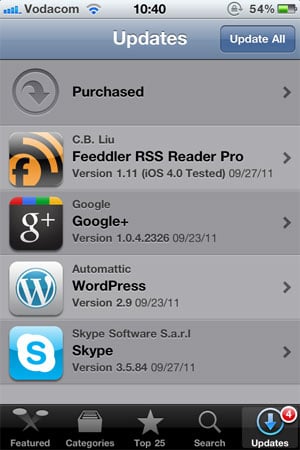
These days, with updates and releases coming with much more frequency than it used to, it’s not uncommon to see an update screen like this one:

versions-ios-updates.jpg

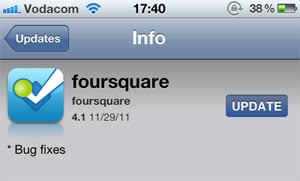
Since there is no common standard for version numbers, it’s not easy to tell which of these updates are significant without going into the release notes for each one. I can guess that Google+ 1.0.4.2326 and Skype 3.5.84 are bug fix releases, but I can’t tell for sure. I have a feeling that Wordpress 2.9 is a fairly big release, but is it in the same order of magnitude as Feeddler 1.11? No idea. Especially since sometimes a seemingly big point release turns out to be pretty unexciting:

versions-foursquare-fixes.jpg

Jeff Atwood is full of praise for the virtues of continuous software updates, and I agree with him. In The Infinite Version he explains how he stopped caring about version numbers after an experience with Google Chrome:

Chrome’s version number has been changing so rapidly lately that every time someone opens a Chrome bug on a Stack Exchange site, I have to check my version against theirs just to make sure we’re still talking about the same software. And once - I swear I am not making this up - the version incremented while I was checking the version.

From a software development perspective frequent software updates are great - you’re able to iterate rapidly and respond to bugs quickly. However, I think this continuing disregard for sensible version numbers is a mistake. We are missing out on an important part of the customer experience: that excited feeling that goes along with getting something new. For paid apps especially, giving users new features “for free” has the potential to delight them and build long-term loyalty. But how will they easily know that they’re getting something new without the visual cues of well-defined version numbers?

There is probably no easy fix for this. We can’t just send the Internet a memo that this is now how we’re doing things. But I hope that software developers will at least start seeing version numbers as part of their product marketing efforts. It would also be helpful to adopt a simple, rough guide to version numbers:

  • x.0 for major redesigns or a re-imagining of the application (such as Path 2.0 and Instapaper 4.0)
  • x.y for the addition of significant new features
  • x.y.z for bug fixes and minor improvements

If we don’t go deeper than three levels (even if z is a four-digit number) and all developers adopt this basic taxonomy, users will eventually start recognizing the pattern. This will give them the necessary cues to understand and appreciate app updates. They’ll know to click through and read the release notes for x.0 and x.y release, but that it’s probably not necessary to bother with x.y.z releases.

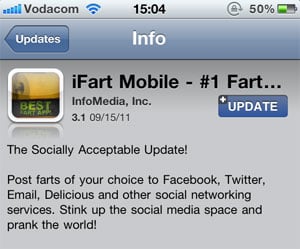
This naturally leads into a discussion about the importance of writing good release notes to go along with a consistent version number strategy, but that’s beyond the scope of this article. I’ll just leave you with an example of an app that sees release notes as part of their”¦ um”¦ “brand experience”?

versions-ifart.jpg


  1. Of course, after 1995 all hell broke loose. Wikipedia lists monstrosities such as Windows 95 USB Supplement to OSR2, Windows XP Professional x64 Edition, and Windows Server 2008 R2 for Itanium-based Systems. ↩

Product Ownership is a role, not a job title

Marty Cagan argues that splitting the Product Manager and Product Ownership roles into two positions is a mistake:

This approach has two common negative consequences.  The first is that there is no clear owner (neither person takes responsibility for the product), and the second is a common lack of respect or understanding between the two (the “product manager” doesn’t appreciate the technical complexities, and the “product owner” doesn’t appreciate the customer’s pain).

I agree, and I would actually go one step further. I view Product Ownership activities (representing the voice of the customer, interacting with the development team, managing the backlog, etc.) as a subset of the overall strategic Product Management position (product planning, execution, and marketing). I’ve resisted calling my team Product Owners, and prefer to say that they are Product Managers who fulfill a Product Ownership role on Agile projects.

The problem is that splitting these roles into distinct job titles also splits their goals. It’s easy for one to become all about the market, and the other to become all about internal development tasks. Instead, a Product Manager should ultimately take end-to-end responsibility for the development of product solutions that meet user goals and business needs. That’s the job. Managing the backlog and working with developers on specifications are just part of that overall function, not a thing on its own.

Product vision and roadmaps

Jared Spool in The Value of Appl’s Knowledge Navigator: Gruber Has It Partially Right:

When teams don’t have a vision [”¦], each person is walking around with a different understanding of what the end of the journey should look like. When ther’s no common understanding on what that end point looks like, each decisions is evaluated on a different criteria and the resulting products end up looking like crap.

This is why I believe that product roadmaps are not evil. As I’ve written before, at our company we are very clear that the product roadmap is a flexible guideline that can (and must) change frequently as needed. But it gives the teams (and the management team) something to work towards. It’s a common vision, a sense of direction that’s more than just fluffy language - it’s concrete evidence that w’re headed somewhere good, and we know how to get there.

"Something that’s perfect just feels much, much better than something that’s almost right."

Aaron Swartz in a great piece called Steve Jobs and the Founder’s Pain:

Something that’s perfect just feels much, much better than something that’s almost right. When I’m doing something myself, I can just sit there and work at it until it’s exactly right. It’s embarrassing to launch a product with a bug in it! It physically hurts when I realize that’s what I’ve done. But as projects and companies grow, there are more and more people in between me and those tiny details. And then I face a choice: do I keep complaining until something’s perfect or do I just let go and consider it somebody els’s problem?

The people who are not content to make it somebody else’s problem are the ones who end up changing the world.

(link via @vhata)

The difference between Apple and Microsoft: product before profit

I’m a little late to this article that made the rounds last week, but I finally read The inside story of how Microsoft killed its Courier tablet. It’s a bit scattered and sometimes hard to follow the narrative (probably because it was split into two pieces), but it’s still a very interesting story and worth reading. For one, if Microsoft found a way to keep J Allard around, things might have turned out differently for them. He seems like exactly the kind of person they needed to deliver real product innovation in the mobile computing space.

The most interesting part for me is how the article shines a light on the differences between Microsoft and Apple’s approaches to product development. Here’s Jay Green in the CNET article about the Courier tablet:

Courier’s death also offers a detailed look into Microsoft’s Darwinian approach to product development and the balancing act between protecting its old product franchises and creating new ones. The company, with 90,000 employees, has plenty of brilliant minds that can come up with revolutionary approaches to computing. But sometimes, their creativity is stalled by process, subsumed in other products, or even sacrificed to protect the company’s Windows and Office empires.

Microsoft has a fear of not doing anything that could cannibalize their cash cows (Windows and Office), even if that means they have to do things that don’t create value for users. It’s an organization that’s optimized for profit, not product. Contrast that with Apple’s approach:

Apple hasn’t optimized its organization to maximize profit. Instead, it has made the creation of value for customers its priority. When you do this, the fear of cannibalization or disruption of one’s self just melts away. In fact, when your mission is based around creating customer value, around creating great products, cannibalization and disruption aren’t “bad things” to be avoided. They’re things you actually strive for ”” because they let you improve the outcome for your customer.

Kyle Baxter adds the following perspective on an approach that places product before profit:

[N]ot only does focusing on the product make for better products, but it completely changes the corporate, business and organizational decisions you make, too. If you are focused on maximizing profit (in the short or long-term), you end up making choices that inhibit great products and great success at best, and destroy your ability to succeed at worst.

The Courier project should serve as a cautionary tale about what happens when the fear of losing profit gets in the way of developing a potentially great product. A product that could have resulted in a very different tablet landscape than the one we have today.

Experience design as craft

Peter Merholz describes Instapaper creator Marco Arment’s approach to design in Craft in Interaction and Service Design:

Instapaper shows the power of approaching experience design as a craft, as opposed to some kind of massive organizational process. Too often companies launch something and then move on to whatever’s next. Instapaper shows what happens when you go deeper and deeper and deeper into something. Unlike Microsoft or Adobe, who simply tack on features with every new release, Marco, instead, refines the design, honing it, polishing it, like his app is some jewel. I’d love to see companies approach service design the way Marco has. It would require a fundamental shift in how they work, but the results could be quite beautiful.

How often do you hear the words “We’ll get to that in Phase 2”? And how often do you actually get to do “Phase 2”? It’s a running joke in the software industry that calling something a “Phase 2 feature” is another way of saying it will never happen. There are just too many squirrel projects, too many Shiny Things that need to get done.

It doesn’t have to work like that, though. Small, dedicated teams who have autonomy and a clear decision maker can focus on one area of an experience for an extended period of time. This can work even in large organizations, but it requires trust and a long-term vision, both of which can be hard to find in big companies. It is the only way to bring craft and care to a design cycle that’s often treated too much like a conveyor belt.

Tech4Africa slides: Breaking down silos

I was privileged to speak at Tech4Africa 2011 about a topic that I care about a great deal: how our environments and the way we work impact the quality of the software we produce. The talk came out of a question I keep asking myself over and over: why, despite our best efforts, do we still too often produce low quality software? Here’s the talk summary:

Why do we see so many web applications with inferior user experiences? Why do UX designers often get stuck being asked to “make the design pop a little more,” with no room or incentive to innovate? Why do some web developers feel demotivated and unable to break out of doing things the way they’ve always been done?

In this talk I explore some of the main causes of ineffective software development, and discuss practical recommendations on how to improve team structures and development processes to build high quality software that users care about, want to use, and that therefore makes more money for the business.

I discuss how designers and developers can work better together, how to ensure everyone gets input into the roadmap without it becoming chaos, and how to make sure that the business benefits are clearly articulated and communicated.

So here are the slides from my talk - I hope you find it useful. If you’d like to read more about this topic, you can check out a two-part series of articles that I wrote for Smashing Magazine.

Small UX details: Error prevention for iCloud photo stream sync

One of the principles of UI design that I always look out for is error prevention. Good design anticipates any errors that a user might make, and then makes it impossible to make those errors.

Apple’s new iCloud settings screen, shown below, is a case in point. It doesn’t allow you to check the box to sync your photo stream until you update iPhoto to the version that supports it. It would have been easy to forget about this detail. They could have allowed users to check the box anyway, and let photo stream syncing just not work until iPhoto is updated somewhere down the line.

iCloud-photo-stream.jpg

This might sound obvious when you see it done right, but it’s not always easy to anticipate errors. Sticking with the Apple/iOS theme, let’s look at the Omnifocus iPhone app. The app now supports location reminders on iOS 5, which means that you can set it to remind you to do something when you arrive at or leave a specific location. I wanted to try it out, so I set up a reminder to go off when I leave work:

omnifocus-location-reminders.jpg

The problem is that the iPhone’s GPS location tracking system needs to be turned on for Omnifocus in order for this to work. I didn’t realize that I didn’t have it turned on for this particular app, so nothing happened. The reminder just didn’t go off. I only discovered my mistake later that evening when I played around with the settings some more.

Designing for error prevention would have prompted me to turn GPS location tracking on for the app before allowing me to add a location-based reminder.

Small details matter.