Menu

Posts tagged “design”

Proving the value of user experience design to organizations and clients

This is a question that doesn’t seem to go away: “How do I convince my company that good design is worth investing in?” It’s frustrating to work in an industry where you have to spend so much time showing the value of what you do.

At first I placed all the blame on (big) companies who are too cheap to pay for good design because they don’t think it’s necessary. But then I started to wonder… maybe some of it is our own fault? Maybe we just haven’t yet proven, within our industry and the companies we work at, that good design will result in positive ROI?

If I remember one thing from Marketing 101, it’s this obvious (but often forgotten) truth: Businesses exist to make money. Companies work so hard to make us happy for one reason only: so that we will buy more of their stuff. This seems obvious, but it’s important to remember. Because when you talk to the management teams of your organization/clients, telling them how beautiful their site will be once you’re done with it is just not going to cut it.

To prove the value of user experience design, you have to prove that by investing in it, the business will make more money. It’s as simple as that. Well, the concept is simple. The execution is… complicated. In this post I’d like to propose some ways to help us prove the value of design, so that we can spend more of our time building great experiences and less time telling people why they should build great experiences.

Design = Money

Proving that good design will make your organization/client more money is not something you can apply a formula to and do overnight. It involves some hard work and clever thinking (time well spent) to figure out what works best for the context you’re designing in. In some cases, like designing a Checkout process, it is relatively easy to define success metrics, benchmark, and show that a redesign resulted in more money - because checkout is where the money is.

In other cases, for flows that are further removed from direct revenue generation, it can be much harder to find the money link. In those cases, a conversion model is often the right way to go:

In most online user flows you can make a strong case that an improved conversion rate (or reduced drop-off rate) will result in increased revenue. Once that link is made, what remains is to prove that an improved user experience results in improved conversion rates. But there are immediately two challenges with this approach:

  1. How do you buy the time you need to prove that UX works?
  2. How do you find the right conversion rate model to link UX to conversion rates (and ultimately revenue)

So let’s dive into that.

Buying time to do the right thing

Getting an organization or client to invest in UX can be quite tricky in the beginning. Without real data, it’s hard to show the value. But without the time to do the process right, it’s hard to get real data. And so the vicious circle continues.

One way to buy some time is to show case studies where an investment in UX design has resulted in significant revenue lifts. One of these case studies is Jared Spool’s The $300 Million Button, where a simple design change resulted in an enormous revenue lift. Spool writes:

When the team contacted us, they’d already pretty much decided what the problem was and how they were going to fix it, even though they had never watched any shoppers make purchases. And they were dead wrong. Not only was their fix not going to help, our research showed that it was going to increase abandonment.

Two weeks of usability testing on the live site (and on competitors’ sites), followed by two weeks of iterative paper prototype testing produced a streamlined checkout process, which, once implemented, showed a dramatic increase in revenues. It’s amazing what you’ll learn when you actually watch your users.

Obviously not all UX changes are going to have this much of an impact. But sharing cases like this with senior management or clients should help in making the case for investing in a proper user-centered design process. I know this is easier said than done, but mountains can be moved with some solid data and stubborn persistance.

So, let’s assume you’ve shown that a good UX can increase revenue quite significantly. How do you go about proving it for one of your own projects?

The three A’s

One of the marketing principles that are quite useful for user experience design is looking at the source of revenue as coming from one or more of three sources:

  • Acquisition. Getting new users to sign up for your site/service
  • Activation. Getting those new users to make their first purchase
  • Activity. Getting those first-time purchasers to come back for more

If you can tie a UX project to one or more of these sources of revenue by showing that you increased conversion rates in those areas, you’ll have what you need. You’d have shown that design=money. Here are some hypothetical examples:

  • A registration flow redesign can be shown to improve conversion from sign-up landing page to signed-up users. This ties into Acquisition.
  • Improvements to a search results page can be shown to improve conversions from search —> items placed in a shopping cart. This ties into Activation and Activity.
  • Home page layout and content changes can be shown to improve click-through rates on merchandising offers specific to new users. This ties into Activation.

And this list can go on and on. It won’t always be easy, but every UX project should be measurable in terms of its impact on the business, and tying it to one of the three A’s is a good structured way of anchoring all design changes in business goals (and ultimately, revenue).

Define your success metrics, benchmark those metrics before any changes are made, and then measure the (hopefully improved) increase in metrics.

In summary

As designers, we need to assume some of the blame of working in an industry that often has to fight very hard for appropriate resources to do our jobs. We need to understand why businesses exist, and follow a strategic approach to proving the ROI of design:

  • Show historical case studies to buy some time and resources to follow a proper UX design process on one or more of your projects.
  • Start on a project where changes can be measured by an improvement in one of the three A’s of revenue generation: Acquisition, Activation, or Activity
  • Benchmark well before the start of the project, follow through on the UX design commitment, and measure your results - see this post on Six Revisions for some tips on which measurement tools to use. (What to do if the results are negative is a topic for a whole different post).

There is no perfect way to prove the ROI on design - this is just one proposal. Another side that I didn’t explore in this post is the many ways that UX can result in cost/resource savings. That’s deliberate since I wanted to focus specifically on the positive side of the revenue equation (for a discussion of some of the savings benefits of UX, see this great video by Susan Weinschenk from HFI).

I’d love to hear your thoughts on this important issue. How else can we prove the value of design?
The KFM Website Redesign Project, or What's Wrong With Our Industry

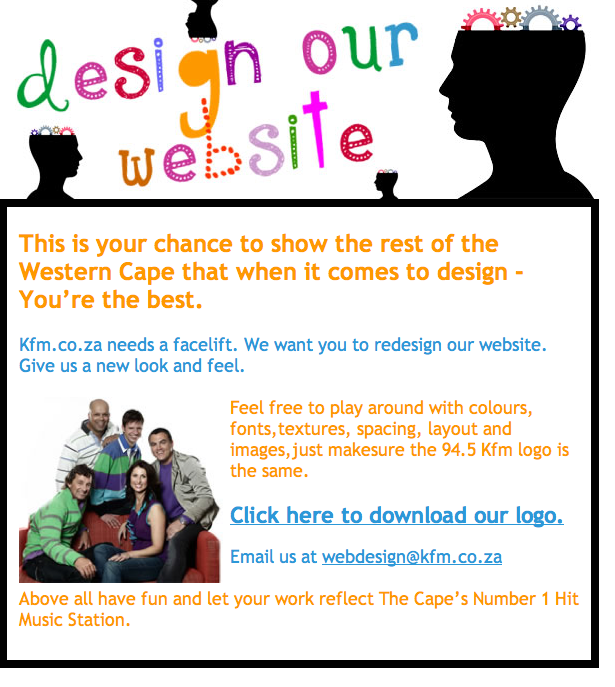
I just found out about the redesign “project” (not sure what to call it) that South African radio station KFM is kicking off (thanks for the heads-up @1rene, @kerry_anne, @allankent, @wendyrobb, and many others). Here is the ad for it:

I’ll stay away from the cheap shots you could take on the ad itself, because granted, they’re admitting they need a designer. Instead, I’d like to focus on two major problems with the idea itself, and what that means for the web design industry.

1. Design is not “colours, fonts, textures, spacing, layout and images”

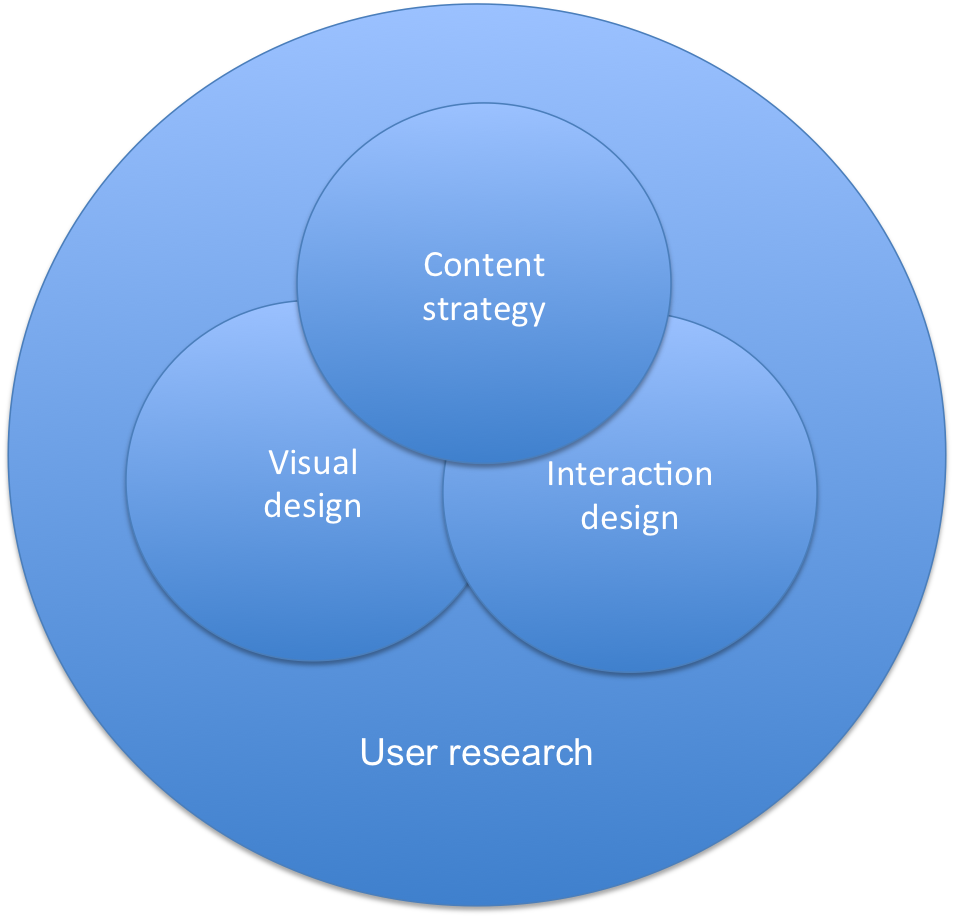
It’s really shocking that we still need to have this conversation in 2011, but guys, what you’re asking for is Visual Design. What you should be asking for is User Experience Design, which is made up of so much more than what you’re asking for:

There is no space or time to go into it here, but the point is that you need a User Experience designer to help you understand these elements, and not just give you a pretty design that doesn’t meet user needs.

  • User research helps you uncover user needs and expectations for the site.
  • Content strategy helps you define the voice and tone of your site, and writes content that meets the needs of your target visitors.
  • Interaction design helps you design an information architecture and a flow through the site that lets users accomplish their goals in the most efficient way possible.
  • Visual design provides the appropriate visual language to guide users along this ideal path that you define (and, fine, it also makes it pretty).

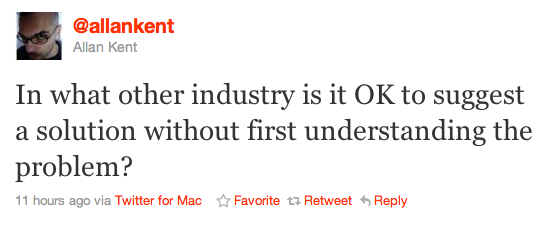
I think @allankent summed up my feelings about this issue the best:

Please KFM (and everyone else thinking about a redesign): don’t just make your site pretty. Make it something that allows your visitors to find the content they’re looking for, and enjoy it while they’re there.

2. “If you’re good at something, never do it for free.”

The second problem with this project is almost worse than the first. And that is the expectation that a designer should give up his or her time for free to work on this. Just, you know, for love of the game. The Joker’s words in The Dark Knight bears repeating:

If you’re good at something, never do it for free

If KFM is serious about a site redesign, they’ll pay for a proper redesign project, not ask people to give away their skills for free. Good design is hard, and if you paid the price it takes to become good at it, you should be compensated for your time. After GAP asked designers to redesign their logo for free a few months ago, Mike Monteiro wrote a great post on this that you must read. In Dear Gap, I have your new logo, he says:

Man, that stuff took time. A lot of time actually. And a tremendous amount of effort, as well as expertise. Expertise that came from a combination of training, which I had to pay tuition for, and experience. I’m good at this because I’ve done it a lot. Sure, ther’s some natural talent there, but by and large I’ve gotten good at my job the same way every other worker has. By experience, by focused effort and by learning from my mistakes.

So as much as I’d like to just show you the greatest logo I’ve ever made for anyone (“¦and trust me, if Paul Rand himself saw it, he would realize he was merely the Pippen to my Jordan.) I’d like to be properly compensated for it. Because I put a lot of time and effort into it. And it’s how I earn my living.

And that time and effort was used to make sure I delivered something that actually met your needs and objectives. You guys have numbers to meet. And plans for the future based on meeting those numbers. So do I.

And for the sake of full disclosure I should let you know that I’ve also frequently shopped at your stores. You sell good stuff. But never in my experience has any of your employees offered me a free pair of pants because the ones I was wearing looked bad. I wouldn’t expect them to. Their job is to sell me clothes.

My job is to sell design.

To designers: please, please don’t cheapen our industry by doing something you’re good at without compensation.

And to KFM: please don’t ask people do this work for free. I’m really happy you want to redesign your site, but you should pay UX professionals to help you do it. I guarantee you will be happy with the result.

If we’re going to move this industry forward in South Africa, we’ll need to start being serious about what design really means. And that means putting money behind the education and employment of user experience professionals.

Best practices for user onboarding on mobile touchscreen applications

As the UX field grows and more companies start taking user-centered design seriously, we need to start thinking about how we’re going to rescue all those stray sheep of the UX world — those areas that are getting left behind because we’re (understandably) focusing on the obvious, most important things. Two of these “stray sheep” issues come to mind immediately.

One is bad error messages, which is the subject of a whole other rant, so I won’t go into that now (I’ve started a Flickr group to collect examples - come join and contribute!). The second is user onboarding, which Whitney Hess defines as follows:

Onboarding is the process by which you can help users overcome the cold-start problem””a blank profile, an unfamiliar interface, a general feeling of “what the heck do I do next?”

And that’s what I’d like to address in this post.

The importance of user onboarding

When Jakob Nielsen wrote his 10 Heuristics for User Interface Design in 1990, he devoted one of his rules of thumb to user assistance and help documentation:

Even though it is better if the system can be used without documentation, it may be necessary to provide help and documentation. Any such information should be easy to search, focused on the user’s task, list concrete steps to be carried out, and not be too large.

Yes, first prize is to have a system that doesn’t require onboarding or documentation. But that’s not always possible, especially in the fairly new field of mobile design. So, if you need to provide onboarding help, what’s the best way to do it?  A List Apart recently published an excellent article (Good Help is Hard to Find) on how to write good Help content, with specific reference to the importance of context:

Help content can be rendered in many ways, but if possible, embedding it directly within the feature it serves is almost always the best choice. When help is offered in context, affordance is high: That is, the help is obvious to the user. Even better, context-based help is the least disruptive to workflow, as it doesn’t require the reader to view a separate page.

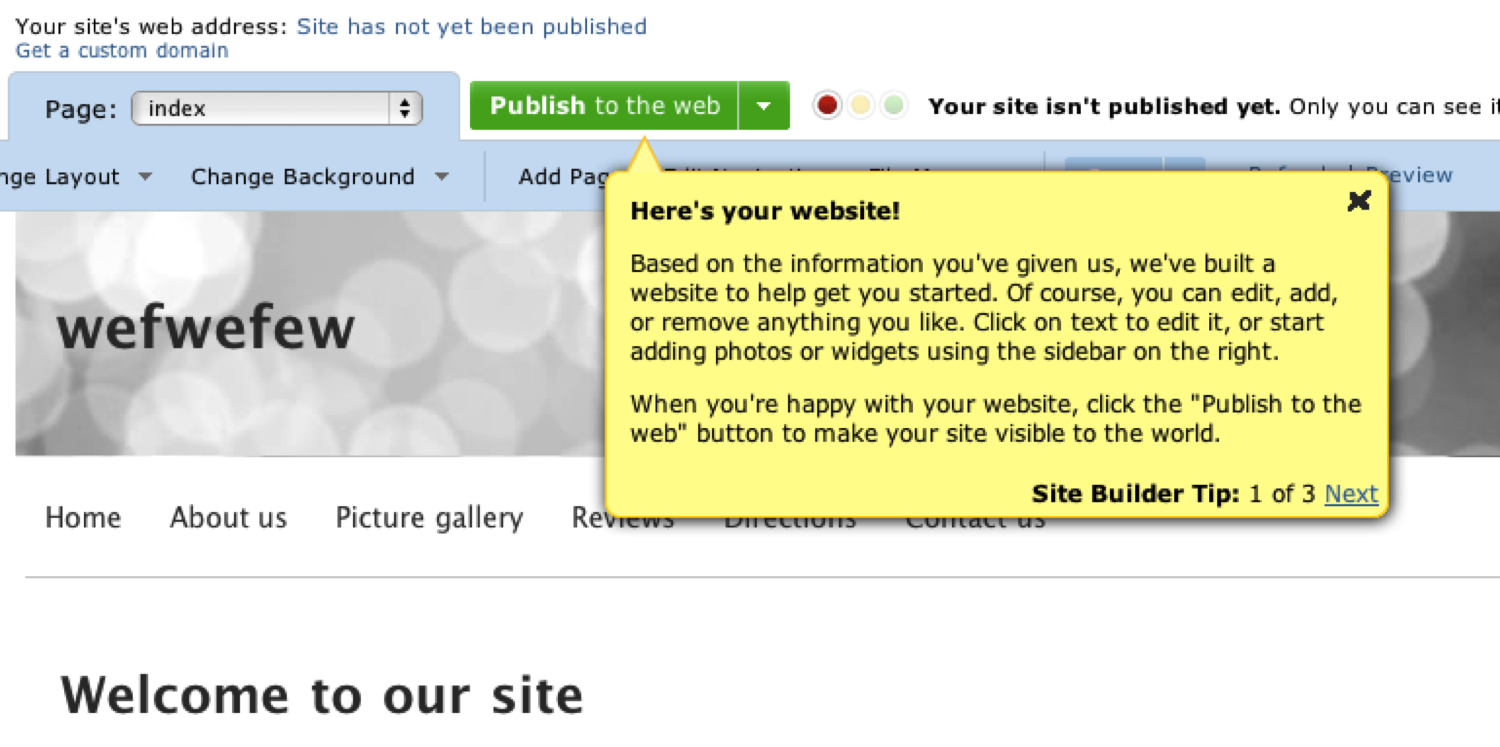
To name one example of contextual onboarding: when you first sign up for an account on website builder Yola.com, you see this screen, which provides tips on how to get started:

You can write whole books on good and bad implementations of user onboarding in web apps (The Baymard Institute recently posted 3 Examples of Inline Help, which is well worth reviewing). But I want to focus specifically on how user onboarding should be applied to mobile touchscreen applications, because we don’t yet have best practices for that.

Here are some best practice guidelines I’d like to propose for onboarding users on these devices:

1. Don’t show all the information at startup

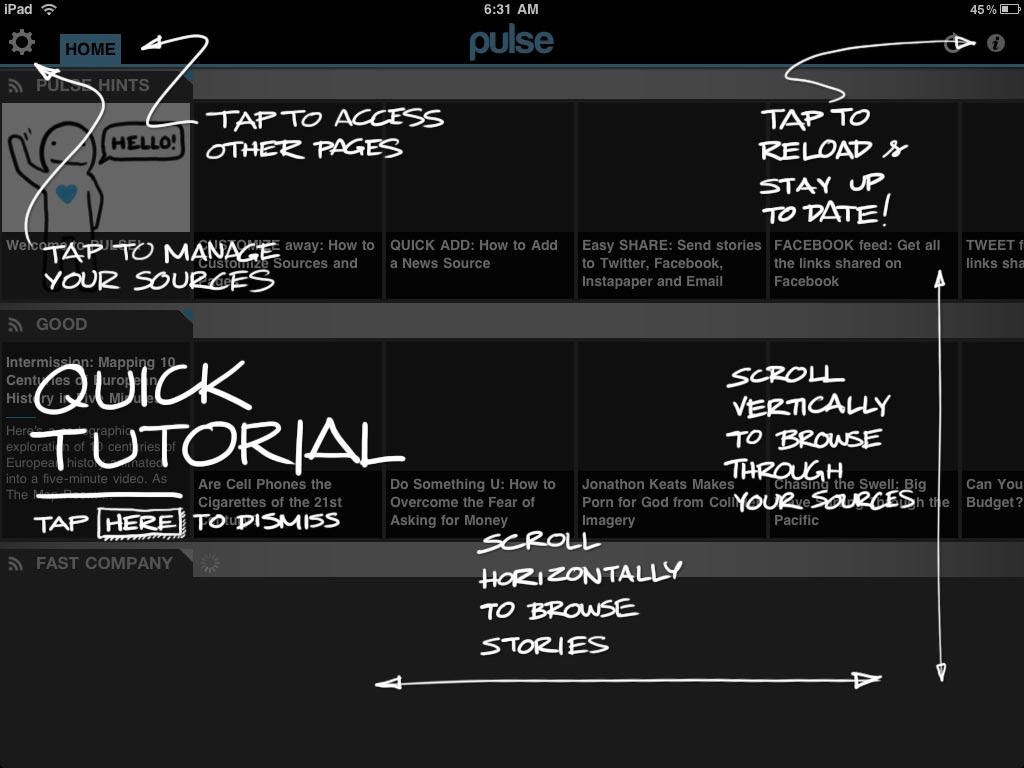
When you first start up the magazine app Pulse, you get this screen:

It’s certainly different - fun and quirky. But it’s also overwhelming and too much, too soon. I haven’t started using the app yet. In fact, when I installed it I wasn’t even sure what it does - is it an RSS reader or a news feed from predetermined sources? Or something completely different? I can’t do a tutorial on something I don’t understand yet.

So, guideline #1: make sure that users have familiarized themselves enough with your app to have the correct mental model before you start teaching them how to use it.

2. Show one (or only a few) tips at a time

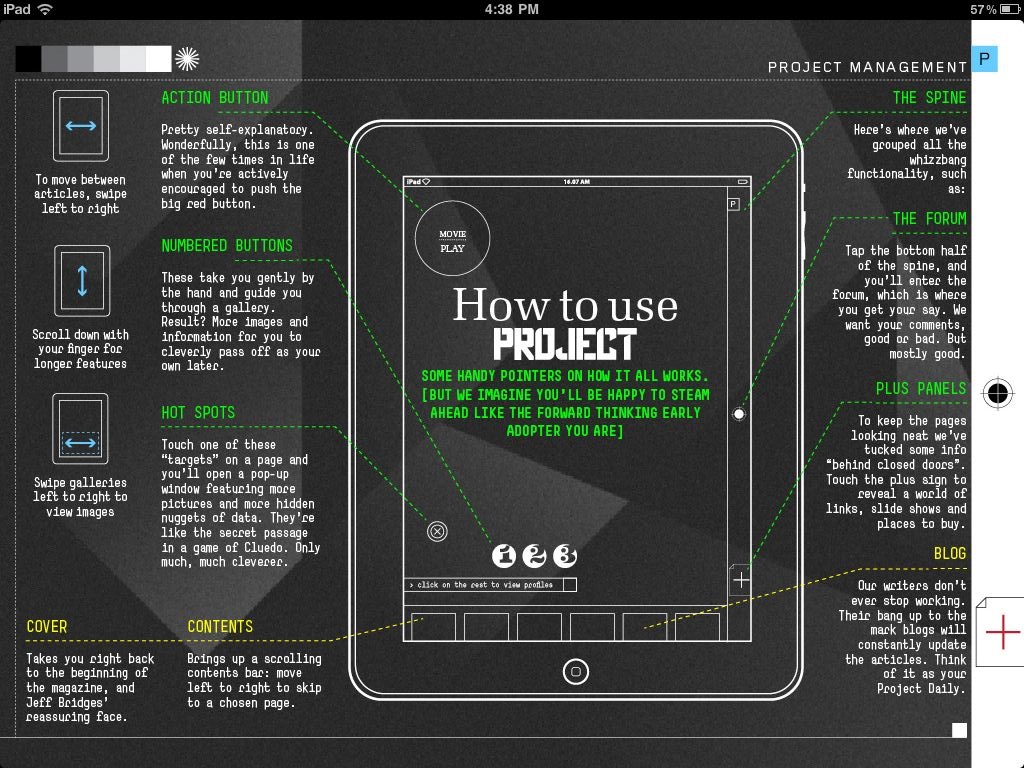
Project is another magazine app that’s getting a lot of press at the moment. Project adheres to rule #1 by getting you a few pages into the experience first before showing you the ins and outs of the app itself. But then you get to this page:

That is just way too overwhelming. Ignore, for the moment, the heavy visual design that makes this so hard to read. Even if this was designed in a clearer way, there is still too much information on the page, too many things to try to absorb and commit to memory. Speaking of Nielsen, remember this heuristic:

Recognition rather than recall: Minimize the user’s memory load by making objects, actions, and options visible. The user should not have to remember information from one part of the dialogue to another. Instructions for use of the system should be visible or easily retrievable whenever appropriate

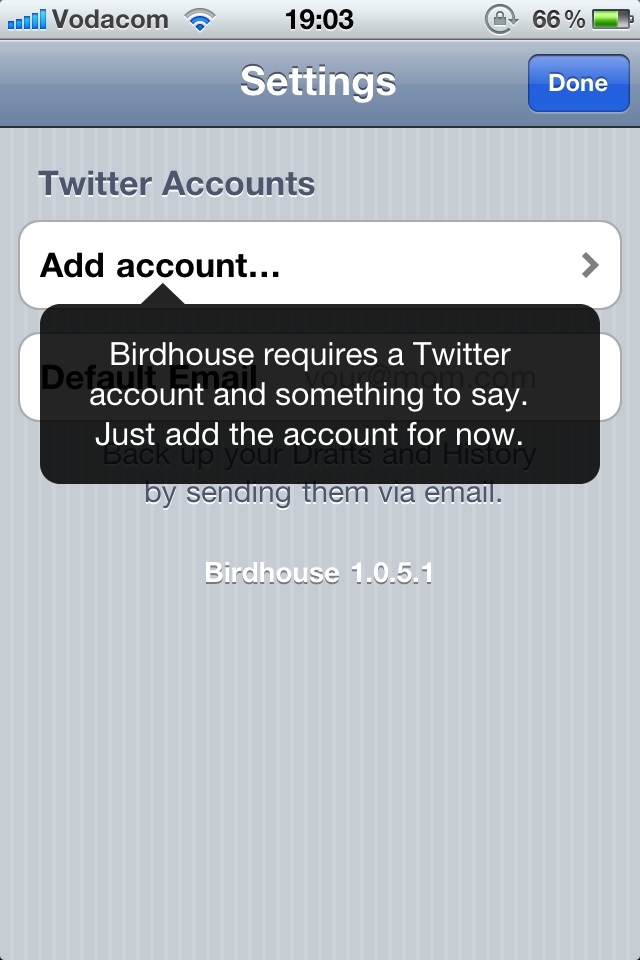
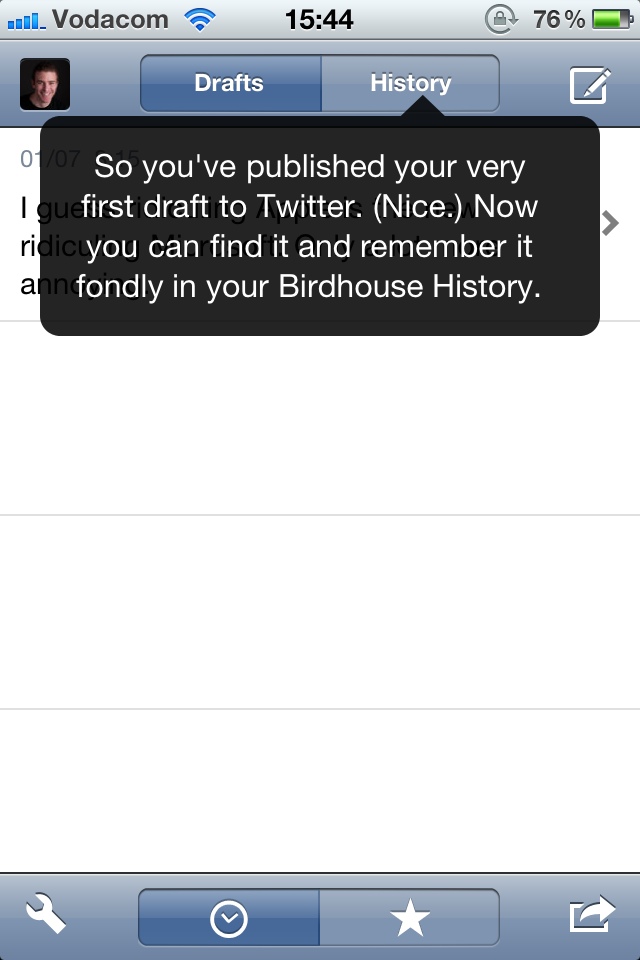
This page increases cognitive load significantly, and requires the user to remember too much. And this brings us to guideline #2: Show users only the information they need to take the immediate next step(s) for using the application. Consider, for example, two screens from the iPhone app Birdhouse:

It follows guideline #1 by telling you what you’re going to use the app for, and it follows guideline #2 by telling you one thing you need to know to use the app, at the exact time you need it. The first screen lets you know what information is needed to use the app. The second screen tells you how the “History” function works, at the moment you might want to start using it (after you’ve published your first tweet).

3. Always keep the app’s context visible

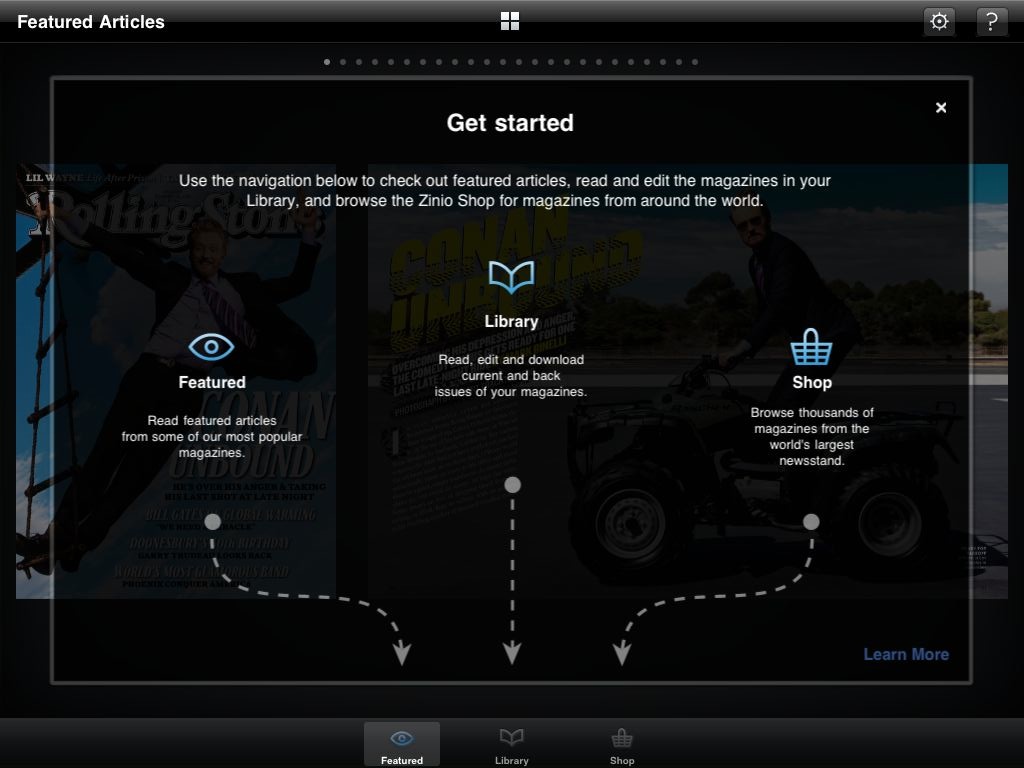
Yet another magazine app, Zinio, does their user onboarding this way:

Even though it could be simplified, this is a pretty good way to get users started. It explains what each of the areas of the app are, and it uses arrows to keep the context of the app visible, so that you know where to find the areas you’re looking for. Guideline #3: Make sure users have a clear link between the information you give them and how to access/use that information in their everyday use of the app.

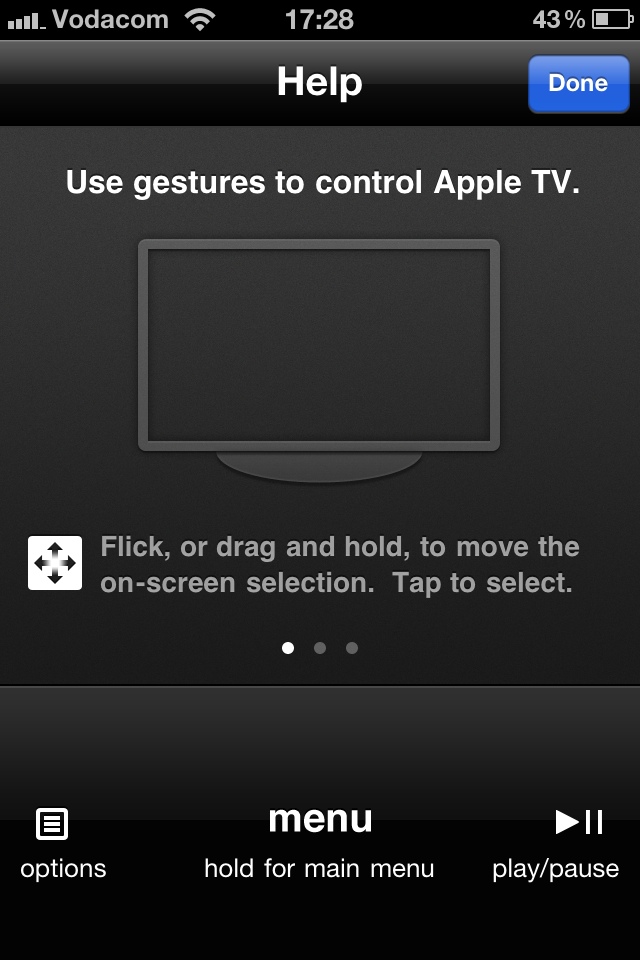
Another good example of this is the Apple remote app for the iPhone. When you tap the Help icon, the interface stays the same, but some additional information is overlayed across the screen to show you what each of the areas are for:

Summary

In this post I proposed some guidelines for onboarding users on apps for mobile touchscreen devices:

  1. Make sure that users have familiarized themselves enough with your app to have the correct mental model before you start teaching them how to use it.
  2. Show users only the information they need to take the immediate next step(s) for using the application.
  3. Make sure users have a clear link between the information you give them and how to access/use that information in their everyday use of the app.

This is certainly just a start, so I’d love to hear more suggestions — how can we quickly and effectively onboard users on mobile applications?

Design is about meeting business goals, not making you feel good

In this post I make the argument that companies should hire designers that have a strong foundation in psychology and design theory. I further make the case that when Product Managers and other UX practitioners give feedback on designs, they should move away from their personal visual preferences and instead focus on feedback that relates to the user and business goals they are trying to meet.

I recently had a discussion with an Interaction Designer friend of mine about the perils of Design by Committee.  His take on it was, in essence, as follows (paraphrased a little bit):

The problem is that everyone thinks they’re a designer. Not everyone can code, so they don’t go to developers telling them their markup needs to be more semantic or more valid. But everyone has a gut feel about design - they like certain colors or certain styles, and some people just really hate yellow. So since everyone has an emotional response to a design, and “it’s just like art,” they think they know enough about design to turn those personal preferences into feedback.

It is a real shame that we have come to this point where design just means “making things pretty” for some. Even among people who do understand it’s about more than that, there is sometimes this misconception that there is so much personal taste involved that “your guess is as good as mine.” And to add insult to injury, they way that feedback is given to the designer is often more destructive than helpful. Look, I’m not against design feedback at all - it’s an essential part of the process. But if you’re going to give feedback, do it right. More on that a little later.

The truth is that design is science. Yes, of course it’s a creative discipline, and every designer has a style they like, and strong ideas on aesthetics.  But it is important to understand that aesthetics is the last mile of design. Before that (if you do it right) comes hours and hours of analysis and thinking, resulting in solutions that are built on very real psychological principles, easily proven using the user experience validation stack.

The major problem with focusing too much on aesthetics (and our personal views of it) in design is this: it makes the site harder to use.  Jeffrey Zeldman’s excellent 1999 piece Style versus design places some of this blame on designers themselves, but it sums the problem up perfectly:

When Style is a fetish, sites confuse visitors, hurting users and the companies that paid for the sites. When designers don’t start by asking who will use the site, and what they will use it for, we get meaningless eye candy that gives beauty a bad name ”” at least, in some circles.  Not enough designers are working in that vast middle ground between eye candy and hardcore usability where most of the web must be built.

So let’s be clear. Design is not about what feels good to you. Design is about meeting business goals. It’s about solving user needs so that your business can make more money. In Mike Monteiro’s recent post on Giving Better Design Feedback he builds on this idea and gets to the crux of it:

First rule of design feedback: what you’re looking at is not art. It’s not even close. It’s a business tool in the making and should be looked at objectively like any other business tool you work with. The right question is not, “Do I like it?” but “Does this meet our goals?” If it’s blue, don’t ask yourself whether you like blue. Ask yourself if blue is going to help you sell sprockets. Better yet: ask your design team. You just wrote your first feedback question.

This madness has to stop. I’m not arguing that we should create ugly web sites. In fact, as long as the focus is first and foremost on meeting user needs and business goals, beautiful sites can make the experience simply wonderful. But I am arguing that those of us in the Product Management and User Experience field need to fight for three things:

  • A design culture that is routed in theory, analysis, and critical thinking.
  • A company culture that hires designers with strong roots in theory and analysis
  • A managerial culture that trusts their designers to do their jobs.

So how do we as Product Managers and UX practitioners help affect this change?  We need to gain a much better understanding of what goes on under the hood of design. We need to do this so that we can give better design feedback, but also for the sake of the business in general, so that we are able to make a strong argument for what’s right when it comes to design culture. And lucky for us, there are plenty of great resources online to help us learn how to objectively look at design, and understand the science behind it. Here is my initial suggested reading list:

  • The psychologist’s view of UX design is an incredibly detailed look at user behavior on websites, with additional outgoing links to more great content. I go back to this post often.
  • Designing for the Mind explains how the brain interprets visual information, and how that translates to web design that works (and is also aesthetically pleasing).
  • Gestalt Principles Applied in Design goes further down the path of using established psychological principles to create better designs.

But just how important is it that we solve this problem? In a scary, almost prophetic way, Zeldman ends his post on style vs. design with the following words of caution:

Most of all, I worry about web users. Because, after ten-plus years of commercial web development, they still have a tough time finding what they’re looking for, and they still wonder why it’s so damned unpleasant to read text on the web ”” which is what most of them do when they’re online.

I fear that now, more than 10 years after he wrote those words, we’re still in the same boat. Let’s change that. The next time you need to give feedback on a design, don’t go with your gut. Go with science, and keep your user/business goals in mind. Ask your designers goal-oriented questions, and if they can defend the decisions they made, trust them. If they can’t, you just gave constructive feedback. As you should.

Inspiration for designers stuck in the 'sheer undiluted slog'

I recently read two book excerpts, both about art and the creative process, that I think are extremely relevant to web design, so I wanted to share it here. The first is from the book Art & Fear: Observations on the Perils (and Rewards) of Artmaking, and it tells the story of a ceramics teacher on his first day of instruction:

A ceramics teacher announced on opening day that he was dividing the class into two groups. All those on the left side of the studio, he said, would be graded solely on the quantity of the work they produced. All those on the right would be graded solely on their works’ quality.

His procedure was simple: On the final day of class he would bring in his bathroom scales and weigh the work of the quantity group; 50 pound of pots rated an A, 40 pounds a B, and so on. Those being graded on quality, however, needed to produce only one pot — albeit a perfect one — to get an A. At grading time, the works with the highest quality were all produced by the group being graded for quantity.

It seems that while the quantity group was busily churning out piles of work — and learning from their mistakes — the quality group had sat theorizing about perfection, and in the end had little more to show for their efforts than grandiose theories and a pile of clay.

The second is from Absolute Truths, where a character in Susan Howatch’s novel talks about the struggles she encounters as a sculpter:

But no matter how much the mess and distortion make you want to despair, you can’t abandon the work cause you’re chained to the bloody thing, it’s absolutely woven into your soul and you know you can never rest until you’ve brought truth out of all the distortion and beauty out of all the mess - but it’s agony, agony, agony - while simultaneously being the most wonderful and rewarding experience in the world - and that’s the creative process so few people understand.

It involves an indestructible sort of infidelity, an insane sort of hope, an indescribable sort of… well, it’s love isn’t it? There’s no other word for it… and don’t throw Mozart at me… I know he claimed his creative process was no more than a form of automatic writing, but the truth was he sweated and slaved and died young giving birth to all that music. He poured himself out and suffered.

That’s the way it is. That’s creation. You can’t create without waste and mess and sheer undiluted slog. You can’t create without pain. It’s all part of the process, it’s in the nature of things.

So in the end every major disaster, every tiny error, every wrong turning, every fragment of discarded clay, all the blood, sweat, and tears - everything has meaning. I give it meaning. I reuse, reshape, recast all that goes wrong so that in the end nothing is wasted and nothing is without significance and nothing ceases to be precious to me.

These stories are some of the best descriptions of the creative process that I’ve ever read. The next time you’re mid-design and feel like you’re stuck in the “sheer undiluted slog” that is sometimes the reality of what we do, think of this.

You’re not just theorizing about perfection - you’re doing.

Think about how you can reuse, reshape, and recast all the failed efforts.

Give it meaning by letting it lead you to the next, better solution.

Plaxo registration and the benefits of good microcopy

Remember Plaxo? I do too, but up to now I remembered them like I remember MySpace: “That site that used to be popular for something-or-other.” But recently a bunch of people I used to work with moved to Plaxo, and they’re colleagues I respect, so I thought I’d check it out again. You know, one day. But to his credit, Preston’s incessant tweeting about how awesome Plaxo is finally got me off my procrastinating butt to sign up for the thing.

And I am impressed.

I only signed up this morning so this isn’t really a review of the service, but I did want to make a couple of points about the sign-up process and some very effective use of microcopy. UX designer Joshua Porter has written extensively about the value of good microcopy, and so have the folks at Polon. To quote from Joshua’s post:

Microcopy is small yet powerful copy. It’s fast, light, and deadly. It’s a short sentence, a phrase, a few words. A single word. It’s the small copy that has the biggest impact. Don’t judge it on its size”¦judge it on its effectiveness.

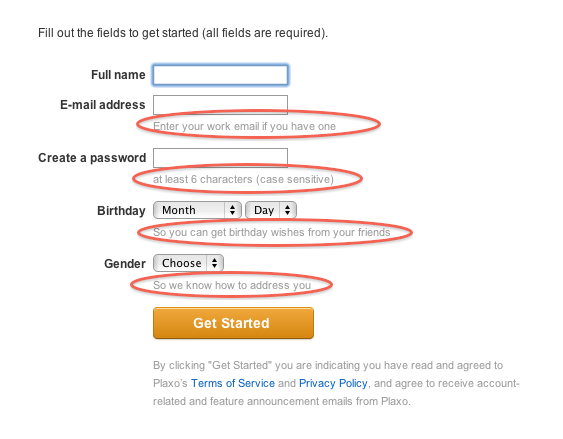
Below is the first screen in the Plaxo registration flow. I’ve circled the microcopy on the form:

The copy on Date of Birth and Gender are particularly interesting, for two reasons:

  1. They’re extraneous fields that you usually don’t see on sign-up forms that are optimized for maximum conversion. More fields usually equal higher drop-off, so this has the potential to be dangerous.
  2. In particular, these are fields that people feel a little uneasy about from a privacy perspective. People are especially skeptical about providing Date of Birth.

Plaxo does quite a few things right with this microcopy:

  1. Short messages to explain why the fields are required.
  2. Plainspoken language that is easy to understand - no legal jargon.
  3. The explanation is phrased as a user benefit. They want your date of birth not for some sinister reason, but so that your friends can wish you Happy Birthday. That’s good copy.

I’d love to see some data on the conversion rate of this form with and without the microcopy. Maybe Plaxo can do the user experience community a favor and run an A/B test for us? :)

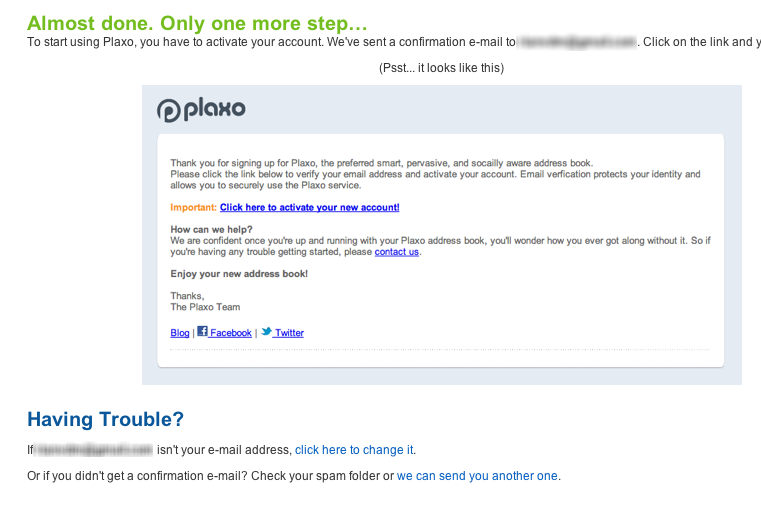
I also wanted to briefly mention the second screen in the sign-up flow:

We’ve all seen these confirmation screens that tell us we need to confirm our email address. But I haven’t seen an image of what the email looks like on the confirmation screen before. In an age where users are terrified of fraud, this is another small detail that probably has a pretty significant impact on users’ comfort with the Plaxo service. Well done, guys.

But hey, it’s not all good. I spent about 10 minutes trying to set things up and I got pretty overwhelmed with all the information being thrown at me, so I took a break to write this post instead. I hope I’m the only one with that reaction…

A few thoughts on effective icon design

Earlier this week I was struggling, as usual, to navigate my way around our Web Analytics provider, Omniture (SiteCatalyst in particular).  Specifically, I once again had to hover over every single icon in one of the views to figure out what they mean.  I was looking for a specific menu item called “Add Metrics,” which ended up not being an icon at all, but rather a text link.

Anyway, in frustration I tweeted this screen shot, and implied that if your icons require users to hover over them to figure out what they mean, you’re dong it wrong:

To their credit and my surprise, quite a few people at Omniture follow mentions of the company on Twitter, so pretty soon I got this comment on the post from one of the Product Managers at Ominture:

Hi Rian - this is great feedback you have given us. We are taking steps to address your specific point in an upcoming release of SiteCatalyst. The icons will be clearer, and tool tips will not be necessary.

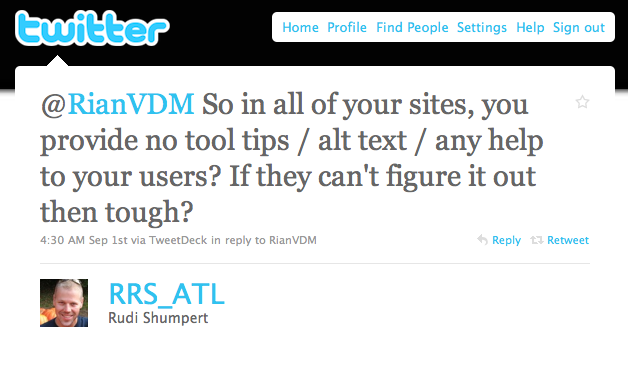
But not everyone was happy.  I also received this reply from @RRS_ATL:

We moved the conversation to email, and Rudi is a really nice guy — we had a very healthy debate about the issue.  I wanted to spend a little time here to summarize my thoughts on this particular issue and icon design in general.

First, let me say that I am not against tool tips and alt text when they provide additional context for text where space is limited, or more information about an element on the page. My specific issue with the Omniture icons is that they are not easily recognizable and mapped to what they actually do.  That breaks an essential UI rule which states there needs to be a match between the system and the real world:

The system should speak the users’ language, with words, phrases and concepts familiar to the user, rather than system-oriented terms. Follow real-world conventions, making information appear in a natural and logical order. (from Nielsen’s 10 Usability Heuristics)

For example, as you can see in the photo above, the Omniture icon for “link to this report”  has a chart and an arrow in it - that’s simply not intuitive enough.

What I am proposing in the Omniture case is one of two solutions:

  1. Redesign the icons to be more intuitive (which, from the PM’s comment on my post, is what they’re doing), or
  2. Turn them into text links (because what’s the use of icons if you have to use text to explain them?)

Icon design is hard, and I think it defeats the purpose if your icons are not easily understandable.  In a great post on UX Magazine called Realism in UI design they discuss this issue in depth, and explain why it is so hard to get right:

People are confused by symbols if they have too many or too few details. They will recognize UI elements which are somewhere in the middle.

The trick is to figure out which details help users identify the UI element, and which details distract from its intended meaning. Some details help users figure out what they’re looking at and how they can interact with it; other details distract from the idea you’re trying to convey. They turn your interface element from a concept into a specific thing. Thus, if an interface element is too distinct from its real-life counterpart, it becomes too hard to recognize. On the other hand, if it is too realistic, people are unable to figure out that you’re trying to communicate an idea, and what idea that might be.

This only scratches the surface of icon design, so for more interesting reading on the topic, see:

To summarize, I stand by my view that if you have to hover over every single icon to see what it means, you either have to design better icons, or just use text.  But I’m open to counter-arguments for sure… What do you think?

Tech4Africa panel: How we redesigned Payfine.co.za

This week I was in Johannesburg for the debut of Tech4Africa, a conference about web technology in the African context. It was a fantastic experience, an opportunity to learn from and meet some great people, and I will most certainly be back next year (but hey, Gareth, let’s move it to Cape Town next year!). Yes, there were the usual small conference hiccups, but nothing that can overshadow the importance and significance of this event.

The mere fact that we were able to listen to speakers like Clay Shirky, Andy Budd, and John Resig, as well as some top South African thinkers & doers, and discuss with them the uniquely challenging opportunities that exist here in Africa, made this conference a winner. The content was mostly great, but the conference was more than that — it was about being inspired and energized about being in this industry, at this time, in Africa. You should follow Tech4Africa and its head organizer, Gareth Knight, for updates on the conference. And no matter where you live, you should attend next year. This event is here to stay.

I also had the great opportunity to speak on a web design panel with Allan Kent, Basheera Khan, and Mike Lewis. We took a User-Centered Design (UCD) approach to redesigning Payfine.co.za, a web site that allows South Africans to pay the many traffic fines they get every… well… every month or so.

We’ve never met each other before the conference, and we were all in different locations. So, since we had to do this remotely and in our limited spare time, we broke the process up into three distinct user experience elements and each took responsibility for one of the tasks: content strategy (me), interaction design (Bash), and visual design (Mike). We collaborated a lot along the way, but we decided to each lead the creation of one piece of the puzzle, and then put it all together in a coherent story (this was Allan’s job!).

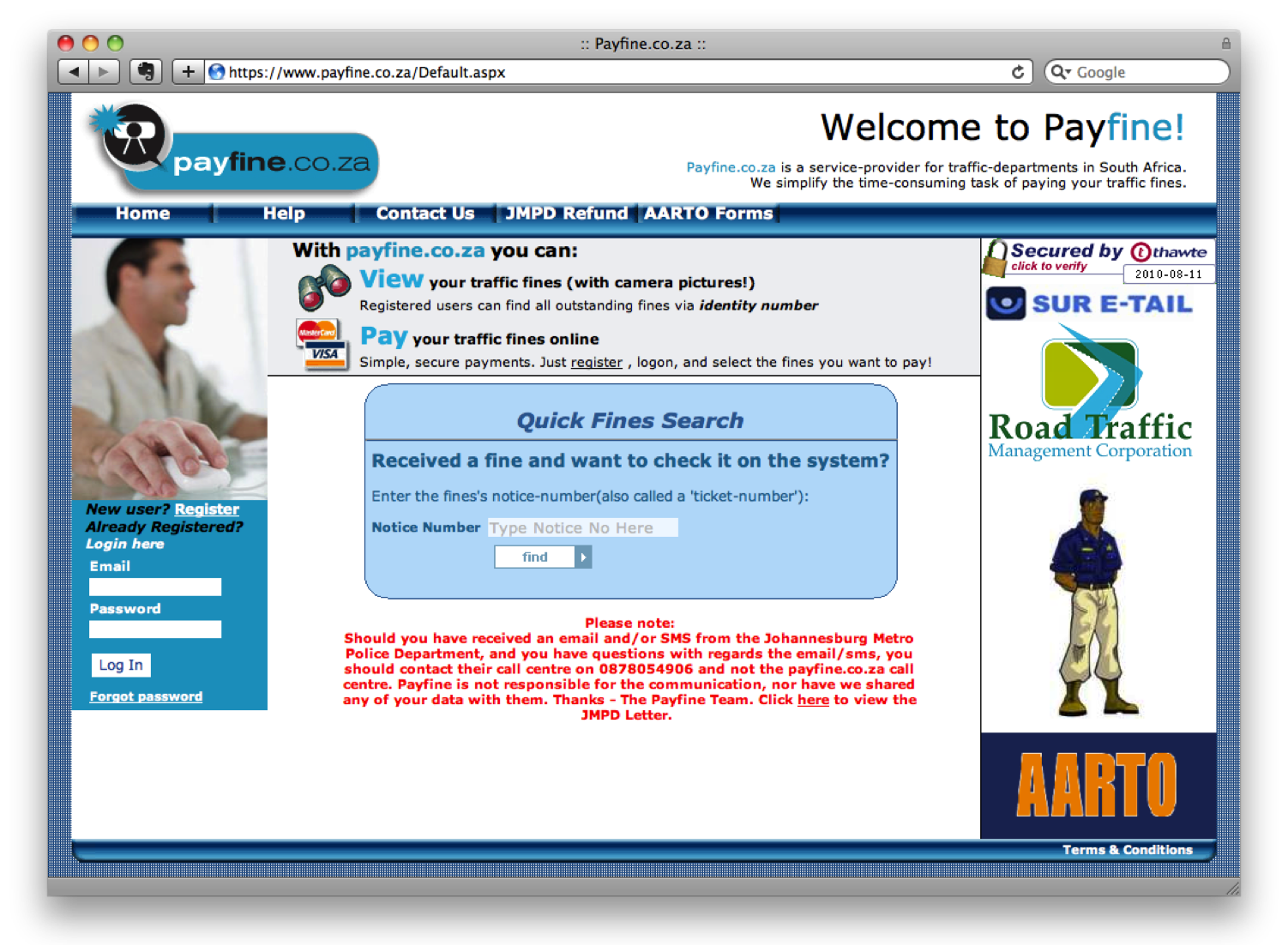
The end result? Well, you should judge for yourself. Here is what Payfine currently looks like:

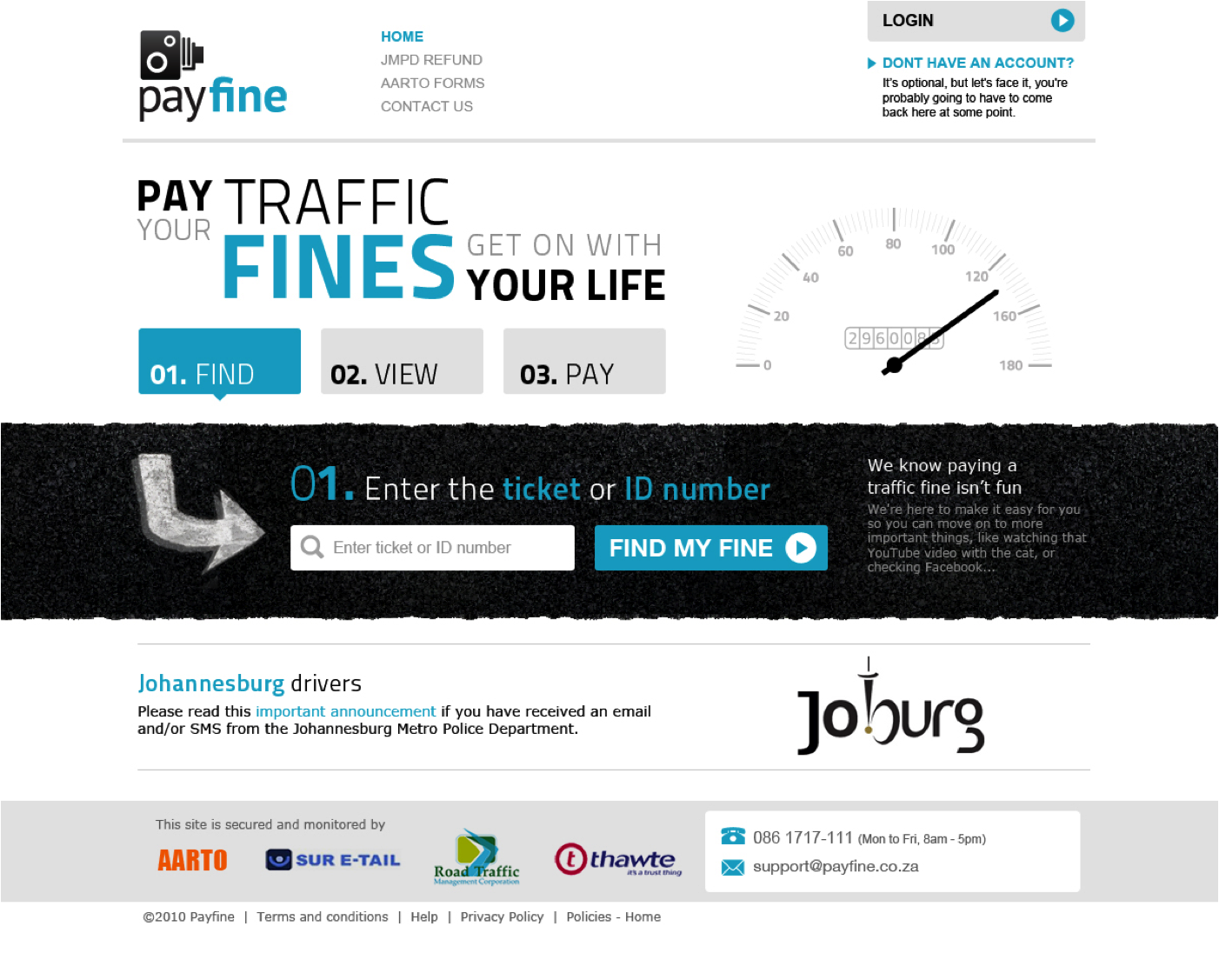
And this is the proposed redesign:

The one thought I want to pull out above the rest about this process, is that UCD is not rocket science. It’s not easy, but it’s not rocket science. There is a process, and there are rules (they can be broken, but they help focus the design process).

But. It does require a mind shift (I hate that word — can anyone suggest something different?) in the African web space — a realization that the interfaces we currently have on our banking sites, our e-commerce sites — even our entertainment sites — are simply not good enough. And it requires a commitment by those companies to invest in the user experience of their sites, because it will have a positive effect on the business.

Below are the slides we went through during our session, which I amended to make it a little bit easier to read without the voice-over we provided. We’re all happy to answer any follow-up comments or questions on this, so please let us know if you have any. And I really want to thank the rest of the team — this has been a great experience — let’s do it again!

How we redesigned Payfine.co.za - Tech4Africa

A rant about TV remote control usability

“DStv: so much more user-friendly,” says the ad in the background as I try in vain to press the button on the remote control just right so I can pause my show and go get another cup of coffee. It probably has something to do with last straws and camels and stuff, but that ad finally put me over the edge and onto the computer to write about the user experience of DStv’s remote control for their HD PVRs.

It is often much easier to figure out which companies practice user-centered design and which don’t when they produce physical products as opposed to online interactions. Think about Target’s redesign of the prescription drug bottle as an example of deliberate design, and America’s 1040 Tax form as an example of what happens when there is little to no design input on a product.

In the past I’ve had the pleasure of using the Logitech Harmony 880 universal remote, pictured below beside the DStv remote, and that showed me that it is, in fact, possible to design a remote that even my mom can use. So I’d like to write about the differences between DStv’s remote for the HD PVR’s, and the Logitech Harmony 880 universal remote. Both are shown below:

DStv HD PVR remote

Logitech Harmony 880 remote

The DStv remote - Why it’s bad

The DStv remote control breaks many principles of user interface design, but mainly this one: Recognition rather than recall. To quote Jakob Nielsen:

Minimize the user’s memory load by making objects, actions, and options visible. The user should not have to remember information from one part of the dialogue to another. Instructions for use of the system should be visible or easily retrievable whenever appropriate.

The principle applies mainly to online design, but it can be applied to the DStv remote in the following ways:

  • Several buttons have no proper affordance and mean nothing to the user. There are 5 different-colored buttons with no mapping to the real world, and some labels are confusing. As examples of interactions that are not obvious to the user without either reading the manual or extensive trial-and-error:
    • To view your recorded shows, you have to press the red button.  How am I supposed to know that?
    • To make matters worse, once you see a list of your shows, this same red button is used to delete the show.  And that’s how we lost the latest episode of 30 Rock.
    • To edit certain (but not all) settings, you have to press the white button within the menu system.
    • At other times, the white button is used to edit your favourite channels.
    • When you pause or rewind a show, you go back to live TV by pressing the “TV” button.
    • The “up” button brings up your favorite channels, while the other direction buttons bring up all available channels.
  • Several buttons don’t do anything at all. I haven’t seen the blue, yellow, and green buttons used for anything. It’s not uncommon for remote control buttons to be “reserved for future use,” but I maintain that this is a bad idea because it just introduces unnecessary user complexity.

In addition to that, the play/pause/forward/rewind interaction is awkward. To pause live TV, you have to press the button exactly in the middle, otherwise you might actually start rewinding or forwarding.

Making the fast forward action a pull action instead of a button you press might sound like a good idea, but doing that limits its function. Now you can only fast forward on one speed. If this becomes a push-button, or something other than “hold to fast forward”, you’d be able to fast forward at different speeds.

And this is only the remote… once you get to the on-screen experience the interaction reaches a whole new level of “what the…!?” Maybe we can dig into that at another time. But first, here’s how it should be done:

The Logitech Harmony 880 remote - Why it’s good

  • Beautiful, ergonomic design that makes you actually want to use it and not hide it under a pillow.
  • Progressive disclosure of features — depending on your activity the “soft keys” at the top of the remote perform different functions, with clear language on the display to indicate which button does what.
  • Online programming of the device — no need to remember device codes to set up the features for each component.
  • Thoughtful key layout with no ambiguity about which button does what.
  • Several smart features, like starting the backlight when you lift the remote off the table.
  • User language incorporated throughout — simple commands such as “Activities” and “Watch a DVD” instead of technical references.

It’s clear that Logitech did some user research to find out what the underlying user needs were before they developed this product. A lot of the features can be directly linked backed to complaints I’m sure we all have about remote controls. A couple of examples:

  • “I can never see the buttons on the remote when it’s dark in the room, but I also don’t want the light from the remote to disturb my viewing.” Solution: motion sensors that turn on the backlight when you pick up the remote, and turns it off after it’s been sitting still for a while.
  • “I don’t want to have to struggle with device numbers and complex remote programming”. Solution: build an online interface where the user can program the remote, and then send the commands to the remote through a USB connection.

There’s probably more to say, and yes a lot of arguments to be made for why DStv’s remote isn’t that good. But in today’s user-centered world, there shouldn’t be excuses any more. Companies need to make products that are useful and usable so that people can enjoy them without frustration. Good user experience = good business.

I do want to end on a positive note and say that I think the DStv iPhone app is a solid piece of user-centered design.  It doesn’t go overboard on features, and it keeps focused on the one thing users need it for — checking TV schedules.  I just think the app designer needs to take a look at the remotes, that’s all.

GeekDinner Presentation: The highs and horrors of website redesigns

Last night I attended my first Cape Town GeekDinner, and I have to say that I will definitely be back next time.  Good food, good wine (thanks Delheim!), great atmosphere and discussions, and a few 10-minute geeky talks sprinkled in between… yes, this is an idea I can get behind.

I also got to do a short talk on 5 things I’ve learned about website redesigns from being involved in various projects at eBay and Yola.com.  The slides are posted below.  As I mentioned in my talk — since you can’t say a whole lot in 10 minutes, I went with breadth over depth here.  There are obviously a lot more that goes into redesign projects (and yes, I know Content Strategy is about more than not using Lorem Ipsum in your designs…).  But these are a some things I’ve learned going through the process a few times:

The highs and horrors of website redesigns

View more presentations from Rian van der Merwe.