Menu

Posts tagged “design”

Craggy rocks: content strategy and the art of language design for the web

They paddled a little further, then Salty looked through his telescope again.
”A pirate ship!” he cried. “Let’s have a battle.”
“Oh dear,” said Button. “I don’t want to meet a pirate.”
“Don’t worry,” said Salty. “I’ll be the hero.”
But when they got close they found that the pirate ship was just a craggy rock.

- Angela McAllister, Salty and Button

I picked up Salty and Button for my 2-year old daughter on a whim. I just felt like we both needed a break from Winnie the Pooh. He’s a nice enough bear, but the dude’s got some serious honey issues. Much to my delight the book quickly became my daughter’s favorite, and we’re now reading it several times a day.

Yesterday something interesting happened. My daughter suddenly became fixated with one specific part of the story. The two friends think they see a pirate ship, but it ends up being just a rock. “Wher’s the craggy rock?”, she keeps asking. “Let’s go find it!” And when we find the page she points to it and says the words “craggy rock” over and over, with obvious delight.

I am now convinced that she does this just because she loves saying the words. She loves the way they sound, and the way the phrase rolls off her tongue. Craggy rock is no cellar door, but it’s pretty close. Seeing my daughter delight in language for its own sake fills me with so much joy. It reminds me of a story I just read in Clay Johnson’s excellent The Information Diet. He quotes Helen Keller, the renowned deaf-blind activist, as she describes her first experience with language:

We walked down the path to the well-house, attracted by the fragrance of the honeysuckle with which it was covered. Someone was drawing water and my teacher placed my hand under the spout. As the cool stream gushed over one hand she spelled into the other the word water, first slowly, then rapidly. I stood still, my whole attention fixed upon the motions of her fingers. Suddenly I felt a misty consciousness as of something forgotten - a thrill of returning thought; and somehow the mystery of language was revealed to me. I knew then that “w-a-t-e-r” meant the wonderful cool something that was flowing over my hand. That living word awakened my soul, gave it light, hope, joy, set it free! There were barriers still, it is true, but barriers that could in time be swept away. I left the well-house eager to learn. Everything had a name, and each name gave birth to a new thought. As we returned to the house every object which I touched seemed to quiver with life. That was because I saw everything with the strange, new sight that had come to me.

I can see this realization in my daughter’s eyes as she continues to learn new words. She’s learning that everything has a name, and that names can be beautiful.

I recently wrote about about some problems I have with language the New York Times used in one of their emails. On the Hacker News thread for the post this comment appeared:

Honestly, this just seems like nitpicking. Your main complaint about their email is that their apology isn’t phrased in the vernacular? Don’t we have better things to do with our time than complain about things like this?

The comment got to me more than it probably should have. Is the commenter right? Is it a waste of time to nitpick language? My daughter’s love for the phrase craggy rock makes me think that it’s a worthy cause to fight, after all. At the risk of stating the absolute obvious, language is the soul of civilization. We have to not just protect it, but help it thrive. We have to find the joy and the power in the names of things. In Patrick Rothfuss’ epic fantasy novel The Name of the Wind he describes the power of language like this:

“What do you mean by blue? Describe it.” I struggled for a moment, failed. “So blue is a name?” “It is a word. Words are pale shadows of forgotten names. As names have power, words have power. Words can light fires in the minds of men. Words can wring tears from the hardest hearts. There are seven words that will make a person love you. There are ten words that will break a strong man’s will. But a word is nothing but a painting of a fire. A name is the fire itself.”

So, here’s the point I’m trying to make.

Those of us who write for the web need to remember that the words we choose are not just about comprehension, but also about feeling. Phonaesthetics teach us that the sound of certain words and sentences have an inherent pleasantness or beauty (euphony), while others can be quite unpleasant (cacophony). Just as a typeface (the artistic representation or interpretation of characters) adds emotion to letters, word aesthetic can be in total harmony with other design elements.

Beauty in design isn’t just the job of visual design. Content strategy has a specific role to play in creating the desired aesthetic of a web site. And beauty is quite important in a changing landscape where aesthetic longevity is the new product expiration date. So the next time you write a paragraph for the web, ask yourself the following question:

Will the sound of these words make that one guy’s 2-year old daughter’s face light up?

Update 1/4/2012: “Nick” emailed and pointed me to the fascinating essay Politics and the English Language, where George Orwell discusses “language as an instrument for expressing and not for concealing or preventing thought”, particularly in politics. He ends with some great writing tips.

If the porridge is too hot or too cold, make a fresh batch

Jeffrey Zeldman in The maker makes: on design, community, and personal empowerment:

I sometimes become impatient when members of our community spend their energy publicly lamenting that a website about cats isn’t about dogs. Their energy would be so much better spent starting bow-wow.com. The feeling that something is missing from a beloved online resource (or conference, or product) can be a wonderful motivator to start your own. I created A List Apart because I felt that webmonkey.com wasn’t enough about design and highfive.com was too much about it. If this porridge is too hot and that porridge is too cold, I better make some fresh, eh?

Sounds to me like a good mantra for 2012. Happy New Year, everyone! In the coming year, may we all make porridge that’s just right.

Don't rip into a design too early

How designers and engineers can play nice is a really great post by Jenna Bilotta. I nodded along enthusiastically to this point in particular:

Too often I observe my fellow designers rip into the aesthetics or interaction design of an early engineering prototype. When an engineer is met with critical feedback from a designer about issues they haven’t even begun to think about, it doesn’t encourage that engineer to include the designer in future reviews. This is how designers end up begging for massive changes the week before launch, and how we almost never get them.

One of the most difficult skills for a designer to learn is restraint during the early stages of implementation, when things aren’t perfect yet.

There are some great suggestions in the article - well worth reading.

Twitter's Creative Director and musician Seal discuss Twitter's iPhone app design

Last night Seal (@Seal) tweeted about his displeasure with the latest Twitter iPhone app. Doug Bowman (@stop), Creative Director at Twitter, asked him to elaborate:

@Seal I’m listening if you have feedback (about Twitter’s design).

— Doug Bowman (@stop) December 29, 2011

What followed is one of those exchanges that make me absolutely love the Internet. A world-famous musician has a conversation about an iPhone app with a world-famous designer, and we get to sit in on it. I think my favorite part of the conversation is Seal’s honest apology:

@stop Thank you. Redownloaded Official Twitter app and a public apology is in order. It’s great now that I understand it. I was wrong.

— Seal (@Seal) December 30, 2011

I can’t quite put my finger on why I find this random chat so great. Maybe it’s because it shows the power of Twitter to reduce degrees of separation to zero in a matter of minutes. Maybe it’s the fact that I can sit in Cape Town, South Africa, and listen to two people who I admire a great deal have a respectful disagreement in real time. Or maybe it’s because I keep thinking about the bizarre exhilaration Doug must have felt, defending an app he worked on with a musician he’s a fan of.

Whatever the reason might be, it’s just really cool. Unfortunately Twitter still isn’t great at showing us conversations (apparently that’s being worked on), but luckily Aaron Swartz built a tool to help us with that. I’m posting a screenshot of the conversation below, but you can also view it here.

seal-stop-twitter-conversation.jpg

On Amazon, Apple, and common excuses for bad usability

Jakob Nielsen explains why saying “but it’s cheap!” is not a good excuse for the Kindle Fire’s bad user interface design:

The difference between user interface design and hardware specs is that better usability is derived from one-time expenses for user studies, design iterations, and coding - whereas beefier hardware (say, adding a camera) is a repeated expense for each additional unit manufactured.

This means that even cheap devices can have great usability because the cost of better research and design is amortized across millions of devices. This is why usability has stupendously high ROI for any big project.

I also like John Gruber’s take on the hardware/software distinction:

[T]hat’s the advantage of software over hardware. You can omit an essential feature and then hustle to get it into your first major update. Good luck adding volume buttons to your Kindle Fire.

Does this mean it’s ok for the first version of the Kindle Fire to have a low-quality UX? Here’s Nielsen again:

I understand why Amazon might want to ship a poor product in late November rather than a good product in February: they want to catch the holiday shopping season. Whether the extra sales are worth the brand damage from a low-quality user experience is difficult to judge.

Amazon has a history of doing this kind of thing. The first Kindle eReader was not a great product, and it didn’t get good reviews. But they kept at it and turned it into something truly great.

This points to one of the main differences between Apple and Amazon. Apple waits until an experience is as close to perfect as possible before they ship. Amazon gets something out there as soon as possible, but then - and this is important - they don’t just move on. They keep working at the product until it reaches an experience they’re happy with.

Both companies are very successful despite their different philosophies on when to ship a product. It proves that we should get over this idea that everyone should just copy everything Apple does. There’s more than one successful business strategy.

I’m sure the Kindle Fire will follow the same trajectory as the original Kindle eReader and become a great device. Eventually. Still, let’s not kid ourselves - the current one isn’t great.

Glitz vs. Plumbing: why I also quit Delicious and switched to Pinboard

Sometimes, you don’t need glitz; you need plumbing.

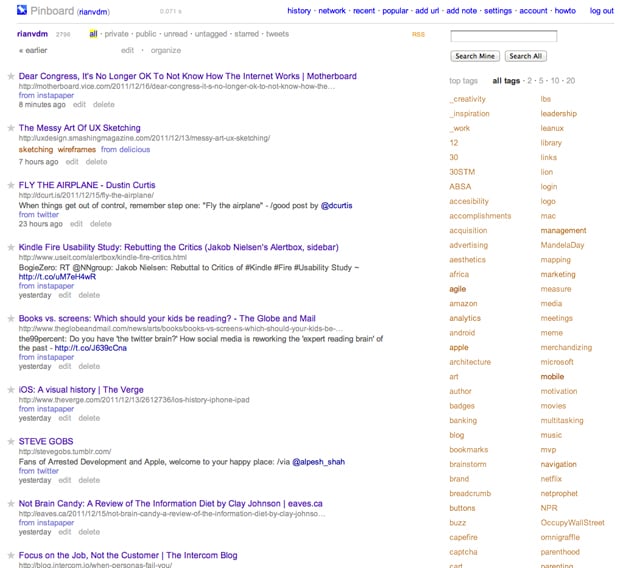
That’s Charles Arthur in Goodbye Delicious, hello Pinboard, explaining why The Guardian is dumping Delicious as their social bookmarking service. Let me ask you a question. Which of the following two screen shots is prettier?

Delicious:

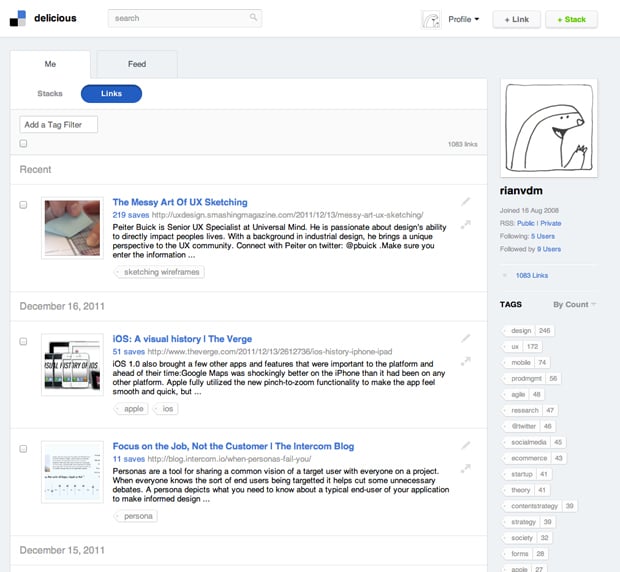
delicious-screenshot.jpg

Pinboard:

pinboard-screenshot.jpg

Delicious, right? Now let me ask you another question. Which site is more useful as a social bookmarking site? It’s ok, I’ll answer for you: it’s Pinboard.

Pinboard’s aesthetic[1] is fairly bland, but the  sparse, table-like layout is the best way to organize the vast amount of information you collect on the Internet. The aesthetic fits the purpose of the app. But wait, there’s more. It lets you import from Twitter, Instapaper, and Google Reader (well, back in the day when Google Reader still supported public sharing). It has browser bookmarklets that work effortlessly. It integrates smoothly with a variety of RSS Readers. Sorry for the cliché, but it just works.

Meanwhile, Delicious has become slow, it has constant availability issues, and the aesthetic keeps getting more extravagant. This actually reduces its utility by obscuring the app’s core features. Social bookmarking is about two things - tagging the things you’re saving, and searching for those thing later on. That’s it. The new Delicious owners are apparently trying to turn it into something more, but whatever that something more is, I’m not buying.

Anyway, back to glitz and plumbing. As I’ve mentioned before, great aesthetic design builds trust, increases engagement, and elicits the appropriate emotional responses to a brand. But glitz is something else. Glitz is about making things shiny without asking what the thing should look like to fulfill its primary purpose.

Social bookmarking is Internet plumbing, not glitz. I now use Pinboard, and highly recommend it.


  1. Time for the obligatory disclaimer. Yes, Design is about problem solving, and it includes elements such as User Research, Interaction Design, Content Strategy, Visual Design, etc. Here I am referring only to the aesthetic layer of the Visual Design component. ↩

Case study: the user experience of kalahari.com, one year later

When I arrived at kalahari.com in December 2010 the site hasn’t seen any significant UI improvements during the 10+ years of its existence. My job description was pretty straightforward: do something about that.

In this post I’d like to talk about the work our team did over the past 12 months to get where we are today. When I look at the site now I still see so much wrong with it - there are way too many things that we still need to fix. So this isn’t an attempt to hold up our work as some kind of standard. I’m doing this in the interest of sharing our methods and lessons learned with the larger design community. I’ve learned so much from others who have shared their stories that it seems only fair that I do the same. So here’s our journey so far.

Making sense of the landscape

Here’s what kalahari.com looked like on December 1, 2010:
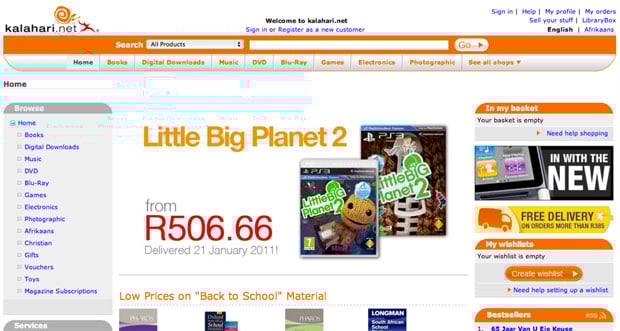
Kalahari.com home page - old

If you stepped through the site back then you probably would have felt as overwhelmed as I did. Where do we start? What order should we do things in? After the first few days of having too much coffee and talking to people all over the organization I realized that we had two primary challenges:

  • No formal prioritization or product development process. It was the same situation I’ve seen many times before. Requirements went straight from “The Business” to developers. That kicked off an endless back and forth about what was needed, with only a cursory nod to Design. The “First In First Out” approach to prioritization was also quite common. The result was, well, not ideal. We needed to fix this.
  • No formal user experience design. This was no surprise, and it was the reason I took the job in the first place. There was no user research, no content strategy, no interaction design, and no visual design beyond marketing and merchandizing materials. This is the part that really excited me: the opportunity to introduce User Experience Design into an organization that was (to their enormous credit) hungry for it but didn’t know where to start.

So we immediately got to work on both those problems.

Hello, I’m a Product Manager

Introducing a Product Management layer into an organization that’s used to working without it is tricky. If you do it wrong it can become a political nightmare and end up ruining your chances of shipping anything good. You might have the best of intentions, but there is always the danger that the only thing people will think when they look at a Product Manager is, “Hey, I used to be responsible for that, jackass!”

We certainly didn’t make this transition perfectly, but I believe the key is to make sure that you talk to as many people as possible about what their organizational issues are, and how they think it can be done better. You have to take the time to explain the benefits of having a Product Team that takes responsible for strategy, vision, and execution of a product (and takes the fall if it fails). And then, most importantly, you have to make the development process fair[1].

We now have a team of Product Managers who are responsible for delivering measurable business results through product solutions that meet both market needs and company goals. They work closely with their teams to develop the strategy and vision for their products. They ensure that designers and developers are included throughout the process. And most importantly: they make sure we ship.

The Intergalactic Product Force

One concept we introduced that I think is worth talking about is the Product Council[2] - a formalized way to deal with prioritization.

The Product Council is made up of the heads (VPs) of every department in the organization: Engineering, Marketing, Support, Category, etc. We have a weekly meeting where we discuss the current product roadmap and priorities. We ask ourselves, Are we still working on the most important things? If something more important comes up, we prioritize it higher in the roadmap, and something else shifts down. If w’re happy with the direction, we do nothing. If a new opportunity arises we ask ourselves, Is this more important than what w’re working on right now? Or is this something we should work on next? If so, what moves down in the priority list?

From here, I communicate any changes to the Product Team, and we discuss this to make sure no one missed anything. But then — and this is important — the Product Manager has complete autonomy and ownership over the implementation of his or her roadmap. The Product Council sets the priorities (with input from all parts of the organization), but the Product Managers work with their development teams (and others) to set the timeline, the implementation details, the design, everything.

Ther’s more to it, but in the interest of brevity I’ll stop there. This process has three main advantages:

  • It gives the management team complete transparency into what the Product team is working on, and it allows for anyone to make the case for a change in priorities. Why this kind of transparency is so essential is a subject for a different blog post, but in short, it takes away a vast majority of the politics you see in many organizations, and it frees up the teams to do what they do best — execute.
  • It prevents scope creep. Nothing can go on the roadmap without something else moving out or down. As anyone who ever worked at a large organization knows, this is an absolutely critical part of a successful development cycle.
  • It gives the Product Manager and their teams what they need to be successful: direction and autonomy. As Jocelyn Glei says: “Give your team members what they need to thrive, and then get out of the way.”

Hello, I’m a User Experience Designer

I knew that we needed to build a great team if we were going to follow a user-centered approach to identifying and addressing the main issues on the kalahari.com site. But building a team takes time and money, and it’s hard to justify a large headcount request before you’ve proven that you can have a real impact on the business.

So we started small. I fulfilled the UX Design role, and we hired one visual designer since that was the primary need at that stage. Then we got stuck in. On a site of this size, and with the pressure we had to make improvements quickly, we decided on a dual approach:

  • Make some initial and obvious changes to the visual design to improve hierarchy and the general aesthetic.
  • At the same time, work on a long-term UX strategy to address some of the more fundamental user experience issues on the site.

The goal was to show quickly that we know what we are doing, and then use those successes to build out the team further and attack the areas where we can have the biggest effect on conversion rates.

Building a roadmap

We started this process with a small team of three Product Managers and two Designers, so we didn’t initially have the luxury of user research and a long period of product discovery to build out a roadmap. Instead, we went offsite for a day and built a customer experience map for our different user journeys. It was a great way to focus on what the core experience is that we need to improve.

We also went a bit further. Based on a heuristic evaluation of the site we annotated each of the steps in the user journey with obvious improvements we could make. This gave us a flexible framework for the year, and guided our roadmap throughout.
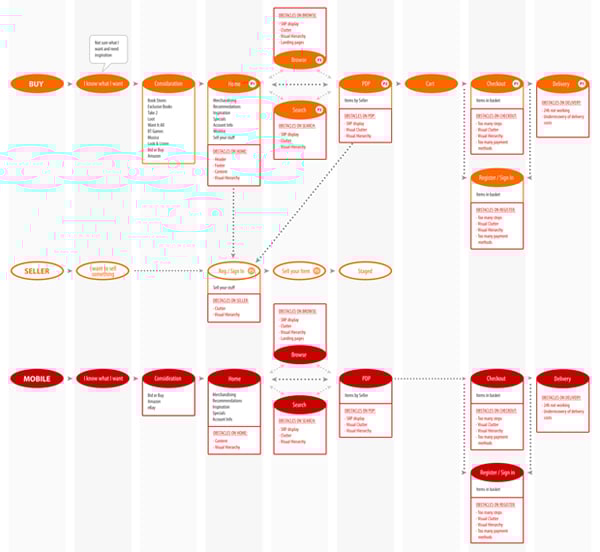
Kalahari customer journey

We decided early on to realign, not redesign. Our approach was to make relentless incremental progress as opposed to doing a 6-9 month project with a big bang release[3]. Our goal was to release every 3-4 weeks, depending on the size of the project.

In our first two releases we took care of some basics. I won’t bore you with the whole list, but here are the highlights:

  • Released a new header and footer.
  • Shifted from heavy reliance on orange to a more muted color scheme that allows products to draw more attention.
  • Removed several links in the header and footer that didn’t get much use.
  • Increased the visual hierarchy of Search.
  • Decreased the visual hierarchy of several non-important features.
  • Introduced a formal button strategy (primary=orange, secondary=silver).
  • Moved from liquid width to a 960px 16-column fixed width design (including the ability to do single-column or two-column designs - every page used to be three columns).
  • Started to separate CSS from HTML (better late than never, right?).
  • Started to build a UI component library.
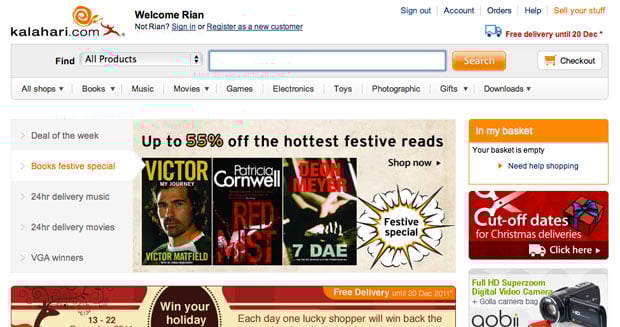
Kalahari new home page

These changes had exactly the desired effect. User response was immediate and universally positive. In combination with some good specials, traffic started to increase. And most importantly: we were able to start growing our team to add designers, a researcher, and a front-end developer. Game on.

We spent the rest of the year systematically working through our customer experience map, starting with the most important areas where improved UX can have the biggest effects (Registration, Checkout, Product Details Page, etc.). Our process grew organically and ended up hitting a good stride towards the middle of the year:

  • Define the area we’re working on, and define what success looks like (what are the metrics we’re trying to improve?).
  • Work in small teams of PM’s, Designers, and Developers to sketch out new flows and develop wireframes.
  • Test wireframes with users, utilizing the RITE method so that the outcome is improved designs, not PowerPoint decks with recommendations.
  • Refine the designs as they evolve into high-fidelity visual designs (with more user testing as required), and deliver high quality HTML and CSS as the final output.

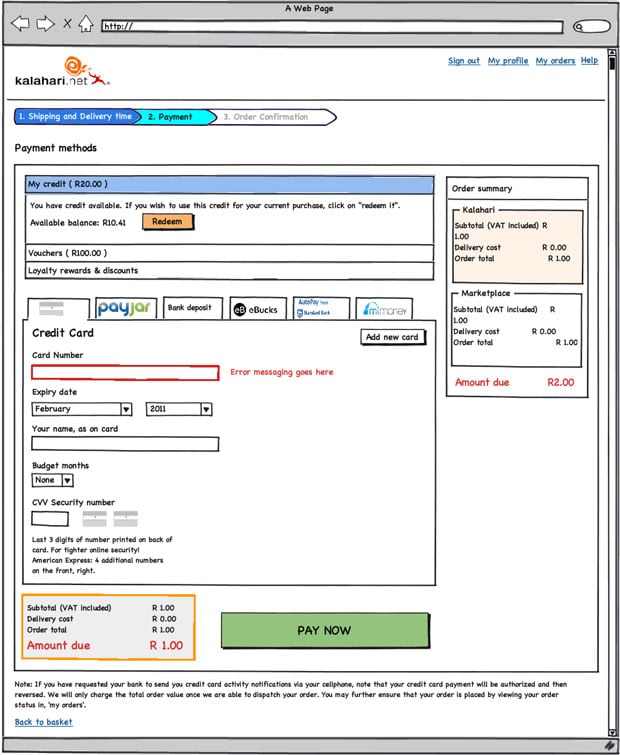
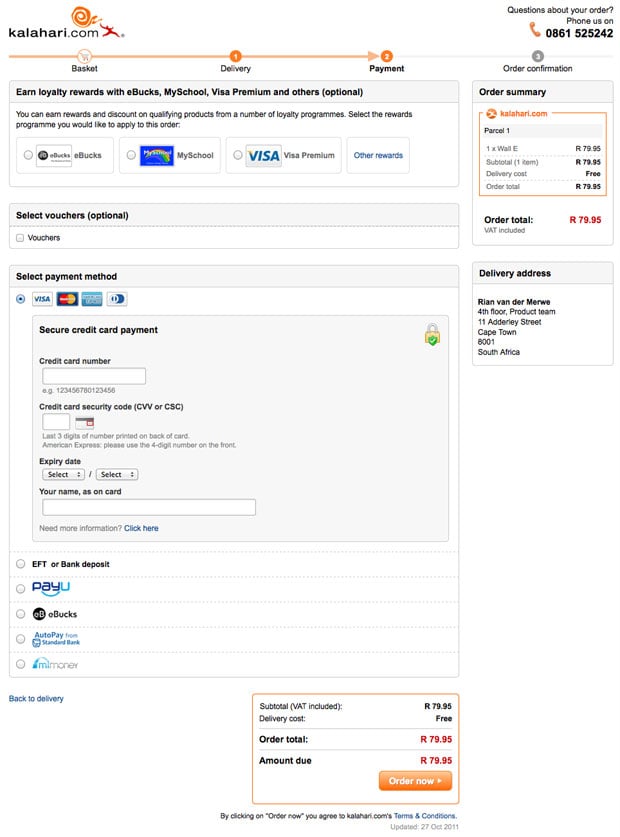
The outcome is a site that is drastically different from where we were a year ago, with real improvements in the success metrics we set for ourselves (% conversion on registration, checkout, and other flows). The changes include not just the main site, but also a brand new mobile-optimized version, as well as some significant changes to our Marketplace for 3rd party sellers. Here’s just one sample of our Checkout redesign, including one of the initial wireframes[4].

Old Checkout:
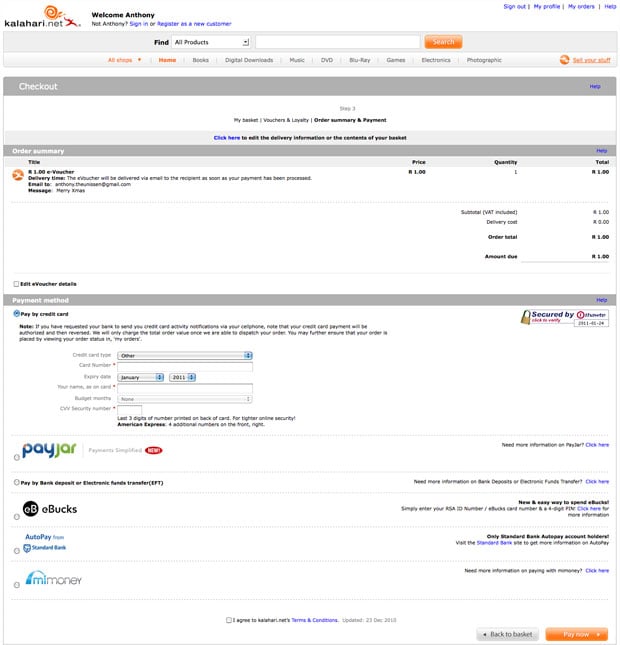
Checkout old

New Checkout:

Initial wireframe:

Checkout wireframe

Final design:

Kalahari new checkout

Three more things

My biggest regret about this year is that we couldn’t do more. We made some great improvements to the site, but it is still so far from where it needs to be. And I know everyone on the team feels this way. We set out to build a culture of quality above all else, and it physically hurts when you have to make compromises and do something that’s counter to that culture. Before you jump in and say that there’s never an excuse to compromise, let me remind you of something Erin Kissane said in What I Learned About the Web in 2011:

If a single idea has followed me around this year, from politics to art and work to friendships, it’s been this one: “it’s more complicated than that.”

It’s centrally important to seek simplicity, and especially to avoid making things hard to use or understand. But if we want to make things that are usefully simple without being truncated or simplistic, we have to recognize and respect complexity — both in the design problems we address, and in the way we do our work.

So, yes, I agree with you - you should never compromise on quality. But it’s complicated. You sometimes run into technical and business complexities that force you to say, “We’ll have to do this later.” It sucks, but that’s life.

I’m exiting this year with three major takeaways - lessons learned and re-learned through our successes and failures:

  • Love your developers. Too many companies see their developers as “resources” whose only reason for existence is to make The Codes. When you pull developers into product planning and design, everything changes. You build better products, and everyone has more fun.
  • User Experience Design is a real thing. I saw way too many dismissive comments about UX this year. If you do it right, it will improve conversion rates and/or make more money. If you don’t believe me, come sign an NDA and I’ll show you our metrics.
  • Culture is everything. In one story out of the Steve Jobs biography, Bud Tribble (one of the Macintosh team members) is quoted as saying, “Hey, if w’re going to make things in our lives, we might as well make them beautiful.” You need a team that has a relentless focus on quality. A team that cares enough to fight for moving that button 3px to the left. It’s the only way to find real meaning in your work.

We have a lot of work to do on our site (sorry, did I mention that already?). But I’m happy that we’ve been able to introduce a fair and effective product development process into the organization. We made user experience an intricate part of how we build product. And we now have a 14-person team of brilliant and dedicated Product Managers and User Experience Designers who care deeply about the product.

It was a good year.


  1. I wrote more about this in The most important characteristic of a good Product Manager  â†©
  2. No one liked my “Intergalactic Product Force” suggestion â†©
  3. I wrote more about this for Smashing Magazine in The Data-Pixel Approach To Improving User Experience  â†©
  4. I’ll spend some time over the break putting together some more before-and-after shots, including stories about the process we followed (if anyone is interested) ↩

New new Twitter's new new direction: Monetization

Mike Rundle sums up how many of us feel about Twitter’s new new iPhone app in Twitter For iPhone Takes A Step Back:

The new app will be more inviting and accessible to new users, but I don’t like that this comes at the expense of the user experience and existing gesture shortcuts. There’s a way to make both novice and advanced users happy, and I hope Twitter 4.1 does a better job at appealing to all sides of their userbase than 4.0 has done.

If you step back from all the interaction and visual changes, this is the overarching theme that stands out for me as well. Expert users are suddenly left out in the cold. The new approach breaks the fundamental UI principle of flexibility and efficiency of use:

Accelerators - unseen by the novice user - may often speed up the interaction for the expert user such that the system can cater to both inexperienced and experienced users. Allow users to tailor frequent actions.

A great example of accelerators done right is Gmail’s keyboard shortcuts. They’re there to increase efficiency for expert users, but they don’t get in the way of novice users. The same functionality is there for all users, yet expert users have the ability to become more efficient by learning these shortcuts.

And that’s where the new Twitter for iPhone falls down. The biggest culprit is the now defunct swipe gesture on individual tweets. I’m with Ben Brooks on this one:

What is absolutely crazy - what drives me nuts - is the ditching of the swipe-to-act gesture. In previous versions you could swipe left or right on a tweet to slide open an action menu. From there you could quickly favorite, retweet, Instapaper, or reply to the tweet.

But let’s get real about this. I don’t think any of the design decisions the team made were an accident or an oversight. This is just all indicative of a company that is shifting the balance from being purely user-centered to a company that needs to sacrifice some user needs in order to make money. Dan Frommer summarized this well:

This is the beginning of Jack Dorsey’s real vision for Twitter combined with Dick Costolo’s vision for a real-time social advertising product. The main components: writing and Tweets, obviously; having conversations with other people; discovering what’s happening in the world through Twitter; and seeing a promoted message from brands here and there.

Spot on. I mentioned this morning that they should have just come clean and called the “Discover” tab the “Monetization” tab. Some have complained that users should be able to remove that tab, which is true, but it’s not going to happen because the balance has shifted. Our needs are going to be sacrificed more and more in favor of business goals[1].

So here’s the truth in all of this: the new app isn’t a mistake. It’s a deliberate and effective redesign to reduce all the pesky “distractions” (like viewing your lists and favorites easily) so that you’re more likely to “discover” the “promoted messages from brands here and there”.

I don’t think we should pass judgment on Twitter for making these decisions to increase revenue - we want them to stay around, after all. But I think we can request and expect a 4.1 version that at least meets us in the middle. Simplifying is not just about taking features away, it’s about making complex actions easier to understand and use. We need our accelerators back, please.


  1. I will say this though - I really like the “Connect” tab. The labeling might be horrible, but it’s a great feature.  â†©

Google Circles and Path 2.0: How good UI design cannot fix a broken solution

When Google+ first came out there was plenty of praise for its UI design[1], particularly the “un-Google like” design of the Circles feature. Oliver Reichenstein wrote:

Every interaction seems to have been thought through and designed until its last little bits (and those matter as much as the big bits). It even has room for some warmth (like the circle rolling away when you delete it) which is rare for Google’s cold UID approach.

We’re seeing the same thing with last week’s release of Path 2.0. I agree with the entire Internet on this: the design is gorgeous with lots of small delightful details. Here’s Geoff Teehan in Going down the right Path:

It feels familiar, but they’ve made some smart decisions that break away from the norm without wandering off into obtuse interactions or under/over-designed visuals. The decisions they’ve made not only make things better, they add personality and delight ”“ something that is crucial, and often overlooked when designing something functional.

Here’s the thing. Google Circles aims to solve a real problem with social networks, but the solution is tedious. Path has a beautiful interface, but I can’t figure out what user need it’s trying to solve. And those issues are problematic if you want to get to product/market fit.

Google Circles

There are inherent problems with binary social networks. The idea that someone is either full-on in your life (and therefore has access to everything about you) or not at all is not how it works offline. You tend to share certain information only with certain groups of people. Only some people will be interested in photos of your new puppy, whereas those same people will probably not be interested in blog posts about your work.

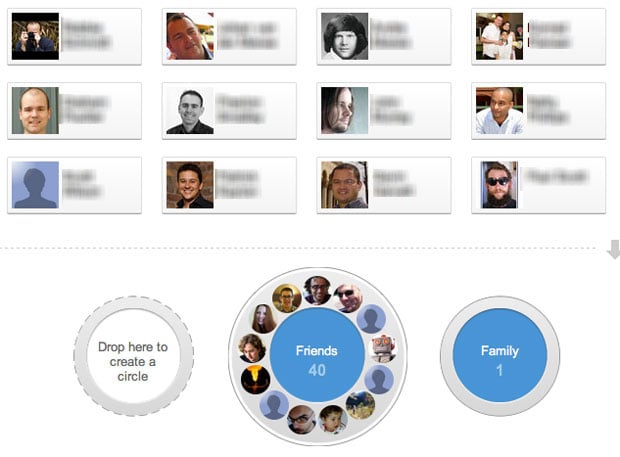
Google Circles aims to solve these problems by allowing you to drag and drop people into distinct buckets, and letting you only share what you want with each circle. And yes, the UI makes it really easy to do this. It’s great design.

google circles

The problem is that it’s just too much work. I’ve long since given up trying to maintain my Circles, and I’m pretty sure I’m not alone. Circles also lost its core utility for me. After I put about 100 people into different buckets I couldn’t remember who I put where, and what I was supposed to share with which Circle. So I just gave up and started sharing everything publicly.

It doesn’t matter how great and fun an experience is, good UI design cannot fix a broken solution.

Path 2.0

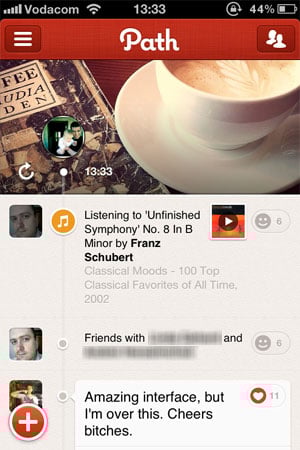
I get the same feeling when I play around with Path. Let me be clear: I love this app. I wish I could dump Facebook and use Path all the time. Sometimes I go in and scroll up and down just to see the clock animation. When I open the app in the morning I tell it that I’m awake just so I can see what the weather is going to be like today. Fantastic design.

path user interface

There’s a problem, though. I don’t know what I’m supposed to be doing with this app. Yes, I know it’s still early and not a lot of people are on the network yet (even though it’s now starting to gain some real traction). But here’s one reason the app might not have enough staying power to grow out of its initial “Hey, that’s cool!” phase: what unmet user need does it solve? Is it doing anything that’s not already being addressed by a number of general and niche social networks? I don’t think so.

Once again: it doesn’t matter how great and fun an experience is, good UI design cannot fix a broken solution. Good design can effectively differentiate a good solution, and bad design can completely ruin a good solution. But good design simply cannot make up for a solution that doesn’t address a core user need really well. As a recent post on ZURBlog proclaimed, people don’t buy products - they buy the benefit.

I’m afraid that in the case of both Google Circles and Path 2.0, they might just be flawed solutions wrapped in a layer of beautiful UI design. It’s fun to play with for a while, but when it inevitably becomes tedious you eventually just forget to use it. Forever.


  1. When I talk about UI design in the context of this article, I mean specifically Interaction Design and Visual Design. I don’t mean to imply that Design = Making Things Pretty, or that UX is only about those elements. I use this term in the interest of simplicity since this is not an article about the elements of a User-Centered Design process. ↩

Update: Luke Bornheimer pointed me to his answer on Quora where he argues that Path’s biggest differentiator is how it easily enables private/public sharing.

What children's drawings would look like if they were painted realistically

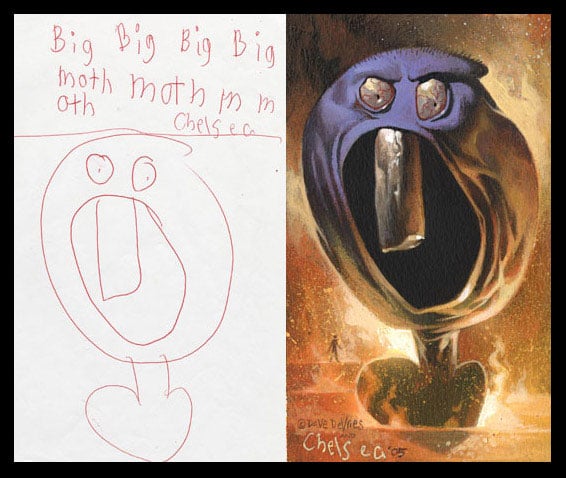
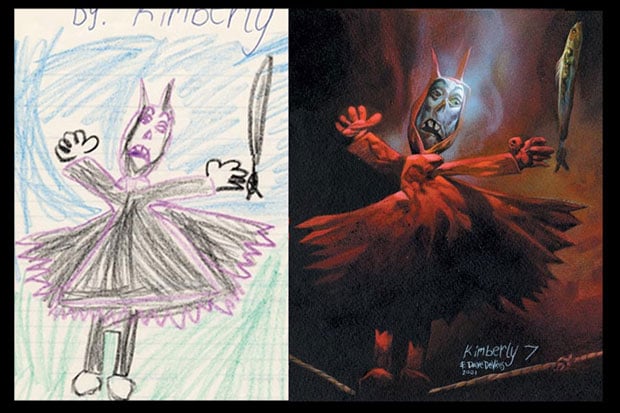
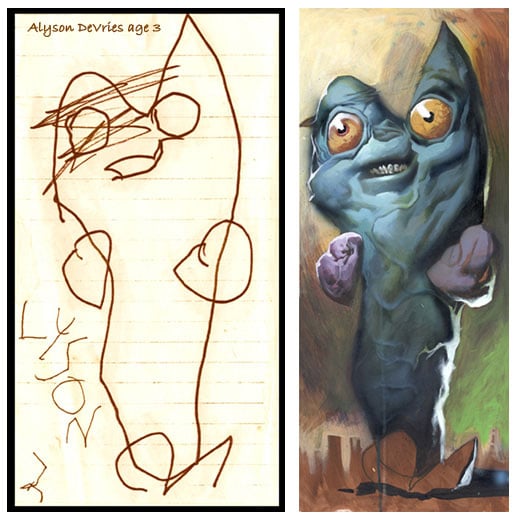
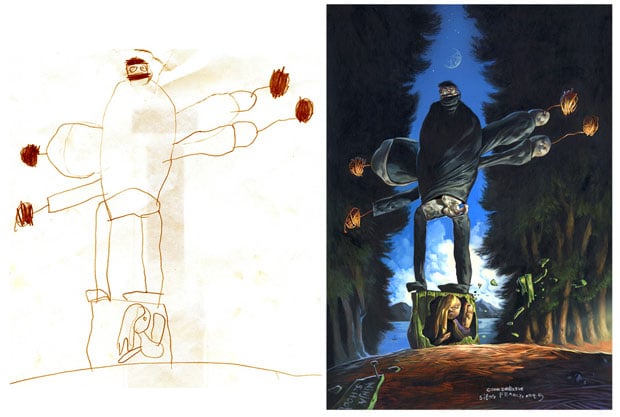
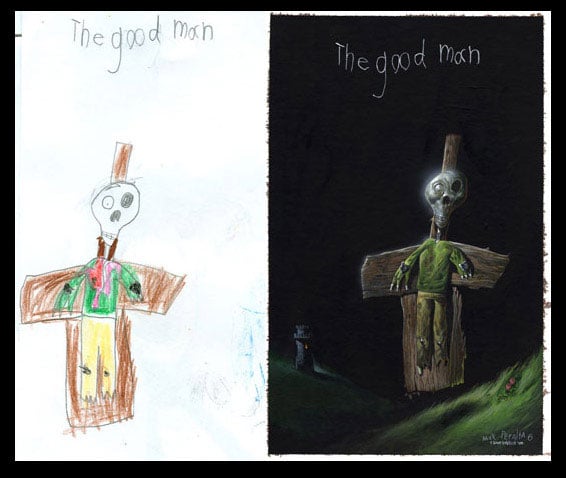
The Monster Engine is one of those projects that make me love the Internet for its ability to expose amazing creative talent to a worldwide audience. Illustrator Dave DeVries started with a simple question: What would a child’s drawing look like if it were painted realistically? In his own words:

It began at the Jersey Shore in 1998, where my niece Jessica often filled my sketchbook with doodles. While I stared at them, I wondered if color, texture and shading could be applied for a 3D effect. As a painter, I made cartoons look three dimensional every day for the likes of Marvel and DC comics, so why couldn’t I apply those same techniques to a kid’s drawing? That was it… no research, no years of toil, just the curiosity of seeing Jessica’s drawings come to life.

The Monster Engine is the 48-page outcome from that curiosity, and it looks wonderful. He describes the process as follows:

I project a child’s drawing with an opaque projector, faithfully tracing each line. Applying a combination of logic and instinct, I then paint the image as realistically as I can.

Below are some of my favorite illustrations from the project. Be sure to check out the whole gallery.

monsters3.jpg

monsters5.jpg

monsters7.jpg

ninja.jpg

monsters1.jpg

Buy “The Monster Engine” on Amazon.