Frieze Magazine posted a great roundtable discussion about the relationship between design and social responsibility. Even though it’s good that “socially responsible design” is becoming more popular, there are also some pitfalls:
There’s a great quote from Brazilian Bishop Hélder Câmara: ‘When I gave food to the poor, they called me a saint. When I asked why the poor were hungry, they called me a communist.’ Everyone loves you for donating something beautiful to a community in need. It’s a good way to win design awards and can sometimes have a meaningful short-term benefit for a community in crisis. But charity work often does not address to the deeper roots and causes of conflict and inequity, and at its worse may even exacerbate a situation, providing the veneer of a solution where deep problems still exist, and creating complacency where there is the need for outrage, tough choices and hard work.
Good design is invisible. Good screen design happens in the subatomic level of microtypography (the exact definition of a typeface), the invisible grid of macrotypography (how the typeface is used), and the invisible world of interaction design and information architecture. Minimum input, maximum output, with minimal conscious thought is what screen designers focus on. And just as type designers and engineers we do not try to find the perfect solution but the best compromise.
I’m going to assume that this tweet from Dan Saffer is in response to the interview, and not some amazing coincidence:
Good design isn’t always invisible. In fact, it can be stunningly, beautifully visible.
So, uh, which is it? Well, they’re both right — because I think they mean different things when they say “invisible design”. See, we talk about this stuff, but we rarely define the concepts before we do, and then we get into arguments and don’t even realize that we actually agree. So instead of just talking about invisible design, we have to discuss visible design as well, and how they’re different from each other.
When we talk about invisible design, I like Vitaly Friedman’s description in his excellent talk The Invisible Side of Design (my emphasis added):
Some things are so well designed that we don’t notice them any more. Our experience of them is invisible; almost beyond form and function… unless they break. The same holds true for Web design. Users stop noticing Web design if it works. Users keep noticing design if it’s broken, or when it gets in the way. Good design strikes a balance between elegance and invisibility. Invisible design relates to function and purpose, rather than appearance.
Invisible design is about the decisions we make about what goes into a product, what stays out, and how to get users through the experience as efficiently as possible. If those decisions are made well, and users can just do what they need to do without scratching their heads about where to go next — that’s when you get invisible design that works well.
But there’s also a striking visual layer to design that, in many cases, shouldn’t be invisible because invisible can be boring and soulless. Craig Grannell gives a good example of this in his article Office 2013 shows that user interface extremes aren’t the way to go:
The problem is, not all interface design scales, and when you go very minimal, interfaces can lose any sense of tactility and make it hard to focus. Peter Bright of Ars Technica’s shot of Office 2013 highlights that the opposite of Apple’s current design aesthetic isn’t necessarily any better. Acres of white space lead the eye to flick all over the design, making it hard to focus on the content (which is the smallish box on the right, with “This is an inline reply” in it). It’s unclear which components are buttons and which are content areas. Worse, there’s no sense of warmth at all. This feels like an email client designed to appeal to people bereft of emotion.
Look at sites like Slavery Footprint or MailChimp. There’s a very strong visual aspect to those designs, full of humanity and emotion. There is still an invisible side too — in MailChimp’s case, the functionality to create newsletters needs to be as invisible as possible — but it’s not an either/or situation. Invisible and visible design go hand in hand to create an appropriate product experience. In the case of Outlook 2013, there should be an invisible part of the design (the functionality you use to send email), but also a visible part that makes the software usable and relatable at more than a machine level.
Because what does design want from us, as designers? I think it wants us to take these items that are sort of mundane or boring on their own—like an annual report, or a website shopping cart, or a business card—and it wants us to fill them up. Fill them with ideas, and emotions, and humor, and warmth. Really everything that’s in our hearts and minds. Design wants us to invest these items with our humanity.
What it all comes down to is a term I first heard Karen McGrane use in her essay for The Manual called Ear Trumpets and Bionic Superpowers:
Designs that make technology completely seamless to the user often deserve admiration. But can we balance our desire for intuitiveness with a wider recognition that some tasks are complex, some interactions must be learned, and sometimes the goal isn’t invisible technology but appropriate visibility?
Instead of striving for purely invisible design, or design that is “stunningly, beautiful visible” but unusable, our aim should be to balance the decisions we make and the aesthetic we choose to arrive at a state of appropriate visibility. Now that’s good design.
Earlier today a new design for Elezea went live. This is about the 5th or 6th redesign since I started the site, but it’s the first one that I think deserves a moment to stop and reflect a bit. With this redesign, I feel like the site finally grew up to become what it always wanted to be. I try to stay away from meta posts because I understand they’re mostly interesting to me, and no one else, but I trust you’ll forgive me for doing it just this once.
I had two major goals with this redesign:
To have a design that’s completely focused on the reading experience.
To improve site speed and performance dramatically.
With these two goals in mind, I asked my friend Alex Maughan to help me with designing and building a custom WordPress theme to accomplish these goals. He did an absolutely stellar job, and I can’t thank him enough. This design makes me happy. Thank you, Alex.
But let’s talk a little bit about each goal.
A design focused on reading
There is one single thought that became the driving force for what I wanted to accomplish with this design, and that’s Jeffrey Zeldman’s quote from 1999 (I’m afraid the original post doesn’t exist on Adobe’s site any more, so I’ll have to link to Zeldman’s discussion of it):
Most of all, I worry about web users. Because, after ten-plus years of commercial web development, they still have a tough time finding what they’re looking for, and they still wonder why it’s so damned unpleasant to read text on the web — which is what most of them do when they’re online.
I discussed this issue in detail in an earlier post called Please let this not be the future of reading on the web, so I won’t rehash everything again here, except to say - yes, it’s damned unpleasant to read text on the web.
And yet, that’s (finally) changing as more and more sites strip away all the fluff - and make their sites responsive. Speaking of Zeldman, his own site is a very interesting experiment to try to rectify this issue. Other sites that are doing a great job at providing good reading experiences include Contents Magazine, the iA blog, and Marco Arment’s blog. So I wanted a site that provides an enjoyable reading experience, regardless of device or situation. With that in mind, here are some of the reasons behind the design decisions we made:
A header that explains what the site is about (set the context), then gets out of the way once you start reading.
A color scheme that not only fits the logo, but also feels similar to the calming Sepia schemes that many reading apps (like Amazon Kindle and Instapaper) provide natively.
A sidebar that sits off to the right - not in your face, but there if you need it - and is focused on what I consider the main calls to action on the site: subscribing to article updates. Everything else is secondary, as it should be.
My favorite feature: a responsive design that scales down well to small screens, to ensure a consistently pleasant reading experience on all devices. No matter how prevalent responsive design becomes, I think I’ll always see it as a kind of magic.
And finally, there’s an appropriate space for one of the well-designed ads from the User Experience Ad Pack. These ads are not only relevant to the stuff I write about, it also covers my hosting costs. I recently switched to the more expensive (but much more reliable) mediatemple, and I’m very happy so far.
The end result is, I hope, a site that’s focused on words, ideas, and readers. As it should be.
I often wish I could move all my link-sharing off Twitter and onto this site, but I know that’s not really possible, because the readership isn’t quite there yet. But I much prefer not just tweeting a link, but also adding some thoughts, or even just trying to set the context so people can decide if it’s a link they would be interested in, or not.
I mentioned this to Alex, and said that if we can get the site to be extremely fast, I might be able to start moving all my link sharing here. He saw that as a challenge, and went to work… So what we have now is the following:
The site is now only a fraction of the size it used to be. It should also have faster server response times from a PHP processing and DB query point of view, as there is much less server side processing required to generate the site.
I also run CloudFlare on top of everything, and I’m really happy with that service so far.
Ok, I think I’ve rambled on long enough. The TL;DR of this whole post is this. I’m really excited about this design, I hope you like it, and thank you Alex!
Many of the design decisions were also influenced by the affordances of ebooks and their readers. The cover was designed to be very iconic so I had a design system which could transition to each reading environment. The page size of the printed book was chosen to be similar in size to what would be experienced on an iPad or Kindle. The illustrations are two-color, because I knew I could make them look good on a Kindle, iPad, and in print.
Basically, I wanted to design a system that was flexible enough to keep its identity intact as the words went from place to place. I think it is possible to craft books in a way so that no reading environment is obviously inferior to another, whether printed book or ebook. Each piece has to shine on all the other parts to make a better whole.
Matthew Butterick recently did a TYPO Talk in Berlin that completely blew me away. In Reversing the Tide of Declining Expectations he discusses how we have come to expect way too little from design, with the consequence that most design on the web is complete crap:
And that’s really what I mean tonight by declining expectations. This idea of what happens when we defer to technology, instead of standing on its shoulders. What happens when we choose convenience over quality. Eventually, w’re going to forget what quality was like.
One of the most interesting parts in Matthew’s talk is where he challenges the conventional wisdom that design is about solving problems. He believes that “solving problems is the lowest form of design” — here’s why:
Because what does design want from us, as designers? Does it only want a solved problem? I think it wants more. I think it wants us to take these items that are sort of mundane or boring on their own—like an annual report, or a website shopping cart, or a business card—and it wants us to fill them up. Fill them with ideas, and emotions, and humor, and warmth. Really everything that’s in our hearts and minds. Design wants us to invest these items with our humanity. And the problem that we’re solving—that’s really just the context where that happens.
I don’t want to quote from the talk too much, because you really have to experience the whole thing — it is such a great reminder to have the courage to create better things.
Jon Kolko’s Iteration and Variation is a great article on some of the dangers of iterative design, and how to avoid them. Jon’s main point is that iteration solidifies ideas:
Once this broad stroke has been created (drawn, wireframed, coded, etc), further iterations assume the basic framework as fact. The initial iteration acts as a constraint, and becomes rigid: I’ll refine details and extremities, review and change aspects of the idea, but the idea itself has come to life. […] Each further iteration serves to solidify details, and they become taken for granted: they become facts.
One way to avoid getting stuck on the wrong path is through variation:
Variation is a way of adding a sense of objectivity to design exploration. Variation is an exploration of alternatives. […] Where an iteration moves an idea forward (or backwards), a variation moves an idea left or right, and is not productive in a typical engineering sense: the expectation is that all of the variations (except one) will be rejected. But variations act as provocations for what-if scenarios.
My immediate thought was that even though this approach sounds great, it just won’t fly in most software development processes — especially if the process involves Agile methodologies. Today, Joshua Porter got to the core of why UX and Agile are often difficult to integrate in Is design building interfaces or solving problems?:
But if you view design as “problem solving” then all bets are off. In this case it may take an hour or a week to figure out a solution to a design problem — It depends on the problem and the tenacity of the designer. This makes the initial design phase more unpredictable because your first decent guess is almost always wrong or inelegant (as usability testing often shows). And this makes it more difficult to schedule — and it’s why design doesn’t fit into fixed-time sprints very well.
And that’s the thing. Problem solving involves not just iteration, but also lots of variation. This often requires time to get it wrong a few times, which doesn’t fit comfortably with the concept of release dates. See, the problem with integrating Agile and UX is not that designers want to hang on to “slow and heavy documents,” “big upfront design”, or whatever you want to call it. The problem is that each iteration further solidifies the chosen path, and there is no time to stop and ask if you’re going in the right direction.
We are, in this model, not doing research before or after the product is made but throughout the product design and delivery process. While in an Agile UX model, Building is Designing is Building, in a Lean UX model, Building is Research is Building
My biggest concern about this, from a practical point of view, is if it allows for enough leeway to test/research different variations, or if it just streamlines the iteration process to get you to the local maximum faster. I don’t know the answer to that, but all I can say is that I’m glad I’m not the only one struggling with these issues.
The gap between the technical skills required to use the software we make, and what the majority of people are actually capable of, is widening at an alarming rate. Not only that, but we often appear to not even like the people we design and develop for. We champion empathy as a core tenet of user experience design, yet we are mighty quick to point out how bad our moms are at “computers”, and how we hate going home for the holidays because we end up spending all our time on family tech support.
I worry that technology is advancing so quickly that it’s no longer able to ground our thinking in a bit of reality. Some might see this as a good thing, but I don’t. Unless we make a conscious effort to get back into the minds of our users — and not chuckle at what we find when we peek in there — we’re going to run away with the web and leave most of the world standing around in bewilderment, wondering what just happened.
Don’t believe me that this is a thing? Ok, here are some examples. First, CNET’s Greg Sandoval describes the downfall of Netflix in his must-read article Netflix’s lost year: The inside story of the price-hike train wreck. It’s long, so it’s easy to skip over this sentence that perfectly sums up why things went so wrong for Netflix:
But even visionaries can misread their customers when they are blinded by their past success.
CEO Reed Hastings thought he had his customers figured out, but he didn’t. At all.
Among the missteps: Digg botched its re-launch in the summer of 2010, and, more importantly, he said the company was slow to respond to the criticism. ‘We were desperately trying to figure out how to get traffic back,’ he said. ‘A bunch of the community had already revolted by the time we fixed it.’
Once again, they thought they knew their customers, and once again, they didn’t.
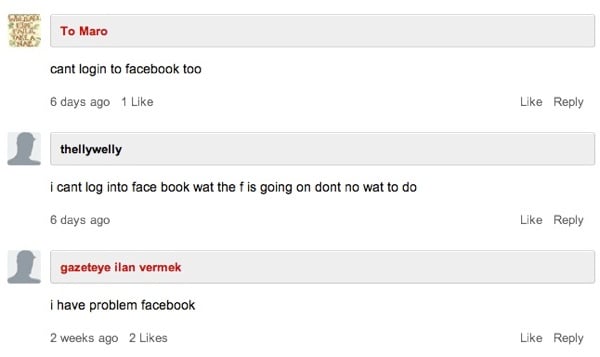
For the last example we’ll go even further down the technical totem pole, lest we forget what goes on in the bottom half of the Internet. In 2010 ReadWriteReb wrote an article about Facebook Connect and AOL Instant Messenger called Facebook Wants To Be Your One True Login. But their SEO was so good that if you went to Google and typed in “Facebook login”, that article would be the first result. It wasn’t long before they started receiving comments like this:
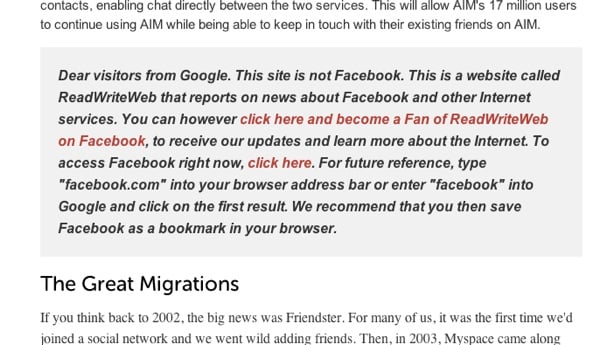
That’s right — people thought that they were on Facebook, and that the “new design” had inexplicably taken away the ability to log in. Things got so bad that they had to put up this message in the middle of the article, which is still there today:
The editors of ReadWriteWeb made one more mistake, though. They assumed that people know what a browser is. Watch this:
You may be asking yourself, “How do these people survive on the Internet? How do they get anything done online?” Well, we’d better believe it — they’re here, walking among us in plain sight. One can argue that things have gotten even worse since that article and video came out. Matthew Berk recently did an analysis of 1.3 Billion URLs and found that 22% of Web pages contain Facebook URLs. Google used to equal Browser for most people. Now Facebook is becoming the browser — it is people’s viewport to the Web.
Ha ha, we scoff. Who wants to do Microsoft Office on a tablet? Office is boring. And tablets have a completely different use case to laptops. Who would want one to run full Windows?
Answer: Lots of people. People with different priorities, working different jobs, living in different countries. People we don’t quite understand.
The rabbit hole just doesn’t end, no matter how deep you go. We haven’t even talked about YouTube comments or Clients From Hell. But I’ll stop here, and just say this: the landscape we create software for is scary. It’s terribly comfortable over here on Twitter, but how can we design software and applications for people we don’t hang out with?
It seems like such a simple problem to solve, but I’m not seeing much evidence that talking to customers is a widespread thing among startups and even many established companies. We love talking about User Experience Design in the abstract — especially if it means we can argue about whether it exists or not.
But you know who are the real heroes of UX (you know, if it actually exists)? The ethnographers. The user researchers (who had to change their name from “usability engineers” because definitions blah blah blah). The real heroes are the people who spend their days understanding user needs, and fighting with all their might to get people to make things that solve real needs, not things that floor us with their beauty and radiance and lack of utility. Douwe Osinga’s description of Google Wave comes to mind:
Wave started with some fairly easy to understand ideas about online collaboration and communication. But in order to make it more general and universal, more ideas were added until the entire thing could only be explained in a 90 minute mind blowing demo that left people speechless but a little later wondering what the hell this was for.
Let’s stop that from happening to the things we make. We don’t have to leave this job to The Researchers. We can all talk to the people who use (or might use) our software. We can go to a coffee shop and get feedback on wireframes for the price of a few cappuccinos. We can sit and watch some of our family members use the web, and make notes. We can try to spend a fixed percentage of every week talking to users. If we don’t, we’ll continue to widen what Jakob Nielsen calls the Usability Divide:
Far worse than the [digital] economic divide is the fact that technology remains so complicated that many people couldn’t use a computer even if they got one for free. Many others can use computers, but don’t achieve the modern world’s full benefits because most of the available services are too difficult for them to understand.
Whereas the [digital] economic divide is closing rapidly, I see little progress on the usability divide. Usability is improving for higher-end users. For this group, websites get easier every year, generating vast profits for site owners. That’s all great news for high-end users, but the less-skilled 40% of users have seen little in the way of usability improvement. We know how to help these users — we’re simply not doing it.
We know how to help these users — we’re simply not doing it. We don’t have a choice, we have to talk to them. It’s easy to start: take your laptop with you on one of your coffee breaks, and ask some people if you can show them what you’re working on. They’ll love giving you feedback, and you’ll walk away with a better understanding of the usability divide — and some very real ideas about how to narrow it.
In 1955 Beatrice Warde wrote an essay on typography, book publishing, and advertising called The Crystal Goblet, or Printing Should Be Invisible. It is one of the best descriptions of the concept of invisible design I’ve ever read. I pretty much want to quote the whole thing, but I’ll stick with this gorgeous paragraph, and let you click through for the rest:
The book typographer has the job of erecting a window between the reader inside the room and that landscape which is the author’s words. He may put up a stained-glass window of marvelous beauty, but a failure as a window; that is, he may use some rich superb type like text gothic that is something to be looked at, not through. Or he may work in what I call transparent or invisible typography. I have a book at home, of which I have no visual recollection whatever as far as its typography goes; when I think of it, all I see is the Three Musketeers and their comrades swaggering up and down the streets of Paris. The third type of window is one in which the glass is broken into relatively small leaded panes; and this corresponds to what is called “˜fine printing’ today, in that you are at least conscious that there is a window there, and that someone has enjoyed building it. That is not objectionable, because of a very important fact which has to do with the psychology of the subconscious mind. That is that the mental eye focuses through type and not upon it. The type which, through any arbitrary warping of design or excess of “˜colour’, gets in the way of the mental picture to be conveyed, is a bad type. Our subconsciousness is always afraid of blunders (which illogical setting, tight spacing and too-wide unleaded lines can trick us into), of boredom, and of officiousness. The running headline that keeps shouting at us, the line that looks like one long word, the capitals jammed together without hair-spaces — these mean subconscious squinting and loss of mental focus.
Alex Maughan adds some fresh perspective to the reasonably stale “Should designers learn to code?” debate. In The click of a well-made box he writes:
I don’t just believe that having development knowledge helps me and others get stuff done. I believe it makes me a better designer. It does this in the same way that being empathetic to both user and business need does; in the same way that aesthetic theory in visual design does; in the same way that content awareness does; in the same way that knowledge of cultural semiotics and iconography does; in the same way that all sorts of knowledge systems do. Many things can positively influence a designer, and many things ultimately do, just as many areas of knowledge can enhance the value and efficacy of on’s work in any discipline.
Spot on. The code aspect is just something we’ve recently been focusing on, but let’s not forget all the other things that can make us better designers. The key to becoming a better designer is not necessarily to learn to code (although it could be — as Alex argues for very effectively). The key to becoming a better designer is to keep learning something related to the craft, always. I love how Alex Charchar (too many Alexes!) describes the current shift to more knowledge-based design in The Principles of Style:
The importance that designers place in their skills is increasing at a staggering rate. We have always taken our craft seriously, but now we are treating it as the architects do. We are working hard to shake the shadow of the artiness and whimsy of our work and are showing that being creative is serious stuff. Some of us have nerded out over theory forever, but the dusty tomes are no longer propping up the wonky table of our profession. Things are getting increasingly balanced and level.
It happened so quickly and what was once hard to find knowledge is now base knowledge. A dependency upon style has been replaced with fundamentals. Theory has become methadone and sobriety looks damn pretty.
So let’s relax a bit about learning to code, and rather stress out about whether we’re learning something. And as Alex (Maughan this time) points out at the end of his essay, make sure it’s something you enjoy:
I also simply enjoy the hell out of it, no matter what value others end up placing on it.
That’s what visual designers get from the grid, too: efficiency, ease, and cheap builds. No question, a well-deployed grid also bestows order and visual harmony on a layout, and those are worthy goals (perhaps the best goals!) of good design. But when you look around at how we use grids on the web, one has the strong impression that we lean on them more for efficiency than aesthetic delight.
His post reminded me of Nishant Kothary’s Rap it in a Grid, which I’ve linked to before:
The reality is, a grid makes the act of solving design problems seem predictable, but says nothing for supplying the appropriate design solution. The grid is akin to the beat. But it’s hardly ever the flow, which is the true design solution.