Menu

Posts tagged “design”

What design is really about

There’s quite a fight going on in the comments of Elliot Jay Stocks’s A conversation with Erik Spiekermann. If you’re able to wade through the mudslinging you’ll find some good points in there, like this paragraph by Erik himself:

Design is first and foremost an intellectual activity which has nothing to do with what medium you work in. It is about looking at a problem, understanding it, translating it into visuals, actions, and messages. That is solving the problem, whatever medium the solution may end up in.

The worst work is done by designers who have decided on a medium before they even know the problem that has to be solved. Just like a print designer (and I do not make that distinction myself) should not immediately think brochure or poster, an interaction designer should also be able to think about other media besides websites or apps. Otherwise you end up behaving like the infamous hammer: every problem looks like a nail.

This relates to a point I made earlier that we shouldn’t let technology or devices (what Erik calls “the medium”) guide product decisions. The problem and the use cases should guide those decisions.

Why mobile and desktop operating systems shouldn't be combined

Dmitry Fadeyev makes the best case so far for why it’s not a good idea to combine mobile and desktop operating systems into a unified experience, like Windows 8 has done. From Blurring of the Lines:

The road to a good OS is not a blurring of the lines between PCs and tablets, but rather an amplification of the differences through a strong focus on the uses that each category serves. The desktop OS should make use of large screen real estate and the precise targeting of the mouse cursor. The mobile OS should be optimized for the small screen and for the rough tap of the finger. The desktop OS should focus on power users and multi-tasking, the mobile OS should focus on content consumption. The environments they run on are different, the use cases are different, and the solutions should be different.

That’s exactly right. This “unified experience” sounds like a decision made from the viewpoint of devices and technology, not use cases. For example, if you make decisions based on devices and technology, you may decide to create an iPhone app before you know what kind of phones people will use your service on. If you make decisions based on real use cases, you may actually find that very few people would use your service on a mobile device, so a better solution would be to (gasp!) optimise for desktop use1.

The irony is that even though Microsoft made a huge deal about their “no compromise” design philosophy, the Windows 8 experience will have to make compromises if the same software needs to work on both mobile and desktop devices.


  1. Wait, don’t slaughter me. I love Mobile First. I’m just saying that some services or applications just don’t lend themselves to mobile use. I’d argue that tax return software falls into that category. 

Quote: Jordan Moore on designing for the right people

If you are build­ing a web­site (re­spon­sive or oth­er­wise) and your pro­ject per­sonas be­come in­dus­try he­roes rather than those you painstak­ingly iden­ti­fied at the be­gin­ning of a pro­ject then it’s time to worry.

— Jordan Moore, Be careful who you build for.

The importance of user experience design specialists

Abby Covert wrote a very important article on the just-relaunched Boxes and Arrows. I know we’re all pretty tired of the “What is UX?” debate, but A Perfection of Means and a Confusion of Aims addresses the damage that the umbrella term “user experience design” is doing to specialist UX functions. Some key passages (but you really should read the whole thing):

I am afraid that there is a shortage of specialist jobs, and it isn’t because those specialities aren’t needed. I believe it is because the value of those specialities, and the impact of not considering each carefully, is in too many cases not clearly called out to our clients and partners. […]

In my experience when “UX” is the term sold-in, the resulting project plans are less likely to reflect the points at which various specialities will be relied upon to progress the team. Often prescribing a stacked to the gills list of tasks reduced to the nebulous “Design the User Experience” on the Gantt chart. The makers of these types of plans leave it to “UX Designers” to divide the time they have amongst the various specialities of a “UX” and arrange their time against it. […]

The worst case scenarios result in teams jumping right to wireframes, prototypes and documentation. I see far too many UX designers that have become wireframe machines.

This is, by and large, an agency problem (but you see it in some internal design teams too). As agencies start to see the value of selling “this UX thing” more and more, many put out unicorn job specs that aim to find some generic skill combination that can be sold to clients as user experience work. And I’ve talked to several people who fell into the trap of these jobs, only to find that their new realities consist of making wireframes and getting dirty looks because their colleagues feel they’re just slowing down the design process.

I have nothing against wireframes — in fact, I remain a huge proponent despite some recent calls to move away from it. It’s not the focus of this post, but I still find huge value in wireframes (particularly HTML prototypes) to (1) work through the complexities of finding elegant solutions to difficult interaction problems, and (2) get early user feedback before moving into high-fidelity design and development. But the point of all this is that wireframes are not the end goal of user experience design, they’re part of the process. A process that involves research, information architecture, customer journey maps, content strategy, and all the other specialities Abby points to in her post.

And that’s where I’m 100% in agreement with Abby. That we have generalised User Experience Design to a black box process that makes it very hard to convince clients (and some agencies!) that the specialist functions that go into designing holistic experiences for people are absolutely essential. We need agencies to:

  • Understand the different specialities that make up the User Experience Design process (I’ve taken a crack at a model here),
  • Hire specifically for some sensible combination of those skills, and
  • Educate clients on the value that each of those specialities can add to make their products successful.

Yes, UX unicorns do exist, I won’t dispute it. But they’re few and far between. The rest of us need to know that there is value in becoming really good at our chosen specialities, and we need to be confident that we can sell those skills to our clients.

So, I’m not arguing that we should throw away the title of UX Designer, as some have suggested. I’m saying that we have a responsibility to know that the field is made up of many specialities, and if we ignore those we do ourselves, our industry, and our clients a huge disservice.
When improved UI is better than no UI

Stefan Klocek wrote a great post challenging the often-repeated idea that “the best UI is no UI.” From Should you ditch your interface?:

For any particular interface in the system, ask:

  1. Does the user want or need control?
  2. Does the user get value from doing the work themselves?
  3. Does the user outperform technology?

If you can answer “no” to every one of these questions, then put in the effort to eliminate the interface. If you answer “yes” to any one of these you should focus on improving the interface so that it supports the user better. If it’s not unanimously “yes” or “no” carefully consider how design can meet the conflicting needs. Get to know your users well. Design a solution that’s as sophisticated and nuanced as their situation calls for.

Stefan goes into great detail on each of those questions, so the post is well worth your time.

Failure fosters humility*

David Lee in Pride Before The Fall:

If success without failure breeds pride, then failure can foster humility, drive, and true self-confidence.

There is so much truth in this statement, and I almost tweeted it without comment when I read it, but I realised that it’s not that simple.

The concept of “Humble Design” is a recurring theme on this site. I first wrote about it here, and then again here, and also here. The thread through all those posts is my belief that to be a good designer (or just a good human being), we need to be able to admit our mistakes and failures, and possess the fortitude to fix whatever went wrong.

The problem comes when we’re unwilling to admit that we’re anything less than perfect, or worse, when we lack the curiosity to seek out and recognise those instances when we’re wrong. So, with that said, I’d like to put an asterisk next to that David Lee quote. Terms and conditions apply. Failure only fosters humility, drive, and true self-confidence when one is willing and able to recognise and fix them.

(link via @mobivangelist)

User centered design in emerging markets

Niti Bhan does strategic design planning and concept development in emerging markets like India and some African countries. She begins her article Developing a user centered methodology for emerging markets and the bottom of the pyramid by discussing what happens when companies in the developed world try to introduce products in lower-income markets:

So the value propositions of the products, services, and programs introduced for lower income markets—particularly in the developing world—are still based on elements of the value system prevalent in global consumer culture. There is a gap here, and it’s most obvious in the marketing messages, advertising and communications which tend to emphasize product benefits or value that may not be relevant—much less contextually appropriate—to the BoP [Bottom of the Pyramid] customer’s life. When the value proposition of the seller has little or no resonance with the value system of the target market, it will most likely be ignored.

Even more interesting, she questions the value of using a standard user-centered design (UCD) methodology in these markets. Her point is that it’s not just products that need to be tailored specifically for these markets, the methodology we use to identify user needs should be different as well:

UCD has emerged from the same operating environment as that of the majority of the producers and most certainly has been part of, if not partially the creator of, the global mainstream consumer culture in which we’re all immersed. Therein lies the rub. The process is not divorced from its context and thus, we found, it needed to be far more flexible as it evolved and was adapted to the challenge of conducting exploratory user research in slums and villages and townships across the developing world. For the human centered designer, more likely to have been trained in the heart of the most sophisticated consumer markets in the world, there were additional challenges when considering the new and emerging consumer markets at the BoP.

I see this in our work at Flow as well. We constantly have to adjust how we do usability testing or contextual interviews to make sure participants are comfortable enough for us to uncover their real needs/issues. Niti’s work looks fascinating, so I definitely recommend reading her post and checking out some of her other writing as well.

Being right all the time

John Gruber wrote the following in the context of recent leadership changes at Apple, but it’s applicable to life in general. From Seriously, Apple Is Doomed:

What you want is to be (1) right more often than wrong; (2) willing to recognize when you are wrong; and (3) able and willing to correct whatever is wrong. If you expect perfection, to be right all the time, you’re going to fail on all three of those — you will be wrong sometimes, that’s just human nature; you’ll be less willing or unwilling to recognize when you’re wrong because you’ve talked yourself into expecting perfection; and you won’t fix what’s wrong because you’ll have convinced yourself you weren’t wrong in the first place.

I’ve mentioned before that the ability to admit that you’re wrong is an essential characteristic of a good designer. I maintain that some of the biggest product failures can be traced back to a refusal to recognize that the idea/design isn’t perfect.

Design like you’re right, listen like you’re wrong.

An agency perspective on responsive design: tips, case studies, and challenges

Christopher Butler shares a long and interesting agency perspective on responsive design in What We’ve Learned About Responsive Design. He shares tips, case studies, and some unresolved issues — including how to deal with larger display sizes:

So, the parting question for me is this: What about upward responsiveness? If we’re heading toward bigger displays with much higher pixel density, how will our designs adapt to make use of them? We’re all excited and sold on the concept of responsive design, but so far that has been limited to responding to smaller conditions. If we’re up for that challenge, than I know we can do better on the “desktop,” too.

So far we’ve dealt with that issue either by setting a maximum width for websites, or to live with acres of white space. Christopher rightly points out that we need to experiment more with ways to take advantage of larger displays without overwhelming users with too much content.

(link via @smashingmag)

More on eBook pagination vs. scrolling

In a response to a series of posts on eBook pagination vs. scrolling (including mine), Dr. Drang presents the strongest argument against pagination that I’ve seen so far. From Scrolling or paging?:

Authors don’t write in pages, they write in sentences and paragraphs, neither of which are honored in a paged interface.

That’s a really good point. Pages artificially break up authors’ thoughts. Pagination is the hurdle-race to scrolling’s 400-meter dash. Everything is a trade-off though, so for the time being I will stubbornly stick to my preference for pagination, because as I said, I just find it easier to deal with.

I want to challenge Dr. Drang on one point, though. He says:

As for the sense of accomplishment, I am, if anything, even more dubious. Flipping a page, whether in a physical book or an ebook, has never charged me with a feeling of achievement. In fact, in paged ebooks I seldom have any sense of how far along I am—in physical books there is, at least, the thickness of what’s in your left hand compared to what’s in your right.

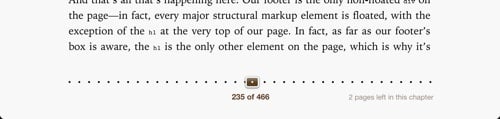
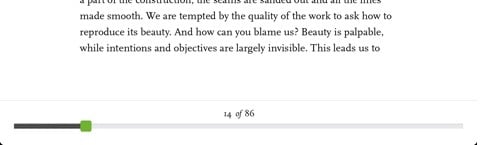
I don’t agree with that. Most eBook readers have sorted out the “sense of place” problem, and now provide both visual and text indicators to help you figure out how far along you are in the book you’re reading. Below are the interfaces for iBooks and Readmill:

iBooks pagination

Readmill pagination

Note the text-based information about the number of pages that have been read, and how many pages there are in total. The visual indicators, in turn, give you a sense of the “weight” of the number of pages you’ve already read — Readmill does a particularly good job of this. And iBooks even tells you how many pages you have left in any given chapter. Those indicators combined serve as a worthy replacement for “the thickness of what’s in your left hand compared to what’s in your right”.