Menu

Posts tagged “design”

Design process: don't let extreme views grind you down

Josh Emerson offers some words of advice that we should all take to heart:

But perhaps the most important thing I want to highlight here, is that the answer to most questions is it depends, and very often in the grey area between black and white. Try not to take extreme views on things, and perhaps see that there is always another level of complexity to be discovered in any decision you make.

We just came out of a season of arguing whether or not Flat Design is the answer to everything. We also heard proclamations that wireframes are dead, designers do in fact need to code, and Photoshop is on its last legs.

But you know what? Screw that. We have to remind ourselves that the vast majority of design is done by people who don’t have Twitter accounts and large public followings. Out there in the trenches they shouldn’t have to worry about what’s cool or what styles they’re allowed to like. They should only care about getting the job done, and using whatever tools they have at their disposal to do the right thing.

Doing the right thing is complex, and messy. Sometimes it has the luxury of involving a content-first approach with interactive prototypes, but other times it involves having to make static wireframes and designing before any content is available. It’s not ideal, but who are we to judge a designer based on what we perceive as the quality of their process? What do we know about the complexity of the project, the relationships they are trying to navigate, and the users they are designing for?

My advice is this. Yes, follow the design zeitgeist. Study the big ideas and explore the edges where the industry is being pushed forward. But don’t get caught up in whatever the cool viewpoint is about any methodology or style. Only you know what your project needs. So be confident, ignore the extreme viewpoints, and use whatever tool will be most effective to help you do the right thing.

Data confusion is a failure of design, not an attribute of information

I just came across this great interview with Edward Tufte from 2011. I love his description of bad information design, and how it’s not the data’s fault:

Overload, clutter, and confusion are not attributes of information, they are failures of design. So if something is cluttered, fix your design, don’t throw out information. If something is confusing, don’t blame your victim — the audience — instead, fix the design. And if the numbers are boring, get better numbers. Chartoons can’t add interest, which is a content property. Chartoons are disinformation design, designed to distract rather than inform. Thus they reduce the credibility of your presentation. To distract, hire a magician instead of a chartoonist, for magicians are honest liars.

Chartoons. Heh.

Anyway, I find this particularly poignant in our current infographic age, where Mashable recently posted — without irony — an infographic on infographics. Here are some of my other favorite infographic takedowns:

(link via @ericatjader)

How to get buy-in on your design process

Coffee at Pink Boutique, Cape Town

I recently had a long conversation about coffee with the manager at the flagship TRUTH.coffeecult retail store. Talking to people who have a passion for their craft — regardless of what that craft is — always invigorates me in my own work as well. One of the things Dominic told me is that since they’re a roaster that supplies coffee to other businesses, TRUTH’s retail coffee shops aren’t their most lucrative business opportunity. So why do they even bother with retail spaces? His answer really got me thinking:

We want to give people the tools they need to tell that our coffee is better than others.

TRUTH realizes that for most people, coffee is just coffee. Whether it’s Starbucks, Denny’s, or Ricoffy doesn’t really matter, as long as it has caffeine in it. But people like Dominic and the team at TRUTH aren’t ok with that. They see a city full of people who are losing out on the joys of an artisan coffee experience, and they want to change that.

But they also know that in order to accomplish their goal, they can’t just give people a cup of TRUTH and leave them to it. They have to teach them why it’s better. They have to explain the roasting process, show the care and precision that goes into pulling an espresso shot, and provide guidance on the flavours they need to look for. Only then will their customers be able to appreciate why TRUTH is better than other coffees.

This is not unlike the work we do in web design. When we work with clients or internal teams who are not aesthetically inclined, or don’t immediately see the value in prototyping and user research, we can’t just yell, “BUT OUR WAY IS BETTER!” and storm off in a fit of righteous anger. Instead, we have to give clients and teams the tools they need to tell that an iterative, research-led approach is better than just pumping out some PSDs real quick. We have to show case studies, and we have to explain how the investment will result in major returns for the business. We need to show passion for our craft, we need to speak confidently about what we do and why we do it, and we need to communicate the benefits to them in a clear and concise way.

Dominic went on to tell me how one person came into TRUTH earlier that day and asked to see how they make a cappuccino. The barista brought her around, showed her how the machine works, and she ended up pulling her own shot and steaming her own milk. The barista didn’t care about sharing secrets, or letting some “lesser being” touch his espresso machine. Because his goal isn’t to show people how good he is. His goal is to get people to love coffee. And if that means letting someone pull their own shot — imperfect as it may be — then so be it.

Our role as designers isn’t to show people how good we are, either. It also shouldn’t be our primary goal to win industry awards. Our goal should be to get the people we work with to fall in love with the design process, and to utilize that passion in them and ourselves to design great solutions. And the only way we’re going to be successful at that is if we invite our clients and teams to step behind the counter to see how and why we do what we do.

Design process: optimize for the scarcest resource

In his thoughts on design process Kevin Anderson quotes a very interesting paragraph from Fred Brooks’s book The Design of Design:

The critical thing about the design process is to identify your scarcest resource. Despite what you may think, that very often is not money. For example, in a NASA moon shot, money is abundant but lightness is scarce; every ounce of weight requires tons of material below. On the design of a beach vacation home, the limitation may be your ocean-front footage. You have to make sure your whole team understands what scarce resource you’re optimizing.

I’ve been thinking about this in the context of web design over the past couple of days. What is the scarcest resource in web design projects — assuming it’s not money? I’d say that in most cases, the user’s attention is the scarcest resource online. There are just so many distractions, interruptions, and other things vying for attention (I mean, there are goat videos to watch, after all). What does this mean for the design process? Here are some examples:

  • On e-commerce product pages users want to know if this is the product they’re looking for. The design process should optimise for information about the product, price, and availability (delivery details).
  • For registration and checkout flows users just want to get through the process with as little friction as possible. The design process should aim to minimise the number of form fields that has to be filled out, and to remove as much clutter as possible to eliminate distractions.
  • For content-heavy sites, users want to know if it’s worth spending time on a article. So the design process should focus on surfacing the right content to help them quickly make a decision to stay or click away. The Great Discontent does a great job at this — each interview engages readers immediately, and gives them a lot of summary information right at the beginning of the article.

The examples above are pretty obvious, but each design problem will have its own unique set of challenges, so I think this should be an important part of any process. When starting a new project, try to work with the team to agree on what the user’s scarcest resources are, and how you plan to optimize for that.

(link via @retinart)

Don't let user experience design methods die

Des Traynor did a great interview with Ryan Singer, Product Manager at 37signals. I’m a huge fan of Ryan’s, and I agree with most of what he says in the interview. But there’s one part I’d like to challenge a bit.

Answering the question “Did you ever consider techniques like personas or user journeys, or any of those UX design methods?” Ryan says, “That stuff is all terrible”. He then obliterates the use of personas before going into a bit more detail a couple of questions later:

The things that get called User Experience come from the agency world. It really seems to be like that. Every time you meet people who are doing all of these UX methodologies they come from the consulting world. My background isn’t in the agency world; it’s in the product world. The whole game changes when you don’t have the pressure of delivering to a client on time, or trying to convince a client that you’re worth hiring or worth sticking with.

For example, if you’re working on products, and you’ve got a really capable team that can prototype things in real code, of course you don’t need wireframes, because you don’t need to get sign-off on something from a client.

This is where I disagree. I started my career in the product world. I worked at big companies, startups, and now an agency. I’ve used (and have observed others using) these “terrible” UX methods very successfully. Ryan is extremely lucky to work at a company like 37signals where personas, user journeys, and wireframes are not needed. But that is evidence of how great the 37signals culture is, not that certain UX methods are useless. I think Josh Brewer said it best:

Re: design processes—Everything depends on the context and the needs of the project. There are no absolutes. You do what needs to be done.

— Josh Brewer (@jbrewer) February 22, 2013

To get a bit more specific, here are just a few scenarios and contexts where using personas, user journeys, and even wireframing (which was pronounced dead again this week) can be really useful:

  • At large organizations, not everyone is focused on and has an understanding of what experience design is about. There’s often a lot of “I am the user” thinking going on, and an inability to see interactions from the perspective of users. In those circumstances, personas and user journeys in particular can be enormously beneficial to help the organization see their products from a user’s perspective. Personas aren’t prescriptive, they’re descriptive. You can’t identify a persona and then try to predict people’s behavior off it. But you can use personas to help focus development efforts on users, and help define what features are included in (and just as importantly, excluded from) the product.
  • At startups as well as large organizations, we’ve used user journeys effectively to guide the organization away from systems thinking that’s focused on internal structures and technologies, to user process thinking that results in the design a of much better experience. Once again, when you’re dealing with people who come from non-UX backgrounds, making this shift can be tougher than it seems.
  • At agencies, we like to help companies wherever we can. To do this, we say that user experience and user-centred design scales well. Therefore, running a task-based usability test in a controlled lab environment will get the best results, but if there isn’t budget, guerilla testing is better than nothing. Similarly, sketching interfaces and then building a clickable prototype for iteration is absolutely the preferred way to go. But lacking budget, flat wireframes for quick iteration is better than doing no iteration at all. We can’t be so idealistic that we’re not willing to scale down our processes when we need to.

So, just to reiterate my point. 37signals appears to be an organization that is in lock-step agreement about their vision and goals. This means that they can build prototypes in code, iterate on that together, and they might not need reminders about their user personas and journeys. That is a fantastic place for a company to be in.

But to call UX methods “terrible” ignores the fact that most of us work in organizations where building good experiences is only 50% design challenge. The other 50% is organizational challenge to get all stakeholders pulling in the right direction. And in the right context, UX methods can be extremely helpful to address both types of challenges.

Further reading:

Design process: capturing and sharing sketches

Here’s some great advice from Joshua Porter: when you’re in a design meeting (or any other meeting, for that matter), Always be capturing:

“Always be capturing” is about the habit of continuously recording the value from your conversation. For example: If you’re talking about a new concept, you should be sketching it as you talk so your team has a shared understanding and an artifact of the conversation.

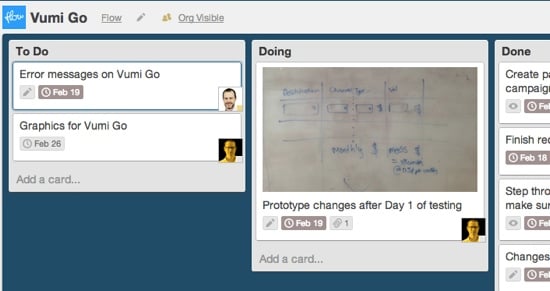
Joshua gives some great tips, including taking photos of your sketches and uploading them to Dropbox immediately. We do this as well, except instead of Dropbox, we add the photos directly to a Trello card related to the project at hand (using the iOS/Android app). Those photos are then immediately accessible to everyone who works on the project:

Trello sketches

We’re increasingly using Trello not just to schedule our work, but also to make our thoughts and sketches immediately available to the team within the context of the task at hand. That’s something Dropbox can’t do.

Using personas for more effective client work

In my latest article for Smashing Magazine I discuss How To Sell Your UX Design Solution To Clients:

How do you convince clients to trust you with their valuable and much-loved product? In my experience, the best way to sell work to clients is to apply user-centered design not only to the work we produce, but also to the clients who commission that work.

We have to understand who our clients are, what is important to them and what their goals are. And then we have to deliver work that not only meets the needs of end users, but also satisfies the personalities within the company itself.

I go through three different “client personas”, and how we adjust our process slightly for each. If you’re in the business of doing client work, I hope you’ll find the article useful.

Optimization points in responsive web design

Mark Boulton argues that we need to think further than breakpoints in responsive design, and also spend time figuring out the “optimization points”. From The In-Between:

I think we’re missing a trick for using breakpoints to make lots of subtle design optimisations. […] Content-out design means defining your underpinning design structure from your content, and then focusing on what happens in between ‘layouts’. This approach of optimising your design by adding media queries (I like to call these optimisation points rather than break points, because nothing is broken without them, just better), means you are always looking at your content as you’re working. You become more aware of the micro-details of how the content behaves in a fluid context because your focus shifts from controlling the design in the form of pages, to one of guiding the design between pages.

He shares some examples and also links to more resources on how to accomplish this. One good example of this subtle optimization approach is Responsive Typography, a concept by Marko Dugonjić where the size of the typography displayed on the screen is based on the viewing distance of the reader, calculated via webcam.

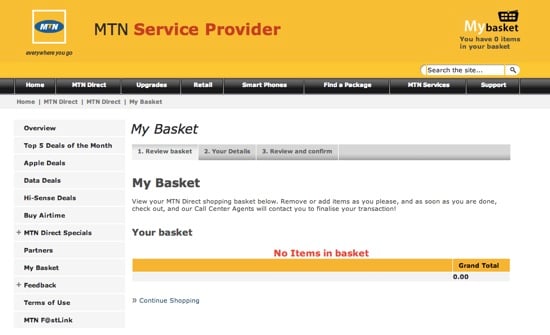
Whose basket is it?

In Yours vs. Mine Dustin Curtis explains his preference to use “Your stuff” as opposed to “My stuff” in interfaces. It might sound trivial, but whether we use “My” or “Your” reveals something about how we view technology:

After thinking about this stuff for a very long time, I’ve settled pretty firmly in the camp of thinking that interfaces should mimic social creatures, that they should have personalities, and that I should be communicating with the interface rather than the interface being an extension of myself. Tools have almost always been physical objects that are manipulated tactually. Interfaces are much more abstract, and much more intelligent; they far more closely resemble social interactions than physical tools.

The answer for me, then, is that you’re having a conversation with the interface. It’s “Your stuff.”

This echoes Yahoo!‘s recommendations:

Labeling stuff with “Your” instead reinforces the conversational dialogue. It is how another human being might address you when talking about your stuff. Even with MySpace1, people say things like “I saw what you put on your MySpace.”

So MTN at least got one out of four right on this page:

MTN account


  1. I guess they haven’t updated this pattern in a while. 

Gestural interfaces and generational transition

Francisco Inchauste did a great interview with MIT Technology Review about the user experience challenges of gestural interfaces. From Does Gestural Computing Break Fitts’ Law?:

I think there are a lot of usability/UX rules and laws that will come into question as we move forward into more of these experimental kinds of interfaces. I know many of them already have been retested/validated by other researchers.

A lot of newer interaction paradigms aren’t naturally intuitive as we like to think. Tapping and swiping at “pictures under glass” (or in this case, content) is always going to be a learned thing, like when we were introduced to the desktop metaphor or icons.

I think we’re in a period of generational transition when it comes to fully gestural interfaces1. Despite living on the Internet, I still struggle to remember some of the newer gestures that are popping up in iOS apps. On the other hand, my 3½-year old daughter has zero problems figuring out (and remembering) gestures, because this is the world she’s growing up in. There is no major shift in mental model needed — to her, this is just how technology works. It reminds me of something Chuck Skoda said a while ago in The touchscreens are coming:

While I fully expect the future to have keyboards and mice (or some precision pointing device), touch is already precluding the ubiquity of both in the minds of children. When the upcoming generation is running the show, we will find another absurd idea, that a computer built for human interaction will have a screen that doesn’t respond to touch.

And when that generational transition is complete, what we once thought of as “newer interaction paradigms” will simply be “the way things are”.2


  1. By the way, check out Rise, a fantastic, fully gestural alarm clock app by Francisco and the team at Simplebots. 

  2. I think I deserve a special Internet high five for not making a “the future is already here…” reference here.