Menu

Posts tagged “design”

Giving users a way out of a responsive design

Jordan Moore wrote a very level-headed post about giving users the ability to switch off the breakpoints of a responsive design to show the “desktop” site1 instead. From Claustrophobia:

This is my overriding concern — there’s no way out. There’s no way out of a bad design, an incompatible plugin, a browser bug, missing content, the endless list of potential issues someone could potentially encounter with a website whether it is responsive or not.

That’s an excellent point, and providing a “way out” echoes one of Nielsen’s 10 Heuristics for User Interface Design, written in 1995:

User control and freedom. Users often choose system functions by mistake and will need a clearly marked “emergency exit” to leave the unwanted state without having to go through an extended dialogue. Support undo and redo.

Jordan argues that giving users that control and freedom on a responsive site might feel like a cop-out, but it could be necessary:

The last thing I want is to lead users into a mass exodus from a responsive design I have put so much thought and effort into. I just think if it helps the odd user out in doing something they happen to find more comfortable in a pinch and zoom environment for whatever reason then we should probably do it rather than prevent them from doing it.

That’s a very sane, user-centered approach. It’s also worth noting that if the mass exodus does occur, it’s a clear sign that something is wrong with the responsive site. That’s valuable data.

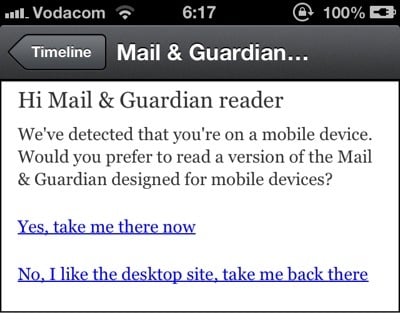
But it all comes down to execution, of course. Users shouldn’t be asked to choose between entering the building or going straight for the emergency exit the minute they arrive at the site. It’s ok to make the exit visible, but forcing a deliberate, upfront choice between the mobile/responsive site and the desktop site puts an unnecessary burden on users.

In short, this kind of placement is ok (although the “Full Site” language is problematic):

OK

This is not ok:

Not ok


  1. Whatever that means these days… 

Gadgets that adapt to our skill level

In The Next Big UI Idea: Gadgets That Adapt To Your Skill Philip Battin applies some existing ideas around progressive disclosure and Flow to tech gadgets:

User experiences are subjective and dynamic, but by and large, interactive products are not designed to take people’s changing capacity and experience into account. But they could. Here, I present a model for how designers can use the fundamentals of video games and the psychological principles of flow to design enhanced user experiences.

Philip proceeds with an example of how such a model could work for a Samsung E8005 SmartTV. We’ve applied these principles in traditional software design for a long time, but it’s interesting to think about how it could be used to improve the design of physical gadgets.

Book review: Lean UX — Applying Lean Principles to Improve User Experience

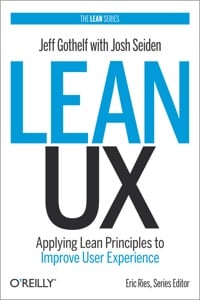
Lean UX cover

Our beloved industry is pretty wary of buzz words. And by “our industry” I mean User Experience Designers — although we can’t even agree on what to call ourselves, so that’s another problem, I guess. Anyway. Debates over terms like skeuomorphism, flat design, and “No UI” have given us a strong skepticism for fancy words. That’s mostly refreshing, but it can also be a handicap if we end up dismissing valuable ideas because we don’t like the terms that describe those ideas.

I would argue that the term Lean UX fits into this last category. It’s easy to dismiss as just another bandwagon fad, but now that I’ve read through Jeff Gothelf and Josh Seiden’s Lean UX: Applying Lean Principles to Improve User Experience I believe that it’s a valuable framework to help us understand where the UX industry is headed — and how to do our jobs better.

Whether you want to call the theory and techniques discussed in this book “Lean” or just “How we work” doesn’t matter as much, in my opinion. What is important is that we understand the benefits of moving towards a more iterative, outcomes-based design approach, while letting go of some our reliance on classic design deliverables. In the introduction to the book, the authors sum up the main reason for this proposed change in design approach:

But the fault is not with the designers, or the engineers, or even the executives. The problem is the systems we use to build companies. We are still building linear organizations in a world that demands constant change. We are still building silos in a world that demands thorough collaboration. And we are still investing in analysis, arguing over specifications, and efficiently producing deliverables in a world that demands continuous experimentation in order to achieve continuous innovation.

The book then describes how to build better products through real collaboration. I say real because Jeff and Josh don’t just say, “you should work together!” They detail a number of practical techniques for working together better, as well as case studies to show how it works in real-world situations. And underlying all of this are the three principles of what they define as Lean UX:

  • Removing waste from the design process to move away from heavily documented handoffs to a process that creates only the design artifacts needed to move the team’s learning forward.
  • Improving the efficiency of the “system” of designers, developers, product managers, quality assurance engineers, marketers, and others in a transparent, cross-functional collaboration that brings nondesigners into the design process.
  • Shifting mindsets away from relying on “hero designers” to divine the best solution from a single point of view, in favor of using rapid experimentation and measurement to learn quickly how well (or not) ideas meet the company’s goals.

Some UX designers will read this book and say that this is how they’ve always worked. That might be true — it’s true for our agency as well, to some extent. But I still found it extremely helpful to have a concrete framework for the work we do, combined with solid reasoning about the benefits of this approach. I also picked up some great execution ideas for techniques we use already — like persona templates and design studio facilitation.

The only part of the book that might be a bit controversial is the discussion of how Lean UX fits into Agile development. Jeff and Josh argue that the long-accepted idea of Sprint 0 or Staggered Sprints (making sure that design is always a sprint ahead of development) doesn’t work long-term:

However, this model works best as a transition. It is not where you want your team to end up. Here’s why: it becomes very easy to create a situation in which the entire team is never working on the same thing at the same time. You never realize the benefits of cross-functional collaboration because the different disciplines are focused on different things. Without that collaboration, you don’t build shared understanding, so you end up relying heavily on documentation and handoffs for communication.

They propose a very interesting alternative that makes a lot of sense (I won’t spoil it for you), but some of the concerns I’ve raised before about Agile UX remains. I’m not sure if any Agile UX techniques allow for enough leeway to test/research different variations of a product idea, or if it just streamlines the iteration process to get you to a local maximum faster.

In summary, Lean UX is a great overview of what an effective UX process should look like. There’s a good balance between theory, practical advice, and case studies. This makes it a valuable resource for those new to the field, but it also gives experienced UX practitioners a framework to structure and communicate the work they do every day. Highly recommended.

Buy Lean UX on Amazon.

[Sponsor] Wufoo

I’d like to thank Wufoo for sponsoring the Elezea RSS feed this week. I use Wufoo as the contact form on Elezea, and it works great.

Wufoo? Who? It’s a web application that lets you build amazing online forms for your websites.

We host everything. We build the backend. You get an easy, fun and fast way to collect and analyze data, and it even integrates with many payment systems.

With Wufoo you get…

  • Over 200 pre-made templates & themes from our form gallery
  • Ability to customize branding with your own logo and themes to match
  • Integration with over 50 web apps including WordPress, MailChimp, Basecamp, Stripe, etc.
  • Support for beautiful typography with custom fonts and Typekit integration

Just because you’re working with forms and data doesn’t mean you have to do it without personality or style. Gathering information from your users is exciting, why shouldn’t your tools be exciting too?

Experience the difference. Sign up for Free and get started with Wufoo today.

Sponsorship by The Syndicate

Collaboration for introverts

Mark Boulton wrote a forceful counter-argument to the common mantra that collaboration results in better design. From Quietly working:

I see plenty of banner waving for collaborative working. Co-designing, pair programming, brainstorming, collaborative workshops. The overwhelming message is that these tools are better for reaching consensus, sharing work, and, ultimately, lead to better work. Well, I’m not so sure that’s the truth. Given my introverted nature, sometimes these activities can rush the process too much. They allow no time for me to think. […]

Personally speaking, a lot of the time, I’d rather listen to what you have to say and go and have a good think.

Mark makes some very good points, and as an introvert myself, his message really resonates with me. But I don’t think it’s an either/or situation. It’s not that we either collaborate, or work alone. Collaboration that doesn’t allow time and space for working alone is ineffective collaboration.

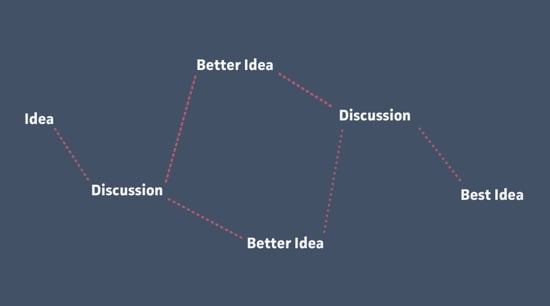
There are two illustrations about the collaboration process that summarize this idea well. The first is from Trent Walton’s Being Prepared To Contribute:

Better ideas

An idea, followed by discussion, often results in better ideas. But the “Better idea” step doesn’t happen in a meeting room — it happens at the designer’s desk, when they have time to reflect and focus on the problem without interruption.

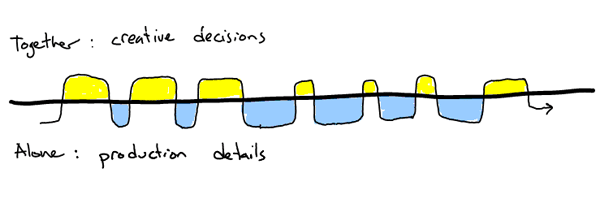
The second illustration is from Stefan Klocek’s excellent post Better together; the practice of successful creative collaboration:

Together

It shows how collaboration doesn’t mean that everyone should do everything together. Important decisions are made together, but the production details (the “better ideas”) happen while working alone.

So I’m definitely with Mark on his call for having more time to think and work alone. But that isn’t an alternative to collaborative working. It’s just a necessary — and too often ignored — part of the collaboration process.

(link via @ChrisFerdinandi)

Redesigning with patience

Jared Spool looks at different redesign strategies in Extraordinarily Radical Redesign Strategies. Whenever time and budget allow it, I believe the “realign” strategy — what Jared calls “The Glacial-Speed Approach” — works best. This strategy relies on continuous, incremental change to reach your site goals:

The beauty of making small changes means that you never have high risk. A menu item here, a new form field there. Slowly the interface morphs, and if you make a mistake, well, you change it back.

But here’s the kicker — the reality that makes most product teams opt for a different strategy:

This type of redesign takes patience. It also takes humility, especially from those organizations who think people want to hear that they’ve made it better. Unfortunately, to most people, those proclamations sound like the web equivalent of “Our menus have changed so please listen carefully.”

To pull this off, the team needs a solid vision of where the design should eventually go. Then, one small change at a time, they start. Make the change and watch what happens, proceeding slowly to the next. The team will know it’s succeeded when they hear a user insist that a new addition has been in the design all along.

Patience isn’t a word most people would use to describe their leadership teams when it comes to site redesigns. But the reality is that most other strategies involve much higher risks than the internal frustration of waiting a few extra months using the realignment approach. Risks like losing the majority of your customer base to a competitor (as Digg found out the hard way).

Read Jared’s article for a good overview of the pros and cons of different redesign strategies.

Design for now, but make it last

Frank Chimero talks about the misuse of the word “timeless” as it relates to design in Let’s talk about timeless design. Here’s one of his complaints:

Why is timeless design always the goal? What’s wrong with making something look like it was made when it was made? Why do designers all of a sudden want to exist outside of time, like Scott Bakula in Quantum Leap? […]

Other people: can you help me understand what is happening in this world of ours? I want to know what technology is doing to my brain. How do I stay human in a digital world? I want to understand what all this technology does to my expectations of myself, other people, and the world. None of this is timeless. These problems are right now.

I agree with Frank on this point (and the others), so it’s a little embarrassing to admit that I wrote in favour of timeless design about a year ago in The elusive goal of lasting beauty in web design. But having just read that post again, and in keeping with Frank’s point that words matter, I think it’s important to make a distinction between design that is timeless and design that lasts. I concluded my piece with the following:

I wonder what would happen if we felt the weight of responsibility a little more when we’re designing. What if we go into each project as if the design will be around for 100 years or more? Would we make it fit into the web environment better, aim to give it a timeless aesthetic, and spend more time considering the consequences of our design decisions? Would we try to design something that “makes life worth living”?

Sure, I use the word “timeless” there (probably incorrectly), but the point I’m trying to make is slightly different. I’m trying to say that the ephemeral and fickle nature of digital products shouldn’t be used as an excuse to put out unconsidered, throwaway work. Our designs don’t have to be timeless — and they should solve the problems we have now — but we should go into each project with the care and attention needed to make things last for a long time.

On careers and parenting

I never used to like interview articles — I felt they lacked substance. Too much backstory, not enough useful information to help me do my job better. But over the past few years I’ve realised the error of my ways. It became clear that by getting to know the people who make the things we use every day, we keep being reminded that we’re defined by more than the jobs we do. And we find that we have more in common with people than we might think.

This week I read two great interviews with designers I’ve admired for a long time. The Great Discontent interviewed Trent Walton, and Industry Web Conference interviewed Josh Brewer. Both interviews are worth reading all the way through, but I want to mention something specific that stood out for me.

Once you become a parent you start looking at everything through that lens — from grocery shopping to restaurant menus to the work you decide to devote your life to. There’s no getting around it. Non-parents usually find it annoying, while fellow parents are drawn to each other and can’t help but discuss how the parenting lens affects every single decision they make every day.

So, my favourite parts of these two interviews were their reflections on parenting. Here’s Trent:

It’s insanity [at work] until 5pm and then I go back inside and it’s all hands on deck. I’m feeding the kids, changing diapers, reading books, and bathing them—I love it because there’s no time to answer email or think about anything work related. It’s a really great transition for me. What I would have thought I would see as a pain in the ass is the best part of my day and it helps me to shift gears.

And here’s Josh, saying something similar:

Keeping things in balance was (and is) a constant challenge and something that my wife and I work hard at. I tried to be home in time for dinner and reading to my daughter and tucking her into bed. Weekends were definitely reserved for family time. I was lucky enough to walk to and from work which gave me a little time to decompress.

It’s hard to explain how comforting it is to read those paragraphs. To realise that these extremely successful designers — people I look up to and learn from every day — generally don’t work 12 hours a day. They work hard, of course, but as any parent knows, 5:30pm - 7:30pm is chaos. And the people we look up to aren’t immune to that. They don’t have superpowers that allow them to fly through that time, and the ones I really admire don’t push those responsibilities to their partners or someone else. They show up, every day, and they pursue the challenges of being a parent with every bit of passion that they throw into their design work.

This is really obvious stuff, I know, but I also think (hope?) I’m not alone in the struggle to find a balance between pursuing my career goals and learning to become a good parent. So reading Trent and Josh’s stories gave me comfort that it is possible to excel at what you do without losing your soul to your work.

And that’s why I like interview articles.

Flexibility and feedback during the design process

In A More Flexible Workflow Dennis Kardys describes an all-too-familiar design process problem in agencies:

In theory the design assembly line made us extremely efficient. Design documents were handed off like batons from one team member to the next as projects moved through stages. The reality however, is that projects would often get held up as clients mulled over wireframes or fought for consensus within their organization. […] In a nutshell, there was too much talking and too little testing.

Dennis goes on to describe how they’ve successfully changed their workflow to incorporate interactive prototypes and frequent customer feedback. These aren’t new ideas, of course, but it’s great to see it from an agency perspective, where these flexible workflows can be much harder to implement.

Sticking with the design process theme, Tuhin Kumar wrote a good post about matching the type of critique a project requires to the design phase that project is currently in. From Feedback & Fidelity in Design:

Momentum is one of the best things for any product design process. It helps you from straying around the wrong path, or losing your core vision, or trying to solve too many things in the first release. […] Asking the wrong questions at the wrong fidelity or giving the wrong feedback kills momentum like nothing else.

Tuhin defines some different phases of the design process, and recommends the right questions to ask during each. Both these articles give some great tips to improve your design workflow.

NoUI, YesUI, and appropriate visbility

Frank Chimero has a great follow-up to Tino Arnall’s excellent post No to NoUI. In The Cloud is Heavy and Design Isn’t Invisible Frank explores what’s appropriate (and what’s not) about using “The Cloud” as a metaphor, and then he makes a great point about the Invisible Design trend:

Sometimes I wonder if the desire to obfuscate production and make the resulting design invisible or seamless to users diminishes their appreciation for the craft of building systems. I think there’s a strong likelihood that metaphors like “The Cloud” and sayings like “It Just Works™” reduce a user’s appreciation of the software/hardware they are using. “Magic” is a great word for selling product, but it also can cheapen all the sweat it takes to get there. If the seams have been covered, you can’t admire how things connect.

I completely agree with Frank on this. As I’ve mentioned before, I think our goal shouldn’t be NoUI (or YesUI or AlwaysUI or whatever we want to label the other extreme). Our goal should be appropriate visibility.