Menu

Posts tagged “agile”

Just another distributed team workflow with Trello and InVision

Working with people can be hard. Designing with people can be even harder. Designing with people who are not in the same location can be almost impossible. There’s no perfect solution for working in distributed teams, but if there’s one tool that seems to get our community further than most, it’s Trello. I’ve seen some really great Trello workflow posts over the past few months:

We have a distributed team across Portland, OR and Dallas, TX, and we use a workflow similar to the ones above, but different enough to make me think it might be worth sharing.

As background, we have a team of 5 UX Designers who split their time across 3 main products as well as our internal Pattern Library. Each product has a Design Lead (this role can rotate), and we define the Lead’s responsibilities as follows:

  • Understanding and documenting user needs, business goals, and technical constraints before any design work starts.
  • Being the single point of contact for any design questions by Product Managers or the rest of the business.
  • Making sure Trello is updated with latest priorities, due dates, and artifacts.
  • Making tie-breaker design decisions as needed and required if there are design disagreements and we can’t reach consensus.
  • Designing interactions and screens, and/or implement those designs in the pattern library, and distribute the workload to other designers as needed and capacity allows.
  • Explaining and defending design decisions, even at 8:30am before having a cup of coffee.

Granted, that last requirement is a bit harsh, but we set high standards for ourselves here.

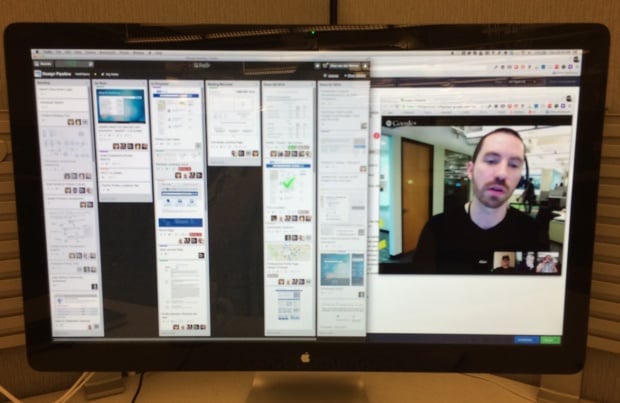
Anyway. Our week starts on Thursday mornings with a Design Pipeline meeting where we go through our upcoming tasks as a team, give each other design feedback, and play with the animations in Google Hangouts. Here is a typical Thursday morning view — Trello on the left, Google Hangouts on the right:

Trello workflow

Each Design Lead comes to this meeting with an understanding of their Product Manager’s main priorities so that we can discuss how to divide up the work. As you can see above our Trello board has 6 columns:

  • Backlog: Work that’s coming down the road, prioritized every week by the Design Lead after talking to their Product Manager.
  • Up Next: What we’re going to work on next once current tasks are complete. We use our Pipeline meeting to pull cards out of the Backlog and into the Up Next column.
  • In Progress: In typical Kanban fashion we try to limit work-in-progress, so for a card to be in this column it really has to be in progress. During our Thursday meeting we have an opportunity to give feedback and help each other out on any questions we might have.
  • Waiting/Blocked: If something can’t move forward it can’t just sit in In Progress gathering dust — we have to move it into this column. This gives me an opportunity to know where I need to get involved to unblock things if necessary.
  • Done (current quarter) and Done (previous quarter): We keep two quarters of completed cards in the history, and archive further back. If everything goes into one big Done column it just becomes really unwieldy.

A couple of other random points:

  • We use Trello’s color labels to indicate who’s responsible for each card, since it’s not possible to assign a single point of contact to a Trello card (unless you remove the watchers, which kind of defeats the point of, you know, collaboration software).
  • We all dial into Google Hangouts separately from our desks. I find that if you have two rooms and a single dial-in it’s easy to get distracted or for side discussion to start happening. This approach puts everyone on the same playing field, and as an added bonus we can all update Trello together.

During the week we use Trello as a running News Feed of what’s happening on each of our tasks, but sometimes that’s not enough. For ad hoc design feedback during the week we using InVision, a tool I dearly love, and not just because they sent me this nice coaster in the mail (thanks guys!):

InVision is more of an internal scratchpad — a safe place where we can work together as a team and ask each other tough questions about our designs. In contrast, Trello is the paper of record for each of our revisions that we share with anyone who’s interested. It works well for us to separate those spaces out.

The combination of Trello, InVision, and Google Hangouts don’t make up for in-person time (I hope for at least some of us to be in the same space every couple of months), but it sure makes it easier than email and Lync, which is THE BIGGEST PILE OF CRAP SOFTWARE EVER CREATED.

The kicker is that our organization is finally moving to JIRA and Confluence, so we’re currently messing around with Kanban boards in JIRA to replace the Trello bit of this workflow. If we ever figure that out, I’ll write another post about. But for now, this is how we work. I’d love to see how you do it. Write a post, send it to me, and I’ll link to it here.

Software development belief systems in corporate environments

Executives in corporate environments have one of three belief systems about software development. To build successful products it is essential for product managers to understand what belief system their executive team subscribes to.

  • Belief system #1: We have to build these features and they have to be live by this date.
  • Belief system #2: We have to be live by this date — what features can you get done by then?
  • Belief system #3: We have to release these features next — how long will it take to get that done?

Belief system #1 is the most common, and it is poison. It usually goes along with a distorted Steve Jobs “reality distortion field” complex, and the only thing it produces is crappy software and burnt-out teams who feel distrusted and undervalued. A product manager’s first job is to move the executive team away from belief system #1.

Belief system #3 is the ideal scenario for most large corporations1. Software development and the product manager’s role are usually well understood in such environments. The product team gets to present their market-driven ideas to the executive team, who can focus on what they do best: providing perspective, vision, and assistance with prioritization. This allows product teams to set their own schedules based on what everyone agrees needs to be done as they balance what’s best for users, the business, and the technology.

Belief system #2 is not ideal, but it is certainly better than #1, and I’ve learned that it is impossible to move executive teams from belief system #1 to belief system #3 without the interim step of belief system #2. The logical jump from #1 to #2 is easier to influence since product managers only have to deal with one variable: the constraints of time.

If a release date is fixed2 product managers shouldn’t spend time trying to move out the date to accomplish everything the executive team wants them to. Instead, spend time explaining that the release date is a horizontal line. All features above the line gets done by the date, and all features below the line don’t, and will have to wait for a future release. Explain that the development team can only do a limited number of things in a given time frame, and if some feature suddenly becomes a must-have, one of the other features have to move “below the line”.

This might seem like a trivial concept, but that’s because we’re software people. Most executive teams have a really difficult time with this because software development in agile environments is fairly new to them.

It bears repeating that one of the biggest mistakes a product manager can make is to try to change people’s belief systems from #1 to #3 without first taking them through the logic of #2. That said, once a project has been completed successfully using #2, the shift to #3 is usually fairly easy to make. That’s because the executive team had the opportunity to get a glimpse of how much better the software can be if “required” features aren’t shoved down a funnel that cannot withstand the pressure.

If you work in a large corporation, identify your executive team’s software development belief system, then guide them to #3. Your product, your business, and your team’s morale will be better for it.


  1. I.e., most practical and pragmatic. I’m talking specifically about corporations with >100 employees, not startups. 

  2. And don’t get me wrong, there can be legitimate reasons for fixed release dates. 

Getting back into the (right) deliverables business

This is a written version of a talk I gave at Industry Web Conference on April 23rd, 2014. It’s a great conference and you should definitely attend next year.

This is a photo of what many believe is the first wireframe ever created. It’s attributed to Paolo di Dono (aka Paolo Uccello), dating somewhere in the mid 1400s (source):
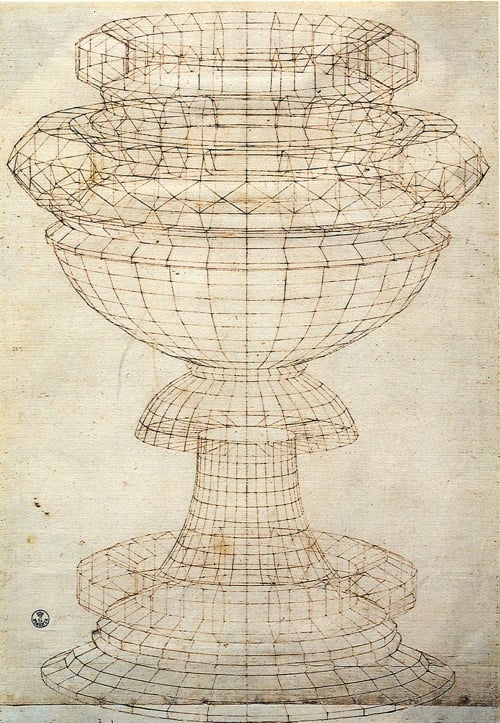
The first wireframe

Back then, wireframes were used to accomplish very specific goals to help with the design of everyday objects (source):

  • To view the model from any desired point
  • To produce standard and auxiliary views
  • To create perspective views more easily
  • To analyze distances within the structure
  • To check tolerances and interference
  • To decrease the number of prototypes required
  • To edit the model

Wireframe models are particularly useful in the world of architecture, so it’s no surprise that software used to create CAD models incorporated wireframes as core to the product:
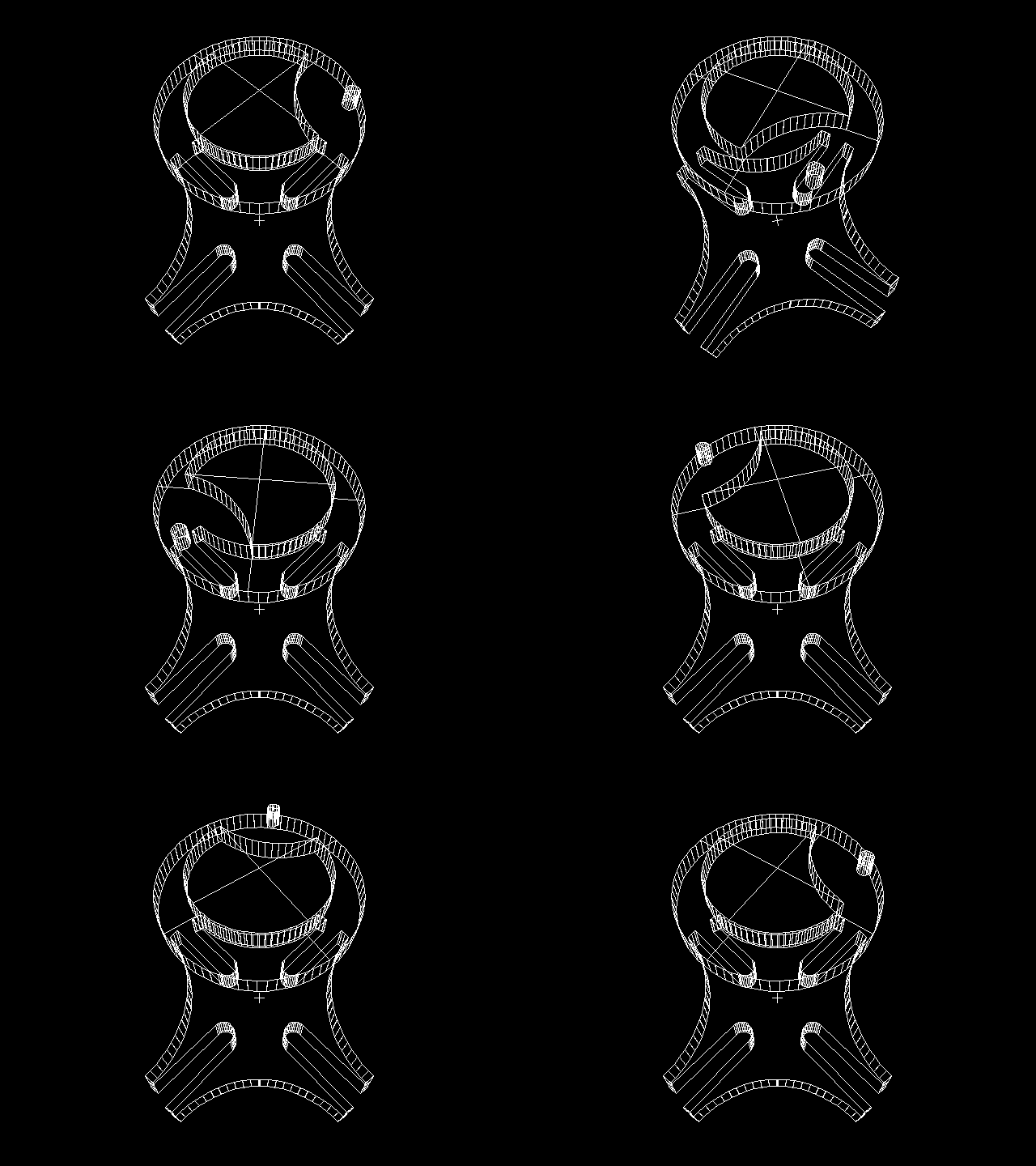
Rotating wireframe

Image source

To clarify things a bit, wireframes were originally used to accomplish two product design goals: to reduce rework, and to speed up delivery. Those are words that will make any designer or developer’s ears perk up. Who doesn’t want that?

However, somewhere along the line we’ve watered down wireframes to something completely different. At worst they’re reverse-engineered artifacts based on completed PhotoShop files once an agency account manager remembers they’re supposed to “do UX” as part of the project they sold. At best they’re hailed as good communication tools — nothing more, nothing less. We’ve managed to reduce a highly useful design tool to something we fight over on Twitter. And it’s not just the humble wireframe that’s in the crosshairs. Personas. PSDs. Debrief presentations. They’re all looked on with the same disdain:
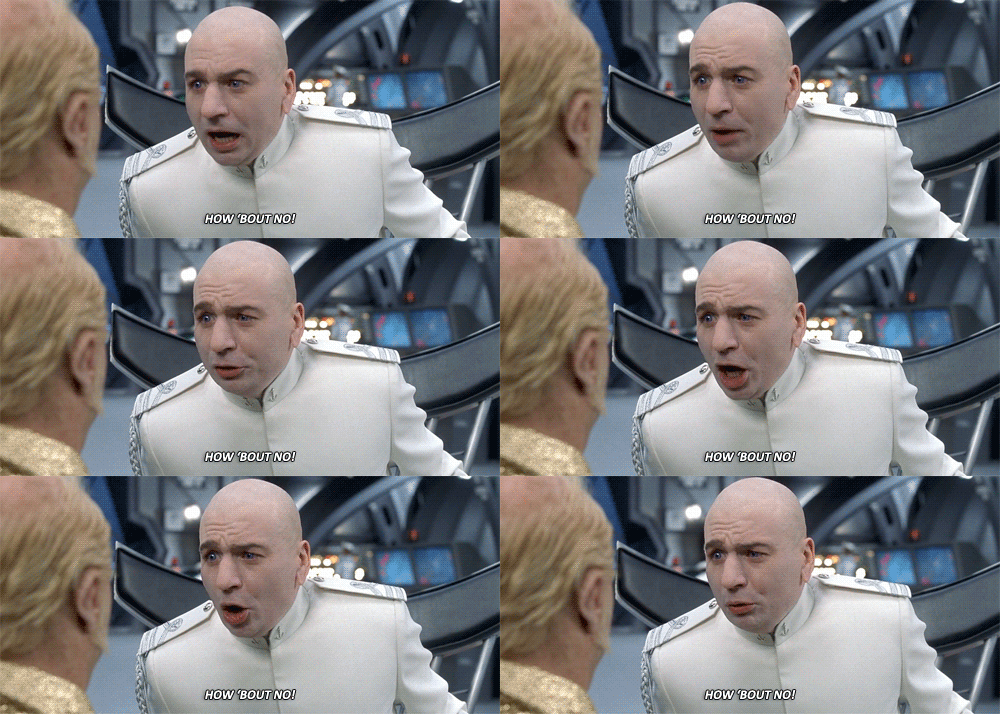
No

The reality is that there is a lot of truth to the criticism we lavish on “deliverables”. The Lean movement is right about the main reason for getting out of the deliverables business — whatever time we spend documenting stuff is time spent we’re not making stuff, and that’s a problem. It’s much better to create hypotheses, build them quickly, and test them with users to get feedback and iterate. I’m in complete agreement on that approach.

That said, there is a problem with this approach that has started to become more and more bothersome as I went on my own journey to stop making deliverables. The problem is that design is path-dependent. The choices we make early on in a design constrain the choices we can make later on. Ryan Singer sums this up really well in his answer on the Quora thread Should I focus on a good user experience, or push something out quickly?

On the very first iteration the design possibilities are wide open. The designer defines some screens and workflows and then the programmer builds those. On the next iteration, it’s not wide open anymore. The new design has to fit into the existing design, and the new code needs to fit into the existing code. Old code can be changed, but you don’t want to scrap everything. There is a pressure to keep moving with what is already there.

Our early design decisions are like bets whose outcome we will have to live with iteration after iteration. Since that’s the case, there is a strong incentive to be sure about our early bets. In other words, we want to reduce uncertainty on the first iterations.

So the main issue I kept running into as I stripped deliverables out of my design process is: how do I know where to start? How do I make sure I start in a place that isn’t going to limit me so much that I’ll have to start over completely at some point? And not just that, but what about that thing we all want to pretend doesn’t exist but we have to deal with every single day? You know, the S word. Stakeholders. Those people who need to know what’s going on and why, all the time. Without deliverables we’re kind of exposed to the elements on that, with nothing to lean on.

Something’s gotta give, and I think that something is the deliverables we make part of our design and development process. So I started thinking.

Thinking

I started thinking about Jared Spool’s excellent piece from earlier this year, A Bias For Making, in which he wrote the following:

A bias for making doesn’t mean the team never plans. On the contrary, plans happen fluidly throughout the entire design process. The difference is they are evolving as the team learns from the process of making.

And then I started thinking about Giff Constable’s words in You Are Spending 3x-5x More Than You Should:

Agile/lean has helped people debunk the ‘big upfront design’ phase, but far too many replace it with nothing.

And as I kept thinking about all this stuff, I started to realize that there are some things that the right deliverables could actually be good at. For example:

  • Deliverables could provide a better baseline to start a design from, particularly when it comes to device-agnostic design and development.
  • Deliverables could help teams running along smoothly by anchoring everyone on the same vision, and serving as a communication tool to help executive teams understand the execution plan.
  • Deliverables could help with building up organizational memory, so that when the inevitable leadership changes happen, everything doesn’t get scrapped to start over.

Of course, the next obvious question is, what are these right deliverables you speak of? If we’re all agreed that flat wireframes and millions of PSDs are against the spirit of Lean, what’s the alternative? How do we solve the problems that “no deliverables” present, and come up with something that helps us create better products (which is the end goal we all have in common)?

There are two kinds of deliverables that I’ve been working on as possible (work-in-progress) solutions to these issues, and in this post I’d like focus on one that clearly needs a better name: Expanded Customer Journey Maps.

Journey maps are visual representations that help summarize research, highlight and prioritize user needs and opportunities, and give teams a common goal to work towards (see Adaptive Path’s excellent introduction at The Anatomy of an Experience Map). A product’s journey map is important because:

  • It confirms a common understand of the users’ needs and goals, and the strategy you intend to follow to attend to those needs and goals.
  • It is an excellent prioritization tool, since it allows companies to focus on the most important parts of an experience first, without losing sight of the overall picture.
  • It is a guiding light for design. Every time a design idea comes along, a quick glance at the journey map helps us figure out if it’s a good idea that will accomplish the chosen strategy.
  • It is an excellent conduit for content-first design, which fits in perfectly with responsive design approaches.

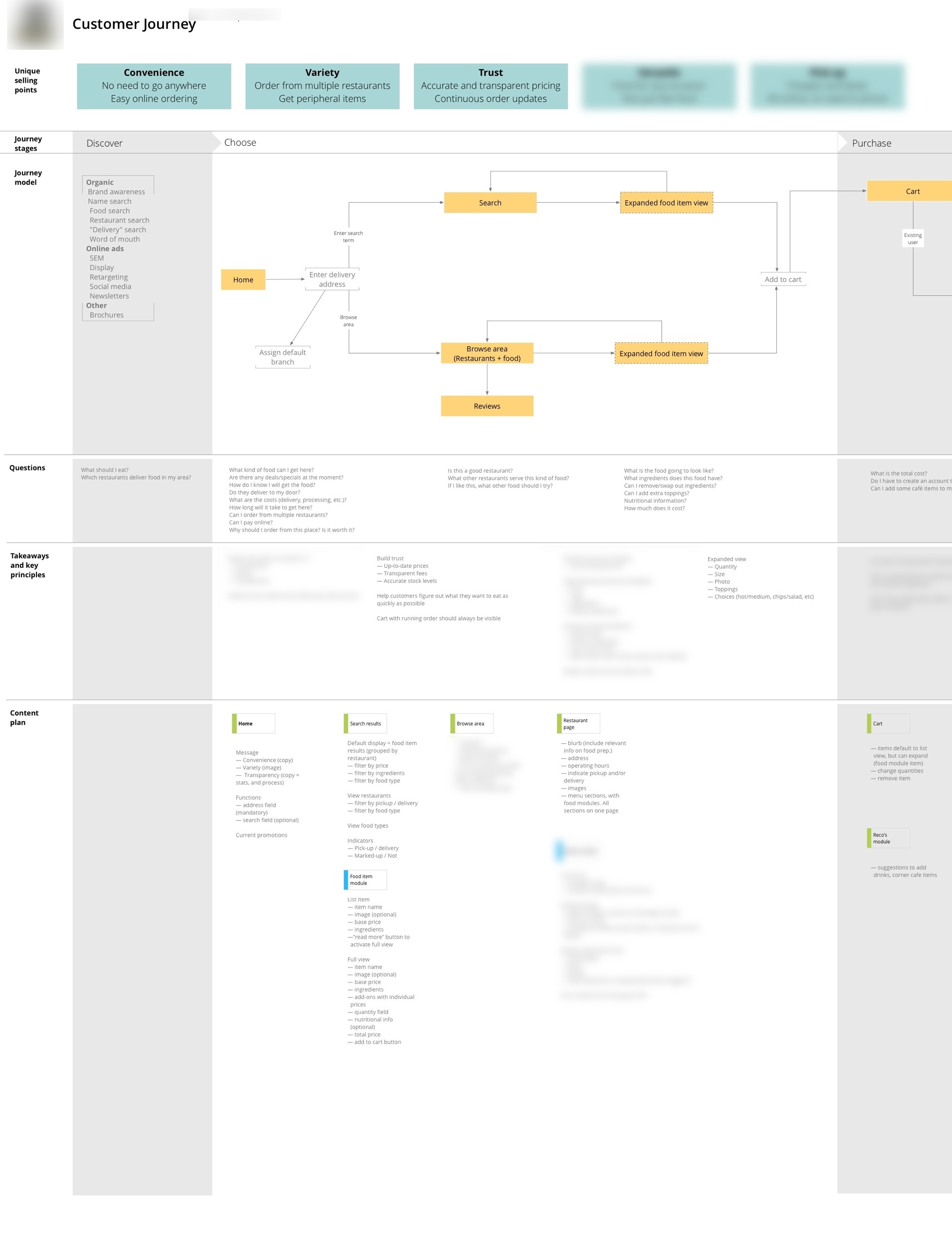
There are many different ways to create a customer journey map. It has some common elements, such as a visual representation of customer touchpoints, emotions, and key takeaways throughout their experience with a product. But that’s only useful up to a point, so we’ve started to expand on the concept. In addition to the usual elements, this document also becomes a representation of the information architecture and the product’s content plan, with personas (needs, goals, scenarios) serving as the starting point for everything — the glue that ties it all together.

This new document is a summary of everything we need to know to design the best possible product for users. It has the following elements:

  • Unique selling points to keep us focused on what the site needs to communicate at all times. This comes straight from the persona needs and goals.
  • Journey stages and model to remind us how the product fits into people’s lives, and what the primary calls to action need to be throughout the site. This section is a visual representation of a customer’s journey from realizing they might have a need for the product, until long after they’ve used it. This helps product managers keep a holistic view of the entire product and how it fits into users’ daily lives.
  • Questions that our target personas are likely to ask in each phase of the journey, to focus the type of content we serve on each page. In an e-commerce context, these are questions like, “Can I trust this retailer?” or “When will my stuff arrive?”
  • Takeaways and key principles to summarize the unique selling points, journey model, and user questions, and document how they translate into the design decisions and solutions we need to keep in mind throughout the design process.
  • Content plan that maps each phase of the journey with the questions our personas will ask during that phase, and what it means for the specific content that needs to go on each page. We get very specific here — nothing gets on the page unless it’s in the content plan. And if we can’t identify a persona that would find the content useful, it doesn’t go on the list.

Below is an example of an expanded journey map. You can click through to see a larger slice of one of the sections.
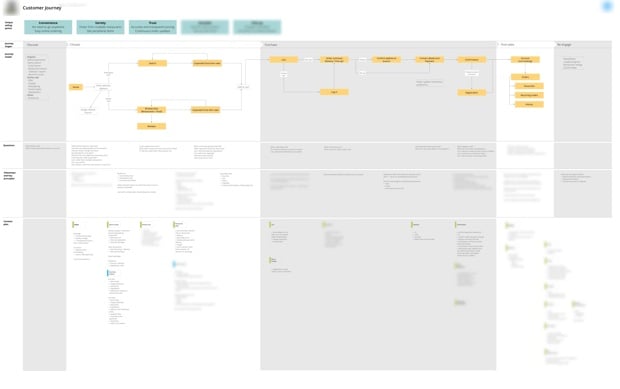
Expanded Journey Map

There are a few things that we found this kind of expanded customer journey map does really well:

  • It is completely device-agnostic. It starts with personas and content, and the entire design remains anchored on that.
  • Once you get going, design cycles happen faster, because everyone is aligned on the vision and direction.
  • During user testing we tend to find fewer usability issues because we already thought through the most common problems that might occur.
  • As a team we tend to have better arguments — meaning we don’t fight about whether the button should be blue or yellow, but whether the design accomplished the goals we agreed on.

It’s not a perfect solution, of course. Everything has drawbacks. In the case of expanded journeys, we’ve found the following challenges that we still need to work through:

  • There’s no denying it, the initial lead time before design starts is longer. That’s just the way it is, because thinking about a problem takes time. Once the design phase starts we actually make up that time in spades, as mentioned above, but it can still be an awkward time with clients and internal stakeholders if they can’t see “pictures” as quickly as they might want.
  • It’s easy to get distracted if you’re a UX nerd. This stuff is so exciting for some people (ok, me) that it’s possible to stand in front of that white board for days if you don’t check yourself. This isn’t about making a nice piece of paper, it’s about making a better product. Give it your best shot, and then move on. Don’t get lost in analysis paralysis.

So where does this leave us? Yes, deliverables can slow us down and result in documentation that no one reads. But the right deliverables anchor teams in a united product vision, they provide early validation for product ideas, and they speed up (the right) making activities. That’s worth the drawbacks for me. Remember, deliverables aren’t bad. Bad deliverables are bad…
Bad deliverables

This is still a work in progress. I’d love to hear others’ thoughts on this methodology, and if they’ve expanded it in other directions. If you have thoughts or ideas please let me know on Twitter, or write a post and send it to me. I’ll link to it here.
Validate first, ship second

Giff Constable makes the case for validation and learning in the product development process before you launch something. From You Are Spending 3x-5x More Than You Should:

Agile/lean has helped people debunk the “big upfront design” phase, but far too many replace it with nothing. I agree that waterfall-style, big-upfront-design is a waste of time and money. I do believe that getting into the market with a designer and an engineer and learning is a critical use of time.

Doing it right vs. doing it over

Cap Watkins in Just Ship*:

We work in a world now where fast isn’t good enough. Where quantity is fairly regularly getting edged out by quality. You shipped twelve just-good-enough things this year? You’re about to get smoked by folks who shipped three of those things thoughtfully and holistically. Where you cut corners on twelve projects to get them out the door, someone else crafted three focused experiences and left themselves little-to-no design or technical debt.

This also describes why arbitrary release dates are poison to good quality products. It forces teams to cut corners to hit a date, which puts them in a more vulnerable position than if they just took the time to do things right.

Also:

Why do we never have time to do it right, but always have time to do it over?

— Alan Skorkin (@skorks) April 10, 2013

The design process of Mark Boulton Design

Mark Boulton’s How we work is a great post about their design process. I particularly like his point about personas, a method that I have defended before as well:

The tool is not the important thing here, [what’s important is] how you can use something to help people think of other people. To help an organisation to think of their customers, or designers to think of the audience they’re designing for, or the CEO to think in terms of someone’s disability rather than the P&L.

What I find generally useful about running a workshop like this is that it exposes weaknesses in an organisation. If a client pays lip-service to a customer-centric approach, it will soon become very evident in a meeting that that’s what’s going on.

I also like his view on agile in an agency environment: “We make things and then fix things as we go.”

User Experience Debt

Vijay Sundaram takes the concept of technical debt and applies it to User Experience Design:

You know you’re a subprime borrower when your team decides to “clean this up next release”. But the next release has a backlog of critical bug fixes, must-have feature requests, and of course plenty of new design shortcuts that emerge in the process. What’s more, the usage data for the last release is showing great engagement and no one has complained yet about the shortcuts you took. Fixing those can’t possibly be a priority right now. Before long, the team is grafting one design shortcut onto another, and the only way to unwind them is a wholesale reboot.

The article made me think of Henrik Kniberg’s excellent Good and Bad Technical Debt (and how TDD helps), in which he explains the concepts of a “good mess” and the “technical debt ceiling”:

A fresh mess is not a problem. It’s the old mess that bites you. […]

If you are coding up a new feature, there are lots of different ways to do it. Somewhere there is probably a very simple elegant solution, but it’s really hard to figure it out upfront. It’s easier to experiment, play around, try some different approaches to the problem and see how they work. […]

The problem is, just like in the kitchen, we often forget to clean up before moving on. And that’s how technical debt goes bad. All that “temporary” experimental code, duplicated code, lack of test coverage — all that stuff will really slow you down later when you build the next feature.

So regardless of your reason for accumulating short-term debt, make sure you actually do pay it off quickly.

I’ve been wondering how this applies to UX debt. Is it ok to take some design shortcuts, knowing that you’ll come back later and fix it (up to a “UX debt ceiling”)? My gut feeling is to say no, because design is so path-dependent. Your early choices constrain your later design choices, so if you make the wrong choice it can really hurt down the line. For example, if you skip user research in the beginning of the project, you’re highly likely to make the wrong choice about what to build, which isn’t something you can fix easily later on.

The solution is to have shorter UX (and development) cycles, which is becoming commonplace anyway with the rise of the Lean movement. I’m reminded of IDEO Design Director David Aycan’s 2010 article in HBR, Don’t Let the Minimum Win Over the Viable, in which he explains the importance of taking small steps so that it’s easier to correct course when you realise you’re on the wrong track:

Sketching or mocking up experiential prototypes and then testing them with consumers or potential partners, while also explicitly jotting down your operating and business assumptions and using them to discuss the business with industry experts, allows you both to pick a promising route to invest in the development sprint and to pivot with confidence. For example, by prototyping multiple consumer experiences and business models before investing in an initial MVP, GoGo was able to launch an airline WiFi and in-flight service experience that combined the best of multiple alternative services that might be offered in flight. One might think of this approach as testing multiple MVPs in parallel.

Creating multiple options in tandem creates more confidence in the core variables, which in turn means that pivots may be less drastic or disruptive later on. This approach can be applied beyond product features to business models and operating approaches as well.

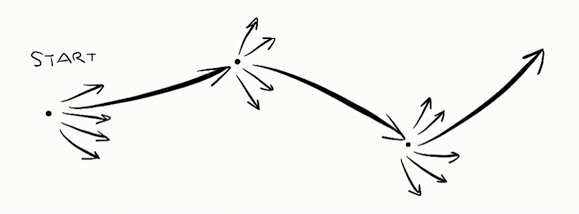
He uses this sketch to illustrate the approach:

MVP approach

This makes a lot of sense in the context of UX and technical debt as well. A pragmatic approach to dealing with software debt seems to be something like this:

  1. Create different possible paths (variation)
  2. Pick a direction and work towards it (iteration)
  3. Get feedback, address debt and other issues, correct course if necessary
  4. Repeat cycle

The trick is to be ok with the early messes, but not let them deteriorate so much that you’re unable to clean things up when you finally decide it’s time. Remember the broken windows theory: “maintaining and monitoring urban software environments in a well-ordered condition may stop further vandalism neglegence and escalation into more serious crime technical issues.”

Create a dedicated project news feed with Trello and Hipchat

I’m always looking for ways to make our workflows more efficient, often to the frustration of my colleagues. I admittedly make them test out way too many tools. But I think I finally found a winning integration that everyone can get behind. First, a bit of background.

We use HipChat as our group chat and IM tool. We have a general room where we all hang out (but I’ll be honest with you, it mostly contains gifs), and then we also set up dedicated project rooms where we discuss project-specific issues. We use Trello to track our tasks and progress on projects. I love Trello, but I wanted to find a way to turn HipChat into the canonical record of what happens on our projects. For that, I turned to a service called Zapier.

Zapier is a tool that connects the web apps you use on a daily basis, and move data between them. Think of it as If This Then That for business use. We have quite a few Zapier automations set up, but my favorites are the ones that post a message to HipChat whenever something specific happens in Trello.

The first step is to set up the connection between Trello and HipChat. To do that, start with this Zapier automation: Create HipChat Alert from new Trello Activity.

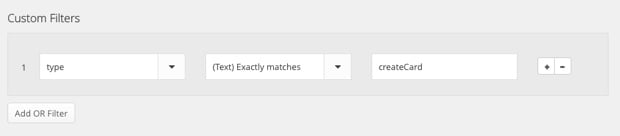
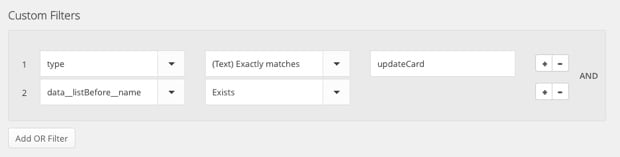
Now, the problem is that this default integration posts a message whenever anything happens in Trello, so it gets overwhelming really quickly. I only want to post a message to HipChat when (1) someone creates a new Trello card, or (2) when someone moves a card from one column (like To Do) to another (like Doing). Trello’s API documentation isn’t very clear, so it took quite a bit of playing around, but I eventually figured out how to make it work. The trick is that you have to create some custom filters to weed out the non-essential stuff. So, once you’ve set up the basic automation, here’s what to do.

To send a message to HipChat when a new card is created in Trello, add the following custom filter:

Zapier Hipchat Trello

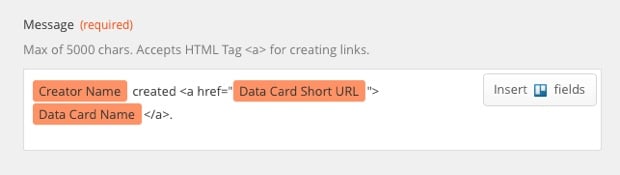
And then use the following variables for the HipChat message:

Zapier Hipchat Trello

To send a message to HipChat when a card is moved from one column to another, create the following custom filter:

Zapier Hipchat Trello

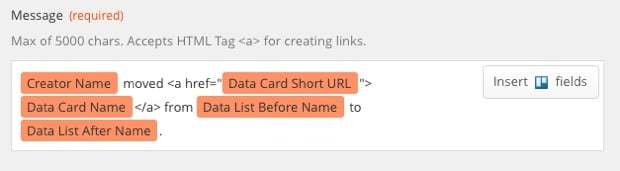
And use the following variables for the HipChat message:

Zapier Hipchat Trello

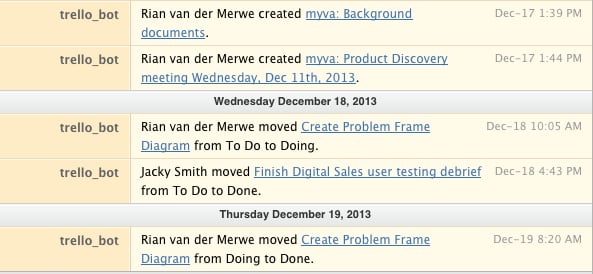
The result looks like this in HipChat:

Zapier Hipchat Trello

I like this message format because it lets you know who did what, and it also links directly to the Trello card if you’d like add a comment or look at other activity.

This integration basically turned HipChat into a dedicated project news feed, which I find extremely useful. If you only work on one project at a time this whole thing might seem like overkill, but we often have 3 or more projects on the go, so it’s great to enter a HipChat room and immediately be able to get a sense of what’s going on.

So, give Zapier a try. Even if you don’t use HipChat and Trello, I’m sure you’ll have fun playing around with the services you do use.

[Sponsor] Atlassian's agile guide

Thanks to Atlassian for sponsoring Elezea’s RSS feed this week!

What’s the point of an agile standup meeting?

Gone are the days of 30-minute status meetings where most people are half-asleep or pecking away on their laptops, oblivious to what’s being said. Agile standups are the leaner, more efficient cousin of status meetings where attendees actually stand up. On our feet, we’re more focused, attentive, and concise. It’s science!

Whether you need robust tools for planning and tracking projects, communicating with coworkers, deploying products, or just some general tips on how to run an agile shop (and how to run them Rong?), Atlassian is here to offer you the tools and advice you need to get the most out of your agile practice.

Sponsorship by The Syndicate.

Healthcare.gov is all our projects

Healthcare.gov

So much has been written about the disastrous launch of healthcare.gov. But Sheryl Solberg and Michael Shear’s Inside the Race to Rescue a Health Care Site, and Obama hit especially close to home. Much of it reads like any number of software development projects I’ve been involved in over the years:

In Herndon, as engineers tried to come to grips with repeated crashes, a host of problems were becoming apparent: inadequate capacity in its data center and sloppy computer code, partly the result of rushed work amid the rapidly changing specifications issued by the government. […]

The website had barely been tested before it went live, so a large number of software and hardware defects had not been uncovered. Fixing the account creation software simply exposed other problems; people still could not register to buy insurance. A system intended to handle 50,000 simultaneous users was fundamentally unstable, unable to handle even a tiny fraction of that. As few as 500 users crippled it, according to people involved.

Rushed work amid rapidly changing specifications… No testing before going live…

Let him who has never experienced issues like that on a project cast the first negative blog post.