Menu

Posts tagged “agile”

Why even Lean startups need functional specs

Ian McAllister states a common rallying cry of the Lean movement in his answer to the Quora question What should a lean startup functional spec / product requirements doc look like?:

Functional specs or product requirements documents invite scope creep and are walking dead documents.

I’d like to start my rebuttal with something Joel Spolsky wrote in Painless Functional Specifications - Part 1, back in 2000:

Failing to write a spec is the single biggest unnecessary risk you take in a software project. It’s as stupid as setting off to cross the Mojave desert with just the clothes on your back, hoping to “wing it.” Programmers and software engineers who dive into code without writing a spec tend to think they’re cool gunslingers, shooting from the hip. They’re not. They are terribly unproductive. They write bad code and produce shoddy software, and they threaten their projects by taking giant risks which are completely uncalled for.

Having said that, I’ll admit that the majority of specification documents are bad. Meaning they are long, they are boring, they are done just to check a box to say they were done, they are written once and never updated, and most importantly, they don’t get used during development. That is a situation Product Managers desperately need to avoid. If a spec isn’t being used actively during development, it’s not the developer’s fault, it’s the Product Manager’s fault. It’s up to the Product Manager to understand what kind of document would be useful to developers, and then provide such a document — one that is much, much better than winging it.

The Functional Spec describes how a product works from a user’s perspective. It’s not focused on how it will be implemented (that’s covered in the Technical Spec), but on defining flows and screens, and how users will experience the product. This might sound a bit academic to some, and against the spirit of the Lean movement that’s all about “getting out of the deliverables business”, but we have to remember that documentation isn’t bad. Bad documentation is bad. Good functional specs help teams communicate, save time, and build better products. But to make sure your functional specs fall into the “good documentation” category, there are a few important points to remember:

  • Specs should be dynamic. They are not written once and forgotten about. This is why specs shouldn’t be written in Microsoft Word (no more “v27_FINAL4.docx” filenames). Instead, use collaborative tools like a Wiki or Google Docs to make it easier to edit and access the most recent version.
  • Specs should be accessible. The spec document isn’t something that the PM writes in isolation before coming down the mountain to hand over their “Ten Commandments” to the development team to implement. Anyone in the organization should be able to access the specs at any time, and team members should be able to ask questions and contribute to the spec. That’s another reason why Word is out, and online collaborative tools are in. Seriously, uninstall Microsoft Word.
  • Specs should be flexible. The biggest and most valid criticism of most functional spec documents is that they are too rigid. Most are merely a list of requirements that were written by people far away from actual implementation, and once their job is done, they are unable to adapt in the face of reality. That’s not how it should work. The last 20% (or more) of a spec is always going to happen during development. That’s not only normal, it’s healthy. It means that teams can adapt to the needs of the products and users, and that they are willing to remove, change, or add features if needed (i.e. if the user evidence or business need is there).

The spec isn’t a document that the PM writes the day before development starts. This is a document that is started as soon as a new project kicks off. Create a template in your wiki (or wherever the plan is to store specs), and open it up as soon you start working on a new project. The best way to write a spec is to add information to it as it becomes available. Add the customer journey map as soon as you have it. Add sketches as soon as you move into the prototyping phase. This reinforces that idea that it’s a living document that is open to collaboration, and it also breaks up the workload so that it doesn’t feel like a huge effort to create the spec.

It’s essential to only add relevant content to the spec — nothing more. For some smaller projects it might be ok to skip the customer journey and prototyping phase, and move straight from sketching to graphic design and/or development. That’s ok. Don’t think of the different sections that make up a spec as above the law, think of them as an a la carte menu that you can pick and choose from based on the needs of the project.

Many people roll their eyes at functional specifications, believing it’s part of an old school way of doing Product Management that isn’t relevant any more. But I’ll repeat what I said earlier: specs aren’t bad. Bad specs are bad. If you create documentation that people actually use to build the product and understand why certain decisions were made, how can you argue that it’s not useful? So my advice is, don’t stop writing specs. Just start writing really good ones.

I’m currently working on a Product Management book, to be published by Smashing Magazine early next year. In the book I go into much more detail on the ingredients of a good functional spec. If you’re interested in getting notified when the book comes up, you can sign up here.
Breaking Development: Prototyping Style

I’m attending the Breaking Development conference in San Diego this week, and will be posting my notes from a few of the talks here.

Ben Callahan did a great talk on design workflows called Prototyping Style. He discussed the problems with linear workflows before giving some great tips on a new way of collaborative working specifically suited for responsive design.

  • We used to have a very linear workflow, which went something like this:
    • Content
    • UX
    • Design
    • Front-end development
    • Back-end development
    • Launch
  • The problem with linear workflows is that decisions are being made in each step, before we have all the data
  • We need to invite others into the process, and work towards a “1 Deliverable” workflow

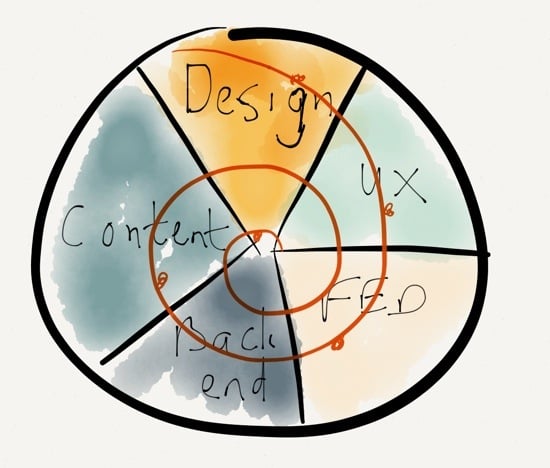
The “1 Deliverable” workflow looks like this (excuse my quick Paper drawing…):

1 Deliverable

The benefits of a “1 Deliverable” workflow:

  • It’s centered on iteration
  • It requires collaboration
  • It results in natural decisions (waiting for the last responsible moment to make decisions, once all the right data is available)
  • Watch out, it sometimes conflicts with organizational structure
  • It requires the right team — no room for superstar egos

So how do we advance the Design phase through a “1 Deliverable” workflow? 3 stages of design:

  • Establish the aesthetic
  • Solve the problem
  • Refine the solution

Establish the aesthetic

  • Do style comparisons with clients, to get a sense of what they’re looking for
    • Light vs. Dark
    • Flat vs. Textures
    • Illustration vs. Photography
  • Move from Style Tiles to Style Prototypes:
    • It shows more accurately what it will look like in the browser
    • It sparks conversations about browser support
    • It’s very easy to make quick changes with CSS
  • Use tools you are comfortable with to establish the aesthetic

Solve the problem

Refine the solution

  • Don’t use static design tools to refine the solution
  • Instead of static design handoffs, consider Design Pairing
  • Continuously get feedback and input on design direction
    • Set office up to create collaborative conversations
    • TVs with Apple TV connections so that anyone can throw up their designs onto any of the screens to discuss
  • Important: you need to be conscious of the switching point between solving and refining, so that design doesn’t continue ad in finitum

Ben ended his talk with a story about Miles Davis and the making of the album Kind of Blue, and what the album can teach us about collaboration. I really liked this because it’s something I’ve written about before as well, in A story about Miles Davis and the nature of true genius.

I really appreciated the practical nature of this talk. There were lots of ideas to take back and use in my everyday design work.

Book review: Lean UX — Applying Lean Principles to Improve User Experience

Lean UX cover

Our beloved industry is pretty wary of buzz words. And by “our industry” I mean User Experience Designers — although we can’t even agree on what to call ourselves, so that’s another problem, I guess. Anyway. Debates over terms like skeuomorphism, flat design, and “No UI” have given us a strong skepticism for fancy words. That’s mostly refreshing, but it can also be a handicap if we end up dismissing valuable ideas because we don’t like the terms that describe those ideas.

I would argue that the term Lean UX fits into this last category. It’s easy to dismiss as just another bandwagon fad, but now that I’ve read through Jeff Gothelf and Josh Seiden’s Lean UX: Applying Lean Principles to Improve User Experience I believe that it’s a valuable framework to help us understand where the UX industry is headed — and how to do our jobs better.

Whether you want to call the theory and techniques discussed in this book “Lean” or just “How we work” doesn’t matter as much, in my opinion. What is important is that we understand the benefits of moving towards a more iterative, outcomes-based design approach, while letting go of some our reliance on classic design deliverables. In the introduction to the book, the authors sum up the main reason for this proposed change in design approach:

But the fault is not with the designers, or the engineers, or even the executives. The problem is the systems we use to build companies. We are still building linear organizations in a world that demands constant change. We are still building silos in a world that demands thorough collaboration. And we are still investing in analysis, arguing over specifications, and efficiently producing deliverables in a world that demands continuous experimentation in order to achieve continuous innovation.

The book then describes how to build better products through real collaboration. I say real because Jeff and Josh don’t just say, “you should work together!” They detail a number of practical techniques for working together better, as well as case studies to show how it works in real-world situations. And underlying all of this are the three principles of what they define as Lean UX:

  • Removing waste from the design process to move away from heavily documented handoffs to a process that creates only the design artifacts needed to move the team’s learning forward.
  • Improving the efficiency of the “system” of designers, developers, product managers, quality assurance engineers, marketers, and others in a transparent, cross-functional collaboration that brings nondesigners into the design process.
  • Shifting mindsets away from relying on “hero designers” to divine the best solution from a single point of view, in favor of using rapid experimentation and measurement to learn quickly how well (or not) ideas meet the company’s goals.

Some UX designers will read this book and say that this is how they’ve always worked. That might be true — it’s true for our agency as well, to some extent. But I still found it extremely helpful to have a concrete framework for the work we do, combined with solid reasoning about the benefits of this approach. I also picked up some great execution ideas for techniques we use already — like persona templates and design studio facilitation.

The only part of the book that might be a bit controversial is the discussion of how Lean UX fits into Agile development. Jeff and Josh argue that the long-accepted idea of Sprint 0 or Staggered Sprints (making sure that design is always a sprint ahead of development) doesn’t work long-term:

However, this model works best as a transition. It is not where you want your team to end up. Here’s why: it becomes very easy to create a situation in which the entire team is never working on the same thing at the same time. You never realize the benefits of cross-functional collaboration because the different disciplines are focused on different things. Without that collaboration, you don’t build shared understanding, so you end up relying heavily on documentation and handoffs for communication.

They propose a very interesting alternative that makes a lot of sense (I won’t spoil it for you), but some of the concerns I’ve raised before about Agile UX remains. I’m not sure if any Agile UX techniques allow for enough leeway to test/research different variations of a product idea, or if it just streamlines the iteration process to get you to a local maximum faster.

In summary, Lean UX is a great overview of what an effective UX process should look like. There’s a good balance between theory, practical advice, and case studies. This makes it a valuable resource for those new to the field, but it also gives experienced UX practitioners a framework to structure and communicate the work they do every day. Highly recommended.

Buy Lean UX on Amazon.

Flexibility and feedback during the design process

In A More Flexible Workflow Dennis Kardys describes an all-too-familiar design process problem in agencies:

In theory the design assembly line made us extremely efficient. Design documents were handed off like batons from one team member to the next as projects moved through stages. The reality however, is that projects would often get held up as clients mulled over wireframes or fought for consensus within their organization. […] In a nutshell, there was too much talking and too little testing.

Dennis goes on to describe how they’ve successfully changed their workflow to incorporate interactive prototypes and frequent customer feedback. These aren’t new ideas, of course, but it’s great to see it from an agency perspective, where these flexible workflows can be much harder to implement.

Sticking with the design process theme, Tuhin Kumar wrote a good post about matching the type of critique a project requires to the design phase that project is currently in. From Feedback & Fidelity in Design:

Momentum is one of the best things for any product design process. It helps you from straying around the wrong path, or losing your core vision, or trying to solve too many things in the first release. […] Asking the wrong questions at the wrong fidelity or giving the wrong feedback kills momentum like nothing else.

Tuhin defines some different phases of the design process, and recommends the right questions to ask during each. Both these articles give some great tips to improve your design workflow.

Agile UX in practice: some concerns

Jon Kolko’s Iteration and Variation is a great article on some of the dangers of iterative design, and how to avoid them. Jon’s main point is that iteration solidifies ideas:

Once this broad stroke has been created (drawn, wireframed, coded, etc), further iterations assume the basic framework as fact. The initial iteration acts as a constraint, and becomes rigid: I’ll refine details and extremities, review and change aspects of the idea, but the idea itself has come to life. […] Each further iteration serves to solidify details, and they become taken for granted: they become facts.

One way to avoid getting stuck on the wrong path is through variation:

Variation is a way of adding a sense of objectivity to design exploration. Variation is an exploration of alternatives. […] Where an iteration moves an idea forward (or backwards), a variation moves an idea left or right, and is not productive in a typical engineering sense: the expectation is that all of the variations (except one) will be rejected. But variations act as provocations for what-if scenarios.

My immediate thought was that even though this approach sounds great, it just won’t fly in most software development processes — especially if the process involves Agile methodologies. Today, Joshua Porter got to the core of why UX and Agile are often difficult to integrate in Is design building interfaces or solving problems?:

But if you view design as “problem solving” then all bets are off. In this case it may take an hour or a week to figure out a solution to a design problem — It depends on the problem and the tenacity of the designer. This makes the initial design phase more unpredictable because your first decent guess is almost always wrong or inelegant (as usability testing often shows). And this makes it more difficult to schedule — and it’s why design doesn’t fit into fixed-time sprints very well.

And that’s the thing. Problem solving involves not just iteration, but also lots of variation. This often requires time to get it wrong a few times, which doesn’t fit comfortably with the concept of release dates. See, the problem with integrating Agile and UX is not that designers want to hang on to “slow and heavy documents,” “big upfront design”, or whatever you want to call it. The problem is that each iteration further solidifies the chosen path, and there is no time to stop and ask if you’re going in the right direction.

This is, of course, where Lean UX comes in:

We are, in this model, not doing research before or after the product is made but throughout the product design and delivery process. While in an Agile UX model, Building is Designing is Building, in a Lean UX model, Building is Research is Building

My biggest concern about this, from a practical point of view, is if it allows for enough leeway to test/research different variations, or if it just streamlines the iteration process to get you to the local maximum faster. I don’t know the answer to that, but all I can say is that I’m glad I’m not the only one struggling with these issues.

The hidden cost of code

Joel Spolsky wrote a great post on some of the hidden costs of software development. From Software Inventory:

The “cost” of code inventory is huge. It might add up to six or twelve months of work that is stuck in the assembly line and not yet in customers’ hands. This could be the difference between having a cutting-edge product (iPhone) or constantly playing catchup (Windows Phone). It’s nearly impossible to get people to buy Windows Phones, even if the iPhone is only six months better. A lot of markets have network effects, and being first has winner-take-all implications. So getting rid of inventory in the development process can make or break a product.

He goes on to propose an alternative to Backlog Grooming — one of the central tenets of Agile development:

The trouble is that 90% of the things in the feature backlog will never get implemented, ever. So every minute you spent writing down, designing, thinking about, or discussing features that are never going to get implemented is just time wasted. When I hear about product teams that regularly have “backlog grooming” sessions, in which they carefully waste a tiny amount of time and mental energy every day or every week thinking about every single feature which will never be implemented, I want to poke my eyes out.

His proposed solution is quite radical from an Agile perspective, and I’m not sure how it would work on large redesign/replatform projects, but it’s certainly worth considering.

Remember this principle when developing software: cupcakes before wedding cakes

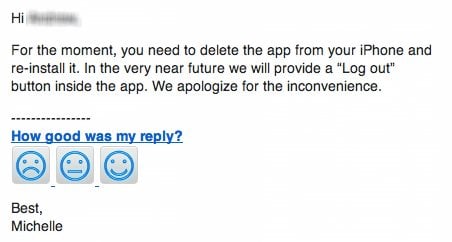
The social media manager at my friend Paul Cartmel’s company needs to track 3 different Twitter accounts on Klout, so he sent an email to their support team to find out how to log out of their iPhone app. This was the response, which Paul kindly forwarded to me:

Klout UX

Yep. You have to delete the app to log out of it. This example reminds me of what Adaptive Path calls the cake model of product strategy. Watch this short video about it before you continue reading:

What Klout did with their iPhone app is a classic “Dry Cake” approach. Even though they probably have additional functionality planned to make the app tasty with filling and icing, the current iteration is dry and not very exciting since key functionality is missing. You can’t do anything except see the Klout scores of yourself and a few other people connected to you — there is no way to search for other users.

What they should have done is build a cupcake first — an iteration that feels complete, even if it doesn’t have an entire roadmap’s functionality built out yet. It should support basic actions like logging out and searching for other users. And despite not having all the features of the web site, it should be an app that can stand on its own, one that is engaging and desirable with the functionality it does have. It’s so much fun to go from cupcake to cake to wedding cake if that first iteration is something that users are excited about.

So when you think about building your own product, remember to make your minimum viable product a tasty cupcake, not a dry cake with some vague promise of filling and icing somewhere down the line.

Six Myths of Product Development

If you’re involved in any kind of software development work, I highly recommend the Harvard Business Review article Six Myths of Product Development (it’s paywalled, but keep reading”¦). It details 6 common misconceptions of most product development managers:

  1. High utilization of resources will improve performance.
  2. Processing work in large batches improves the economics of the development process.
  3. Our development plan is great; we just need to stick to it.
  4. The sooner the project is started, the sooner it will be finished.
  5. The more features we put into a product, the more customers will like it.
  6. We will be more successful if we get it right the first time.

The authors detail the effects of and possible solutions to each of these fallacies. Here’s an excerpt from the resource people utilization section:

In both our research and our consulting work, w’ve seen that the vast majority of companies strive to fully employ their product-development resources. The logic seems obvious: Projects take longer when people are not working 100% of the time””and therefore, a busy development organization will be faster and more efficient than one that is not as good at utilizing its people.

But in practice that logic doesn’t hold up. We have seen that projects’ speed, efficiency, and output quality inevitably decrease when managers completely fill the plates of their product-development employees””no matter how skilled those managers may be.

Unfortunately the full article is behind a paywall. You can read the whole thing if you haven’t hit your 3-articles-per-month quota yet (sigh”¦). Or you can download this PDF I made of the print view.

Product Ownership is a role, not a job title

Marty Cagan argues that splitting the Product Manager and Product Ownership roles into two positions is a mistake:

This approach has two common negative consequences.  The first is that there is no clear owner (neither person takes responsibility for the product), and the second is a common lack of respect or understanding between the two (the “product manager” doesn’t appreciate the technical complexities, and the “product owner” doesn’t appreciate the customer’s pain).

I agree, and I would actually go one step further. I view Product Ownership activities (representing the voice of the customer, interacting with the development team, managing the backlog, etc.) as a subset of the overall strategic Product Management position (product planning, execution, and marketing). I’ve resisted calling my team Product Owners, and prefer to say that they are Product Managers who fulfill a Product Ownership role on Agile projects.

The problem is that splitting these roles into distinct job titles also splits their goals. It’s easy for one to become all about the market, and the other to become all about internal development tasks. Instead, a Product Manager should ultimately take end-to-end responsibility for the development of product solutions that meet user goals and business needs. That’s the job. Managing the backlog and working with developers on specifications are just part of that overall function, not a thing on its own.

Product roadmaps are safe

Over on the 37signals blog they just reposted an old article entitled Product roadmaps are dangerous. Jason Fried says the following:

Instead of the roadmap, just look out a few weeks at a time. Work on the next most important thing. What’s the point of a long list when you can’t work on everything at once anyway? Finish what’s important now and then figure out what’s important next. One step at a time.

It’s hard to disagree with a person (and a company) you have great admiration for, as I do for Jason and 37signals. But I do think it’s important to set the record straight on product roadmaps - particularly when it comes to large organizations. The post highlights two main concerns with product roadmaps:

  • Product roadmaps assume you know what’s going to happen 6 - 18 months from now
  • Product roadmaps set expectations, so you can’t change them (and if you do change them it becomes a worthless exercise)

So let’s look at each of these points in turn.

Product roadmaps assume you know the future

Jason writes:

When you let a product roadmap guide you you let the past drive the future. You’re saying “6 months ago I knew what 18 months from now would look like.” You’re saying “I’m not going to pay attention to now, I’m going to pay attention to then.” You’re saying “I should be working at the Psychic Friends Network.”

This is not what a product roadmap is, or what it’s supposed to do. The purpose of a product roadmap is to set forth a long-term vision for the business, and break that up into smaller, meaningful pieces of work, based on what you know now. It’s fallacy to believe that this is an unchangeable list of dates about where the business is headed. A product roadmap that doesn’t react to day-to-day changes in the market and within the company is a pretty dumb document.

At my organization we are very clear that the product roadmap is a flexible guideline that can (and must) change frequently as needed. But it gives the teams (and the management team) something to work towards. It’s a common vision, a sense of direction that’s more than just fluffy language - it’s concrete evidence that we’re headed somewhere good, and we know how to get there.

We can change direction as many times as we want. This doesn’t make it a useless exercise, it means that instead of starting fresh on a new “roadmap” every few weeks, you build on your past successes, don’t make the same mistakes twice, and keep making measurable progress since you can see where you came from.

Product roadmaps set the wrong expectations

Elsewhere in the post:

The other problem with roadmaps is the expectations game. People expect you to deliver what you say you will in 4, 5, 6 months. And what if you have a better idea? What if ther’s a shift in the market that you need to address? What if what you thought wasn’t what actually happened? Any change in the roadmap nullifies the roadmap. Then the map isn’t a map at all.

If you have this problem it doesn’t mean that product roadmaps are wrong, it means that you’re doing it wrong. As long as everyone in the organization buys into the fluid nature of the roadmap, you won’t have this problem. In our organization we do this mainly through the mechanism of what we call the Product Council (I was partial to Intergalactic Product Force, but for some reason that didn’t fly so well). Here’s how it works.

The Product Council is made up of the heads (VPs) of every department in the organization: Engineering, Marketing, Support, Category, etc. This body has a weekly meeting where we discuss the current product roadmap and priorities. We ask ourselves, Are we still working on the most important things? If something more important comes up, we prioritize it higher in the roadmap, and something else shifts down. If we’re happy with the direction, we do nothing. If a new opportunity arises we ask ourselves, Is this more important than what we’re working on right now? Or is this something we should work on next? If so, what moves down in the priority list?

From here, I communicate with my Product Team about any changes, and we discuss this to make sure no one missed anything. But then - and this is important - the Product Manager has complete autonomy and ownership over the implementation of the roadmap. The Product Council sets the priorities (with input from all parts of the organization), but the Product Managers work with their development teams (and others) to set the timeline, the implementation details, the design, everything.

There’s more to it, but in the interest of brevity I’ll stop there. This process has three main advantages:

  • It gives the management team complete transparency into what the Product team is working on, and it allows for anyone to make the case for a change in priorities. Why this kind of transparency is so essential is a subject for a different blog post, but in short, it takes away a vast majority of the politics you see in many organizations, and it frees up the teams to do what they do best - execute.
  • It prevents scope creep. Nothing can go on the roadmap without something else moving out or down. As anyone who ever worked at a large organization knows, this is an absolutely critical part of a successful development cycle.
  • It gives the Product Manager and their teams what they need to be successful: direction and autonomy. As Jocelyn Glei says: “Give your team members what they need to thrive, and then get out of the way.”

Why product roadmaps are safe (and essential)

At a practical level I went through the exercise of figuring out how we could execute in my organization without a roadmap. And I just can’t see it. Changes to current pages/flows affect changes we’ll make down the line - I have to think about that.

If you’re serious about frequent incremental change as opposed to large redesign projects (as we are), you can’t live without a roadmap because you’ll have no idea how far you’ve gone, what you still need to do, and what’s more important than something else. And perhaps most dangerous of all, everyone in the organization will come to you and want all their projects done right now, and you’ll have no systemic method for dealing with that in a way that’s best for the business.

Andy Wagner summed up my feelings on this issue quite succinctly in a comment on the 37signals post:

[Product roadmaps are] an opportunity to dream about what the future might look like so that as you make your day-to-day responses to the customer, you can do so consistent with building the future state. It emphatically should not be anything to be slave to, it should be dynamic and notional, not static and specific.

Jason says, “The further you get from now, the less you know. And the less you know, the worse your decisions will be.” We agree on that. My argument is that without a roadmap you only see now. And if you only see now without seeing yesterday and tomorrow, you don’t see a whole lot. And “the less you know, the worse your decisions will be”.