Menu

Posts tagged “agile”

Effective remote teams over-share

Joe Tullio has some good tips for remote teams in Distributed UX teams: Early lessons learned. This part, in particular, is something I think many teams ignore because it can feel like busywork:

At Google, we have an internal “snippets” tool for posting regular updates on our work, typically at a weekly cadence. Snippets serve to share the latest mock versions, research reports, study plans, hiring updates, and anything else that feels noteworthy.

To be fair, snippets are a diligence task; I’ve been on teams where these updates were neglected for months at a time. However, my far-flung teammates have been instrumental in encouraging the rest of us to share updates, as they benefit greatly from seeing them. We’ve come up with several ways of reminding ourselves to do them, through calendar appointments, shared compilations, and as a last resort, the tried-and-true email nag.

I’ve written about a similar approach we follow in Useful daily standup meetings for remote teams, and I stand by it. The benefits far outweighs the “cost” of spending a few minutes thinking about your day and updating your team about what you’re working on.

Moving beyond Agile

Andy Budd asks, Are we moving towards a post-Agile age?

Perhaps we’re moving towards a post-Agile world? A world that is informed by the spirit of Agile, but has much more flexibility and nuance built in.

This post-Agile world draws upon the best elements of Agile, while ditching the dogma. It also draws upon the best elements of Design Thinking and even — God forbid — the dreaded Waterfall process.

People working in a post-Agile way don’t care which canon an idea comes from, as long as it works. The post-Agile practitioner cherrypicks from the best tools available, rather than sticking with a rigid framework. Post-Agile is less of a philosophy and more of a toolkit that has been built up over years of practice.

This is certainly true for how our team works as well. We took the parts we like about Agile (like autonomous teams, flexible roadmaps, daily standups, small pieces of work), left out the parts we don’t like (like rigid sprints, long backlog grooming meetings), and then mixed in some spicy goodness from other methodologies (like deploying whenever a feature is ready). I’m sure strict Agile works for some teams — particularly in large organizations — but this approach works much better for us. It speeds us up and makes us all much happier human beings.

Useful daily standup meetings for remote teams

As with many distributed teams our approach to tools at Wildbit is to try to strike a balance between making sure everyone on the team knows what’s going on, and not having hours of meetings every day. We are very serious about the ability to have a lot of time during the day for focused work, so we sometimes err on the side of not enough meetings. For this reason the team hasn’t done formal daily standups for a while, instead opting for a weekly meeting to do a roundtable of what everyone’s been working on, and what the plan is for the week.

There are a couple of problems with this approach. First and foremost, it doesn’t always feel like time well spent—we shouldn’t be spending an hour a week just talking about what we’re doing. That’s why we have planning tools1. Another side effect is that it’s harder to respond quickly when issues come up. If a team member is having a problem, or we didn’t realize before that two projects are related somehow, it could take up to a week to find out what the issues are. So we wanted something better. Something lightweight, useful, and more frequent.

We realized early on that synchronous standups wouldn’t work for us—we just work across too many time zones to find a convenient time, and it also doesn’t make sense to have a standup at the end of someone’s day. We also didn’t want this to be just an update for everyone else, we wanted to make it a useful planning tool for individual work as well.

So we started looking for Standup bots built for Slack, and of course there are tons of them. We ended up signing up for Geekbot because it met our most important criterium: it’s asynchronous. We set up Geekbot to ask each team member (product, design, engineering, and QA—we’re all in this…) a set of questions at 9am in their time zone. This means each team member can use these questions to be thoughtful about their day and what they want to accomplish.

In order to make this more useful for us we also changed the questions a little bit. Usually the first question in a standup is “What did you accomplish yesterday?” This didn’t feel right to us—it felt too much like checking up on each other. Instead, we ask the question this way:

Did you work on what you wanted to yesterday? If not, what happened?

This might seems like a subtle change, but it shifts the focus quite a bit. Instead of listing out the things we did, this question allows us to tell each other if something happened that distracted us from the work we wanted to do, which helps us solve those issues as well. So here’s what our Geekbot setup looks like:
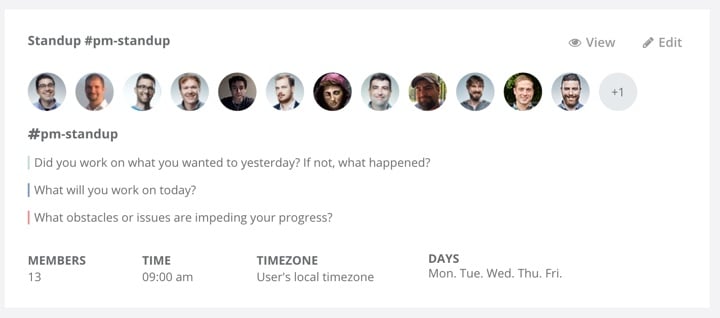
Geekbot settings

Every time someone answers these 3 questions, Geekbot posts a status in our #pm-standup team room in Slack, where we can all read through it on our own time.

There is, of course, nothing groundbreaking about what we’re doing here. But I wanted to write up our process because I know there are many distributed teams who struggle with this. The issue is always the same: How do we have standups that are useful and that don’t feel like busywork that just takes us away from the jobs we’re supposed to be doing? By using an asynchronous bot and adapting the questions to our needs, we accomplished a few important things:

  • Every member on the team takes a few minutes every morning to plan out their day, and troubleshoot anything that might have gone wrong the previous day.
  • Instead of weekly meetings of an hour long where we discuss what everyone’s working on, we now have focused 30-minute meetings every Monday where we solve problems and discuss issues that came up during the week (I keep an agenda as we progress through the week).
  • I am much more equipped to fulfill my role as Product Manager because our updates are more frequent and the signal to noise ratio is extremely high.

So even if your remote team is against the idea of a standup, I recommend you try something like this. Don’t just do what we did though. Choose your own questions, your own cadence, maybe even your own tool. But do something—start with the question “How can we make frequent checkins useful?” and see what the team comes up with.


  1. I have a whole other post planned about using Jira in small teams… 

The real purpose of a Minimum Viable Product

In Jim Brikman’s post A Minimum Viable Product Is Not a Product, It’s a Process he explains the real purpose of following an MVP approach:

An MVP is a process that you repeat over and over again: Identify your riskiest assumption, find the smallest possible experiment to test that assumption, and use the results of the experiment to course correct.

When you build a product, you make many assumptions. You assume you know what users are looking for, how the design should work, what marketing strategy to use, what architecture will work most efficiently, which monetization strategy will make it sustainable, and which laws and regulations you have to comply with. No matter how good you are, some of your assumptions will be wrong. The problem is, you don’t know which ones.

And the crux:

The only way to find that out—the only way to test your assumptions—is to put your product in front of real users as quickly as possible. And when you do, you will often find that you have to go back to the drawing board. In fact, you’ll have to go back to the drawing board not just once, but over and over again.

This is one of the major problems with MVP-thinking as I see it in many organizations today. For many product managers MVP is unfortunately not a learning process, but just a fancy way of saying “v1”. And as we all know, the biggest lie in the enterprise world is “v1”. There’s never a v2. So many hide behind the “MVP” moniker to obscure the fact that they just want to get a thing out the door and move on. We’d do well to remind our teams that the real purpose of an MVP is to learn, not to complete.

Product vision + OKRs = Sustainable roadmap

I really love the product strategy direction Marty Cagan proposes in The Alternative to Roadmaps:

Ensure your product organization has a compelling product vision.  Ensure that each product team has a clearly defined, prioritized set of business objectives.  Make sure any commitments that must be made are high-integrity commitments.

This means that instead of prioritizing features (and the timing of those features), the leadership team prioritizes business objectives and problems to solve. There are two components to this:

First, the product vision is about setting OKRs—Objectives and Key Results (again—not features or solutions). From The Art of the OKR:

The objective sets a goal for a set period of time, usually a quarter. The key results tell you if the objective has been met by the end of the time.

Second, high-integrity commitments mean we give teams the time they need to figure out how long something will take. From Managing Commitments in an Agile Team:

So the way we manage commitments is with a little bit of give and take. We ask the executives and our other stakeholders to give us a little time in product discovery to investigate the necessary solution, and validate that solution with customers to ensure it has the necessary value and usability, with engineers to ensure its feasibility, and with our stakeholders to ensure it is viable for our business (they can support this solution).

Once we have come up with a solution that works for our business, we now can make an informed and high-confidence statement about when we could deliver this and what type of business results we can expect. We can also decide if it’s even worth doing.

One day when I grow up, this is how I will run my product team.

How The New York Times does Product Discovery

In The New York Times Product Discovery Activity Guide Al Ming lays out how the product team brought Lean principles into their organization:

As part of our efforts to adopt such a data-driven, experimental approach to product development, we recently kicked off a product discovery “pilot program.” Small, cross-functional teams were paired with coaches and facilitators over a six week period to demonstrate product discovery and Lean methodologies as they apply to real-world customer opportunities at The New York Times.

This is such a great way to introduce Lean activities into a large enterprise. Start with a small project, prove value, then expand.

The team also made an “activity guide” for teams to follow, and it reads like a cheat sheet for developing great products. This is really impressive work. Here’s the guide:

NYT Product Discovery Activity Guide from almingwork

Feature prioritization with remote teams using Mural.ly and the Kano model

As if feature prioritization isn’t hard enough, many companies are starting to introduce another tricky variable into the mix: remote teams. If you’re a product manager who spends a lot of time on video calls with team members in different parts of the world, you’ll be forgiven for feeling like involving the team in prioritization is too much to deal with. But don’t give up on the dream yet. One of the teams on a project I’m working on is very much distributed, and I think we may have found a reasonably painless way to do prioritization together.

Here are the ingredients you’ll need:

Let’s discuss the recipe in detail…

On Mural.ly

Mural.ly is virtual whiteboard software. Before you scream “BLASPHEMY!”, I want to assure you that I still enjoy physical sticky notes as much as the next person. Nothing compares to the feeling of ripping a bad idea off the board and rage-throwing it into the closest trash can1. That said, physical sticky notes have two major drawbacks:

  • It’s hard to get remote teams involved in the process.
  • Transcribing them is such a chore.2

And that’s where Mural.ly comes in. It lets you create virtual sticky notes on a whiteboard, move them around, change their color, and best of all: the whole team can play along. You can do voting sessions, multiple people can edit at the same time, etc. This tool has really done wonders for our collaboration efforts across offices.

On the Kano model

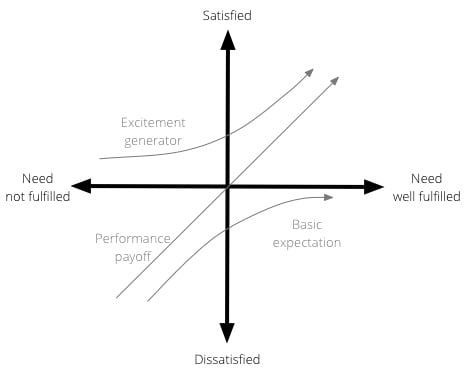
The Kano model isn’t new, and it’s been fairly widely used in software product development for a while. Developed in the 1980s by Professor Noriaki Kano for the Japanese automotive industry, the model is a helpful method to prioritise product features by plotting them on the following 2-dimensional scale:

  • How well a particular user need is being fulfilled by a feature
  • What level of satisfaction the feature will give users

The model is generally used to classify features into three groups:

  • Excitement generators. Delightful, unexpected features that make a product both useful and usable.
  • Performance payoffs. Features that continue to increase satisfaction as improvements are made.
  • Basic expectations. Features that users expect as a given — if these aren’t available in a product, you’re in trouble.

Here is a visual representation of the Kano model:

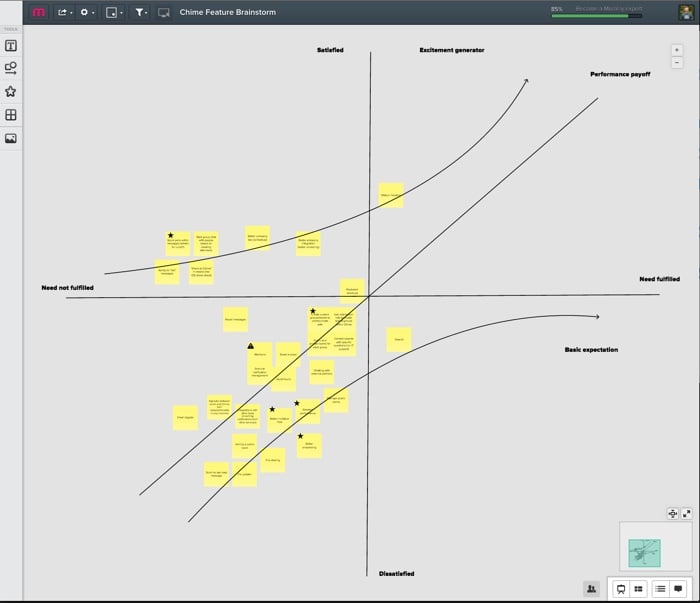
So, as we started our prioritization exercise, I drew the x and y axes on a new mural. We then listed out all the features that we’re thinking about for the next few months—one feature per sticky note. We proceeded to go through each sticky note, and discuss where it fits on the Kano model—how far are we in meeting the need currently, and how satisfied do we believe users will be once we’ve met the need better?

We ended up with something like this:

(Yes, it’s small—unfortunately I can’t show the feature details. Maybe once they’re live…)

This now becomes a great tool for prioritization and release planning. There are couple of rules of thumb I like to stick to when doing sprint/release planning:

  • Make sure there is a balance between the 3 different types of features. Don’t overemphasize one type over the other.
  • Start with the features with the biggest upside. For Basic expectations, that means features on the far left, where a little work would result in a big increase in satisfaction. For Excitement generators that shifts to features closer to the y-axis, since the real benefits start to kick in exponentially once you go the extra mile on fulfilling the need. For Performance payoff features the story is a little less clear since the relationship is linear, but I would still argue for starting on the far left. The sooner you can get users on the “satisfied” side of the scale, the better.

We’re still learning our way through this, but so far I’m happy with the process. It’s a model that everyone understands and can rally around, and with Mural.ly at our side we get to involve the whole team. I believe marketers call that a win-win.


  1. Why do rage-throws always miss the basket? Such a let-down. 

  2. Funny how you never see photos of the lone product designer sitting in a room, tearfully writing down every sticky note in an Evernote document as everyone else leaves the room high-fiving each other. 

Lean vs. Design?

This is sure to be a bit controversial, but Jon Kolko makes some great points about design-led vs. lean development in Lean Doesn’t Always Create the Best Products:

And with this, we arrive at perhaps the most important distinction between an empathetic design-led approach and Lean. Lean is fast. Design is slow. Design is more contemplative, reflective, and because it demands systems thinking and marinating in the ambiguity of cultural data, it simply takes longer. The benefit is in producing emotionally sound products: products that people love, not just products people use. Increasingly, people expect more from the products and services they engage with. They expect quality, and use it both as a selection criteria for purchase and as a constraint for sustained use.

I don’t think Lean principles are necessarily in conflict with design principles (there is, after all, a thriving Lean UX movement). But the part that resonates here is the speed pressure that the Lean movement has placed on design activities. All research, prototyping, and graphic design is expected to happen much faster now. Speed is good, but not if it comes at the cost of not truly understanding the problems and user needs you’re designing for. And that’s where Jon’s points are worth taking to heart.

Using process for good

Kate Heddleston makes some great points in The Null Process:

When people say they don’t want process, what they’re really saying is they don’t want formalized process. There is really no such thing as “no process.” A process is simply the steps it takes to complete a task, so if a task is completed then by definition a process was used. Without formalized process everyone does things their own way, and there is no documentation for how problems are solved. This informal, undocumented process is the “null process,” and, if used incorrectly, the null process can have major implications for a company.

This reminds me of two things. The first is Rebekah Cox’s definition of Product Design:

Design is a set of decisions about a product. It’s not an interface or an aesthetic, it’s not a brand or a color. Design is the actual decisions.

What this implies is that everything you do in product design has a consequence. So just “letting things happen” is also a decision. It’s just a pretty bad one. Maybe that should be called “null design.” I don’t know, I’m not good at naming things1.

The second is Michael Lopp’s The Process Myth. The whole thing is great, but this quote in particular has always stuck in my mind:

Engineers don’t hate process. They hate process that can’t defend itself.

Also this advice:

Healthy process is awesome if it not only documents what we care about, but is willing to defend itself. It is required to stand up to scrutiny and when a process fails to do so, it must change.

For more reading on what it takes to build good processes (because let’s be honest, what else are you going to do on a Friday night?), I recommend Adam Wuerl’s Avoiding Process Hell and Jeff Gothelf’s Applying Product Thinking to Process Improvement.


  1. Just look at my URL. Seriously, what was I thinking. 

Technical debt and the ceiling

Shaun McCormick describes Why the way we look at technical debt is wrong:

Technical debt is ok, and often a solid product strategy. The importance is getting to market. When launching a new system or feature, focus your effort and time on areas of the product that need to be agile, and move quickly through areas that don’t. Later, if the product proves that it can drive revenue, you can revisit those areas and improve if they need to scale.

This is an excellent sentiment, and I agree 100% in theory. The problem is that in most organizations, “later” = “never.” Or as Jeff Gothelf puts it, the biggest lie in corporate america is Phase 2.

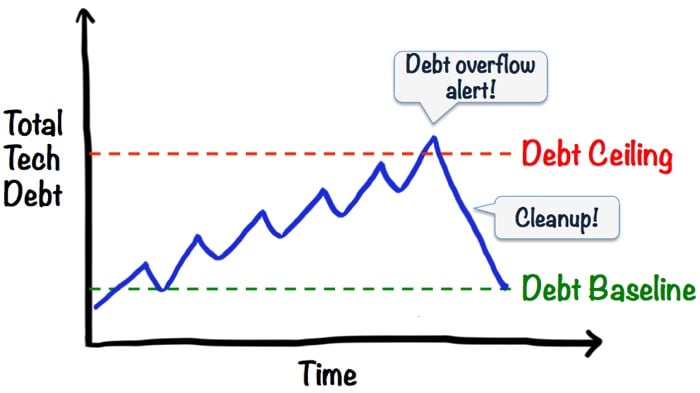
That’s why I really like Henrik Kniberg’s concept of a “technical debt ceiling.” Read his post Good and Bad Technical Debt (and how TDD helps) for the whole explanation, but here’s a diagram that explains his point:

Debt ceiling

Source: Henrik Kniberg

This forces teams to pay attention to technical debt, and make a conscious effort to reduce it when it becomes a problem.