Menu

Posts tagged “user research”

Conversions are not people

Andy Beaumont wrote a great piece about his popular Tab Closed; Didn’t Read Tumblr site, which documents websites that obscure their content behind modal overlays. His point on analytics in The Value of Content is spot on:

Analytics only tell you part of the story — if that’s all you bother to find out, and you have absolute faith in those numbers, then you’re going to end up putting a modal overlay on your site. Analytics will tell you that you got more “conversions”. Analytics will show you rising graphs and bigger numbers. You will show these to your boss or your client. They will falsely conclude that people love these modal overlays.

But they don’t. Nobody likes them. Conversions are not people. If you want the whole story here you should also be sat in a room testing this modal overlay with real people. Ask them questions.

Once again, this points to how important research triangulation is to make good decisions based on insights, not just data. Real insights are found at the intersection of different research methods. Not over in the corner with just one method.

Research triangulation

Some open questions on the Techrunch redesign

Brad Frost’s article on the Techcrunch redesign is a great case study of a modern responsive design process. A few things stood out for me, and remain open questions that I wish I could ask Brad about.

First, there is no mention of user research. There was a kick-off meeting, with some Design Studio work, but how did they identify user needs, and why was there no user testing on their prototypes? That’s a bit perplexing.

Second, it’s really nice to see Brad take a more nuanced stance on the whole Post-PSD Era thing, and admit that comps can be useful under the right circumstances:

Believe it or not, we did indeed create a few full comps. Gasp! Horror!

But the difference between this and all the other projects I’ve ever worked on is that we didn’t lead with the comps. By the time Dan made some comps (for the homepage and featured article page), we had established many of our key molecules and organisms, and had an understanding of the systematic nature of our design.

That’s how we do it in our agency as well, so I’m glad to find out that we’re not completely insane.

And lastly, it would’ve been great to get a little more detail on how much backend developers were involved through the process. Brad mentions it briefly:

From the design end of things, Dan went through and created an incredibly detailed list of minor design tweaks that tightened things up and got things ready for final delivery to be implemented into their WordPress backend by the fine folks at 10up (who by the way were involved throughout the course of this process).

“Final delivery” and “were involved throughout” are two phrases that don’t sit very well together, so I wonder how that worked practically.

Don’t get me wrong — this is a great process, and they obviously got some impressive results. These are just some things I wondered about as I read through the case study.

Social media and identity construction

Rob Horning’s Google Alert for the Soul is a very dense read, but don’t let that put you off. It’s an in-depth, well-written exploration of how social media affects our sense of identity and authenticity. In particular, Rob discusses the idea of the “data self”, where our identity starts to come from the data that different social media sites collects about us:

The data self no longer seeks meaning through action; it seeks to be processed into meanings. It’s available for audit and pliable to the incentive structures built into social media platforms. By letting social media capture and process everything, a more reliable, socially authenticated version of the self is produced, better than what our memory can give. Facebook Timeline, for instance, can be seen as an infographic of our personality so compelling that we can comfortably overlook its formulaic nature. Facebook invites us to forget we even had a self before Timeline was there to organize it.

He goes on to say:

The pleasant Pavolovian buzz of seeing someone respond to one of our social media posts is not merely pleasure at having gained some attention but a momentary reassertion of control over identity.

With all of social media’s feedback loops, we get a comprehensive status update from ourselves, allowing us to consume our own personality as novelty. We effectively set a Google alert for our soul.

It’s an interesting idea, that through social media we effectively step outside of ourselves, and become observers into our own lives — as if we’re mere actors trying to convince the world that our “character” is the real thing. Notifications, followers, and likes become the barometer of how well our character(s) are doing at this life thing. So we also rewrite the script constantly based on the instant and constant feedback built into the system.

Once again it’s worth asking: Who will hold a brief for the real?

The forces at work when choosing a product

The jobs-to-be-done framework isn’t new, but I’ve only recently started digging into it much more since it’s been gaining a lot of traction everywhere I look. For a nice primer on the topic see Eric Portelance’s recent article for Teehan+Lax called The Iceberg of Jobs-to-be-Done, in which he explains how crucial this framework is for good product design:

[Most successful products are created by] people who understand the importance of creating products that solve real customer problems, and have a set of tools and frameworks like jobs-to-be-done that they use to identify and validate the real human problems they’re trying to solve in the market.

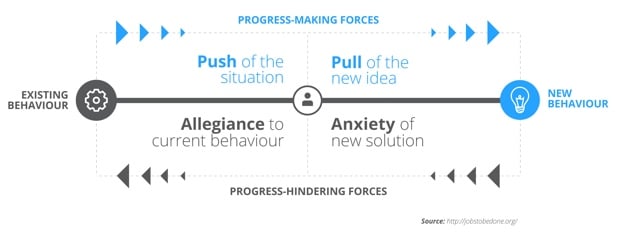
The progress-making forces diagram has been particularly useful for me in client work, since it helps people understand how difficult it can be to change existing user behavior. I’m not a huge fan of the diagram on the JTBD site, so we made a new one:

Progress making forces diagram

The basic premise of the diagram is this. For someone to move from their existing behavior (a product they’re currently using) to new behavior (switching to a new product), there are two types of forces at work: progress-making forces, and progress-hindering forces.

Progress-making forces move people from their existing behavior to the new behavior, and consists of the push of the current situation (things they’re not happy with in the current product) and the pull of the new idea (things that sound appealing about the new product). Progress-hindering forces, on the other hand, hold people back from switching to new behavior. It consists of allegiance to the current behavior (things they really like about the current product) and the anxiety of the new solution (worries about learning curves and not being able to accomplish their goals with the new solution).

What this comes down to is that for someone to switch from an existing product to a new product, the progress-making forces have to be stronger than the progress-hindering forces. This might seem obvious, but applying this model to your product planning can inject an extremely healthy dose of reality. Is the product really that much better than a current solution? What does the new product have to do to overcome people’s allegiance to what they’re currently using?

In the context of product design this can be a crucial component to making a go/no-go decision on whether to go ahead with an idea, so it’s always a mental test I run with the teams when we’re working through our planning.

The forgotten role of teachers in mobile education

The importance of research and participatory design appears to be kind of a theme on the site this week. I just keep running into articles like Sven Torfinn’s How teachers in Africa are failed by mobile learning. He discusses how leaving teachers out of the design process is a big risk:

My concern is that some people use the problems with education systems to justify excluding teachers from the design and development of mobile learning interventions. Teachers’ voices are marginalised. And mobile operators association GSMA (to take just one example) characterises the teaching profession in a way that divorces it from progress and innovation.

The difficulties teachers face are used as a starting point for criticism, rather than as a motivation to address systemic issues. […] It is a mistake to run down teachers’ professionalism to justify technology use in education.

The London International Development Centre puts it this way in Why mobile learning on its own won’t solve the access problem:

We need to move away from the notion that simply because mobile phones are the most available technology to those in the majority world that somehow they will in and of themselves lead to developmental learning. A more sustainable approach is to work within the formal education system, in particular to build the capacity of teachers and practitioners to design and develop mobile learning interventions in country. Only then will they be useful to those whose capability development they aim to support.

If One Laptop per Child taught us anything, it’s the dangers of designing technology without a proper understanding of the context of use. The same goes for the push into mobile education (and mobile anything, for that matter).

Not all UX deliverables are bad

Amen to everything in Mona Patel’s article The Lean Agency:

While being lean is awesome, being innovative means that spending time and money on smart research and devoting ample time to thinking through the problem space can sometimes mean the difference between a good design and a great design. Our focus is not just on making something usable, but on creating value for a business and really impacting people’s lives.

And a double Amen to this:

Yes, agencies typically end engagements with deliverables. But, we don’t charge our clients just for the deliverables. We charge them for the value that we provide and the objective insights, fresh perspectives, and innovative solutions that we offer. We provide an innovative vision for an exceptional user experience in the form of an artifact, or deliverable. The presentation of our insights and recommendations in a solid deliverable can often be the tipping point for organizations seeking to change their product or experience for the better.

This is how we work at Flow as well. And especially since we started using Expanded User Journey Maps, good deliverables have become the difference between a successful and unsuccessful project.

The role of ethnography in the success of Starbucks

I realise it will ruin some of my coffee street cred to say something positive about Starbucks. However, their use of ethnographic research outlined in Maria O’Connell’s Not Just Coffee: Starbucks’ Rise to Success is commendable (and clearly successful):

Starbucks interviewed hundreds of coffee drinkers, seeking what it was that they wanted from a coffee shop. The overwhelming consensus actually had nothing to do with coffee; what consumers sought was a place of relaxation, a place of belonging. They sought an atmosphere.

The round tables in a Starbucks store were strategically created in an effort to protect self-esteem for those coffee-drinkers flying solo. After all, there are no “empty” seats at a round table. Service counters are built out of natural materials like warm woods and stone, rather than plastics and metals, to create a homier atmosphere.

It’s still so frustrating to see how many companies embark on their redesigns or MVPs without doing contextual research first. You might get the usability of your product right, but without utility, it will still be useless. As Milica T. Jovanovic points out in Better safe than sorry:

Startup culture is using a bunch of clichés to tell (mostly) young people that it’s ok to invest an enormous amount of time and energy into something and then let it fail. Well, it’s not ok. It’s bollocks. There is nothing wrong in investing your time and effort into something you are passionate about, but you can make sure that the risk of failure is as small as possible.

In short, do your research first!

Related reading from the Elezea archive: Coffee, sense of place, and designing whole experiences

Case study: redesigning Vumi Go

We recently had an opportunity to work with one of my favorite companies, Praekelt Foundation. They do amazing work with projects like MAMA (using mobile technologies to improve the health and lives of mothers in developing nations) and TxtAlert (automated, personalized SMS reminders to patients on chronic medication).

One of their products is called Vumi — a conversation engine for the delivery of SMS, USSD (Star Menu), and chat messages to diverse audiences. Vumi is a custom development platform that usually requires Praekelt involvement to set up, but they also have a self-service portal called Vumi Go, which they wanted to improve and scale so that they can move more of their clients to self-service. And that’s where Flow comes in. Towards the end of last year we started working with the Praekelt team on a redesign of the Vumi Go interface (you should follow Simon and Ben, they’re great). The internal Flow team consisted of me and Philip.

This is one of the hardest interface problems we’ve ever encountered at Flow. Which means it’s exactly the kind of project we love working on. We were tasked with taking some very low-end mobile technologies (SMS and USSD), along with IM (Gchat in particular), and create an easy interface on top of that to allow people to not only understand how the technology works, but also to create complex conversations and surveys using these technologies.

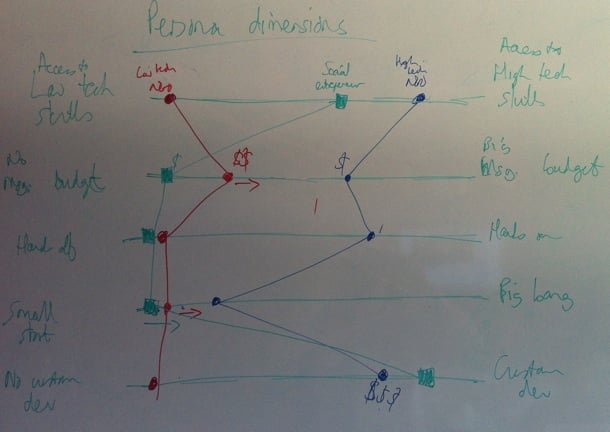
So, we dug in. We started by working with the team to create Personas for the Vumi Go product, so that we could always keep top-of-mind who we’re designing for. Our first goal was to come up with dimension that accurately reflect the different types of people who use Vumi, and would be inclined to go self-service:
Vumi Go personas

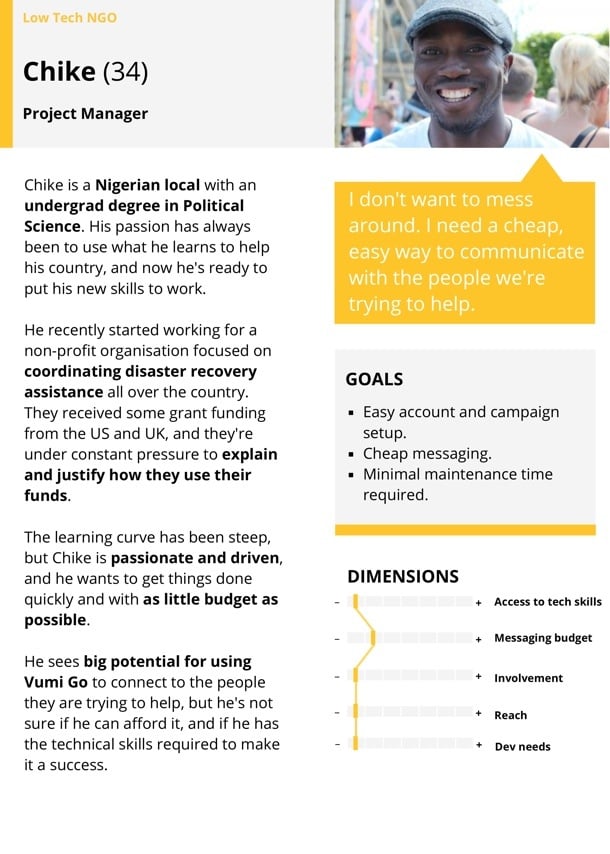
We ended up identifying and fleshing out three target Personas for Vumi Go: The NGO with very little technical knowledge, the NGO with significant technical knowledge, and the social entrepreneur. Here’s our Low-tech Persona:
Vumi Go Personas

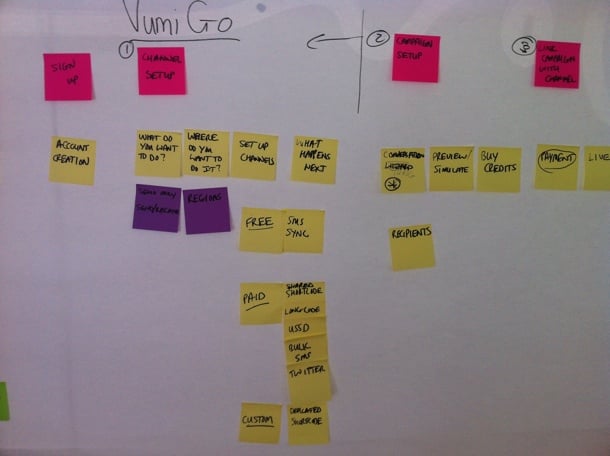
Our next step was to create the ideal customer journey map for the Vumi Go experience. We wanted to outline how people find out about Vumi, and how we can guide them through this complex flow in the simplest possible way. We started with a lot of sticky notes on a whiteboard to define all the possible actions that users needed to perform to set up their conversations. We then proceeded to order those steps in a way that makes the most logical sense (and would allow us to progressively disclose the right information at the right time). This was an essential step because the process of setting up a campaign in Vumi Go can be quite overwhelming, so it was imperative to figure out the right order of steps. That’s why sticky notes were such a great initial approach, since we could move things around at will:
Vumi Go Journey

Those sticky notes eventually turned into a user journey sketch on the whiteboard, once we were getting sure about the best way forward:
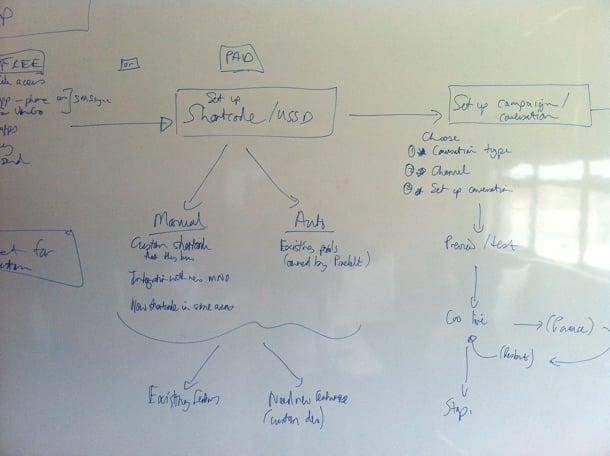
Vumi Go journey

After quite a bit of discussion and refinement, we got to a journey map that we were happy with. This version is too small to give much detail, but it gives a general idea of what we were building for:
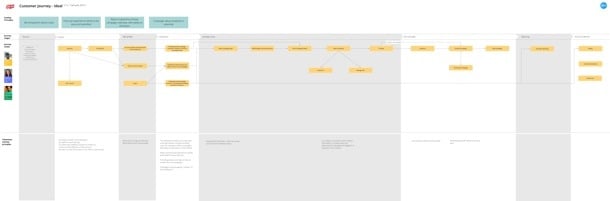
Vumi Go journey

This also allowed us to start working on the Information Architecture. Since we used the journey map as the starting point for the IA, we were confident that we had a good handle on the screens we needed to design, and the order of those screens:
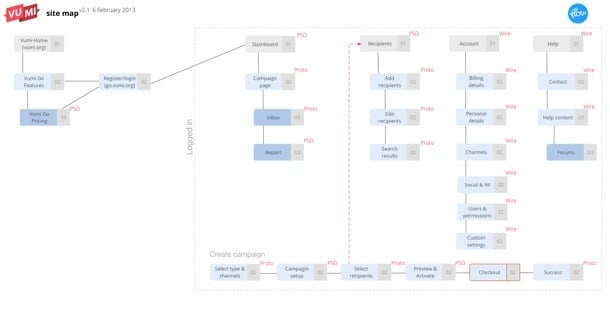
Vumi Go site map

One detail I want to point out here is that we also defined what our deliverables will be for each screen — Sketch, Prototype, or PSD. We find this step really important to avoid miscommunication and surprises down the line.

Armed with a solid user journey and Information Architecture, we were finally ready to start designing the interface. We really needed this upfront time to define the problem properly, otherwise we would’ve gotten stuck along the way and it probably would have resulted in tons of rework. We did our sketching with the team using a combination of white board and paper, so that we could quickly try out different solutions without feeling too bad about the many designs we erased/threw out:
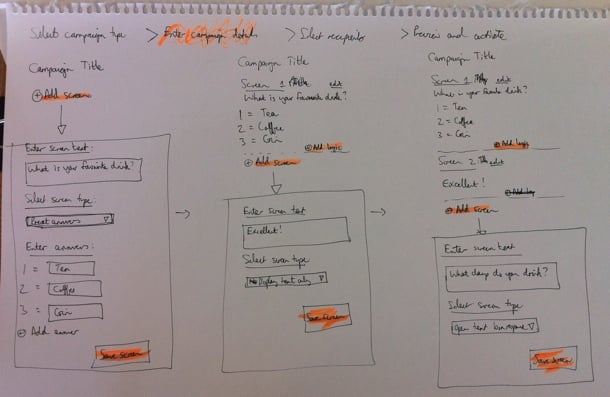
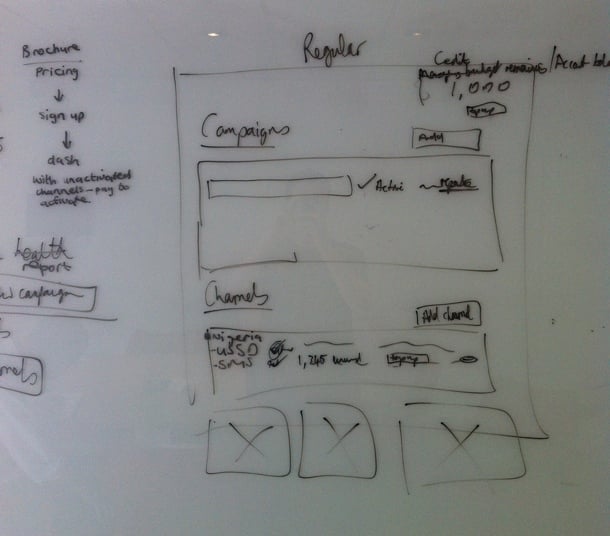
Vumi Go sketching

Vumi Go sketching

Once we eliminated the designs we believed wouldn’t work well for our target Personas, and settled on a concept we wanted to refine further, we started building an interactive prototype in Axure so that we could test it with real target users. We went through 22 iterations in total before settling on a direction we were confident about. Each of those iterations were based on either internal or user feedback.

The user testing phase was quite tricky. We could do some of it locally in our lab, but most of it had to be done remotely, since the target users reside in places like Kenya and Nigeria. We ended up using TeamViewer for the remote tests, but honestly, we won’t do that again. I’d much rather use Google Hangouts (or Skype screen sharing as a second prize). Teamviewer was just such a mission to set up, and it doesn’t deal well with less-than-perfect internet connections. Google Hangouts seem to be a lot more forgiving when Internet connections slow down (in low-bandwith situations it reduces video quality before it reduces voice quality).

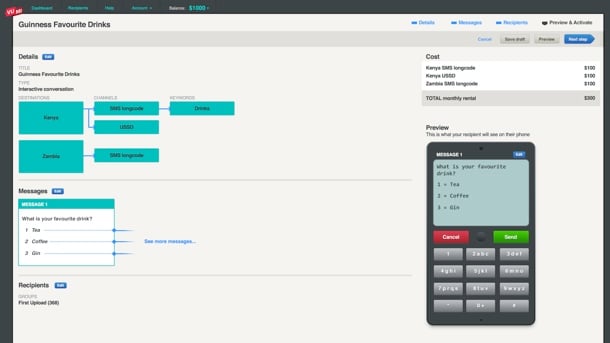
Below is a screenshot of one of the prototype screens. If you’d like to play around with one of the prototypes yourself, you can do so here.
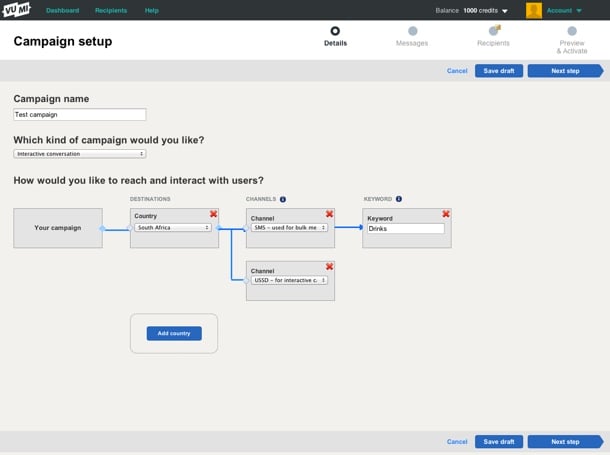
Vumi Go prototype

One thing we realized pretty early on is that this is utility, and it needs to be treated as such. Our research showed that people wanted to get through this process as quickly as possible. The complexity forced us to strip out any kind of ornamentation out of the interface. Not that we set out to make an ugly interface, but there were many decisions we had to make in the interest of utility and usability over “look and feel” (sorry, I hate that term too).

During the final stages of prototyping we started working on Style Tiles to get a sense of the graphic direction of the application. Style Tiles are a great way to discuss graphics without getting bogged down in UI details, since it’s not concerned with layout but exclusively with interface elements: typography, color palettes, button behavior, etc. Here’s an example of one of the Style Tiles that Philip created:
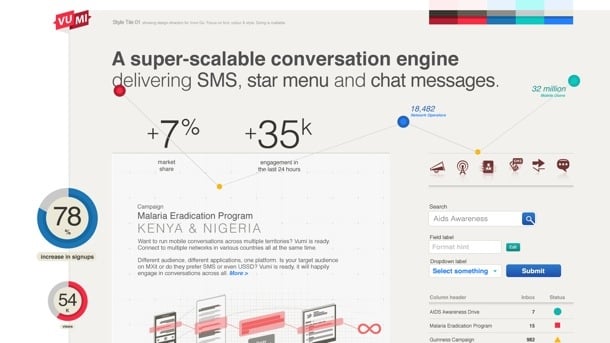
Vumi Go style tile

Once we had a refined prototype based on user testing, as well as Style Tiles to guide the graphic direction, it was fairly easy to go to the PSD stage. The prototype and strong style guide also allowed us to not have to create the entire site in Photoshop. We could just create a few key pages, and rely on the rest of it to be defined during development (yep, I admit we’re not quite Post-PSD). Here are a couple of examples of the graphic design:
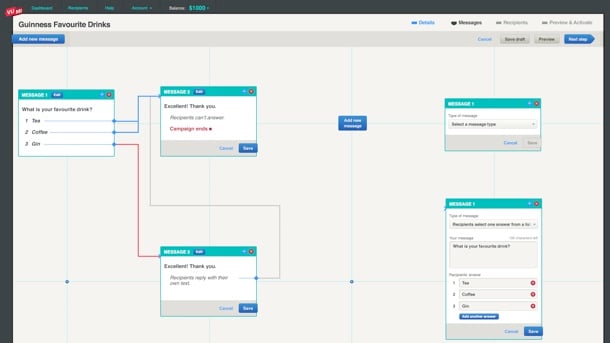
Vumi Go graphics

Vumi Go graphics

Again, as you can see, there’s nothing flashy here, and that’s by design. Based on our Personas and user journey, our conscious decision was to create this web application as an easy-to-use utility. It’s not a general consumer site, and it’s not an e-commerce site — it’s an essential cog in the larger machine of what businesses (and NGOs in particular) need to accomplish.

At this point the Praekelt developers (who were involved throughout) took over the process to get the application live. Ben talks about the development of the site more on the Vumi blog (see The inside scoop on our recent Vumi launch), so I won’t cover that here. I’ll just end by saying that this is one of the most gratifying projects I’ve ever worked on. We always talk about doing meaningful work in the design community, and this was one of those projects where we absolutely know that the product we helped build is going to affect people in a positive way. And the fact that it was such a hard problem to solve only made the experience better.

Congratulations to the Praekelt team on their relaunch. From everyone at Flow, we love you guys.

Why research is essential in product design

I agree with every glorious word in Erika Hall’s How the ‘Failure’ Culture of Startups Is Killing Innovation. It’s a brilliant and impassioned defense of making design research part of every product development process:

Somewhere along the way, it got to be uncool to reduce one’s risk of failure.

Part of this may be because the risk of failure is dramatically lower than it used to be. But another reason is that many people don’t actually understand what research is, and have somehow conflated concepts like “rapid prototyping,” “lean startup,” “minimal viable product,” and “[insert] other smart-sounding thing to do” with avoiding research.

It’s really hard to not just go ahead and quote the whole article, because it’s so good. I’ll leave you with just one more bit and an enthusiastic recommendation to read the whole thing:

Maybe knocking out a prototype or building a company is the fastest, cheapest way to learn. But often it’s not. Sure, a prototype can tell us if the user understands the potential solution — but if it’s solving a problem no one has, why bother building it in the first place?

Ok, I lied. One more bit:

It becomes immediately apparent, when we try to understand our fellow humans through research, that we are not rational creatures. But when it comes to making business decisions, research helps address that irrationality and increases our chances to succeed. And make no mistake: in a world where design makes or breaks success, all product design decisions are business decisions. Asking the right questions will lead to useful insights.

Our obsession with meaningless data

Stijn Debrouwere’s Cargo cult analytics is a fantastic talk/essay on how we often get obsessed with meaningless data in the name of evidence-based decision-making. I don’t want to ruin it, because it’s one of those rare must-read pieces, but here’s a small taste:

Pageviews is a vanity metric: something that looks really important but that we can’t act on and that tell us nothing about how well we’re actually doing, financially or otherwise. […]

There’s nothing like a dashboard full of data and graphs and trend lines to make us feel like grown ups. Like people who know what they’re doing. So even though we’re not getting any real use out of it, it’s addictive and we can’t stop doing it.