Menu

Posts tagged “user experience”

A Fresh Look At Usability Heuristics

Alex Faaborg for UX Magazine in Debating the Fundamentals: The geographic, temporal and political nature of usability heuristics:

On the surface, usability heuristics provide a simple checklist for making any interface perfect. But what is fascinating about them is the extent to which all of the heuristics are actually in direct opposition to each other, the extent to which they are geographic and temporal, and the extent to which they expose the designer’s underlying political views (at least in the domain of things digital). Usability heuristics present a zero-sum game with inherent tradeoffs, and it is simply impossible to achieve all of the heuristics simultaneously.

This is the best UX article I’ve read in a while. Like most UX designers I live and breathe the usability heuristics, and have always been reasonably comfortable with the tradeoffs, but this article perfectly articulates the complex interplay at work.

But it’s not just a theoretical exploration, I really appreciate the thought put into the practical approach to managing these complexities:

Novice designers memorize the list of usability heuristics and try to employ them in their work. As a more experienced designer, you may have already seen a deeper dynamic at play here. Instead of using heuristics as a simple checklist, try placing pairs of the heuristics against one another in a spider graph.  Achieving every ideal isn’t possible because the pairs exist in direct opposition. Realizing this, the challenge shifts to shaping a design that captures as much surface area as it can, given all the opposing forces.

This is one of those “I wish I wrote that” articles.

Hot Shots, Shoelaces, and Designing for Ordinary People

There’s a scene in Hot Shots! Part Deux (shut up, we all have our guilty pleasures) where Charlie Sheen’s character (Topper Harley) rescues Rowan Atkinson’s character (Dexter Hayman) from prison. The conversation goes something like this:

Topper: Dexter, I’m here to rescue you. Dexter: You don’t understand. I can’t walk. Topper: Why? Dexter: They tied my shoelaces together. Topper: Bastards!

The joke is funny, of course, (shut up, it is funny!) because of the ridiculous nature of the claim that tying someone’s shoelaces together can somehow stop them from walking around. We look at the situation from the outside and think they’re idiots - don’t they realize they can just untie Dexter’s shoelaces?

I often think of this scene when I hear designers defend their decisions by insisting that users will “figure it out”. I hear statements like “it’s not our fault that they can’t use this feature”, and I think about users with their shoelaces tied together, unable to move. We look at them with pity in our eyes - if they could only see the obvious and untie the knot, they would have no trouble using the site.

You Are Not The User

But of course, that’s not how it works. We think users are stuck because they aren’t untying their shoelaces, while they’re actually knee deep in the cement of poor usability we put them in. We can make T-Shirts that say “I am not the user” and wear them all day long, but somehow we still manage to find a way to blame them when something goes wrong. Not cool.

We will never be able to design web sites that don’t confuse users unless we observe them using our sites, and fix the issues that uncovers. We cannot think like our users - as designers we are simply too close to the product, and way too proficient in all things web. It reminds me of something Douglas Adams once said:

A common mistake that people make when trying to design something completely foolproof is to underestimate the ingenuity of complete fools.

There is a great post on the Agile Bits blog that talks about the difficulties of designing security systems. In one part they discuss the problem of designing for users and sum up the issue perfectly:

Security systems (well, the good ones anyway) are designed by people who fully understand the reasons behind the rules. The problem is that they try to design things for people like themselves ”” people who thoroughly understand the reasons. Thus we are left with products that only work well for people who have a deep understanding of the system and its components.

Stepping Into Their Shoes

We have to be able to step out of this cocoon of deep understanding, and the only way to do that is to regularly observe users as they make their way through our applications. Whether you take your laptop to a coffee shop and ask random people to give you a few minutes of their time, or set up full-scale usability tests, the payoff of uncovering usability issues on your application is so worth the time. What’s the upside, you ask? Matt Gemmel sums it up really well:

The biggest (and most lucrative) set of customers is ordinary people, without a computing degree or specialist knowledge. These are people with no interest in specific technologies, but only in how easily they can finish today’s tasks without reading the manual. Apple caters to that market; companies who loudly proclaim their device supports CSS3 and MPEG4 and SDHC don’t even understand that it exists.

If we can get into the heads of those ordinary people who use our products every day we’ll be able to meet their needs so much better. I agree with Jeff Gothelf on this one: test everything, regardless of its polish or fidelity:

Increasing your time with customers throughout the design and build process improves the outcome of your project by continually nudging the interface in a more appropriate direction. As an added side benefit, you also begin to build a user-centric culture within the company if it didn’t already exist ”“ a huge plus.

I’ll end with the words of Jeffrey Zeldman in Style versus design, because it articulates so well why this is such an important issue:

Not enough designers are working in that vast middle ground between eye candy and hardcore usability where most of the web must be built.

Most of all, I worry about web users. Because, after ten-plus years of commercial web development, they still have a tough time finding what they’re looking for, and they still wonder why it’s so damned unpleasant to read text on the web ”” which is what most of them do when they’re online.

Let’s realize that the problem is a little more complex than untying shoelaces. Better yet, let’s realize it’s our problem if users get stuck, not theirs. And best of all, let’s allow them to help us fix it.

Content Designed to Manipulate Users

Back in 2004 Adam Greenfield wrote down some ethical guidelines for user experience in ubiquitous-computing settings. He starts off as follows:

Principle 1: Default to harmlessness. Ubiquitous systems must default to a mode that ensures their users’ physical, psychic and financial safety.

That might sound a little overly dramatic, but as we’ll soon see, it’s a very important principle for a designer to keep top-of-mind. Adam goes on to say this:

Principle 5. Be deniable. Ubiquitous systems must offer users the ability to opt out, always and at any point. As an absolute ethical imperative, users must be afforded the ability to make their own meaningful decisions regarding their exposure to ubiquitous perception, the types and channels of information such exposure will necessary convey, and the agencies receiving and capable of acting on such conveyance. Critical to this is the ability to simply say “no,” with no penalty other than the inability to make use of whatever benefits the ubiquitous system offers its users.

Now. Think about those principles, and then have a look at the newsletter preferences page for eBucks:

eBucks Newsletter Preferences

The text in the opt-out line reads:

I’m not concerned with my eBucks balance and I don’t think I should be the first to know about all the latest news.

It’s an interesting content approach taken by eBucks, and one I would argue violates both principles I quote above. They are basically making you feel out of touch (“be deniable”) and a little bit stupid (“default to harmlessness”) if you don’t subscribe to their newsletter. Are they also implying that you won’t be able to view your balance if you don’t subscribe? Probably not, but it can be interpreted that way.

Fast forward a few years after Adam’s article, and we now even have a name for this type of tactic. It’s a classic example of persuasion design:

Persuasion design doesn’t share User-Centered Design’s ethical neutrality. Instead, it makes an implicit but undeniable judgment that certain behaviours are preferable to others.

Persuasion design prioritises business goals above those of the user, and its values are irreconcilable with empathy, the central value of User Experience.

This is just one example, but you can see it everywhere. It might seem innocent at first, but it’s such a slippery slope to the evil of dark patterns. We need to consider the implications very carefully before we employ such techniques.

Speaking the web's language

Frank Chimero on why designers should learn to code:

Design decisions are not only affected by the characteristics of the content being designed, but also the qualities of the format. The best way to understand the characteristics of the web is to speak its language.

Good design and good markup provide structure to content. Good markup is a fundamental part of good design: beautiful on the inside, beautiful on the outside. HTML and CSS give another venue to provide structure to content in the native language of the web, and learning these guides decisions by surfacing the affordances of the medium. Design decisions are affected by both the content and the format, like how a sculptor would make different decisions if she were working with clay rather than marble.

Spot on. The whole post is worth a read, and Frank gives some good suggestions for resources to help designers get started on coding.

Files Aren't Dead, They Just Need to Become Invisible

In There Will Be No Files In The Cloud Fred Wilson argues that file-based cloud computing will become a thing of the past:

This is why I love Google Docs so much. I just create a document and email a link. Nobody downloads anything. There are no attachments in the email. Just a link. Just like the web, following links, getting [stuff] done. I love it.

That’s the future. I’m pretty sure of it.

He has a point, but I think it’s important to clarify what he means by “file”. Sorry to go all Wikipedia on you, but I promise ther’s a point on the other side. Wikipedia defines a computer file as follows:

A computer file is a block of arbitrary information, or resource for storing information, which is available to a computer program and is usually based on some kind of durable storage. A file is durable in the sense that it remains available for programs to use after the current program has finished.

The point being that a file is a block of data that is accessible to the programs that need it. Based on that definition files are certainly not going away, because software will always need access to the data that makes it more than a pretty shell.

What is going away though is the need for users to care about files: where they’re located, what file extensions work with what, etc. The best example currently in the wild is probably Notational Velocity, a text editor for the Mac where you don’t need to worry about where your files are located. From the web sit’s description:

The same area is used both for creating notes and searching. I.e., in the process of entering the title for a new note, related notes appear below, letting users file information there if they choose. Likewise, if a search reveals nothing, one need simply press return to create a note with the appropriate title.

Those files still exist, you just don’t have to go into Finder and start a search from there. Ther’s no File | Open command because it’s not needed. The data is in the app, and you interact directly with it. So if that’s what Fred Wilson means by saying “That’s the future. I’m pretty sure of it.” then we agree. But if he means that w’ll lose the “computer file” as an entity, I disagree. Fred ends his piece with this:

So if you are working in the cloud storage space, I think you’ve got a bit of a conundrum. The reality of the market today is that people use files. You need to support that use case, enhance it, and make peopl’s lives easier. But over time, that use case will go away. And what people will want is a service that doesn’t have files as the atomic unit.

I don’t think it’s that big of a conundrum. Notational Velocity doesn’t care where I store my .txt files, but I happen to store them in Dropbox. It doesn’t mean I now have to think about my files and wonder if they’re ok over there. It just means that the app pulls its data from a folder in Dropbox.

So taking that example all the way to the future of the computer file, this could be a great selling point for cloud storage companies: we host your files/data so that your apps will work anywhere and on any computer. (Ok, that sentence might need some Marketing magic, but you catch the drift).

Even if manipulating files becomes a thing of the past, data isn’t going anywhere. BBEdit 10 is already going down this road - they are encouraging users to sync application support files with Dropbox so you can easily maintain multiple installs. My guess is that many apps will take this approach where they add seamless data syncing to their offering without having to go into the cloud storage business themselves.

We don’t have to kill files. We just have to build apps that allow users to stop thinking about them.

UI Conventions and Inverted Scrolling in Mac OS X Lion

My favorite sentence from John Siracusa’s epic review of Mac OS X Lion is this one:

Apple appears tired of dragging people kicking and screaming into the future; with Lion, it has simply decided to leave without us.

And nowhere in Lion is this more apparent than what appears to be everyone’s least favorite feature: inverted scrolling on the trackpad. As I’m sure you know, what this means is that scrolling now mirrors how it works on iOS devices: you essentially drag the content up and down the screen, as opposed to moving the viewport of the application like we’re used to.
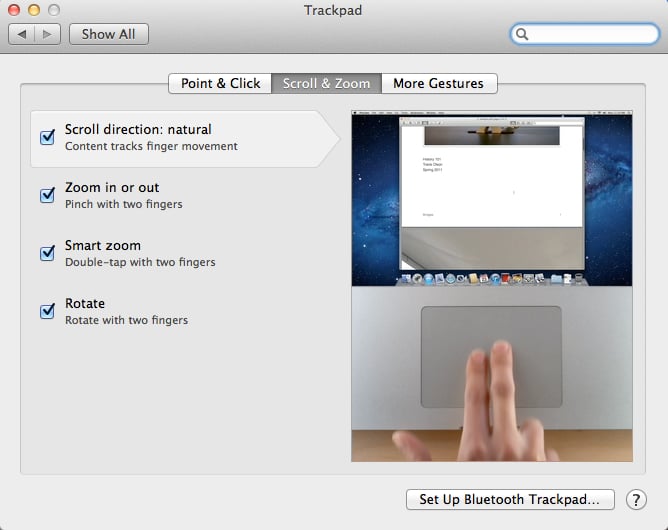
Natural scrolling in Mac OS X Lion

I love this change - it took me about 5 minutes to get used to it. But I appear to be in the minority with this opinion. It sounds like the first thing most people do once Lion is installed is head over to Settings and change it back to the old way of scrolling. So I’d like to step back a little and use this change to talk about UI conventions and when it’s ok to change them. To do that, let’s first look at what we know about Apple’s direction for their operation systems.

Data Is The Future

We got our first glimpse into Apple’s future at WWDC, where John Gruber summed up the keynote as follows:

Googl’s frame is the browser window. Appl’s frame is the screen. That’s what w’ll remember about today’s keynote ten years from now.

Robert X. Cringely touched on the implications of this in an article about Facebook where he says this:

The trend is clear from “the computer is the computer” through “the network is the computer” to what’s next, which I believe is “the data is the computer.”

The point is this. Up to now the metaphor we’ve had about computers is that data = files, and we view this data through windows (with a small “w”). We then manipulate these windows around to get things done. With the introduction of iOS, Apple noticed that the metaphor is not only unnecessary, it’s also not the most effective way to do things.

Instead, Apple wants us to remove the current abstraction from our data (the file system and the “window”), and instead focus on and interact with the data itself. Our data no longer has to be served to us through a middleman - we can go straight to the source. In this context, inverting scrolling behavior makes total sense. Why would you move a window around to see data that sits somewhere behind it, when you can manipulate that data directly? If the data is the computer, scrolling down should move your words down the page, not up.

Inverted scrolling is only one piece of the puzzle. Full-screen mode, disappearing scroll bars, auto-save - these are all new features in Lion that build on this fundamental shift away from file-based computing to data-based computing[1].

But there is a problem with this shift, as we’ve seen from the outcry. People are used to doing things a certain way, and you can’t just go ahead and change that without asking permission. So how do you deal with a change like this?

Floppy Disks And UI Conventions

Another example of this kind of conundrum is the trusted old “save” icon - the floppy disk. My 2-year old daughter will probably never see a floppy disk in her entire life, yet she will learn that the floppy disk icon = save action. Some have tried to change this - recently David Friedman proposed a baseball home plate as replacement icon.

But getting every software developer (and user) in the world to adopt a new standard like this seems nearly impossible. So, we’re stuck with the floppy disk for now[2], even though it is an outdated metaphor, similar to how scrolling currently works.

So this is where we need to go back to the theory. In essence, reversing scrolling behavior lines up with one of the fundamental heuristics of UI design: there has to be a match between the system and the real world:

The system should speak the users’ language, with words, phrases and concepts familiar to the user, rather than system-oriented terms. Follow real-world conventions, making information appear in a natural and logical order.

There is a tension here. Users are familiar with the current concept of scrolling. Yet, I’ve tried to argue above that the new way is actually more natural and logical. Apple is essentially caught in the middle of this UI heuristic, and they had to make a choice. So the question becomes, when is it ok to change what’s familiar to something that’s different but more natural and logical?

You’ve Got To Leave It Behind

The answer is that you make such a change when you believe it’s part of a much bigger trend in computing, and you’re willing to take the negative backlash because you know you’re doing it for the greater good. Ok, stop rolling your eyes. Yes, I’ve been accused of drinking the Apple Kool-Aid just a little bit too much lately. But hear me out, and re-read that Seracusa quote in the beginning of this post.

Apple is undeniable moving iOS and Mac OS X closer to each other. And in their future, direct manipulation of the data (primarily through touch) is at the center of a larger computing shift first introduced by the iPad. So they are making this tough call now, saying, “this is where we’re going, don’t get left behind.”

In short, I implore you to take John Gruber’s advice on this:

My number one Lion tip: No matter how wrong it feels, stick with the new trackpad scrolling direction. Give it a week.

Six months from now I think we’ll look back at Lion and iOS 5 as the operating systems that ushered us into the era of the data as the computer. And we’ll be better for it.


  1. Apps like Notational Velocity have been going this route for a while, where the file system is completely hidden. You don’t interact with it at all, unless you really want to.↩
  2. At least until all developers follow Apple and Google Docs (to a certain extent) and replace save icons with auto-save options.↩

No More Banner Ads: Alternatives to Ad-Supported Media Sites

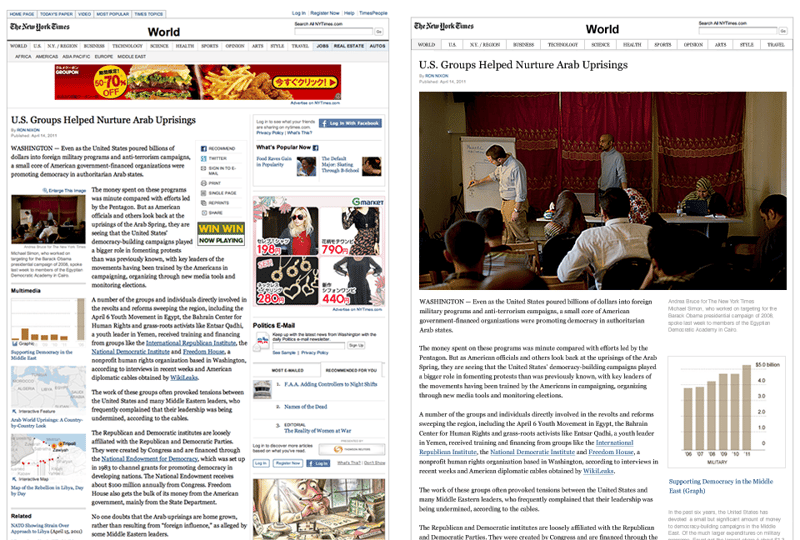
This morning I read an article about something that’s been on my mind for a while: Banner ads on media sites/blogs. In The Truth About Display Advertising, Mitch Joel writes:

Go to the website for your local newspaper. How many display ads, banners, buttons, text links, etc… do you see that are ads? Mine has over 15. That’s not in consecutive order… that’s all at once. It’s hard enough to get consumers to sit through four TV ads in a row, so what did you expect to have happen when you blast them with 15 ads on one page, all at once? Foregoing the aesthetics and the basic Marketing lesson that an ad will experience diminishing returns based on how cluttered the environment that it’s placed in is, does anyone really believe that this is the best way to advertise to consumers in the digital spaces?

No. I don’t think this is the best way to advertise to consumers. In fact, I don’t even think advertising is the best way to monetize media sites either. But are there viable alternatives? I think there are at least two business models that could work.

Distraction-Free Reading

One of my favorite services on the web is Readability. Users sign up for at a low monthly fee (minimum $5), and it then allows them to read articles in a beautiful distraction-free environment with all the ads stripped out. But here’s the best part: publishers also get something out of it:

70% of all Readability membership fees go directly to writers and publishers. Every time a subscriber uses Readability on your site, a portion of that subscriber’s fees are allocated to you. Whether in a web browser, iPhone, or just about any mobile or tablet device, Readability puts reading ”” and your content ”” at the center of the experience.

Here’s a 1-minute video that summarizes the experience:

You’ll also see that the Readability buttons are the only content sharing buttons I have on my blog apart from the Tweet button. There are many reasons for only choosing those two, but with Readability it’s simple - I think they have a fair business model where both reader and publisher win.

How would this work as a replacement for ads? Sites could integrate the “Read Later” functionality in some innovative ways. Sites that publish a lot of content could provide an ad-free home page with content snippets and “Read now/later” buttons to get to the full article. Users without a Readability (or an equivalent) account could view ad-supported full articles if they prefer. My hope is that content would win and readers would start to prefer paying small amounts of money for ad-free reading environments.

This is by no means a well-explored alternative for ad-supported sites, but it could be the beginning of something great that rewards both readers and publishers.

Business Class Subscriptions

Oliver Reichenstein recently posted another very interesting alternative to traditional paywalls on sites like the New York Times. He refers to it as Freemium for News, and the idea is that instead of paying for additional content like with traditional paywalls, you pay to get a better experience (just like paying for Business Class still gets you to the same destination, but in a much more comfortable way). Think of it as a Readability season ticket for a specific site. Here is one example he shows:

Now, think about how this might work for ad-supported sites. I would certainly pay $0.99/month to access a Business Class version of TechCrunch. Would you?

But Can Any Of This work?

Realistically, could either of these ideas provide viable alternatives to the traditional ad model for media sites and blogs? Probably not yet. But I don’t think we’re seeing enough discussion about alternatives, particularly those that focus on user experience as opposed to “monetizing traffic”. I also don’t think these ideas would ever replace ads completely (just being realistic), but at the very least it could provide an additional revenue stream that’s actually based on what users want, not on what advertisers want to push down our throats.

Let me end with something I probably should have begun with. I am no expert in the area of publishing, so it’s easy for me to back-seat-drive media sites out of their biggest source of revenue - after all, it’s not my car. I am in the lucky position where I don’t need to monetize this blog, so I don’t really have to make tough decisions about these things.

But I do hope that if I ever need to make money here, there would be a viable alternative to putting ads all over the page. I just don’t think an ad-supported User Experience Design blog is a good idea. So from the back seat I just ask those who make a living in the publishing industry: Can you please figure out how to do this so I don’t have to?

Hierarchy and Aesthetics: Separating Science from Art in Visual Design

In this post I argue that we need to communicate the differences between the science and art of Visual Design better to help change the common perception by stakeholders and clients that user experience is purely subjective.

One of the most difficult aspects of visual design is finding the right science:art ratio to accomplish user goals. I’ve always subscribed to what Tim van Damme calls the mathematics of design. You start with the science:

If art is about talking and expressing yourself, interface design is about listening and disappearing into the background. You listen to the content and its context, and take it from there, one step at a time. Don’t worry about the looks, just start with the variables. 1 + 1 + 1 + ”¦ Baby steps, over and over again until what you have on your screen feels right.

And then you mix in art where appropriate:

But sometimes, even 1 + 1 is too much to handle, and you need to clear your head. This is where art comes into play, in the broadest meaning of the word: Paintings, illustrations, architecture, human beings, even nature is art. They won’t help you decide whether you should draw a 1 or 1.5 pixel highlight, but allow you to take a step back and just decide on what’s more suitable or pick one and move on.

Of course, this is not a serial process. Great designers are able to design within that delicate balance between science and art, and find the right ratio as they’re doing it. And even though it’s not easy, I do feel that most designers inherently get this - that visual design is science and art combined in different levels based on the needs of the user and the application.

What’s even harder is explaining this to stakeholders and clients in a convincing way. Over the past week I’ve seen so many comments about how “UX is subjective” and “standards always change” that it got me thinking about a possible solution to this problem. I haven’t figured it out, but I’d like to write down some initial thoughts for discussion.

The problem with Visual Design

I think as a UX community we’ve done a good job of splitting out the different elements of UX Design. Stakeholders and clients are slowly starting to understand the difference between Information Architecture, Content Strategy, Interaction Design, etc. And most people also now understand that those functions are not just gut feel or whatever is the trend of the day. We’ve done a decent job of showing the evidence behind the decisions we make - thanks in large part to the results of user experience research methods like ethnography and usability studies.

But Visual Design is the odd one out in this equation. It walks the line between science and art so tightly that most stakeholders and clients only see the art part. So they look at a design, make a gut call, and think that it’s all just whatever style the designer fancied on that particular day. Sure, some of it is our own fault, and many designs don’t have enough science at all. As Zeldman pointed out:

When Style is a fetish, sites confuse visitors, hurting users and the companies that paid for the sites. When designers don’t start by asking who will use the site, and what they will use it for, we get meaningless eye candy that gives beauty a bad name ”” at least, in some circles. Not enough designers are working in that vast middle ground between eye candy and hardcore usability where most of the web must be built.

We have to find a better way forward.

Breaking down the elements of Visual Design

So how do we fix this? One way is to provide a much clearer distinction between the different aspects of visual design. I’m not saying we should split the job title into two functions, I’m saying we should be more explicit about the goals and outcomes of visual design. And it needs to be simple, so it can’t be too detailed. I’m not 100% sure how to do that yet, but here is one suggestion:

  • Hierarchy Design could refer to decisions made during the design process that sets the appropriate visual hierarchy based on the scientific principles of visual perception (such as contrast, grouping, balance, symmetry, etc.). See Designing for the Mind as an example.
  • Aesthetic Design could refer to decisions made during the design process to help the design fit the brand promise and elicit an appropriate emotional response (such as choice of color, typography, button styling, etc.). See In Defense of Eye Candy for more.

Now, as I already mentioned, there is a lot of overlap between these activities, and you can’t have one kind of visual design without the other. But there has to be a way for us to talk to our stakeholders and clients about the visual layer of design that is not based on style preference but on “hardcore usability” as Zeldman puts it.

As we continue to grow and define the different elements of user experience I believe that Visual Design has the most baggage to overcome simply because of the history of web design and its initial focus on what’s pretty vs. what works. What works is not subjective, and we need to communicate that effectively to our stakeholders and clients. It’s not their fault for not “getting it”, it’s our fault for not explaining it properly. Let’s change that.

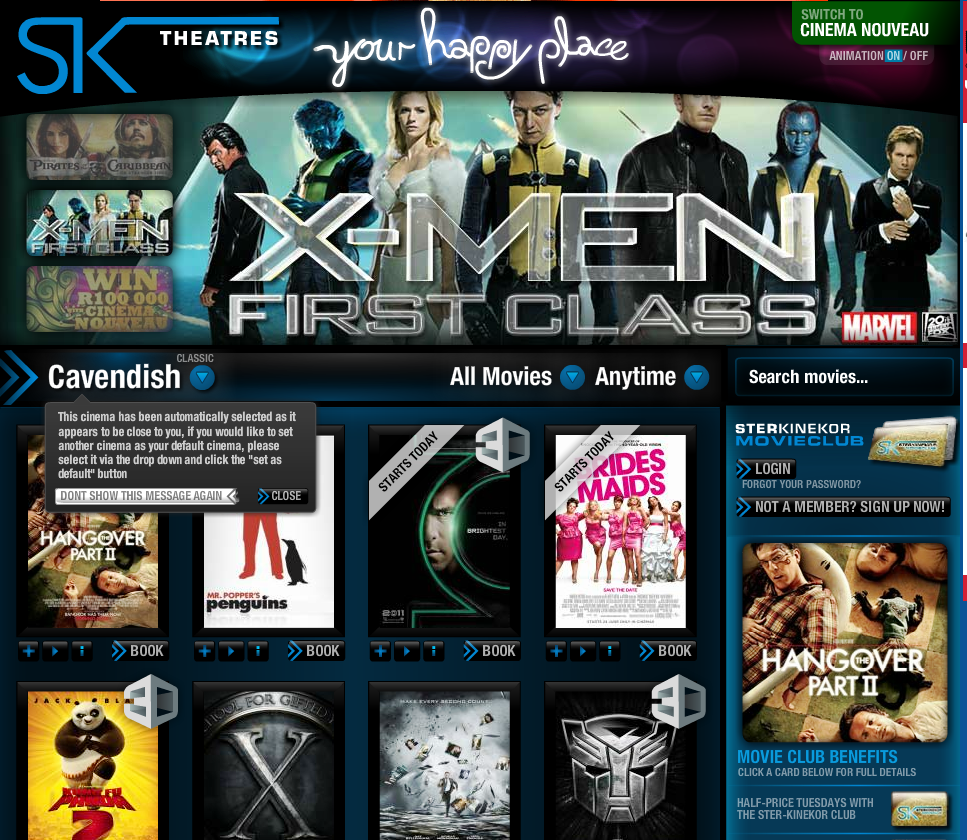
The problem with Flash and Ster Kinekor's new web site

South African movie site Ster Kinekor just relaunched their web site to much fanfare. Much of the discussion I’ve seen on Twitter about the new site is about their decision to remain completely reliant on Flash. I agree with all the technology arguments against Flash, but I want to take a slightly different approach here and talk about Flash as an enabler of bad user experience.

You see, Flash is like the guy who keeps giving your alcoholic uncle a drink while the rest of the family is trying so hard to help him get sober. Every time he gets close to quitting he gets “one more drink” from somewhere and falls back into bad habits. And this is what Flash is to user experience.

Every time you might get close to following standard UI conventions or have a simple flow, Flash comes in to whisper sweet animatic nothings in your ear… “Just one more flyout,” it says. “Just one more hover state - come on, everybody’s doing it.” Designing a boring old button? “No man,” says Flash, “we can make this thing move and light up with Flash, wouldn’t that be cool?”

And before you know it, you have this:

In my view, most of the user experience issues with the old Ster Kinekor site have not been addressed in the redesign. For example:

  • There is no visual hierarchy on the site. Everything is important, so nothing is important. I just don’t know where I’m supposed to click.
  • Animations are intrusive and adds to the confusion.
  • Standard UI conventions are ignored. Buttons don’t look like buttons, links don’t look like links (links are grey on the site…).
  • Forms are non-standard and not easy to fill out. For example, the checkout flow uses skeuomorphic design to make the credit card look like a real card, but it’s just confusing. And you can’t copy and paste your card number from a different document.

There are more issues, but that’s not really what this post is about. This post is a call to cutt off Flash as a primary development technology on a web site, not just because it’s slow, difficult for SEO, doesn’t work on iOS, and all the other technical arguments against it.

We need to cut off Flash mostly because it makes it way too easy to design bad user experiences. The web is undeniably moving beyond Web 2.0 (whatever that was) and into an era where simple designs that put content first provide the best user experience. And Flash simply doesn’t fit that mold.

The struggle between Writing and Design, or Why everyone should write

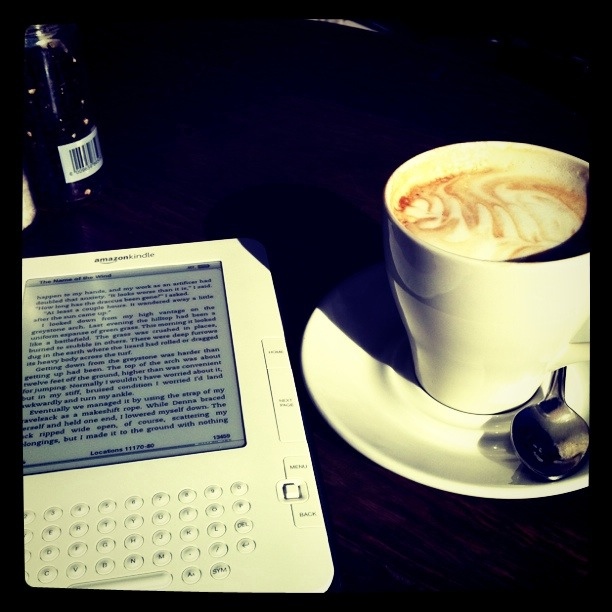
[caption id=“attachment_1181” align=“alignright” width=“240” caption=“Thinking about writing at Melissa’s Food Shop, Cape Town.”][/caption]

How good I am at my job as a software Product Manager depends on my ability to do two things: Understand the needs that real people have when they go online (whether they can articulate it or not), and building products that satisfy those needs as well as meet business goals. It occurred to me this morning that in many ways writing is about doing the exact opposite. To a large extent, writing is about being selfish.

Virtually any book or article you read about writing gives the same advice: Write what you know and what you’re passionate about. Write what’s in you, not what you think people want to read. Just last week James Shelley reminded us that people cannot help but notice an individual with passion. In another post he says:

Although passion may at times appear dangerous, the planet does not need less human passion right now, it needs more passion than ever before ”” passion that refuses to be immunized by the lulling caress of consumption and the crippling inundation of knowledge.

But it is this apparent struggle between Design and Writing (with a big D and W) that makes it so damn difficult to write sometimes. As user experience designers we’re trained to get out of our own shoes and into those of others. It’s about their needs, not our likes and dislikes. “You are not the user,” we often say.

But I have a feeling that the best writers (and designers, for that matter) are those who are able to balance this apparent conflict between user needs and internal passion effortlessly. Writers and designers who truly astound us with their work are those whose understanding of what people need are so ingrained in their beings, so much part of them, that they’re able to express their passion in a way that meets those needs “without fuss or bother,” as the NN Group definition of User Experience states.

It is for this reason that I think if you’re in software, you should write. Anil Dash got me thinking about this when he said:

Some ideas are just bigger than 140 characters. In fact, most good ideas are. More importantly, our ideas often need to gain traction and meaning over time. Blog posts often age into something more substantial than they are at their conception, through the weight of time and perspective and response.

If nothing else, the practice of writing down your thoughts (yes, about the things you are passionate about) will teach you how to create words in a way that resonates with those who read it. And just go ahead and try to convince me that won’t make you a better designer.

The biggest problem is, of course, that we all hate our own work, especially in the beginning. As Ira Glass so eloquently puts it:

Nobody tells this to people who are beginners, I wish someone told me. All of us who do creative work, we get into it because we have good taste. But there is this gap. For the first couple years you make stuff, it’s just not that good. It’s trying to be good, it has potential, but it’s not. But your taste, the thing that got you into the game, is still killer. And your taste is why your work disappoints you. A lot of people never get past this phase, they quit.

He goes on to give this advice:

And if you are just starting out or you are still in this phase, you gotta know it’s normal and the most important thing you can do is do a lot of work. Put yourself on a deadline so that every week you will finish one story. It is only by going through a volume of work that you will close that gap, and your work will be as good as your ambitions.

If you’re noticing a change in this blog over the past few weeks, you’d be right. I’ve redesigned to put the focus on the content, and I hope to write just a bit more - even if that means fewer long-form posts. I have to test this theory that writing better words will help blur the lines between what I’m good at and what people need from software. We’ll see how it goes.

And you - yes, YOU. Go write something, ok?