
Menu

Posts tagged “user experience”

Industry Web Conference: information and discount code

Industry Conf

I’m excited to be part of Industry Web Conference in April this year, alongside some people I’ve admired for a long time. I’m going to be talking about a thing that’s fallen out of fashion a little bit over the past year or so: Deliverables. Yep — the business we’re supposed to be getting out of. So I’m a bit nervous about the talk, but I hope people will give it a chance.

The talk is called Getting back into the (right) deliverables business, and here’s a little more about it:

I feel a little bad for the static wireframe. It’s had a bad year. In fact, UX deliverables in general have had a bad couple of years. There’s a growing skepticism about the value of Personas and other traditional UX artefacts, as well as an onslaught of “get out of the deliverables business” refrains from Lean methodologies.

All of this led me to lots of introspection about deliverables, and if it’s actually possible to create deliverables that are useful to help create better products.

In this talk I’ll tell our story. How we stripped down all our deliverables to almost nothing, and then started building it all up again slowly by asking ourselves, “What is absolutely necessary for us to do a great job?” I’ll discuss some of the deliverables we’ve since created (such as Expanded Journey Maps and Content Slice Diagrams), how they’re useful to us, and how you might be able to use them in your design process as well.

We’ve come to realise that not all UX deliverables are bad. Only bad deliverables are bad.

I’m going all in on this — the day before the conference I’m also doing a full-day workshop called Using Customer Journey Maps for Effective Content-First Design. This will be a very practical day on what has become an essential deliverable for us:

More than just a journey with touchpoints, emotions, takeaways, etc., it’s also a representation of the Information Architecture and the content plan, with Personas (needs, goals, scenarios) serving as the starting point for everything — sort of like the glue that ties it all together.

You can think of this as the UX Strategy document. It incorporates Persona-based user needs and business goals with site structure and content planning in a way that really works. It also places content at the centre of the design process, which makes it easier to follow mobile first and responsive design strategies.

In this workshop we’ll discuss the value of this document and then go through a practical exercise to create an Expanded Customer User Map so you can apply it in your roles immediately.

So anyway, I’m really looking forward to it. And here’s the special bit. If you use the discount code rian, you can get conference tickets and/or workshop tickets for £40 off. That’s a pretty substantial discount. You can read more about the conference here, and register here. I hope to see you in Newcastle upon Tyne in April!
User Experience Debt

Vijay Sundaram takes the concept of technical debt and applies it to User Experience Design:

You know you’re a subprime borrower when your team decides to “clean this up next release”. But the next release has a backlog of critical bug fixes, must-have feature requests, and of course plenty of new design shortcuts that emerge in the process. What’s more, the usage data for the last release is showing great engagement and no one has complained yet about the shortcuts you took. Fixing those can’t possibly be a priority right now. Before long, the team is grafting one design shortcut onto another, and the only way to unwind them is a wholesale reboot.

The article made me think of Henrik Kniberg’s excellent Good and Bad Technical Debt (and how TDD helps), in which he explains the concepts of a “good mess” and the “technical debt ceiling”:

A fresh mess is not a problem. It’s the old mess that bites you. […]

If you are coding up a new feature, there are lots of different ways to do it. Somewhere there is probably a very simple elegant solution, but it’s really hard to figure it out upfront. It’s easier to experiment, play around, try some different approaches to the problem and see how they work. […]

The problem is, just like in the kitchen, we often forget to clean up before moving on. And that’s how technical debt goes bad. All that “temporary” experimental code, duplicated code, lack of test coverage — all that stuff will really slow you down later when you build the next feature.

So regardless of your reason for accumulating short-term debt, make sure you actually do pay it off quickly.

I’ve been wondering how this applies to UX debt. Is it ok to take some design shortcuts, knowing that you’ll come back later and fix it (up to a “UX debt ceiling”)? My gut feeling is to say no, because design is so path-dependent. Your early choices constrain your later design choices, so if you make the wrong choice it can really hurt down the line. For example, if you skip user research in the beginning of the project, you’re highly likely to make the wrong choice about what to build, which isn’t something you can fix easily later on.

The solution is to have shorter UX (and development) cycles, which is becoming commonplace anyway with the rise of the Lean movement. I’m reminded of IDEO Design Director David Aycan’s 2010 article in HBR, Don’t Let the Minimum Win Over the Viable, in which he explains the importance of taking small steps so that it’s easier to correct course when you realise you’re on the wrong track:

Sketching or mocking up experiential prototypes and then testing them with consumers or potential partners, while also explicitly jotting down your operating and business assumptions and using them to discuss the business with industry experts, allows you both to pick a promising route to invest in the development sprint and to pivot with confidence. For example, by prototyping multiple consumer experiences and business models before investing in an initial MVP, GoGo was able to launch an airline WiFi and in-flight service experience that combined the best of multiple alternative services that might be offered in flight. One might think of this approach as testing multiple MVPs in parallel.

Creating multiple options in tandem creates more confidence in the core variables, which in turn means that pivots may be less drastic or disruptive later on. This approach can be applied beyond product features to business models and operating approaches as well.

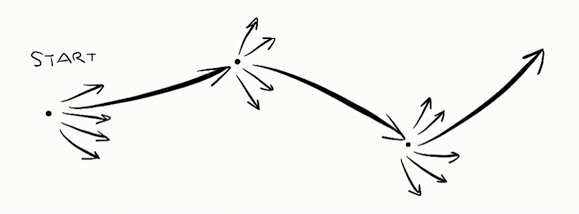
He uses this sketch to illustrate the approach:

MVP approach

This makes a lot of sense in the context of UX and technical debt as well. A pragmatic approach to dealing with software debt seems to be something like this:

  1. Create different possible paths (variation)
  2. Pick a direction and work towards it (iteration)
  3. Get feedback, address debt and other issues, correct course if necessary
  4. Repeat cycle

The trick is to be ok with the early messes, but not let them deteriorate so much that you’re unable to clean things up when you finally decide it’s time. Remember the broken windows theory: “maintaining and monitoring urban software environments in a well-ordered condition may stop further vandalism neglegence and escalation into more serious crime technical issues.”

In defense of web standards

Jeffrey Zeldman in a strong defense of web standards:

While many of us prefer to concentrate on design, content, and experience, it continues to be necessary to remind our work comrades (or inform younguns) about web standards, accessibility, and progressive enhancement. When a site like Facebook stops functioning when a script forgets to load, that is a failure of education and understanding, and all of us have a stake in reaching out to our fellow developers to make sure that, in addition to the new fancy tricks they’ve mastered, they also learn the basics of web standards, without which our whole shared system implodes.

I’ll add this to the ever-growing case for progressive enhancement.

Mixing public and private moments on social networks

Megan Garber takes on Instagram Direct1 in Behold, Facetwitterest: The Standardized Future of Social, and makes this observation:

So one of the biggest challenges facing the major (and the trying-to-be-major) social networks is a structural one: How do you build yourself up and out in ways that balance users’ desire for intimacy with their desire for publicity? How do you merge the web’s ability to create communities with its ability to create universalities? 

You could read Direct as Instagram’s (and Facebook’s) latest attempt to navigate that tension. The service is, basically, attempting to add a layer of privacy to its existing, public-leaning architecture. But Instagram isn’t just Snapchatting itself. It’s offering its users a Snapchat-like functionality within the context of its much more public social network. It’s trying to have it both ways — cynically, but perhaps ingeniously — by offering a refuge of privateness within a very public service.

It reminds me of something Luke Wroblewski said recently:

Every mobile app attempts to expand until it includes chat. Those applications which do not are replaced by ones which can.

Direct appears to be a necessary defensive move by Instagram — private messaging is now a basic expectation for social networks. But it also looks like people are getting more savvy about their privacy and what happens to their data (Thanks, NSA!), so it will be interesting to see how this mixing of public and private plays out in 2014.


  1. The ability to send photos privately to people in your network 

How culture affects user experience

Sean Madden makes some interesting points in American-Centric UI Is Leveling Tech Culture — and Design Diversity:

Just as user-centered design transformed technology in the 1990s and early 2000s, cultural fluency needs to transform it today: user experience (UX) design that’s familiar enough with a user’s cultural background to meet him or her halfway.

Cultural fluency demands abandoning the idea that functionality is a universal language, and that “good UX” is culturally agnostic.

He goes on to give some examples of this cultural bias:

Consider the use of gestural interfaces in a world where gestures mean very different things in different cultures. Or using scrolling for timelines when time horizons (among other culturally sensitive dimensions) represent different values to different societies. Even the idea of touching our screens is a culturally sensitive UX action.

We see this not just in how people use products differently, but also how we interact with them during the user-centered design process. Last year I started working on a talk called The challenges and opportunities of user-centered design in developing nations. Somewhere along the line I ran out of steam with it, but I still think it’s an important topic. For example, a usability lab in an office full of Macs and giant screens can be quite intimidating to users if you’re doing research on low-end phone usage, so that’s something you have to account for. Even our user-centered design methods need to be user-centered, but it’s unfortunately something we tend not to pay much attention to.

Maybe parallax scrolling isn't all it's cracked up to be

In Snow Fail: Do Readers Really Prefer Parallax Web Design? Eric Jaffe reports on a recent study done at Purdue University by graduate student Dede Frederick:

“I’ve read from many blogs how people say it’s going to attract users and create so much of a better user experience,” Frederick tells Co.Design. “I thought it was going to be superior to a typical website in every aspect.”

As it happens, the parallax site was only superior in one sense — fun. None of the other survey measures indicated a significant difference in user experience between the two sites. Parallax didn’t even edge the standard site in questions about visual appeal (although participants did think it looked slightly more “professional”). Frederick also discovered one critical disadvantage of parallax: test participants who suffered from motion sickness found the style disorienting.

This doesn’t mean parallax scrolling can’t be used well, just that we shouldn’t jump on every new design fad without understanding its usability impacts first.

Adding meaning to digital music

Dancing Bale

Khoi Vinh wrote a great essay exploring What Streaming Music Can Be. He starts by describing some of the things that made buying CDs and albums a meaningful experience:

This is all trivia, to be sure, but it’s the kind of stuff that used to be such a meaningful part of owning music — and that makes one a fan for life. Having a record in your collection meant that you could spend time poring over its liner notes: familiarizing yourself with the names of musicians, producers, engineers, and managers; memorizing lyrics; and studying photos of musicians’ faces, stances and attire. These were the intangible qualities that made music more than just a service, but something to be collected.

But Khoi doesn’t just want streaming music services like Spotify and Rdio to copy the days of physical liner notes. Instead, he makes some suggestions on how these services can use metadata in fascinating ways to add meaning to digital music.

I’ve been a happy Spotify customer for a few months now, but everything Khoi says in his post makes sense to me. I’ve discovered some great music — and some great albums — but I tend to listen to those albums a lot less than when I used to buy CDs. The turnover is just too fast — there’s always something new to discover. And I’m hungry for it, incapable of resisting the lure of the next great song.

Apart from the missing metadata, there is something else that bugs me about streaming services (and digital music in general). Janko Jovanovic discusses this in the context of eBooks in his post Digital and physical, but it’s just as applicable to digital music:

When I buy a physical book, it starts to live a life of its own. After reading it for days or weeks, the book changes. It’s not brand new anymore. Edges of papers lose their sharpness. The cover becomes slightly bent and you can tell it was read just by looking at it. When I put a book on a shelf it becomes a part of the space I live in and it continues to change over time. This transience and decay of things around me remind me that I should use every moment of my life since I will go through the same lifecycle as that book. […]

All digital goods, be it ebooks, software, documents or images give me a sense of permanency and immutability. They are sterile. And that sterility prevents me from getting in touch with transience and gives me a sense of timelessness. Which is just an illusion.

I’m not going to end my Spotify subscription, but I do miss glancing over my CDs, observing the wear and tear of albums that have gone through so much with me. Those CD covers become more than the music they contain. They become reminders of a life well lived. And I do fear that I’m losing that now that I mainly listen to my (admittedly awesome) Spotify playlists.

No more FAQs

Lisa Maria Martin gives some advice on What To Do With Those Dreaded FAQs:

These all underscore FAQs’ fatal flaw: they are content without context, delivered without regard for the larger experience of the website. You can hear the absurdity in the name itself: if users are asking the same questions so frequently, then there is an obvious gulf between their needs and the site content. (And if not, then we have a labeling problem.) Instead of sending users to a jumble of maybe-it’s-here-maybe-it’s-not questions, the answers to FAQs should be found naturally throughout a website. They are not separated, not isolated, not other. They are the content.

We’re definitely in agreement about that. A while I go I wrote this:

Most users don’t know what FAQ stands for, and besides, it’s bad practice to answer questions outside the context people want to ask them in. Figure out where in the process each question in your FAQ might come up, and provide the answer right there within the flow. Don’t expect people to click to a different page to find the information they need.

By the way, 24 ways is a collection of fantastic design and development articles and tutorials for advent. If it’s not part of your daily reading yet, make it so!

Conversions are not people

Andy Beaumont wrote a great piece about his popular Tab Closed; Didn’t Read Tumblr site, which documents websites that obscure their content behind modal overlays. His point on analytics in The Value of Content is spot on:

Analytics only tell you part of the story — if that’s all you bother to find out, and you have absolute faith in those numbers, then you’re going to end up putting a modal overlay on your site. Analytics will tell you that you got more “conversions”. Analytics will show you rising graphs and bigger numbers. You will show these to your boss or your client. They will falsely conclude that people love these modal overlays.

But they don’t. Nobody likes them. Conversions are not people. If you want the whole story here you should also be sat in a room testing this modal overlay with real people. Ask them questions.

Once again, this points to how important research triangulation is to make good decisions based on insights, not just data. Real insights are found at the intersection of different research methods. Not over in the corner with just one method.

Research triangulation

What is good design?

There are a few pieces on the topic of what makes a design good that jumped out at me recently. First, I like this approach from Uday Gajendar in What is good design?:

So what is “good design”? It’s an attitude of design-driven excellence (from strategy to delivery), a process of iteration and creativity, a mentality of enabling humanistic achievement for people, and a value system grounded in excellence of craft with a magnanimous bent towards what’s best for customers: appropriate, empowering, delightful.

Jon Bell talks about “Of Course” Design:

When people try to design magical interfaces, they’re often aspiring for the “wow” moment, but that’s the wrong focus. Designers should instead be focusing on “of course” moments, as in “of course it works like that.” Most product design should be so obvious it elicits no response.

Finally, Randy Hunt implores designers to Stop Trying To Be So Damned Clever:

During the design process, you can easily want to surprise and delight the user. So you create a design element — an interaction pattern, a naming scheme, a symbol, and so on — that is fresh and extremely inventive. However, the cleverness of your creation obscures the intent of the product. And the cleverness of that first impression doesn’t hold up over time — and I don’t mean over years; I mean over only the first few moments of use. After that first rush of newness, if the intended value of the product is not clear, or the functional intent isn’t obvious, the novel idea means nothing.

All three posts are worth reading in detail for their different points of view that point to similar definitions of good design.