Menu

Posts tagged “product strategy”

Apple and Faster Horses

The Harvard Business Review says they have proof that Henry Ford never said “If I had asked people what they wanted, they would have said faster horses.” It’s an interesting piece, but it’s the conclusion I want to quote here:

The real lesson learned was not that Ford’s failure was one of not listening to his customers, but of his refusal to continuously test his vision against reality, which led to the Ford Motor Company’s failure of continuous innovation, resulting in a catastrophic loss of market share from which it never recovered.

Translation: regardless of where your innovative ideas come from, make sure you test those ideas with users and learn from their feedback.

The iPhone might have been one man’s vision, but the way users interacted with the first generation iPhone paved the way for the iPad and the iPhone 4. They tested their vision with a real product, and then learned from it.

Files Aren't Dead, They Just Need to Become Invisible

In There Will Be No Files In The Cloud Fred Wilson argues that file-based cloud computing will become a thing of the past:

This is why I love Google Docs so much. I just create a document and email a link. Nobody downloads anything. There are no attachments in the email. Just a link. Just like the web, following links, getting [stuff] done. I love it.

That’s the future. I’m pretty sure of it.

He has a point, but I think it’s important to clarify what he means by “file”. Sorry to go all Wikipedia on you, but I promise ther’s a point on the other side. Wikipedia defines a computer file as follows:

A computer file is a block of arbitrary information, or resource for storing information, which is available to a computer program and is usually based on some kind of durable storage. A file is durable in the sense that it remains available for programs to use after the current program has finished.

The point being that a file is a block of data that is accessible to the programs that need it. Based on that definition files are certainly not going away, because software will always need access to the data that makes it more than a pretty shell.

What is going away though is the need for users to care about files: where they’re located, what file extensions work with what, etc. The best example currently in the wild is probably Notational Velocity, a text editor for the Mac where you don’t need to worry about where your files are located. From the web sit’s description:

The same area is used both for creating notes and searching. I.e., in the process of entering the title for a new note, related notes appear below, letting users file information there if they choose. Likewise, if a search reveals nothing, one need simply press return to create a note with the appropriate title.

Those files still exist, you just don’t have to go into Finder and start a search from there. Ther’s no File | Open command because it’s not needed. The data is in the app, and you interact directly with it. So if that’s what Fred Wilson means by saying “That’s the future. I’m pretty sure of it.” then we agree. But if he means that w’ll lose the “computer file” as an entity, I disagree. Fred ends his piece with this:

So if you are working in the cloud storage space, I think you’ve got a bit of a conundrum. The reality of the market today is that people use files. You need to support that use case, enhance it, and make peopl’s lives easier. But over time, that use case will go away. And what people will want is a service that doesn’t have files as the atomic unit.

I don’t think it’s that big of a conundrum. Notational Velocity doesn’t care where I store my .txt files, but I happen to store them in Dropbox. It doesn’t mean I now have to think about my files and wonder if they’re ok over there. It just means that the app pulls its data from a folder in Dropbox.

So taking that example all the way to the future of the computer file, this could be a great selling point for cloud storage companies: we host your files/data so that your apps will work anywhere and on any computer. (Ok, that sentence might need some Marketing magic, but you catch the drift).

Even if manipulating files becomes a thing of the past, data isn’t going anywhere. BBEdit 10 is already going down this road - they are encouraging users to sync application support files with Dropbox so you can easily maintain multiple installs. My guess is that many apps will take this approach where they add seamless data syncing to their offering without having to go into the cloud storage business themselves.

We don’t have to kill files. We just have to build apps that allow users to stop thinking about them.

Apple as "the third who benefits", or why developers shouldn't be upset

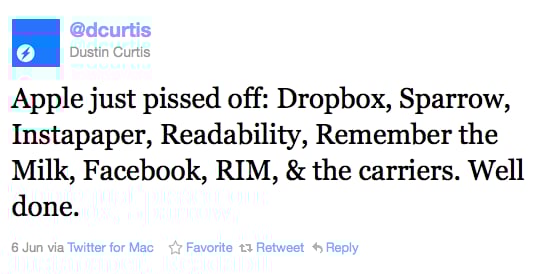
Perhaps the most succinct summary of Monday’s Apple WWDC keynote is this tweet by Dustin Curtis:

Screen shot 2011 06 08 at 9 57 47 AM

I understand the sentiment, and a lot of the post-keynote blog posts echoed this general statement. The most measured response, in my view, came from Marco Arment, the creator of Instapaper:

If Reading List gets widely adopted and millions of people start saving pages for later reading, a portion of those people will be interested in upgrading to a dedicated, deluxe app and service to serve their needs better. And they’ll quickly find Instapaper in the App Store.

I’m certainly not going to stop using Instapaper. I’m deeply invested in the service and can’t see myself moving to Safari any time soon. But that’s beside the point. Here’s the point.

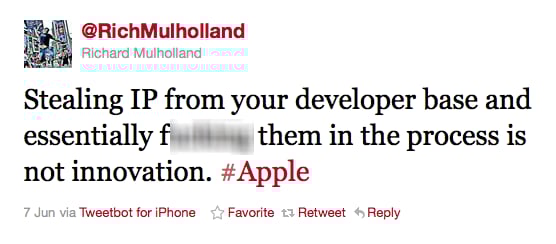
I find it strange that people are freaking out about how Apple is going after successful apps and integrating them deeply into Lion and iOS. Here’s Rich Mulholland (well, censored a little bit):

Screen shot 2011 06 08 at 10 03 12 AM

For my part, I agree much more with Justin Williams when he says:

Some people grow frustrated by Apple continually making inroads in existing developer’s territory, but it comes with being a part of the platform. The key is to ensure your product lineup is diverse enough that you can survive taking the blow Apple may offer at the next keynote.

The Theory

And this is where we have to start talking about Sociology theory (No, don’t go away, this is going to be great!). One of the key concepts in Social Network Theory is Ronald Burt’s theory of ‘structural holes’. This theory aims to explain how competition works, and argues that networks provide two types of benefits: information benefits and control benefits.

  • Information benefits refer to who knows about relevant information and how fast they find out about it. People with strong networks will generally know more about relevant subjects, and they will also know about it faster.
  • Control benefits refer to the advantages of being an important player in a well-connected network. In a large network, central players have more bargaining power than other players, which also means that they can, to a large extent, control many of the information flows within the network.

Burt’s theory of structural holes aims to enhance these benefits to their full potential. A structural hole is “a separation between non-redundant contacts” (Burt, 1992). The holes between non-redundant contacts provide entrepreneurial opportunities that can enhance both the control benefits and the information benefits of networks.

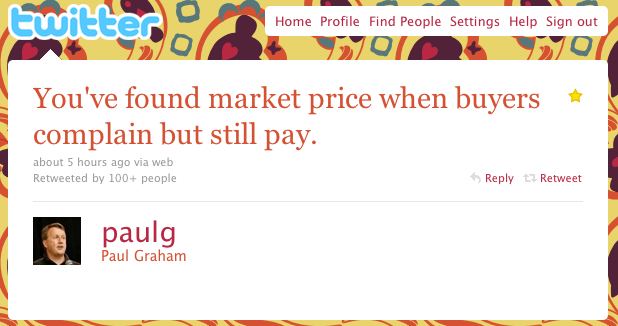
To understand the role of structural holes in this regard, it is necessary to understand the concept of tertius gaudens. Taken from the work of George Simmel, the tertius gaudens is defined as “the third who benefits” (Simmel, 1923). It describes the person who benefits from the disunion of two others. For example, when two people want to buy the same product, the seller can play their bids against one another to get a higher price for the particular product.

Structural holes are the setting in which the tertius gaudens operates. An entrepreneur stepping into a structural hole at the right time will have the power and the control to negotiate the relationship between the two actors divided by the hole, most often by playing their demands against one another.

Apple’s Strategy

This is exactly what Apple is doing, and have been doing from the start when the first iPhone came out (maybe even before). They saw the structural hole between 3rd party developers and consumers, and walked right into it. Through the app store, they built an enormous network (information benefits) where they broker the relationship between developers and users (control benefits). By providing developers with a massive audience, they became “the third who benefits.”

I also don’t think they’ve been particularly secretive about this strategy, so it shouldn’t come as a surprise to developers that if they have a one-platform strategy, and that platform is iOS, they might get disintermediated at some point.

Which brings us back to Marco Arment and Instapaper, and why I don’t think he’s in trouble. Instapaper is an ecosystem that’s intimately part of my workflow. It’s integrated with Firefox, iPhone, iPad, Twitter, Google Reader, Flipboard, Zite, … the list goes on. I’m not going to switch away, because I don’t see Instapaper as an iOS app. I see it as a solution to my reading needs.

So should developers still make iOS apps? Of course. But it’s important to realize that the product shouldn’t be the app. The product should be the problem you solve for users, on multiple platforms and in a simple, integrated way. Those are the apps that will survive (and even thrive) despite any changes that occur on Apple or another platform.

Product roadmaps are safe

Over on the 37signals blog they just reposted an old article entitled Product roadmaps are dangerous. Jason Fried says the following:

Instead of the roadmap, just look out a few weeks at a time. Work on the next most important thing. What’s the point of a long list when you can’t work on everything at once anyway? Finish what’s important now and then figure out what’s important next. One step at a time.

It’s hard to disagree with a person (and a company) you have great admiration for, as I do for Jason and 37signals. But I do think it’s important to set the record straight on product roadmaps - particularly when it comes to large organizations. The post highlights two main concerns with product roadmaps:

  • Product roadmaps assume you know what’s going to happen 6 - 18 months from now
  • Product roadmaps set expectations, so you can’t change them (and if you do change them it becomes a worthless exercise)

So let’s look at each of these points in turn.

Product roadmaps assume you know the future

Jason writes:

When you let a product roadmap guide you you let the past drive the future. You’re saying “6 months ago I knew what 18 months from now would look like.” You’re saying “I’m not going to pay attention to now, I’m going to pay attention to then.” You’re saying “I should be working at the Psychic Friends Network.”

This is not what a product roadmap is, or what it’s supposed to do. The purpose of a product roadmap is to set forth a long-term vision for the business, and break that up into smaller, meaningful pieces of work, based on what you know now. It’s fallacy to believe that this is an unchangeable list of dates about where the business is headed. A product roadmap that doesn’t react to day-to-day changes in the market and within the company is a pretty dumb document.

At my organization we are very clear that the product roadmap is a flexible guideline that can (and must) change frequently as needed. But it gives the teams (and the management team) something to work towards. It’s a common vision, a sense of direction that’s more than just fluffy language - it’s concrete evidence that we’re headed somewhere good, and we know how to get there.

We can change direction as many times as we want. This doesn’t make it a useless exercise, it means that instead of starting fresh on a new “roadmap” every few weeks, you build on your past successes, don’t make the same mistakes twice, and keep making measurable progress since you can see where you came from.

Product roadmaps set the wrong expectations

Elsewhere in the post:

The other problem with roadmaps is the expectations game. People expect you to deliver what you say you will in 4, 5, 6 months. And what if you have a better idea? What if ther’s a shift in the market that you need to address? What if what you thought wasn’t what actually happened? Any change in the roadmap nullifies the roadmap. Then the map isn’t a map at all.

If you have this problem it doesn’t mean that product roadmaps are wrong, it means that you’re doing it wrong. As long as everyone in the organization buys into the fluid nature of the roadmap, you won’t have this problem. In our organization we do this mainly through the mechanism of what we call the Product Council (I was partial to Intergalactic Product Force, but for some reason that didn’t fly so well). Here’s how it works.

The Product Council is made up of the heads (VPs) of every department in the organization: Engineering, Marketing, Support, Category, etc. This body has a weekly meeting where we discuss the current product roadmap and priorities. We ask ourselves, Are we still working on the most important things? If something more important comes up, we prioritize it higher in the roadmap, and something else shifts down. If we’re happy with the direction, we do nothing. If a new opportunity arises we ask ourselves, Is this more important than what we’re working on right now? Or is this something we should work on next? If so, what moves down in the priority list?

From here, I communicate with my Product Team about any changes, and we discuss this to make sure no one missed anything. But then - and this is important - the Product Manager has complete autonomy and ownership over the implementation of the roadmap. The Product Council sets the priorities (with input from all parts of the organization), but the Product Managers work with their development teams (and others) to set the timeline, the implementation details, the design, everything.

There’s more to it, but in the interest of brevity I’ll stop there. This process has three main advantages:

  • It gives the management team complete transparency into what the Product team is working on, and it allows for anyone to make the case for a change in priorities. Why this kind of transparency is so essential is a subject for a different blog post, but in short, it takes away a vast majority of the politics you see in many organizations, and it frees up the teams to do what they do best - execute.
  • It prevents scope creep. Nothing can go on the roadmap without something else moving out or down. As anyone who ever worked at a large organization knows, this is an absolutely critical part of a successful development cycle.
  • It gives the Product Manager and their teams what they need to be successful: direction and autonomy. As Jocelyn Glei says: “Give your team members what they need to thrive, and then get out of the way.”

Why product roadmaps are safe (and essential)

At a practical level I went through the exercise of figuring out how we could execute in my organization without a roadmap. And I just can’t see it. Changes to current pages/flows affect changes we’ll make down the line - I have to think about that.

If you’re serious about frequent incremental change as opposed to large redesign projects (as we are), you can’t live without a roadmap because you’ll have no idea how far you’ve gone, what you still need to do, and what’s more important than something else. And perhaps most dangerous of all, everyone in the organization will come to you and want all their projects done right now, and you’ll have no systemic method for dealing with that in a way that’s best for the business.

Andy Wagner summed up my feelings on this issue quite succinctly in a comment on the 37signals post:

[Product roadmaps are] an opportunity to dream about what the future might look like so that as you make your day-to-day responses to the customer, you can do so consistent with building the future state. It emphatically should not be anything to be slave to, it should be dynamic and notional, not static and specific.

Jason says, “The further you get from now, the less you know. And the less you know, the worse your decisions will be.” We agree on that. My argument is that without a roadmap you only see now. And if you only see now without seeing yesterday and tomorrow, you don’t see a whole lot. And “the less you know, the worse your decisions will be”.

The most important characteristic of a good Product Manager

About a week ago I had a discussion with a colleague in our development team about the new product development process we rolled out a few months ago. One of the words he used to describe the new process is fair.

It was a passing comment and I didn’t really think much of it at the time, but since then I keep going back to that conversation, and the importance of fairness in the product management profession.

Loads of articles have already been written about the characteristics of a good Product Manager (see the end of this post for links to some of them). They’re all fantastic, and I go back to them constantly when I’m in the hiring process or looking for personal development areas. But I’ve never been able to find the one characteristic that I think a PM simply cannot do without. I now think that fairness is that characteristic. Here’s why.

The role of fairness in effective product management

Let’s look at one definition of the word fair:

fairadjective. free from favoritism or self-interest or bias or deception.

Free from favoritism

One of the fastest ways to become ineffective in a PM organisation is to start playing favorites with a particular internal group, product line, or user base. As soon as people sense that you are not looking at all ideas and input equally and fairly, a lack of trust inevitably follows. And without trust, you’ll have to work a lot harder (and longer) to bring people along for the ride on your roadmap.

Free from self-interest

If you start doing things purely with reasons like “because I want to” or “because I’m being measured by this metric,” that same lack of trust happens very quickly. You cannot be effective by nursing your own pet projects and ignoring all the other needs around you.

Free from bias

This often happens when PM’s get news they don’t want to hear — especially from the user research team. If something doesn’t test well, don’t make up reasons why you are right and the users are wrong. Do the right thing and realign the design.

One of the hardest skills for a PM to learn is to take their own emotions and feelings out of the equation when it comes to decision making. Yes, a lot of gut feel goes into a product vision, but that cannot be based on personal preferences or preconceived ideas.

Free from deception

This one seems obvious, but you see it often, especially when it comes to metrics and assessment. Don’t ignore/distort negative data or make a problem someone else’s fault. The PM’s job is to own a product — and this means owning its successes and its failures. You’ll gain trust and respect if you not only claim the successes, but also acknowledge the failures and commit to do it better next time.

The elements of fairness in product development

The PM role is often referred to as “the great diplomat,” and with good reason. It is our responsibility to balance a variety of needs from inside and outside the business, and somehow turn that into a roadmap that delivers business value as well as meets user needs. A focus on fairness accomplishes that goal:

  • Fairness to users. Approach users with respect, openness and transparency. Understand their needs, and explain to them when you’re doing something that makes it more difficult for them to meet those needs. (Don’t be like Twitter and hide behind reasons like “consistent user experience.”)
  • Fairness to the business. Do everything you can to understand the needs of marketing, merchandising, customer support, etc. Pull them into the planning process, be clear about how projects are prioritised, and help them adjust to that process so that they can define their project goals in the right way to get on the roadmap.
  • Fairness to technology. Don’t force the development team to make the technology do things it’s not capable of doing. Understand the technical debt in the organisation, and work actively to make those improvements part of regular development cycles.

A lot of this comes naturally in good product managers, but we need to be conscious of it every day. Fairness is a table stakes characteristic for an effective product manager. If you do it right, the real work of building great product can begin. But if you don’t, you’re dead in the water, working with a team that has no reason to trust that you’re doing the right thing.

More characteristics of good product managers:

Proving the value of user experience design to organizations and clients

This is a question that doesn’t seem to go away: “How do I convince my company that good design is worth investing in?” It’s frustrating to work in an industry where you have to spend so much time showing the value of what you do.

At first I placed all the blame on (big) companies who are too cheap to pay for good design because they don’t think it’s necessary. But then I started to wonder… maybe some of it is our own fault? Maybe we just haven’t yet proven, within our industry and the companies we work at, that good design will result in positive ROI?

If I remember one thing from Marketing 101, it’s this obvious (but often forgotten) truth: Businesses exist to make money. Companies work so hard to make us happy for one reason only: so that we will buy more of their stuff. This seems obvious, but it’s important to remember. Because when you talk to the management teams of your organization/clients, telling them how beautiful their site will be once you’re done with it is just not going to cut it.

To prove the value of user experience design, you have to prove that by investing in it, the business will make more money. It’s as simple as that. Well, the concept is simple. The execution is… complicated. In this post I’d like to propose some ways to help us prove the value of design, so that we can spend more of our time building great experiences and less time telling people why they should build great experiences.

Design = Money

Proving that good design will make your organization/client more money is not something you can apply a formula to and do overnight. It involves some hard work and clever thinking (time well spent) to figure out what works best for the context you’re designing in. In some cases, like designing a Checkout process, it is relatively easy to define success metrics, benchmark, and show that a redesign resulted in more money - because checkout is where the money is.

In other cases, for flows that are further removed from direct revenue generation, it can be much harder to find the money link. In those cases, a conversion model is often the right way to go:

In most online user flows you can make a strong case that an improved conversion rate (or reduced drop-off rate) will result in increased revenue. Once that link is made, what remains is to prove that an improved user experience results in improved conversion rates. But there are immediately two challenges with this approach:

  1. How do you buy the time you need to prove that UX works?
  2. How do you find the right conversion rate model to link UX to conversion rates (and ultimately revenue)

So let’s dive into that.

Buying time to do the right thing

Getting an organization or client to invest in UX can be quite tricky in the beginning. Without real data, it’s hard to show the value. But without the time to do the process right, it’s hard to get real data. And so the vicious circle continues.

One way to buy some time is to show case studies where an investment in UX design has resulted in significant revenue lifts. One of these case studies is Jared Spool’s The $300 Million Button, where a simple design change resulted in an enormous revenue lift. Spool writes:

When the team contacted us, they’d already pretty much decided what the problem was and how they were going to fix it, even though they had never watched any shoppers make purchases. And they were dead wrong. Not only was their fix not going to help, our research showed that it was going to increase abandonment.

Two weeks of usability testing on the live site (and on competitors’ sites), followed by two weeks of iterative paper prototype testing produced a streamlined checkout process, which, once implemented, showed a dramatic increase in revenues. It’s amazing what you’ll learn when you actually watch your users.

Obviously not all UX changes are going to have this much of an impact. But sharing cases like this with senior management or clients should help in making the case for investing in a proper user-centered design process. I know this is easier said than done, but mountains can be moved with some solid data and stubborn persistance.

So, let’s assume you’ve shown that a good UX can increase revenue quite significantly. How do you go about proving it for one of your own projects?

The three A’s

One of the marketing principles that are quite useful for user experience design is looking at the source of revenue as coming from one or more of three sources:

  • Acquisition. Getting new users to sign up for your site/service
  • Activation. Getting those new users to make their first purchase
  • Activity. Getting those first-time purchasers to come back for more

If you can tie a UX project to one or more of these sources of revenue by showing that you increased conversion rates in those areas, you’ll have what you need. You’d have shown that design=money. Here are some hypothetical examples:

  • A registration flow redesign can be shown to improve conversion from sign-up landing page to signed-up users. This ties into Acquisition.
  • Improvements to a search results page can be shown to improve conversions from search —> items placed in a shopping cart. This ties into Activation and Activity.
  • Home page layout and content changes can be shown to improve click-through rates on merchandising offers specific to new users. This ties into Activation.

And this list can go on and on. It won’t always be easy, but every UX project should be measurable in terms of its impact on the business, and tying it to one of the three A’s is a good structured way of anchoring all design changes in business goals (and ultimately, revenue).

Define your success metrics, benchmark those metrics before any changes are made, and then measure the (hopefully improved) increase in metrics.

In summary

As designers, we need to assume some of the blame of working in an industry that often has to fight very hard for appropriate resources to do our jobs. We need to understand why businesses exist, and follow a strategic approach to proving the ROI of design:

  • Show historical case studies to buy some time and resources to follow a proper UX design process on one or more of your projects.
  • Start on a project where changes can be measured by an improvement in one of the three A’s of revenue generation: Acquisition, Activation, or Activity
  • Benchmark well before the start of the project, follow through on the UX design commitment, and measure your results - see this post on Six Revisions for some tips on which measurement tools to use. (What to do if the results are negative is a topic for a whole different post).

There is no perfect way to prove the ROI on design - this is just one proposal. Another side that I didn’t explore in this post is the many ways that UX can result in cost/resource savings. That’s deliberate since I wanted to focus specifically on the positive side of the revenue equation (for a discussion of some of the savings benefits of UX, see this great video by Susan Weinschenk from HFI).

I’d love to hear your thoughts on this important issue. How else can we prove the value of design?

Incorporating the right business and technology needs into product requirements (Product Managegement series, Part 3)

This is the third post in a series I recently started on software development and the role of the Product Manager.  If you haven’t already done so, it might be a good idea to read Part 1 (Overview) and Part 2 (How to ensure that product requirements are informed by user needs) before your read on.  This post continues the discussion on Product Requirements and the different sources that should feed into requirements.

In Part 2 of this series I discussed the role of user needs in product requirements, and in this article I’d like to talk about the role of business needs and technology needs, and making sure that the right balance is struck when incorporating these (often loud, often conflicting) voices in the organization into what gets built.  So, let’s dive in…

Business needs

When I was at eBay, we often heard the mantra from our executive team, “If you fix the user experience, you fix the business.”  Lovely words, but when it comes time to decide what to build, “Fix the business” usually comes first.  This is, of course, not a bad thing, but unfortunately the best user experience often means taking revenue-generating features out of the product.  Would we have banner ads if UX really was king?  Don’t think so…

Still, you have to make money.  That is, after all, the point of the business.  The trick is to understand the difference between good revenue streams and bad revenue streams, and opt for the good ones as much as possible.  A good case study on this is eBay’s interesting approach to photos in product listings on the site.  eBay started charging users to add photos to their  listings pretty much from the very beginning.  This was back in 1995, and in those days storage wasn’t dirt cheap, so it was a natural thing to do.

As the years went by, and more and more photo sharing services popped up that allows users to upload and stores pictures for free, this approach became increasingly frustrating for users.  The other side of the story is that it’s actually in eBay’s best interest for users to upload photos of their items — items with photos convert way better than those without photos.

Still, it took many months to convince the executive team to make it free for users to upload photos of their items.  This is an example of a bad revenue stream — it brings in money, but to the detriment of users and the overall success of the business.  When it comes to adding revenue streams to your product, the important question should always be: are you doing this so people will buy it, or are you doing this so people will want to use it and be willing to pay for it****?

In a recent interview on Microsoft and tablets, Steve Ballmer said the following:

And so we are working with [our] partners, not just to deliver something, but to deliver products that people really want to go buy.

And in that lies the core of what’s wrong with Microsoft — the difference between making products users want to buy vs. making products they want to use.  When you make products people want to use, charging for the value it brings (i.e., looking for good revenue streams), becomes so much easier.  Approaching it from the more negative side, I guess you could also say it like this:

Technology needs

One of the dangers of product roadmaps and the PM’s role is that back-end maintenance and optimization can start to take a back seat.  This is a huge mistake, best explained through the metaphor of technical debt. In Steve McConnel’s great post on this topic, he defines technical debt as follows:

The first kind of technical debt is the kind that is incurred unintentionally. For example, a design approach just turns out to be error-prone or a junior programmer just writes bad code. This technical debt is the non-strategic result of doing a poor job.

The second kind of technical debt is the kind that is incurred intentionally. This commonly occurs when an organization makes a conscious decision to optimize for the present rather than for the future. “If we don’t get this release done on time, there won’t be a next release” is a common refrain””and often a compelling one.

He goes on to explain why this can become a problem:

If the debt grows large enough, eventually the company will spend more on servicing its debt than it invests in increasing the value of its other assets. A common example is a legacy code base in which so much work goes into keeping a production system running (i.e., “servicing the debt”) that there is little time left over to add new capabilities to the system. With financial debt, analysts talk about the “debt ratio,” which is equal to total debt divided by total assets. Higher debt ratios are seen as more risky, which seems true for technical debt, too.

Technical debt isn’t always wrong — quick hacks to get a product out the door is often the right choice.  But as with most debt, it’s important to start paying it off in small chunks as soon as it’s incurred, before you get into too much trouble.  If you’re interested in this topic, also read Andrew Chen’s great post called Product Design debt vs. Technical Debt.

Striking the right balance

Now that we’ve discussed user needs, business needs, and technology needs, the obvious question is: how do you decide what to build now vs. later vs. not at all?

For that, the right answer is unfortunately, in my experience, the traditional cop-out answer: it depends. It depends mainly on the following factors (in no particular order):

  • The level of user engagement and involvement.  If users are screaming for a particular feature, or if there are rumblings around “why haven’t you done anything for us recently?”, it could be a good time to up the level of customer needs you meet.
  • The stage of the product in its lifecycle. If the product is just at the beginning, customer needs will most likely come first.  As the product matures, technology and business needs become more important and should start taking precedence.
  • The financial state of the business.  If there are ways to add good revenue streams, those opportunities should always be taken.

Depending on where the business is on each of these 3 factors, the different inputs might be weighted differently. If the product is going through a growth spurt with lots of buzz, more attention could be placed on user needs. If the product is mature and making good money, technical needs might get more weight.

Exactly how this is balanced in each version/release of the product has no clear answer, and it’s where the art of product management comes in. But one thing is for sure — none of these needs can be ignored for any extended period of time. Take too long to pay down technical debt, and your platform will become bloated and unable to scale. Focus on making money too much, and users will fall out of love with your product.

Successful products have clear product management leaders who are able to take all the different requirements inputs, place it into context with other external and internal pressures, limits, and opportunities, and design a product vision and a (flexible) product roadmap that ultimately increases product/market fit (which I mentioned briefly in Part 2 of this series).

But what do product requirements look like, and what is the Product Manager’s role in that process?  That will be the topic of the next post…

How to ensure that product requirements are informed by user needs (Product Management series, Part 2)

I recently started a series on software development and the role of the Product Manager.  If you haven’t already done so, it might be a good idea to read Part 1 (Overview) before continuing.  In this post I’d like to write about the first step in the development process, namely Product Requirements, and the various sources of input that go into deciding what to build and how to improve your product.

As I started writing I realized the topic is just too big for one post, so I’m going to split it up into a few different posts:

  • Part 2 (this post) will be about user needs as an input to product requirements.
  • Part 3 will be about business needs and technology needs as inputs to product requirements.
  • Part 4 will be about  the PM’s role in the Product Requirements phase.

Even though the focus here is not on what kind of product/service your company should develop and sell, I do want to briefly mention product/market fit, because it is probably the most important aspect to figure out to be a successful business.  No one talks about this better than Marc Andreesen, so I wanted to quote from one of his (now deleted) blog posts:

The quality of a startup’s product can be defined as how impressive the product is to one customer or user who actually uses it: How easy is the product to use? How feature rich is it? How fast is it? How extensible is it? How polished is it? How many (or rather, how few) bugs does it have?

The size of a startup’s market is the the number, and growth rate, of those customers or users for that product.

The only thing that matters is getting to product/market fit.  Product/market fit means being in a good market with a product that can satisfy that market.

With product/market fit figured out (no easy task), and a workable product to start with, it’s time to get serious about building and improving the product — and that’s the stage where this post starts.  At the heart of a good product roadmap stands a Product Manager that is able to strike a balance between user needs, business needs, and technology needs.  So let’s look at each of those in detail, starting with user needs.

User needs

Identifying user needs is at the core of a user-centered design process, and it involves gathering feedback from the users of your product through a variety of methods to uncover unmet needs and opportunities for improvements.  This is called user experience research (UER), and there are plenty of resources available on the topic, so I’m just going to provide an overview here.

First, it’s important to mention the fundamental difference between market research and user experience research:

  • Market research seeks to understand the needs of the market in general, and is generally more focused on areas like market fit, brand perception, advertising and pricing research, and ways to uncover perceptions of the company and its products.
  • In contrast, user experience research focuses on users’ interaction with the product.  It relies heavily on observational techniques, since users are notoriously bad at describing their experiences or predicting their behavior.

There are many ways to classify different UER methodologies, but my preference is for a classification that lines up the different methods with the outcomes required by different phases of the product development process.  In that approach, there are three classes:

1. Strategic research

Strategic research is done with the goal of coming up with new product ideas and business opportunities, or preliminary design explorations during the product discovery phase to  help with the brainstorming of design solutions.  Here are some of the methods that fall into this class:

  • Ethnography.  A technique long used in Anthropology that has only recently found its way into the toolkit for research on interactive products.  It involves going to users’ homes or offices, and observing how they use your products in their natural environment.  It allows the researcher to see users in action where they feel most comfortable.  Ethnography is all about observing and listening.  It is generally not task-based like usability studies, but follows a loose interview script with the goal of uncovering needs and insights that users are unable to articulate.  I have an extreme positive bias towards ethnographic research, especially in contrast to focus groups (of which I’m not a fan at all, but that’s a subject for a different post).  I have seen first-hand how ethnography sparks innovation when it shows how users make up their own workarounds for the limitations of software, which in turn reveals opportunities for product improvements.  When it comes to exploratory methods to help with product strategy and roadmaps, there simple is nothing better than a good ethnography study.
  • Participatory design.  Another favorite, this technique brings users together to solve design problems in a way that would make sense to them.  The purpose is not to take users’ designs and implement them, but to find out which elements and activities are most important to them.  My preference is to do this in diads, where 2 users work together on a design.  This forces both participants to be active, and you learn as much from their conversation with each other as with the designs they put together.  The usual process is to provide users with a blank page or basic framework, cut-outs of various elements that could go on a page, and watch and listen as they make trade-offs and design decisions on what should go on the page based on how they would use the product.  This technique especially helps guide interaction design because it gives a glimpse into users’ process as they go through the site.
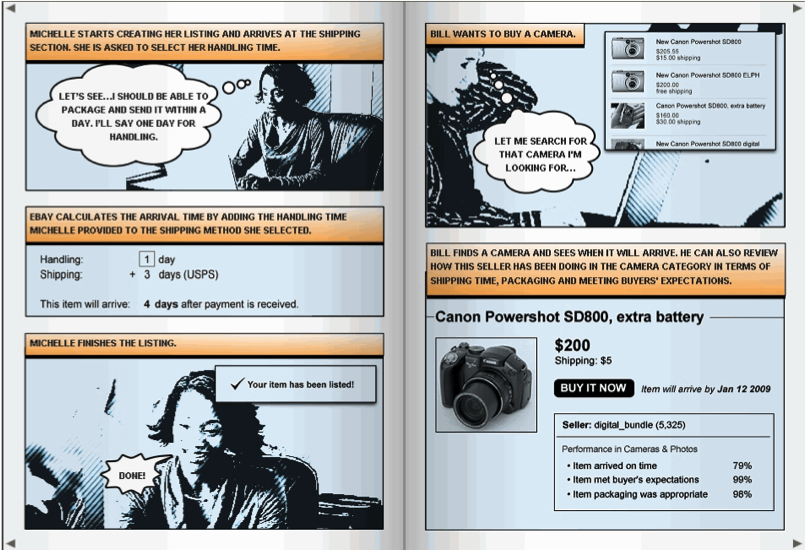
  • Concept testing.  This is a good way to gather feedback on an approach before wireframes or mockups are created.  Storyboards/comics are great artifacts to use for this kind of testing, since it takes design out of the process, and gathers feedback from users on the process you intend to design.  Although mostly done in-person with 6-8 users, there are also great tools for large-scale concept testing, like Invoke.  Below is an example of a storyboard one of our researchers at eBay used during early concept testing for one of our products:

Further reading on strategic research:

2. Design research

Design research includes most of the methods that are associated with traditional user experience research.  Its role is to improve and refine existing designs in various levels of fidelity.  Some of the methods include:

  • Usability testing.  This is, of course, the most well-known UER method, and what most people default to for any kind of design feedback.  Task-based usability testing in a lab is a fantastic tool, but it has become a little bit too much of a “when all you have is a hammer…” method.  Usability testing should be used to uncover usability problems with a proposed interaction design.  It should not be used for feedback on visuals, finding out which design users prefer, or uncovering new product ideas.  There are other techniques that are much better suited to that task.  Usability testing involves 1-on-1 sessions with users where the researcher observes them as they perform assigned tasks.  This kind of direct observation is a great way to understand what users would actually do on the site (as opposed to what they say they would do), as well as to uncover the reasons why they do what they do.
  • RITE testing.  Rapid Iterative Testing & Evaluation (RITE) is a very specific form of usability testing, but I wanted to call it out because it is my preferred way of testing.  It involves a day or two of focused usability testing, followed by a design cycle where the feedback is immediately injected into the design before the next round of testing.  Doing several of these cycles quickly means your outcome isn’t a bloated Powerpoint deck with a bunch of recommendations; your outcome is a better design that incorporated user feedback in real time.  As the debate continues on how UX can be more involved in Agile development, this technique should become increasingly important since it fits in perfectly with the Agile mindset.
  • Desirability studies.  Invented by researchers at Microsoft (yes, really - see this Word article where they outline the approach), this has become another favorite technique for me if I want feedback on the visual aspects of a site (not so much interaction), and specifically which visual approach users like more when there is more than one alternative.  It involves a survey to a large number of users where they are asked to rate one of the proposed design alternatives using a semantic differential scale.  The survey is done as a between-subjects experiment, meaning each user sees only one of the proposed designs, so that they are not influenced but the other design alternatives.  The analysis then clearly shows differences in the visual desirability of the proposed design alternatives.

Further reading on design research:

3. Assessment research

Often neglected, the role of assessment research is to measure the impact design decisions have made, and to evaluate success and continued areas that need improvement.  This requires larger sample sizes to ensure the ability to compare before/after metrics with statistical significance, so these methods are mainly quantitative in nature.  Methods include:

  • Product surveys.  Everyone hates surveys, but it remains an effective way to assess how design changes are affecting user perceptions of the site. Different from most market research surveys you receive (and delete) in your inbox, these surveys deal specifically with user perceptions of the interaction and design.  It’s not always effective as standalone research studies since there is so much bias in surveys with their <5% response rates, but if you can run surveys over time, and control the sample so that the bias remains the same, it can be a very good tool to ascertain the success of your design changes.
  • Online user experience assessments.  Another favorite, tools like Keynote allows you to gather real-time click-through data as well as subjective user feedback.  It uses a proxy or a browser download to give users tasks on a site, and ask them questions about the experience while their activity is being tracked.  This often produces a mountain of data, which can be quite overwhelming and not always effectively used if there is not enough time/resources available to analyze the data.
  • Analytics.  Web analytics need no introduction, but there are several tools specifically aimed at user experience, with my favorite being Razorfish’s Advanced Optimization tool for web forms.  By placing a small piece of JS on form pages, it gives you a mountain of data on how users interact with forms, including what error messages they receive, how much time they spend in each field, the last field they were on before closing the form, scrolling data, and the list goes on.  It’s a great way to improve form conversion.  I honestly don’t know why they don’t market this thing more.

So that’s an overview of user research methods — there are many more, but I wanted to focus on the ones I’ve found especially useful in my own work.  The real power of user research starts to happen when you combine methods and triangulate results to come up with a product strategy that takes a variety of quantitative and qualitative insights into consideration.  If you’re interested to learn more about this, Using Multiple Data Sources and Insights to Aid Design is a good post on the topic.

There are so many resources available on user research — your best bet to stay on top of the latest happenings in the field is to subscribe to UX Booth and UX Matters.

In part 2b, I’ll talk about the other two inputs to Product Requirements: Business Needs and Technology Needs.  I’ll also discuss how all of this fits into creating Product Requirements, and what the Product Manager’s role is in all of it.  Stay tuned!

Software development and product management: Part 1 (Overview)

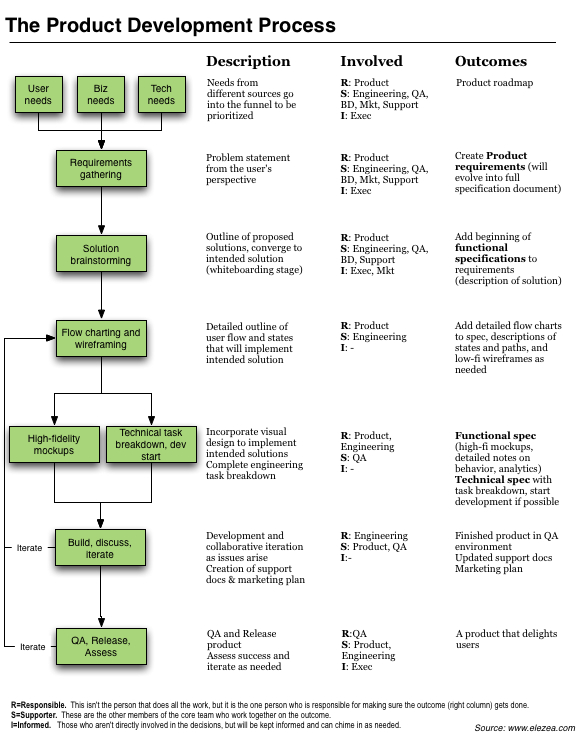
Almost a year ago I wrote a post to propose/summarize a universal model for product development.  I’ve now refined that model into what I believe is much closer to what the original intention was: a product development framework that is detailed enough to be practically usable, but generic enough to fit on top of any development paradigm (Agile, Waterfall, etc.).

I’ve decided to start a series of posts on software development and the Product Manager’s role in that process.  The first, this one, is a very general overview — it’s basic, yes, but necessary to lay the groundwork.  After that, I want to spend time writing down my thoughts on each of these stages in detail.

Why do this? Because I think the Product Management profession is finally starting to come into its own, and I’m hoping that through discussion we can, together, evolve a practical guide to what we do from day to day, something that is both flexible enough and rigid enough to be helpful without being constricting.  And maybe also just to force myself to think through this in detail and become more deliberate and focused on each of these steps.  I hope you’ll join the discussion!

I won’t be talking about scheduling, scrum methodology, or team organization in these posts.  The goal is to focus on the work that needs to be done — whether it’s being done by an individual or a core team is not the focus here, and will be different depending on the company, the philosophy, and the team.

So let’s start here — a diagram of a proposed universal model for software product development:

Borrowing from and expanding on my original post, I want to make a few observations. First, there are a few assumptions that are important to note about this model:

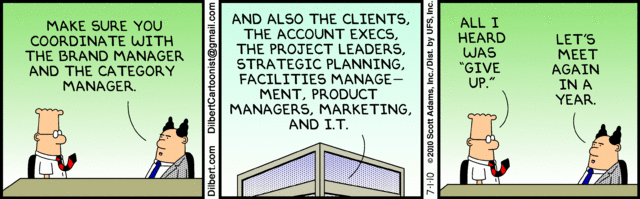
  • Regardless of the development methodology, representatives from Product, Marketing, Business, Design, and Engineering should be involved to some extent from the very beginning of the process. Once detailed requirements are being written, it largely becomes an Engineering and Product effort to ensure momentum and avoid the dangers of design by committee, best summed up by Dilbert:

  • Having said that, it is important for one person to own this process (i.e. be accountable for its success) from start to finish, and that person should be the Product Manager/Product Owner. A good product manager is not a dictator. He/she is a facilitator between all the different stakeholders of a product, and the really good ones are able to get through this model on time and on budget, every time and with as much consensus between groups as possible.
  • The roles of the Responsible (R), Supporter (S), and Informed (I) are important to define for each of these steps.  Most important is that there should be only one “R” for each step.  This doesn’t necessarily mean it’s the person who does all the work, but it’s the person who is ultimately responsible to get the work done (with help from the “S”es).
  • This model is designed to work for any organizational structure, project size, and timeline. If the project is large, more time can be spent on each step. If the project has a tight timeline, it doesn’t mean that you will skip the “Iterate” part of “Design + Iterate.” It just means that you will spend less time on it (more on that later).

Summary of the different aspects of the model

The rest of this series will be devoted to detailed discussions about this model. My goal with this post is to be general and make one or two points about each aspect. So let’s look at some definitions and implications of the model:

  • The starting point - identifying needs. At the beginning of any project (new or iterative), it is important to gather and synthesize input from three different sources:
    • User needs. Everyone needs to have a good understand of the market, the target segments, and their behaviors and attitudes. There’s not enough room to go into detail here, but it is important to look at four sources of user input: market research (segmentation, etc.), user experience research (usability studies, ethnographic explorations), site analytics (behavioral analysis), and customer support (call transcripts, interviews with CS reps, etc.). Having this common understanding allows the organization to build products that matter to users.
    • Business needs. User experience practitioners too often neglect the fact that well, your site has to make money! Revenue goals are not a good excuse for bad design, and that attainable revenue goals are essential to push the organization to design good product.
    • Technology needs. Engineering needs to be at the table from the start. They know the limitations of the product, they know what needs to be fixed, they know what technical debt needs to be paid down. Having engineering and product working together is essential in good product development.
  • Requirements gathering. Pragmatic Marketing, in a post entitled “On Reqs and Specs: The Roles and Behaviors for Effective Product Definition,” proposes some solid definitions for the three different documentation outcomes in this model: Requirements, Functional specifications, and Technical specifications. The first outcome from the discussion and synthesis of needs is a common understanding of the problem statement you are trying to address, which takes the form of Requirements. A requirement is simply a short statement of the problem, and Pragmatic Marketing recommends the following format: “Our preference is the Requirements That Work format: [Persona] has [problem] with [frequency]. It forces product managers to explore the problem, not the solution, and helps the design team understand the context of the problem.”
  • Solution brainstorming. Once the problem has been defined and agreed upon, the team starts thinking about solutions, usually through some form of design thinking or abductive reasoning. There are three important aspects of this phase, which is often called Product Discovery:
    • Start with blue sky ideation (divergent thinking). At this point, don’t limit solutions by what is technically or otherwise feasible. Spend time dreaming about the product - this is where innovation happens!
    • Relentlessly prioritize (convergent thinking). This is the part of the process where nonsensical ideas are thrown out, and the team consolidates around a few possible solutions to the problem that can be further explored. Remember: there is no commitment to implementation or specific designs yet at this phase.
    • Apply the technology filter only after the ideation phase. There is a very important technology filter that needs to be applied during prioritization. What is technically feasible? If something is currently not feasible, what would it cost to build the right architecture? Those early inputs can save a lot of headache down the road.
  • Flow charting and wireframing. This phase starts to put some flesh around the second output document, Functional specifications, which Joel Spolsky defines as follows: “A functional specification describes how a product will work entirely from the user’s perspective. It doesn’t care how the thing is implemented. It talks about features. It specifies screens, menus, dialogs, and so on.” At this point visual design is still left out of the picture, all you are doing is defining flows and interactions.
  • High-fidelity mockups. In this phase, visual design gets involved to design the experience as it will look on the screen.  If there are pre-defined patterns and standards (as is hopefully this case), this could be a pretty light step, but I do believe it is important, even in an agile environment, not to leave this part up to chance.
  • Technical specifications. Development can start before the full designs have been completed.  Once the flow and interaction are sorted out, you do in most cases have enough information to start task breakdown and implementation.  Quoting Joel Spolsky again, “A technical specification describes the internal implementation of the program. It talks about data structures, relational database models, choice of programming languages and tools, algorithms, etc.”
  • Build, discuss, iterate. Everyone designs a product, but it is sad to see that when time/budget gets tight, iterating on it before it goes live is often the first part of the process to fly out the window. It cannot be overstated how important it is to prototype and test your designs before they go live. And not having time is really no excuse. If you have no time, make a paper prototype and test it with three of your friends over coffee in the evening. You’d be surprised how much value this can add. Boxes and Arrows has a great article on prototyping and how to integrate it with your design process that’s well worth the read.
  • QA, release, assess. After the thrill of releasing, the assessment phase is extremely important and often overlooked. It is important to define your measures of success upfront, and then follow up to see if you’ve met those goals. How do users respond to the product? Are we meeting revenue/engagement goals? What can we learn from how users interact with the product to give us ideas for new products? I’m also an advocate for using the same four sources of input we discussed earlier (market research, user experience research, site analytics, and customer support), as opposed to relying on only one methodology, like a 3-week A/B test. More on the dangers of that in one of my earlier posts.

Where we go from here

So now that the stage is set, what happens next?  Over the next weeks and months, I’d like to write a detailed post on each of these phases, particularly from a Product Management perspective, and what the role of the PM/PO is during each of the phases.

There are, of course, lots of resources out there for Product Managers, but I’m hoping to talk more practice than theory here, and hopefully generate some discussion (and disagreements!) to help us reflect on our chosen profession.

PS Big hat tip to @justinspratt who gave me the nudge I needed to start this series.  He is the real deal, despite being Australian.

Three characteristics of a successful freemium business

I’ve been thinking about Evernote and Dropbox, and the characteristics that make them successful freemium businesses.  Of course, a lot has been said about freemium, and Ning’s recent decision to drop that business model has placed it under renewed scrutiny.  But I don’t think it’s time to bury freemium just yet.  I wanted to write down some quick thoughts on what I believe are three essential characteristics of a successful freemium business:

  1. Be patient with usersEvernote’s cohort analysis shows that initial conversion rates are at about 1%, but once users have been with the service for 18+ months, that jumps to 4% — more than enough to be profitable.  And it’s not actually a bad thing to have free users for that long — at that point they are so invested that they’re not going to take their data elsewhere.  They know and love the product, so when they hit the storage limit, they’re comfortable with paying.
  2. Have a natural (and inevitable) path to upgrading.  With both Dropbox and Evernote, if you use the product long enough, you’re going to have to upgrade — at some point you’re going to run out of storage.  If you don’t have a natural path to upgrading you need to create one, or you’ll find yourself in trouble.  Users will use your free product for forever and be happy with it.  You need to make it inevitable that a certain % users will hit one of your limits.
  3. Have a great free product.  It might sound contradictory, but if your free product sucks, the switching cost will be very low.  Dropbox and Evernote are successful because users love the free product, so when they run up against the limits, the decision to pay is an easy one.

To put it another way, I think that to be successful as a freemium company you need to (1) have a free product that users love, (2) be ok if those users don’t convert to paying customers for months, but (3) make it inevitable that at some point, they will have to upgrade if they want to keep using your service.

If you haven’t seen these great talks on freemium, I highly recommend you invest the time to watch it - very informative: