Menu

Posts tagged “product discovery”

How to display threaded discussions on the web

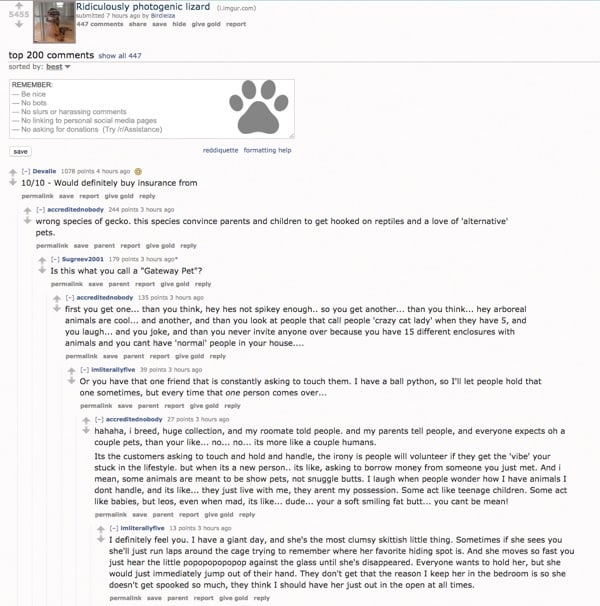
I’ve been doing some work on threaded discussions and comment threads in our web and mobile apps, and I thought it might be useful to summarize some of my findings here. The particular issue we’re trying to address is how to deal with infinitely threaded discussions, like the kind you find on Hacker News and Reddit1:

Infinitely threaded comments on Reddit

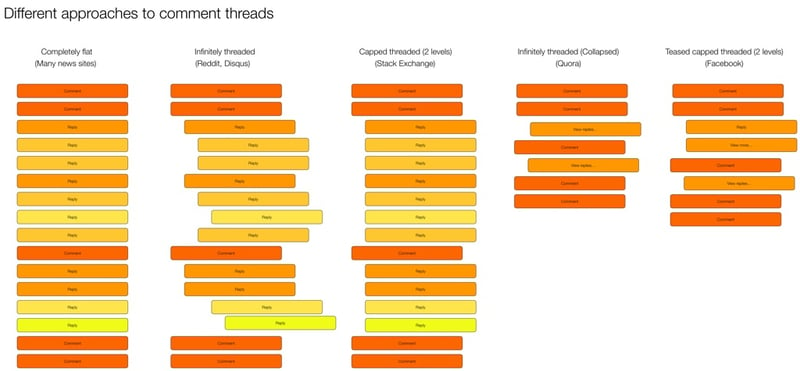
The first thing I did was some research on the different approaches currently used on the web and mobile for discussions and comments. There are some weird outliers, but in general there are five major ways threads are handled:

Threaded discussions on the web

I did some further digging and came up with the following list of pros and cons for each approach.

Completely flat

  • Example: New York Times
  • Pros:
    • Easy to navigate—just scroll down
    • Content not pushed off screen
  • Cons:
    • No context available
    • Difficult to follow conversation or see what a comment/reply refers to

Infinitely threaded

  • Example: Reddit
  • Pros:
    • Context always visible
    • Can have deep side conversations
  • Cons:
    • Difficult to navigate
    • Hard to find new replies on a thread
    • Pushes content off screen (as threading continues to reduce column width)
    • Doesn’t let you decide which tangents (reply threads) you want to dig into2

Capped threaded

  • Example: Stack Exchange
  • Pros:
    • Sets expectations that replies can’t go on forever
    • Keeps context visible (up to a point)
    • Content not being pushed off the screen
  • Cons:
    • Deeper levels of replies not possible

Infinitely threaded (collapsed)

  • Example: Quora
  • Pros:
    • Context available on demand
    • Easy to scroll and decide which tangents to go off on
    • Less cognitive load to scroll through
  • Cons:
    • An extra action needed to view context

Teased capped threaded3

  • Example: Facebook
  • Pros:
    • Context available on demand
    • Easy to scroll and decide which tangents to go off on
    • Less cognitive load to scroll through
    • Can highlight relevant content as teasers
  • Cons:
    • New comments in thread can be confusing without their context

Our approach

All design in a business is compromise. In our case, we need to figure out what we’re willing to gain, and what we’re willing to give up for it. In our case, our existing product uses infinitely threaded comments. So any change from that will obviously be… complicated. But considering that we want a single approach on mobile and web, it currently looks like we’re going to go with the Teased capped threaded approach:

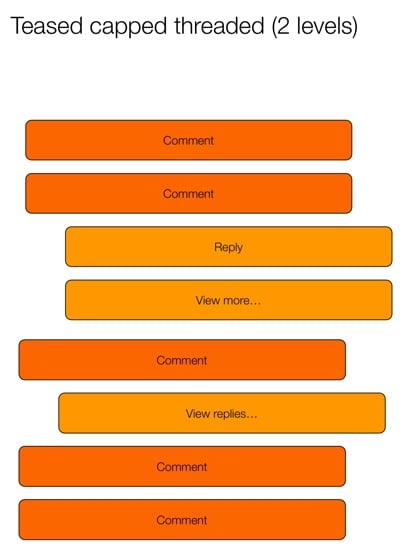
Teased capped threaded

This seems to strike the best compromise between easy scanning and the ability to drill into specific conversations. The “teaser reply” is particularly interesting, because it opens up some neat ways to provide relevant content to users. Perhaps you show the first unread reply, or the latest reply by someone you follow, or the most-liked reply. We’re still trying to figure out what would be most useful.

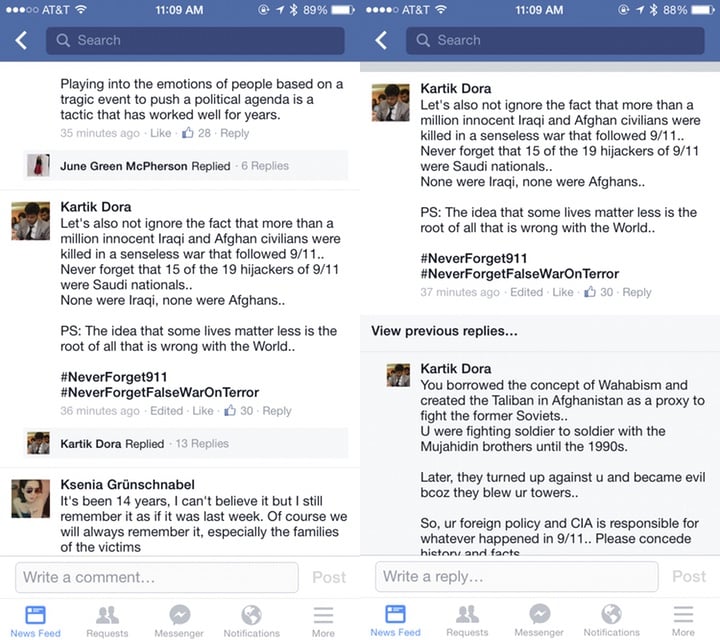
Another outstanding issue is if/how to deal with this approach differently on desktop and mobile. Some apps (like Quora and Facebook) split the view into two pages. The first page has the content and the first level of comments, and the second page has only the reply threads. In digging into it a bit more, it looks like this is mostly to make the app more performant. Here’s how Facebook does it:

Facebook comments

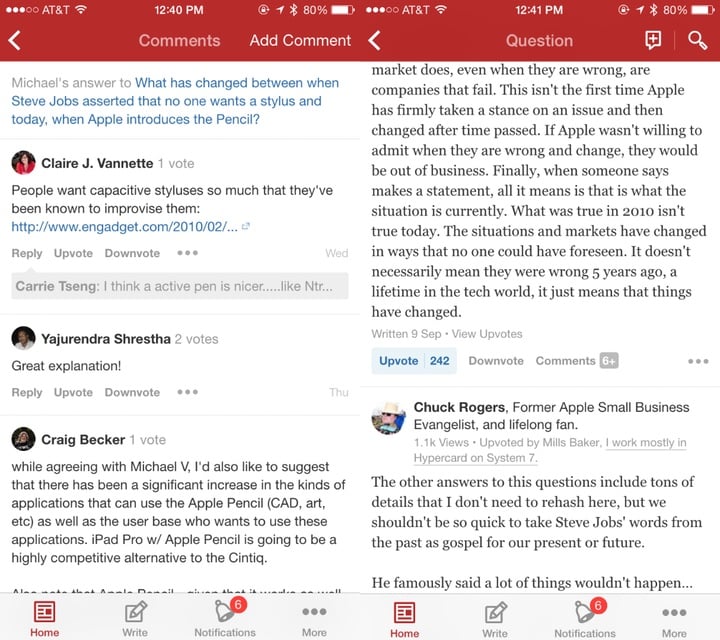
And here’s Quora:

Quora comments

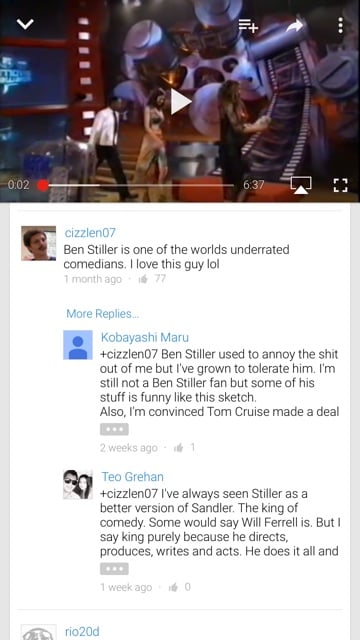
Youtube, on the other hand, does it all on one page:

Youtube comments

We’ll need to dig into the performance issue, but my preference would be for a single page with truncated replies, like YouTube does it. Our current working hypothesis for a good solution is this:

  • Show entire comment thread on the same screen (replies not on a separate screen) to make the flow better (easier to scan and dig into individual threads)
  • Cap each individual comment at 5 lines (with a way to expand) (Mobile only)
  • Show first reply to a comment, with “View more replies” to load 5 more (“View more” on mobile only)
  • Show first 10 comments on a post, with “View more comments” to load the next 10 (“View more” on mobile only)

I like this hypothesis because it keeps the approach the same across devices, but still allows for differences in screen real estate available on mobile and desktop. We’re still in the middle of the debate, so if anyone has any recommendations or anything to add, please let me know!


  1. Yes, Reddit starts capping threaded replies at some point, but they’re the best example out there of threads that go on forever. 

  2. Jeff Atwood did a good deep-dive on these issues in his post Web Discussions: Flat by Design 

  3. Yeah, I know I’m not good at naming things… 

What they say vs. what they do

If you invest in growth before you have retention, you’re renting users, not acquiring them.

— Gillian Morris in a great post about what users say vs. what they do.

How to get user feedback on designs

Jessica Harllee’s Sharing Our Work: Testing and Feedback in Design is a great article on different ways to get user feedback on designs:

To help choose our path, we create low-fidelity mockups and do concept testing with Etsy users who fit the target audience for the project. Rather than invest a lot of engineering time up front on building something we might not use, we often test clickable prototypes, which, while clunky, are cheap to create and involve zero engineering time. They’re mockups of an unbuilt interface, which also means we’re able to throw in blue sky features. Focusing on the best-case scenario of the feature lets us test whether sellers grasp the concept—realism and constraints can come later.

User-centered design in the enterprise: A case study of Jive Circle

We just announced Jive Circle, a new corporate directory app for iOS and Android that we’ve been working on since the beginning of the year. I’m really excited about this app, because we were able to follow a user-centered design process to ensure we’re launching a product that is both useful and usable. In this post I’d like to talk a bit about the process we followed, and some of the lessons we learned as a team.

So let’s start where every product should start: user needs.

Start at the beginning: user needs

Jive Circle is the 3rd product in what we’re calling our Workstyle apps. The first (Jive Daily) and second (Jive Chime) were released earlier this year. During the market research for these products the research team discovered a new pain point that was just waiting to be solved: corporate directories.

Accessing the corporate directory is something people do multiple times a day. The problem is that it’s a terrible experience. There are usually HR systems or intranets that try to give easy access, but the research showed that people rarely used these systems (for reasons ranging from “it sucks!” to “I forgot my password and can’t be bothered to reset it”). Instead, they do something that’s accessible but a really bad experience: they use Microsoft Outlook.

The most common way to look someone up in a corporate directory is this:

  1. Compose a new email message in Outlook
  2. Type in the person’s email address
  3. Right click on their name
  4. Go to their profile
  5. Copy the needed information
  6. Close out the (unsent) email

Not exactly an ideal process. We saw an opportunity to fix this. Enter Jive Circle.

Iteration is better than words: prototyping solutions

From the very beginning, we wanted the design process to be right. We agreed as a team that we want to get user feedback early and often, and that we’ll get a working prototype as quickly as possible so that we can iterate from there.

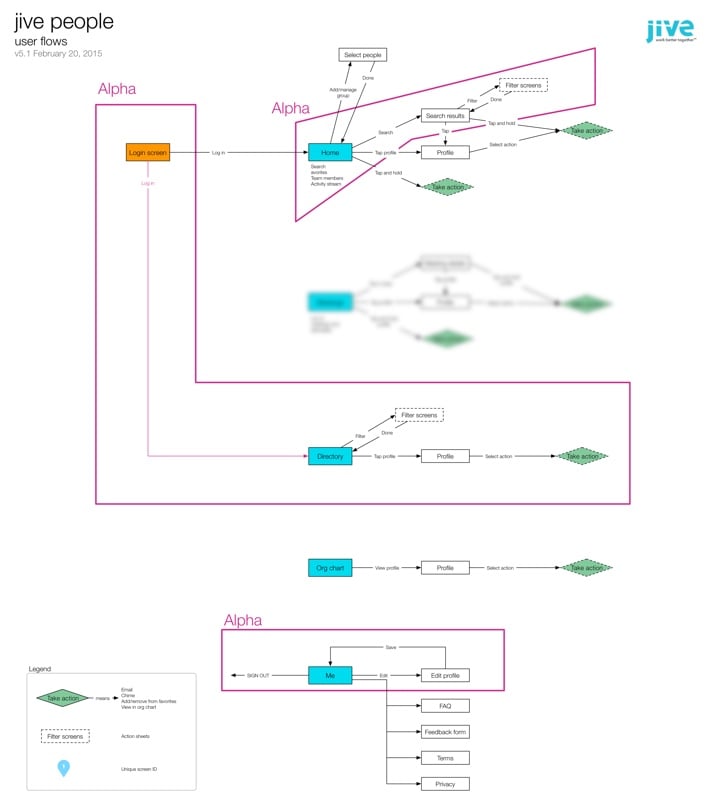
The first thing I wanted us to agree on—before starting any design work—was the basic user flows and information architecture. This took a couple of weeks to get right, but eventually v5.1 was the one we settled on (apologies for the blurring—there’s an upcoming feature I can’t tell you about yet…):
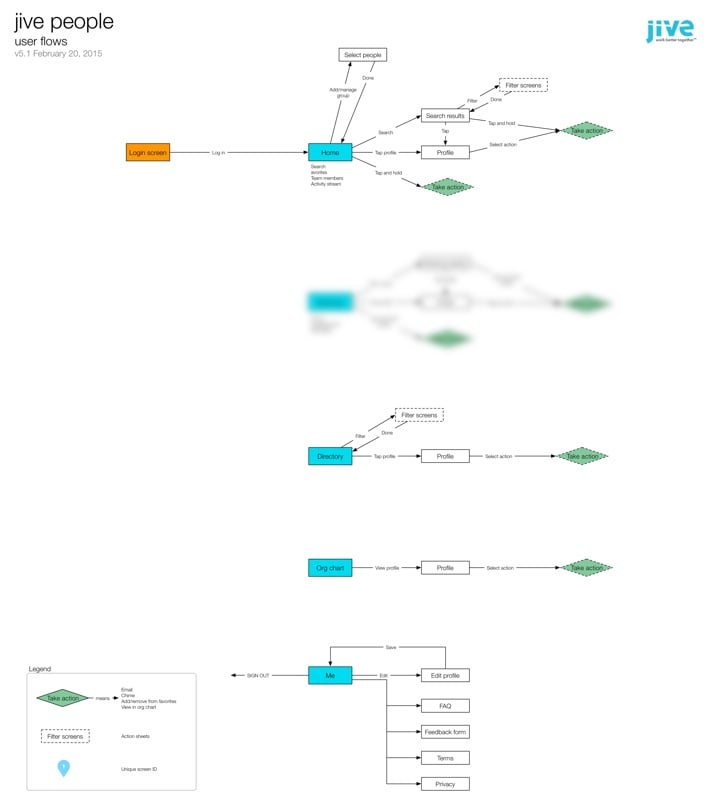
The flows have stayed mostly unchanged from this version. It was immensely helpful to start with user flows, as opposed to just making screens and hoping for the best. We came across a bunch of questions and issues as we worked through the IA, and it was much more efficient to work through them in this phase than it would have been once design had already started.

With the basic flows settled it was time to move on to design. I chose to use Proto.io for the initial prototypes. There are lots of alternatives, of course, but this is the one that came closest to what I needed (including a “long tap” gesture that none of the other tools had at the time).

Looking back over it now, it’s amazing to see the evolution of the app from the first prototype to our first Alpha dev build. Some things changed a lot, others remained largely the same. Here’s for example, is the Home screen from the very first prototype, compared to what is in the Beta version today:
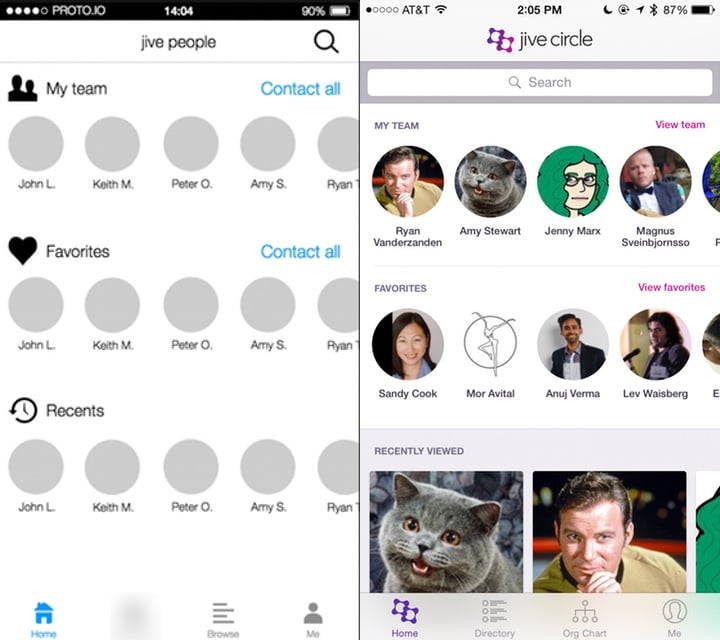
The more prominent search bar, dedicated “team” views, and card-based information at the bottom were all changes made as a direct result of usability testing—but more on that later.

Every couple of days I would publish a new version of the prototype based on team feedback, along with a list of what changed:
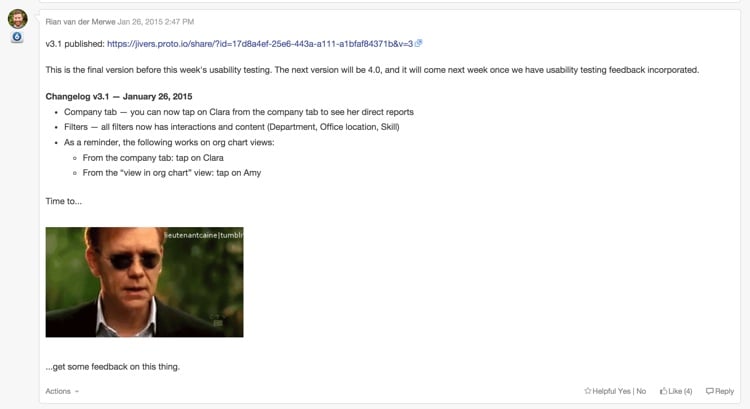
As you can see from the image above, by the time we hit v3.1, we realized it was time to get this thing in front of users before we went any further…

Save time and pain: usability testing

It was always really important to us to do at least two rounds of usability testing on this product: one round on a prototype, and one round on the first Alpha build. So with v3.1 of the prototype in hand I ran some usability tests to better understand how people currently use their corporate directories, and how well our proposed solution is working.

It was, as usual, incredibly insightful, and the changes we made based on that early feedback had a big impact on the utility and usability of the app. If we waited until we released the app to market to find that out… Well, that would have been an expensive mistake.

Two of the biggest insights we uncovered were:

  • Knowing someone’s location, time zone, and availability is incredibly important, and the starting point for almost every interaction with that person. So this has to be a central component of the app.
  • It’s surprising how often people want to look others up in an org chart—especially in large organizations. This meant that instead of having an org chart as a sub-set of a directory, we needed to make it another core aspect.

With our insights in hand we continued to make improvements to the prototype, until we arrived at v5.1. It was time to start visual design and development…
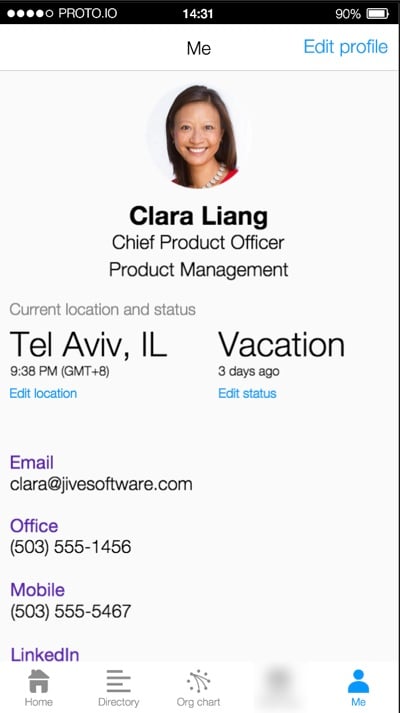
Making it real: From prototype to visual design and development

Early on in the development process we did something that I think is important to note. We decided to develop the first iteration of the app using a vertical as opposed to a horizontal approach. Here’s what I mean by that… With a horizontal approach you add all the features the app will have in the first iteration, and then start perfecting them. The problem with this is that you end up with a bunch of half-baked features, and if you run out of time before the release date, you’re screwed.

If you take a vertical approach you pick the features you want to work on first, and complete them front to back. You make sure they work well. You might have fewer features in the first release, but they’ll be fully baked, so you’ll have a useful app. And then you get to add some great stuff in upcoming releases. This is sometimes referred to as the cupcake theory of product development. For us, this meant focusing on a very specific feature-set that the entire team agreed on:
At this point our visual designers started working on the main screens and animations for the Alpha release, and the dev team started to build the back-end. We followed a very collaborative approach to development. It was challenging at times, since our dev team is in Tel Aviv, and the product and design teams are all on the US West Coast. But thanks to our internal collaboration software, lots of video calls, and a few weeks of in-person time, we made it work.

By the time the team published Alpha, we were all quite beside ourselves with excitement. The Alpha was already an amazing app, and we couldn’t wait to get it into the hands of users. So we moved on to the next phase…

Polishing a turd diamond in the rough: more usability testing

We did two things with the Alpha version:

  • We released it as an internal Alpha to a subset of users in our own company, so that they could try to break it and help us fix bugs.
  • We did another round of usability testing to do a few last course corrections if needed (and yes, we did need to!).

At this point we also started working on the fun parts of the app—those extra little animations and interactions that just make the app special. Our visual designers and developers did a fantastic job on the details here. Below are a couple of my favorite animations in the app:

Long press on an avatar:

Org chart animation:

These animations are subtle and not overbearing, but really help to bring some personality to the app.

Ship it already: knowing when you’re done

We probably could’ve kept going for forever, but the market waits for no person, so it was time to work towards our announcement date.

This is where our decision to follow a vertical approach really paid off. We were halfway through a feature when we ran out of time. In a horizontal approach that would have been a disaster. But because we completed each feature before starting on the next one, this wasn’t a problem. We just cut that feature out of the initial release, and we’ll add it as an update in coming months.

So now we wait for August 31st, our official release date! The app was submitted to the app stores today, so we’ll see how that part goes. All in all this is one of my favorite projects I’ve ever worked on. The team is amazing, the process was fantastic, and I can’t wait to get it out there and start adding even more useful things to it.

Most of all, I’m excited that we were able to make prototyping, usability testing, and rapid iteration part of the design process. It helped us focus on staying user-centered, and I’m convinced it saved us months of development time.

Lessons learned

There are a couple of important takeaways from the project that I want to note.

  • Remote teams are hard. We all know this, but it sometimes feel like we pretend it’s going to be easier than it is. There are only two things I’ve found that make working in remote teams easier: (1) overcommunicate, and (2) travel to spend time together as much as possible.
  • Prototyping really is the best way to go. I’m not going to say wireframes are dead—in fact, I would say quite the opposite. But if time and budget allows for it, nothing beats an interactive prototype for team communication and user feedback.
  • Enterprise software CAN be designed and developed in a modern way. The whole team was on board with our user-centered design approach, and that made all the difference. Don’t think that just because you work in a large organization, you have to continue to work in BDUF, slow, waterfall environments.

As with all things design-related, this app is far from perfect. But I have confidence in our process. I have confidence in the utility of it. And I know that we’ll keep making improvements as the feedback from users come in, because that’s been a cornerstone of the project since the beginning. What more can a product designer ask for?
How = What + Why

I wrote an article on analytics and usability testing for the UserVoice blog, so I wanted to share it here as well. From How = What + Why (Or, Where to Start Improving Your User Experience):

The first thing to clear up is this: in order to know where to start to improve the user experience of your product, you’re going to need more than a single data source. No single method can tell you the whole story you need to make good decisions. Usability testing will show you where there are interaction problems, but it won’t show you the magnitude of those problems. Web analytics will show you lots of numbers, but it can’t tell you how to fix issues you encounter. Even worse, it’s not always clear how to interpret analytics in isolation, so you might not even be able to tell if some things really are issues in the first place.

There is hope, though. It’s in the combination of these two methods that we find the elusive answer to our question. Combining usability testing with web analytics gives us the insight we need to make the right UX decisions about our products.

Ethnography and humanizing design

I love Hal Phillips’s story of how ethnographic research changed the culture at Benjamin Moore1. From Escaping a Strategic Cul de Sac: Using Ethnographic Insights to Challenge Organizational Bias:

They no longer saw homeowners simply as property owners who were protecting their investments – they were also people whose homes were reflections of their changing selves.

They no longer saw painting contractors simply as skilled applicators who would always choose the best paint for the job – they were also businesspeople facing market pressures from all sides, and who needed a helping hand.

And they no longer saw designers simply as indoctrinated advocates for Benjamin Moore – they were also project managers who still wanted mentorship.

Equipped with their newfound intuition, Benjamin Moore set out to reconnect authentically with their customers at all levels. We provided a road out of their strategic cul de sac – a human heartbeat in all of the hard data, and a way to truly internalize the emotions motivating stakeholder behavior.

There is, in my experience, no better way to humanize a company’s design process than doing ethnographic research.


  1. Insert “watching paint dry” joke here. 

How The New York Times does Product Discovery

In The New York Times Product Discovery Activity Guide Al Ming lays out how the product team brought Lean principles into their organization:

As part of our efforts to adopt such a data-driven, experimental approach to product development, we recently kicked off a product discovery “pilot program.” Small, cross-functional teams were paired with coaches and facilitators over a six week period to demonstrate product discovery and Lean methodologies as they apply to real-world customer opportunities at The New York Times.

This is such a great way to introduce Lean activities into a large enterprise. Start with a small project, prove value, then expand.

The team also made an “activity guide” for teams to follow, and it reads like a cheat sheet for developing great products. This is really impressive work. Here’s the guide:

NYT Product Discovery Activity Guide from almingwork

Lean vs. Design?

This is sure to be a bit controversial, but Jon Kolko makes some great points about design-led vs. lean development in Lean Doesn’t Always Create the Best Products:

And with this, we arrive at perhaps the most important distinction between an empathetic design-led approach and Lean. Lean is fast. Design is slow. Design is more contemplative, reflective, and because it demands systems thinking and marinating in the ambiguity of cultural data, it simply takes longer. The benefit is in producing emotionally sound products: products that people love, not just products people use. Increasingly, people expect more from the products and services they engage with. They expect quality, and use it both as a selection criteria for purchase and as a constraint for sustained use.

I don’t think Lean principles are necessarily in conflict with design principles (there is, after all, a thriving Lean UX movement). But the part that resonates here is the speed pressure that the Lean movement has placed on design activities. All research, prototyping, and graphic design is expected to happen much faster now. Speed is good, but not if it comes at the cost of not truly understanding the problems and user needs you’re designing for. And that’s where Jon’s points are worth taking to heart.

Easy with the onboarding

Some interesting perspectives from Dharmesh Shah in Why Your Startup Should Ignore Your Onboarding Experience (For Now):

Great user onboarding makes users say, “WOW, this is awesome,” and recognize that your product is a must have experience. But these WOW moments don’t come easy. And the mechanics by which you onboard users is just a small part of whether or not they fall in love with your product.

The more substantial part of the equation is the value your product delivers to your user: something in their life that must get easier, faster, cheaper, more productive, more fun, etc. because of using your product. Otherwise, why would they switch?

And that’s the difficult part to create. That’s the part that requires customer development and experimentation. It requires you to test your assumptions, to pivot, to try new things.

His recommendation is to do completely manual onboarding at first—contact every new user to find out why they starting using the product, email users who become inactive, etc. It might not scale, but it provides invaluable feedback at the inception of a product. Once you get to about 100 active users, Shah believes you know enough to create a great in-app onboarding experience. Food for thought!

Usability testing note-taking and analysis

David Travis has a good overview of collecting and analyzing usability testing data in How to record and analyze user research observations. This definition of an observation is particularly important:

Here’s the golden rule: an observation is a record of something you see or hear. Novice researchers often treat their opinions on what they like or dislike as observations. But your opinions aren’t observations — and neither are suggestions for new features or insights on how to fix usability issues. Don’t try to interpret the things you observe or fit things into a solution. That comes later.

The best observations come from watching real users do real tasks, and being as true as possible to the concrete details of what you see. You can either do this in the wild (with a field visit) or simulate actual use in a lab environment (with a usability test).

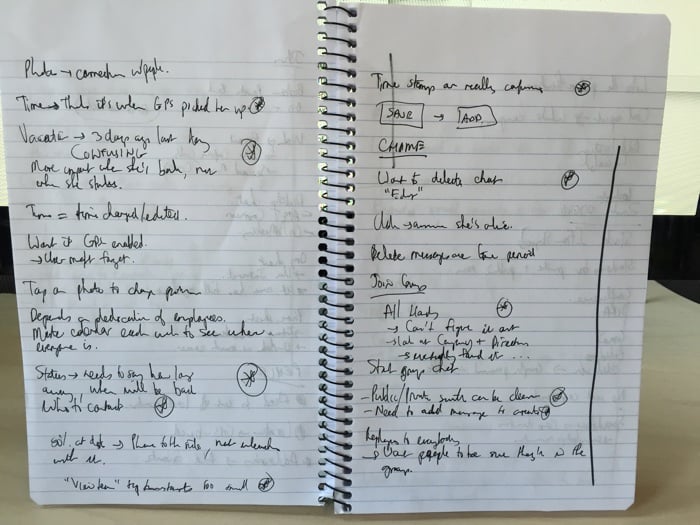
When making notes, just jot down observations, don’t try to solve the problem right there. The only thing I would add to David’s advice is that I try to mark important observations as I start to notice trends throughout the day, like so:

Usability notes

Now, if I could only figure out how to read my own handwriting, that would really help.