Menu

An overabundance of junk information

David Eaves wrote a great review of Clay Johnson’s new book The Information Diet:

With information, our problem isn’t that we consume too much. What’s dangerous is consuming an overabundance of junk information - information that is bad for us. Today, one can choose to live strictly on a diet of ramen noodles and Mars bars. Similarly, it’s never been easier to restrict one’s information consumption to that which confirms our biases.

In an effort to better serve us, everywhere we go, we can chomp on a steady diet of information that affirms and comforts rather than challenges - information devoid of knowledge or even accuracy; cheaply developed stories by “big info” content farms like Demand Media or cheaply created opinion hawked by affirmation factories like MSNBC or FOX News; even emails and tweets that provide dopamine bursts but little value.

In small quantities, these information sources can be good and even enjoyable. In large quantities, they deplete our efficiency, stress us out, and can put us in reality bubbles.

It looks like a considered, non-alarmist analysis of the problem, with some good practical advice on how to address it. I just bought it - here’s the Amazon link if you’d like to do the same.

Case study: the user experience of kalahari.com, one year later

When I arrived at kalahari.com in December 2010 the site hasn’t seen any significant UI improvements during the 10+ years of its existence. My job description was pretty straightforward: do something about that.

In this post I’d like to talk about the work our team did over the past 12 months to get where we are today. When I look at the site now I still see so much wrong with it - there are way too many things that we still need to fix. So this isn’t an attempt to hold up our work as some kind of standard. I’m doing this in the interest of sharing our methods and lessons learned with the larger design community. I’ve learned so much from others who have shared their stories that it seems only fair that I do the same. So here’s our journey so far.

Making sense of the landscape

Here’s what kalahari.com looked like on December 1, 2010:

Kalahari.com home page - old

If you stepped through the site back then you probably would have felt as overwhelmed as I did. Where do we start? What order should we do things in? After the first few days of having too much coffee and talking to people all over the organization I realized that we had two primary challenges:

  • No formal prioritization or product development process. It was the same situation I’ve seen many times before. Requirements went straight from “The Business” to developers. That kicked off an endless back and forth about what was needed, with only a cursory nod to Design. The “First In First Out” approach to prioritization was also quite common. The result was, well, not ideal. We needed to fix this.
  • No formal user experience design. This was no surprise, and it was the reason I took the job in the first place. There was no user research, no content strategy, no interaction design, and no visual design beyond marketing and merchandizing materials. This is the part that really excited me: the opportunity to introduce User Experience Design into an organization that was (to their enormous credit) hungry for it but didn’t know where to start.

So we immediately got to work on both those problems.

Hello, I’m a Product Manager

Introducing a Product Management layer into an organization that’s used to working without it is tricky. If you do it wrong it can become a political nightmare and end up ruining your chances of shipping anything good. You might have the best of intentions, but there is always the danger that the only thing people will think when they look at a Product Manager is, “Hey, I used to be responsible for that, jackass!”

We certainly didn’t make this transition perfectly, but I believe the key is to make sure that you talk to as many people as possible about what their organizational issues are, and how they think it can be done better. You have to take the time to explain the benefits of having a Product Team that takes responsible for strategy, vision, and execution of a product (and takes the fall if it fails). And then, most importantly, you have to make the development process fair[1].

We now have a team of Product Managers who are responsible for delivering measurable business results through product solutions that meet both market needs and company goals. They work closely with their teams to develop the strategy and vision for their products. They ensure that designers and developers are included throughout the process. And most importantly: they make sure we ship.

The Intergalactic Product Force

One concept we introduced that I think is worth talking about is the Product Council[2] - a formalized way to deal with prioritization.

The Product Council is made up of the heads (VPs) of every department in the organization: Engineering, Marketing, Support, Category, etc. We have a weekly meeting where we discuss the current product roadmap and priorities. We ask ourselves, Are we still working on the most important things? If something more important comes up, we prioritize it higher in the roadmap, and something else shifts down. If w’re happy with the direction, we do nothing. If a new opportunity arises we ask ourselves, Is this more important than what w’re working on right now? Or is this something we should work on next? If so, what moves down in the priority list?

From here, I communicate any changes to the Product Team, and we discuss this to make sure no one missed anything. But then — and this is important — the Product Manager has complete autonomy and ownership over the implementation of his or her roadmap. The Product Council sets the priorities (with input from all parts of the organization), but the Product Managers work with their development teams (and others) to set the timeline, the implementation details, the design, everything.

Ther’s more to it, but in the interest of brevity I’ll stop there. This process has three main advantages:

  • It gives the management team complete transparency into what the Product team is working on, and it allows for anyone to make the case for a change in priorities. Why this kind of transparency is so essential is a subject for a different blog post, but in short, it takes away a vast majority of the politics you see in many organizations, and it frees up the teams to do what they do best — execute.
  • It prevents scope creep. Nothing can go on the roadmap without something else moving out or down. As anyone who ever worked at a large organization knows, this is an absolutely critical part of a successful development cycle.
  • It gives the Product Manager and their teams what they need to be successful: direction and autonomy. As Jocelyn Glei says: “Give your team members what they need to thrive, and then get out of the way.”

Hello, I’m a User Experience Designer

I knew that we needed to build a great team if we were going to follow a user-centered approach to identifying and addressing the main issues on the kalahari.com site. But building a team takes time and money, and it’s hard to justify a large headcount request before you’ve proven that you can have a real impact on the business.

So we started small. I fulfilled the UX Design role, and we hired one visual designer since that was the primary need at that stage. Then we got stuck in. On a site of this size, and with the pressure we had to make improvements quickly, we decided on a dual approach:

  • Make some initial and obvious changes to the visual design to improve hierarchy and the general aesthetic.
  • At the same time, work on a long-term UX strategy to address some of the more fundamental user experience issues on the site.

The goal was to show quickly that we know what we are doing, and then use those successes to build out the team further and attack the areas where we can have the biggest effect on conversion rates.

Building a roadmap

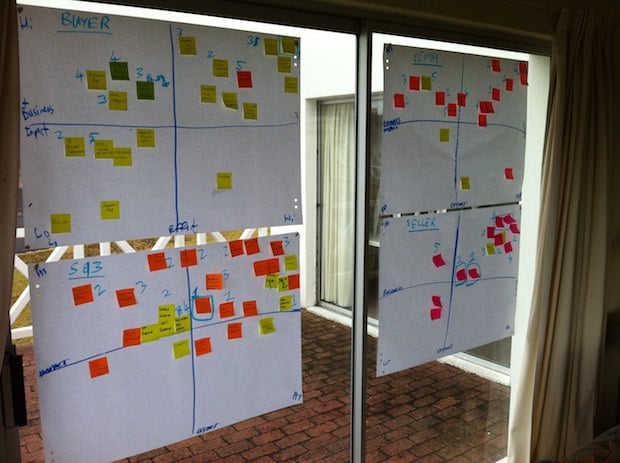
We started this process with a small team of three Product Managers and two Designers, so we didn’t initially have the luxury of user research and a long period of product discovery to build out a roadmap. Instead, we went offsite for a day and built a customer experience map for our different user journeys. It was a great way to focus on what the core experience is that we need to improve.

We also went a bit further. Based on a heuristic evaluation of the site we annotated each of the steps in the user journey with obvious improvements we could make. This gave us a flexible framework for the year, and guided our roadmap throughout.

Kalahari customer journey

We decided early on to realign, not redesign. Our approach was to make relentless incremental progress as opposed to doing a 6-9 month project with a big bang release[3]. Our goal was to release every 3-4 weeks, depending on the size of the project.

In our first two releases we took care of some basics. I won’t bore you with the whole list, but here are the highlights:

  • Released a new header and footer.
  • Shifted from heavy reliance on orange to a more muted color scheme that allows products to draw more attention.
  • Removed several links in the header and footer that didn’t get much use.
  • Increased the visual hierarchy of Search.
  • Decreased the visual hierarchy of several non-important features.
  • Introduced a formal button strategy (primary=orange, secondary=silver).
  • Moved from liquid width to a 960px 16-column fixed width design (including the ability to do single-column or two-column designs - every page used to be three columns).
  • Started to separate CSS from HTML (better late than never, right?).
  • Started to build a UI component library.

Kalahari new home page

These changes had exactly the desired effect. User response was immediate and universally positive. In combination with some good specials, traffic started to increase. And most importantly: we were able to start growing our team to add designers, a researcher, and a front-end developer. Game on.

We spent the rest of the year systematically working through our customer experience map, starting with the most important areas where improved UX can have the biggest effects (Registration, Checkout, Product Details Page, etc.). Our process grew organically and ended up hitting a good stride towards the middle of the year:

  • Define the area we’re working on, and define what success looks like (what are the metrics we’re trying to improve?).
  • Work in small teams of PM’s, Designers, and Developers to sketch out new flows and develop wireframes.
  • Test wireframes with users, utilizing the RITE method so that the outcome is improved designs, not PowerPoint decks with recommendations.
  • Refine the designs as they evolve into high-fidelity visual designs (with more user testing as required), and deliver high quality HTML and CSS as the final output.

The outcome is a site that is drastically different from where we were a year ago, with real improvements in the success metrics we set for ourselves (% conversion on registration, checkout, and other flows). The changes include not just the main site, but also a brand new mobile-optimized version, as well as some significant changes to our Marketplace for 3rd party sellers. Here’s just one sample of our Checkout redesign, including one of the initial wireframes[4].

Old Checkout:

Checkout old

New Checkout:

Initial wireframe:

Checkout wireframe

Final design:

Kalahari new checkout

Three more things

My biggest regret about this year is that we couldn’t do more. We made some great improvements to the site, but it is still so far from where it needs to be. And I know everyone on the team feels this way. We set out to build a culture of quality above all else, and it physically hurts when you have to make compromises and do something that’s counter to that culture. Before you jump in and say that there’s never an excuse to compromise, let me remind you of something Erin Kissane said in What I Learned About the Web in 2011:

If a single idea has followed me around this year, from politics to art and work to friendships, it’s been this one: “it’s more complicated than that.”

It’s centrally important to seek simplicity, and especially to avoid making things hard to use or understand. But if we want to make things that are usefully simple without being truncated or simplistic, we have to recognize and respect complexity — both in the design problems we address, and in the way we do our work.

So, yes, I agree with you - you should never compromise on quality. But it’s complicated. You sometimes run into technical and business complexities that force you to say, “We’ll have to do this later.” It sucks, but that’s life.

I’m exiting this year with three major takeaways - lessons learned and re-learned through our successes and failures:

  • Love your developers. Too many companies see their developers as “resources” whose only reason for existence is to make The Codes. When you pull developers into product planning and design, everything changes. You build better products, and everyone has more fun.
  • User Experience Design is a real thing. I saw way too many dismissive comments about UX this year. If you do it right, it will improve conversion rates and/or make more money. If you don’t believe me, come sign an NDA and I’ll show you our metrics.
  • Culture is everything. In one story out of the Steve Jobs biography, Bud Tribble (one of the Macintosh team members) is quoted as saying, “Hey, if w’re going to make things in our lives, we might as well make them beautiful.” You need a team that has a relentless focus on quality. A team that cares enough to fight for moving that button 3px to the left. It’s the only way to find real meaning in your work.

We have a lot of work to do on our site (sorry, did I mention that already?). But I’m happy that we’ve been able to introduce a fair and effective product development process into the organization. We made user experience an intricate part of how we build product. And we now have a 14-person team of brilliant and dedicated Product Managers and User Experience Designers who care deeply about the product.

It was a good year.


  1. I wrote more about this in The most important characteristic of a good Product Manager  â†©
  2. No one liked my “Intergalactic Product Force” suggestion â†©
  3. I wrote more about this for Smashing Magazine in The Data-Pixel Approach To Improving User Experience  â†©
  4. I’ll spend some time over the break putting together some more before-and-after shots, including stories about the process we followed (if anyone is interested) ↩

Software version numbers: a neglected opportunity to improve customer experience

I love opening the App Store to see what updates are available for my iOS apps. Sometimes I forget to go there for a week or so and as the loading spinner comes up I play a little guessing game - will there be four updates? Seven? Double figures!?

Yes, I know I need to get out more. But I do believe my irrational excitement about something so inane points to an underutilized product marketing opportunity: Software version numbers as part of a delightful customer experience.

Before SaaS and the ease of over-the-air updates, version numbers made sense. In most cases v2.0 came after v1.0, and it was followed by v3.0, or maybe v2.1 for a non-significant update. Companies like Microsoft went a little more granular, but that was usually the exception. 1985-1992 saw the release of Windows 1.01 through 3.1, with only a few point releases in between[1].

These days, with updates and releases coming with much more frequency than it used to, it’s not uncommon to see an update screen like this one:

versions-ios-updates.jpg

Since there is no common standard for version numbers, it’s not easy to tell which of these updates are significant without going into the release notes for each one. I can guess that Google+ 1.0.4.2326 and Skype 3.5.84 are bug fix releases, but I can’t tell for sure. I have a feeling that Wordpress 2.9 is a fairly big release, but is it in the same order of magnitude as Feeddler 1.11? No idea. Especially since sometimes a seemingly big point release turns out to be pretty unexciting:

versions-foursquare-fixes.jpg

Jeff Atwood is full of praise for the virtues of continuous software updates, and I agree with him. In The Infinite Version he explains how he stopped caring about version numbers after an experience with Google Chrome:

Chrome’s version number has been changing so rapidly lately that every time someone opens a Chrome bug on a Stack Exchange site, I have to check my version against theirs just to make sure we’re still talking about the same software. And once - I swear I am not making this up - the version incremented while I was checking the version.

From a software development perspective frequent software updates are great - you’re able to iterate rapidly and respond to bugs quickly. However, I think this continuing disregard for sensible version numbers is a mistake. We are missing out on an important part of the customer experience: that excited feeling that goes along with getting something new. For paid apps especially, giving users new features “for free” has the potential to delight them and build long-term loyalty. But how will they easily know that they’re getting something new without the visual cues of well-defined version numbers?

There is probably no easy fix for this. We can’t just send the Internet a memo that this is now how we’re doing things. But I hope that software developers will at least start seeing version numbers as part of their product marketing efforts. It would also be helpful to adopt a simple, rough guide to version numbers:

  • x.0 for major redesigns or a re-imagining of the application (such as Path 2.0 and Instapaper 4.0)
  • x.y for the addition of significant new features
  • x.y.z for bug fixes and minor improvements

If we don’t go deeper than three levels (even if z is a four-digit number) and all developers adopt this basic taxonomy, users will eventually start recognizing the pattern. This will give them the necessary cues to understand and appreciate app updates. They’ll know to click through and read the release notes for x.0 and x.y release, but that it’s probably not necessary to bother with x.y.z releases.

This naturally leads into a discussion about the importance of writing good release notes to go along with a consistent version number strategy, but that’s beyond the scope of this article. I’ll just leave you with an example of an app that sees release notes as part of their”¦ um”¦ “brand experience”?

versions-ifart.jpg


  1. Of course, after 1995 all hell broke loose. Wikipedia lists monstrosities such as Windows 95 USB Supplement to OSR2, Windows XP Professional x64 Edition, and Windows Server 2008 R2 for Itanium-based Systems. ↩

Product Ownership is a role, not a job title

Marty Cagan argues that splitting the Product Manager and Product Ownership roles into two positions is a mistake:

This approach has two common negative consequences.  The first is that there is no clear owner (neither person takes responsibility for the product), and the second is a common lack of respect or understanding between the two (the “product manager” doesn’t appreciate the technical complexities, and the “product owner” doesn’t appreciate the customer’s pain).

I agree, and I would actually go one step further. I view Product Ownership activities (representing the voice of the customer, interacting with the development team, managing the backlog, etc.) as a subset of the overall strategic Product Management position (product planning, execution, and marketing). I’ve resisted calling my team Product Owners, and prefer to say that they are Product Managers who fulfill a Product Ownership role on Agile projects.

The problem is that splitting these roles into distinct job titles also splits their goals. It’s easy for one to become all about the market, and the other to become all about internal development tasks. Instead, a Product Manager should ultimately take end-to-end responsibility for the development of product solutions that meet user goals and business needs. That’s the job. Managing the backlog and working with developers on specifications are just part of that overall function, not a thing on its own.

New new Twitter's new new direction: Monetization

Mike Rundle sums up how many of us feel about Twitter’s new new iPhone app in Twitter For iPhone Takes A Step Back:

The new app will be more inviting and accessible to new users, but I don’t like that this comes at the expense of the user experience and existing gesture shortcuts. There’s a way to make both novice and advanced users happy, and I hope Twitter 4.1 does a better job at appealing to all sides of their userbase than 4.0 has done.

If you step back from all the interaction and visual changes, this is the overarching theme that stands out for me as well. Expert users are suddenly left out in the cold. The new approach breaks the fundamental UI principle of flexibility and efficiency of use:

Accelerators - unseen by the novice user - may often speed up the interaction for the expert user such that the system can cater to both inexperienced and experienced users. Allow users to tailor frequent actions.

A great example of accelerators done right is Gmail’s keyboard shortcuts. They’re there to increase efficiency for expert users, but they don’t get in the way of novice users. The same functionality is there for all users, yet expert users have the ability to become more efficient by learning these shortcuts.

And that’s where the new Twitter for iPhone falls down. The biggest culprit is the now defunct swipe gesture on individual tweets. I’m with Ben Brooks on this one:

What is absolutely crazy - what drives me nuts - is the ditching of the swipe-to-act gesture. In previous versions you could swipe left or right on a tweet to slide open an action menu. From there you could quickly favorite, retweet, Instapaper, or reply to the tweet.

But let’s get real about this. I don’t think any of the design decisions the team made were an accident or an oversight. This is just all indicative of a company that is shifting the balance from being purely user-centered to a company that needs to sacrifice some user needs in order to make money. Dan Frommer summarized this well:

This is the beginning of Jack Dorsey’s real vision for Twitter combined with Dick Costolo’s vision for a real-time social advertising product. The main components: writing and Tweets, obviously; having conversations with other people; discovering what’s happening in the world through Twitter; and seeing a promoted message from brands here and there.

Spot on. I mentioned this morning that they should have just come clean and called the “Discover” tab the “Monetization” tab. Some have complained that users should be able to remove that tab, which is true, but it’s not going to happen because the balance has shifted. Our needs are going to be sacrificed more and more in favor of business goals[1].

So here’s the truth in all of this: the new app isn’t a mistake. It’s a deliberate and effective redesign to reduce all the pesky “distractions” (like viewing your lists and favorites easily) so that you’re more likely to “discover” the “promoted messages from brands here and there”.

I don’t think we should pass judgment on Twitter for making these decisions to increase revenue - we want them to stay around, after all. But I think we can request and expect a 4.1 version that at least meets us in the middle. Simplifying is not just about taking features away, it’s about making complex actions easier to understand and use. We need our accelerators back, please.


  1. I will say this though - I really like the “Connect” tab. The labeling might be horrible, but it’s a great feature.  â†©

Google Circles and Path 2.0: How good UI design cannot fix a broken solution

When Google+ first came out there was plenty of praise for its UI design[1], particularly the “un-Google like” design of the Circles feature. Oliver Reichenstein wrote:

Every interaction seems to have been thought through and designed until its last little bits (and those matter as much as the big bits). It even has room for some warmth (like the circle rolling away when you delete it) which is rare for Google’s cold UID approach.

We’re seeing the same thing with last week’s release of Path 2.0. I agree with the entire Internet on this: the design is gorgeous with lots of small delightful details. Here’s Geoff Teehan in Going down the right Path:

It feels familiar, but they’ve made some smart decisions that break away from the norm without wandering off into obtuse interactions or under/over-designed visuals. The decisions they’ve made not only make things better, they add personality and delight ”“ something that is crucial, and often overlooked when designing something functional.

Here’s the thing. Google Circles aims to solve a real problem with social networks, but the solution is tedious. Path has a beautiful interface, but I can’t figure out what user need it’s trying to solve. And those issues are problematic if you want to get to product/market fit.

Google Circles

There are inherent problems with binary social networks. The idea that someone is either full-on in your life (and therefore has access to everything about you) or not at all is not how it works offline. You tend to share certain information only with certain groups of people. Only some people will be interested in photos of your new puppy, whereas those same people will probably not be interested in blog posts about your work.

Google Circles aims to solve these problems by allowing you to drag and drop people into distinct buckets, and letting you only share what you want with each circle. And yes, the UI makes it really easy to do this. It’s great design.

google circles

The problem is that it’s just too much work. I’ve long since given up trying to maintain my Circles, and I’m pretty sure I’m not alone. Circles also lost its core utility for me. After I put about 100 people into different buckets I couldn’t remember who I put where, and what I was supposed to share with which Circle. So I just gave up and started sharing everything publicly.

It doesn’t matter how great and fun an experience is, good UI design cannot fix a broken solution.

Path 2.0

I get the same feeling when I play around with Path. Let me be clear: I love this app. I wish I could dump Facebook and use Path all the time. Sometimes I go in and scroll up and down just to see the clock animation. When I open the app in the morning I tell it that I’m awake just so I can see what the weather is going to be like today. Fantastic design.

path user interface

There’s a problem, though. I don’t know what I’m supposed to be doing with this app. Yes, I know it’s still early and not a lot of people are on the network yet (even though it’s now starting to gain some real traction). But here’s one reason the app might not have enough staying power to grow out of its initial “Hey, that’s cool!” phase: what unmet user need does it solve? Is it doing anything that’s not already being addressed by a number of general and niche social networks? I don’t think so.

Once again: it doesn’t matter how great and fun an experience is, good UI design cannot fix a broken solution. Good design can effectively differentiate a good solution, and bad design can completely ruin a good solution. But good design simply cannot make up for a solution that doesn’t address a core user need really well. As a recent post on ZURBlog proclaimed, people don’t buy products - they buy the benefit.

I’m afraid that in the case of both Google Circles and Path 2.0, they might just be flawed solutions wrapped in a layer of beautiful UI design. It’s fun to play with for a while, but when it inevitably becomes tedious you eventually just forget to use it. Forever.


  1. When I talk about UI design in the context of this article, I mean specifically Interaction Design and Visual Design. I don’t mean to imply that Design = Making Things Pretty, or that UX is only about those elements. I use this term in the interest of simplicity since this is not an article about the elements of a User-Centered Design process. ↩

Update: Luke Bornheimer pointed me to his answer on Quora where he argues that Path’s biggest differentiator is how it easily enables private/public sharing.

What children's drawings would look like if they were painted realistically

The Monster Engine is one of those projects that make me love the Internet for its ability to expose amazing creative talent to a worldwide audience. Illustrator Dave DeVries started with a simple question: What would a child’s drawing look like if it were painted realistically? In his own words:

It began at the Jersey Shore in 1998, where my niece Jessica often filled my sketchbook with doodles. While I stared at them, I wondered if color, texture and shading could be applied for a 3D effect. As a painter, I made cartoons look three dimensional every day for the likes of Marvel and DC comics, so why couldn’t I apply those same techniques to a kid’s drawing? That was it… no research, no years of toil, just the curiosity of seeing Jessica’s drawings come to life.

The Monster Engine is the 48-page outcome from that curiosity, and it looks wonderful. He describes the process as follows:

I project a child’s drawing with an opaque projector, faithfully tracing each line. Applying a combination of logic and instinct, I then paint the image as realistically as I can.

Below are some of my favorite illustrations from the project. Be sure to check out the whole gallery.

monsters3.jpg

monsters5.jpg

monsters7.jpg

ninja.jpg

monsters1.jpg

Buy “The Monster Engine” on Amazon.

The dangers of teaching without doing

I love teaching and writing about user experience and design, and have often wondered what would happen if I tried to make a full-time career out of doing that. My main fear (well, apart from the fear of failing miserably) has always been that if I stop designing and building products, those muscles might atrophy.

Bret Victor puts that fear into words in his great piece Some Thoughts on Teaching:

Can you trust a teacher whose only connection to a subject is teaching it?

How can such a teacher know if what he’s teaching is valuable, or how well he’s teaching it? (“Curricula” and “exams”, respectively, are horrendous answers to those questions.)

Real teaching is not about transferring “the material”, as if knowledge were some sort of mass-produced commodity that ships from Amazon. Real teaching is about conveying a way of thinking. How can a teacher convey a way of thinking when he doesn’t genuinely think that way?

It’s a great reminder of the value of making things - especially if we often write or talk about the process.

Security, passwords, and the messiness of everyday experiences

I enjoyed On Culture and Interaction Design, an interview with anthropologist Genevieve Bell. In one section she discusses how we often design systems based on a cultural ideal, but in practice it ends up solving the wrong problem. She uses the example of security:

We design systems to keep systems safe and people write their passwords on bits of paper stuck to their systems. So, is it that people don’t care about security or is that the security we are designing is securing the wrong things? Or, are they just securing them in the wrong ways? Clearly we know that people care about the security of their homes, their possessions, their digital selves, but they adopt a range of patterns for doing it that are incredibly messy, complicated, and contradictory.

Passwords ensure that unauthorized people don’t get access to a system. But the mere fact that tools like 1Password exist to remove the need to remember passwords should tell us that we’re doing it wrong. Current password systems solve the problem from the wrong perspective: the system, not the user.

The problem runs even deeper. We’re not only solving the problem from the wrong perspective, we’re also introducing unnecessary complexity because of the way these systems are implemented. From a great post on the AgileBits blog:

Security systems (well, the good ones anyway) are designed by people who fully understand the reasons behind the rules. The problem is that they try to design things for people like themselves””people who thoroughly understand the reasons. Thus we are left with products that only work well for people who have a deep understanding of the system and its components.

This is why people have weak passwords and write them down on pieces of paper everywhere. It’s why the experience is complex and messy, and why we have to spend so much time building “Forgot password” flows when we could be spending that time making the core experience of our products better.

So what’s the alternative? I have a huge appreciation for the role that anthropology can play in the design of products and experiences - which is what Genevieve advocates in her interview as well. Ethnography (often called Contextual Inquiry in the user-centered design world) is the single best way to uncover unmet needs and make sure we are solving the right problems for our users.

In Ethnography in Industry, Victoria Bellotti defines ethnography as “a holistic, in-person, and qualitative approach to the study of human behavior and interaction in natural settings.” By using this method to understand the culture and real needs of personal security, we should be able to design a user-centered solution to protecting digital information. One that isn’t stuck in the downward spiral of designer myopia we often encounter in proposed solutions to complex problems.

Security is an impossible industry to reinvent, you say? Maybe. But the problem does remind me of something Matt Legend Gemmell says about innovation in his excellent post Copycats:

The lesson of the technology industry in the past five years is that really successful products dare to NOT copy. They’re pure, in that they’re actually designed from first principles - they’re based on the problem and the constraints, without being viewed through the lens of someon’s existing attempt. You know, the kind of thing you actually wanted to work on when you got your degree and were still unsullied by the lazy, corporate machine.

So who wants to take a crack at it?

No more unedited first drafts

Mandy Brown in Babies and the Bathwater, a great article for the first edition of Contents Magazine:

Something about the nature of digital content seems to give us permission to slack off editorially. Digital formats are routinely marked by slapdash editing and nonexistent proofreading””a sign of how little anyone cares. Many online publications rearrange content based on the needs of machines rather than people. As the web forces us to speed up our publishing process, editing is often the first thing to be thrown out.

This is one of my pet peeves as well. Publishing is cheap, but that doesn’t mean we don’t have to do it right. I like how Merlin Mann puts it in Better:

What worries me are the consequences of a diet comprised mostly of fake-connectedness, makebelieve insight, and unedited first drafts of everything.

Words continue to matter more and more. Let’s not forget to edit them.