Menu

Posts tagged “user experience”

Longing for an open(er) web

At first glance, Anil Dash’s The Web We Lost might come across as typical nostalgia for times gone by. But he makes some really good points about the changes we’ve seen over the past few years that have closed down the web in significant ways. I especially like this conclusion:

I know that Facebook and Twitter and Pinterest and LinkedIn and the rest are great sites, and they give their users a lot of value. They’re amazing achievements, from a pure software perspective. But they’re based on a few assumptions that aren’t necessarily correct. The primary fallacy that underpins many of their mistakes is that user flexibility and control necessarily lead to a user experience complexity that hurts growth. And the second, more grave fallacy, is the thinking that exerting extreme control over users is the best way to maximize the profitability and sustainability of their networks.

Let’s briefly look at the two fallacies Anil points out.

The fallacy that user flexibility and control necessarily lead to a user experience complexity that hurts growth

I think designers and product people were so traumatised by the aesthetic crimes committed on MySpace pages by giving too much flexibility and control to users that the pendulum has swung way back into the opposite direction. One of the things that are cited as a core component to Facebook’s early mass market success is the complete lack of flexibility when it comes to the design of “your page.” By taking that choice away Facebook not only introduced consistency, but by making everyone’s pages look the same they also took the burden away from users to spend countless hours making their pages unique just to impress their friends. Instead, they could focus on the content.

But times they are a-changin’. There is a renewed expectation for customisation (Android!) and personalisation (Zite, Flipboard, Prismatic). Read Frank Chimero’s The Anthologists, where he talks about users looking for “new ways to select, sequence, recontextualize, and publish the content they consume.” The challenge for designers now is not how to hide complexity, but how to work through complexity and arrive at what Karen McGrane calls “appropriate visibility” in her essay for The Manual called Ear Trumpets and Bionic Superpowers:

Designs that make technology completely seamless to the user often deserve admiration. But can we balance our desire for intuitiveness with a wider recognition that some tasks are complex, some interactions must be learned, and sometimes the goal isn’t invisible technology but appropriate visibility?

We have to figure out how to provide flexibility and control without hurting user experience. And like Fred Wilson says, “Just because something is hard doesn’t mean you shouldn’t try to do it.”

The fallacy that exerting extreme control over users is the best way to maximize the profitability and sustainability of their networks

On this one I agree with Anil unreservedly. The best analogy I can think of to illustrate the problem is to look at online publications’ link policies. Some publications make a point of linking to source articles prominently and early on in any piece they’re writing, while others hide the source link (if it’s there at all) at the bottom of the article in the hopes that no one will see they’re not actually the ones who wrote it. Matthew Panzarino explains the difference this way in Stop Not Linking:

If you truly believe that what you’re writing is worthwhile then you’ll trust that your readers will come back to you the next time you have something to share. So please, start sharing more liberally and encouraging your readers to view the source materials if they feel that they want to, without making them dig for them.

They will appreciate it and, if you’re honest and passionate, they will still happily read what you have to say. You are not diminished by the fact that other people have original thoughts as well.

The same goes for social media sites, ecommerce sites, everything. If you are confident in the value you provide to users, you don’t have to try to control them and lock them in with fancy tricks. You’ll just provide the value and know that if you meet a real need, those people will be back, and they will be the most loyal customers in the world because you respect their freedom.

And if they don’t come back, you’ll learn from it and tweak your offering until they do. By doing things the long, hard, stupid way you’ll sacrifice short-term returns for a long-term sustainable business with happy customers. And I think we can all agree that’s something worth pursuing.
E-commerce sites as editorial outlets

Marcelo Somers is in the process of writing a great series on e-commerce. Part 2 is called Sell the Hole, Not the Drill – A Guide to eCommerce Content Strategy:

The failure of eCommerce is that the functionality has been designed to sell, but sites have overlooked the opportunity to build relationships with their customers and genuinely make their lives better. Most online shopping engagements only make customers’ wallets lighter. […] eCommerce sites must start blurring the line between being an editorial site and a place for commerce.

I completely agree with this. I’ve written about it before, and called the approach context-based e-commerce:

[Where product-based e-commerce sees the product as the unit of measure], context-based e-commerce sees a customer’s unique situation as the unit of measure, and the user experience is built around delighting them based on who they are and how technology can help improve their lives. Quality, personal, context-based content serves as the bridge between product and customer.

Facebook and the imperfect past

So we beat on, boats against the current, borne back ceaselessly into the past.

— F. Scott Fitzgerald, The Great Gatsby


Eric Bellm remembers the early days of Facebook in When Facebook was Fun:

And we grew older. The guy who was your buddy in class or in the dorms moved to a different city, and you lost touch with him, except in the weird limbo of Facebook, where you remain capital-F Friends and your seven-year-old inside jokes remain preserved in digital amber. You don’t notice it, as the News Feed pushes your recent history out of sight, but who you were trying to be back then can still be found in your Timeline. What was once a means of creative expression and a connection to a living community has ossified: a hidden record of who you aspired to be, as you became who you are now instead.

Facebook Timeline is a brilliant piece of behavioral design. It encourages people to reminisce constantly about the past in a way that cuts out most of the bad and non-exciting parts. As Matt Haughey pointed out in a widely-circulated post called Why I love Twitter and barely tolerate Facebook:

At Facebook, half the people in my recent feed are defined by the university they attended, even if that was 50 years ago. Their location is mentioned in posts and prominently on their profile, as well as their entire school history. Heck, the whole notion of organization at Facebook is now defining a person as a “Timeline.” I find the new life history Timeline approach to be a way of constantly dredging up the past, to show others how it shaped this person, and it’s not necessarily the best way to define ourselves.

Jason Kottke expanded on Matt’s thoughts in Twitter is a machine for continual self-reinvention:

For a certain type of person, changing oneself might be one of the best ways of feeling free and in control of one’s own destiny. And in the social media world, Twitter feels like continually moving to NYC without knowing anyone whereas Facebook feels like you’re living in your hometown and hanging with everyone you went to high school with. Twitter’s we’re-all-here-in-the-moment thing that Matt talks about is what makes it possible for people to continually reinvent themselves on Twitter. You don’t have any of that Facebook baggage, the peer pressure from a lifetime of friends, holding you back. You are who your last dozen tweets say you are. And what a feeling of freedom that is.

I find Facebook’s deliberate focus on the past such a cunning piece of design, especially since most other social networks feel more focused on what’s happening now. What’s so interesting is that your past as told by Facebook’s Timeline is only a minuscule part of the full story. Yes, there were parties, vacations, and engagements. But there was also heartache, grief, and lots and lots of plain-old boring life.

Obviously Facebook only tells the story it knows, and most of the time it only knows about your happy times. What we sometimes forget is that it’s conflict that makes the story of our life interesting. In his book A Million Miles in a Thousand Years Donald Miller puts it this way:

When we watch the news [and stories about violence come on], we grieve all of this, but when we go to the movies, we want more of it. Somehow we realize that great stories are told in conflict, but we are unwilling to embrace the potential greatness of the story we are in.

I’m slowly coming around to the idea that if we’re going to embrace public living (in the form of social networks) at all, we should either go all in with the full spectrum of our emotions, or rather not bother. Because if we only share a small, perfect sliver of our lives, we start to create unrealistic expectations for ourselves, and the people who know us.

The best article I read about this stuff in a long time is Leah Reich’s Disconnect:

But sometimes, even now, I think about public mourning rituals. I think about how the Victorians treated grief, how publicly they wore it, how they wore rings made from the hair of their beloved deceased. I recall telling myself I could say something, I could document my grief. It was okay to make it public, even if it felt like a very wrong, obnoxious, and strange thing to do. I remember thinking I needed someone to do something, but I didn’t know what it was and I didn’t know how to ask.

That’s the rub, isn’t it? Under even the most ordinary circumstances, how difficult it is to tell people we feel awful, to ask for a little extra patience, to ask for comfort. So to reach through the emotional distance when the stakes are so much higher, when the cost of rejection is risking further isolation at a time when you are already floating on what seems like the last splinter of wood from the great wreck of your life — well, you know, maybe throwing a thing or two at the internet and seeing what sticks doesn’t seem so crazy.

Yes, I know. We’re already in a culture of over-sharing. So I’m cognisant of the fact that it’s not quite practical from information overload and audience burden perspectives for all of us to suddenly start gushing every time we’re having a rough day. So I don’t really have an answer for how this should work. But I worry that our incomplete, happy pasts will someday come back to haunt us when we realise that by ignoring hard times, we have no idea how to deal with them any more.

Responsive design is not an excuse for poor site performance

Tim Kadlec wrote a very timely post about performance and responsive design called Responsive Responsive Design. He starts off by driving home the importance of well-performing sites:

The reality is that high performance should be a requirement on any web project, not an afterthought. Poor performance has been tied to a decrease in revenue, traffic, conversions, and overall user satisfaction. Case study after case study shows that improving performance, even marginally, will impact the bottom line. The situation is no different on mobile where 71% of people say they expect sites to load as quickly or faster on their phone when compared to the desktop.

And then he breaks down one of the most prevailing and dangerous myths of responsive design:

I adamantly disagree with the belief that poor performance is inherent to responsive design. That’s not a rule – it’s a cop-out. It’s an example of blaming the technique when we should be blaming the implementation. This argument also falls flat because it ignores the fact that the trend of fat sites is increasing on the web in general. While some responsive sites are the worst offenders, it’s hardly an issue resigned to one technique.

Tim then shares some very good strategies and techniques for making sure responsive sites don’t become too bloated. Read Responsive Responsive Design.

Related post on Elezea: Why Google might just be right about responsive design in Africa.

Responsive design's overly enthusiastic phase

Dmitri Fadeyev wrote a good critique of the recent design trend we see in redesigns of sites like The Next Web, Mashable, and ReadWrite. From Redesign Trend in Tech News Sites: Big, Responsive and Content Heavy:

While I like the style direction, I think these sites are trying a little too hard to work like apps, and in doing so, they surrender the strengths of the plain website, namely: simple, responsive navigation mechanisms. Simple sites don’t lag and don’t have any ambiguous navigation elements. They behave like a page, which, while being a constraint, is not necessarily a bad thing. The new wave of responsive redesigns in tech news sites certainly look good with their nice typography and healthy use of whitespace, but they feel heavy, they don’t feel right in the browser. They look more like apps but the speed and responsiveness of a native app just isn’t there.

I think we’re in a period of enthusiastic over-reaching as more and more content sites discover the power of good typography and responsive design. It’s great to see major sites taking risks and experimenting with this stuff. The enthusiasm is fantastic. But I hope that we’ll eventually get through the flashy phase to reach a maturity level in responsive design where the text can truly speak for itself without relying on fancy gimmicks to draw attention to itself.

Stop telling us how much everything sucks

Last night Cennydd Bowles tweeted something that really resonated with me:

Never ascribe to stupidity that which is adequately explained by complexity.

— Cennydd Bowles (@Cennydd) December 3, 2012

It reminded me of Erin Kissane’s contribution to the A List Apart article What I Learned About the Web in 2011:

If a single idea has followed me around this year, from politics to art and work to friendships, it’s been this one: “it’s more complicated than that.”

It’s centrally important to seek simplicity, and especially to avoid making things hard to use or understand. But if we want to make things that are usefully simple without being truncated or simplistic, we have to recognize and respect complexity—both in the design problems we address, and in the way we do our work.

I don’t know the flow of events that led Cennydd and Erin to their respective statements, but I know why it struck a chord with me. It feels like the number of tweets and blog posts that are written to ridicule and obliterate new products/apps/redesigns are on the rise. It’s like people don’t like anything any more — unless their friends made it. I think we can do better.

It’s easy to write a few paragraphs about how much something sucks. You know what’s difficult? Recognizing and respecting complexity. Giving people the benefit of the doubt and trying to understand why they made the decisions they made — whether it’s related to business, design, development, or anything else.

What’s really difficult is starting your argument from an assumption that other people are deliberate and thoughtful, and then working through each of your criticisms methodically. You’ll either realize that they made the right decisions, or arrive at the conclusion that they made some mistakes. Even if they did make mistakes — and we all have — by starting from a different baseline you’ll end up with a solid (and respectful) critique that the person can use to do things better.

For a creative person, the difference between reading “You suck!” and reading “Here’s where I think you made some wrong decisions” is the difference between being shamed into crawling under the covers and never putting their work out there ever again, and being encouraged to make their product better. We should always, always aim to do the latter.

Going beyond usability to design meaningful experiences

Giorgio Baresi wrote a long and very interesting post on how designers have an opportunity (and responsibility) to go beyond usability to build meaningful products that enrich people’s lives. From Designing Life-Changing Solutions :

The spread of widely available technology, such as sensors, smartphones, and high-speed mobile networks, puts us on top of a mountain of data and allows designers to tackle problems in ways that were unimaginable even a few years ago. By making sense of this abundance of data, designers are able to create life-changing products and services that help people achieve goals and objectives in relevant, meaningful, and actionable ways.  This ability moves design beyond the “A to B” scenario to embrace whole new solutions in which the starting point is known but the destination and the path to get there cannot be precisely defined upfront. Clear goals with clear paths have broadened, becoming as vague as “taking good care of yourself,” “living a healthy lifestyle,” or “managing your personal finances.”

This creates the opportunity for designers to work together with psychologists, as well as other subject matter experts, to better define how these broad challenges can be translated into meaningful products and services that are able to become true life companions.

Giorgio shares some great examples, as well as three design principles to help turn these goals into reality. It’s definitely worth making time for this one.

Ok Twitter, I see where you're going with this

In December 2011 Twitter unveiled a new UI, along with updated iPhone, Android, and web clients. The response from tech circles was immediate and extremely negative. Twitter 4.0 for iPhone got slammed particularly hard. Here’s John Gruber with a pretty good representation of the views expressed by many:

Twitter 4.0 for iPhone lacks the surprise, delight, and attention to detail of a deserving successor to Tweetie, offering instead a least common denominator experience that no one deserves.

By the time Twitter 4.0 came out I was already using Tweetbot, but I updated and played around with the app anyway, as I’m sure many did. I had three main issues:

  • Severely limited functionality. Some things I do all the time in Tweetbot are either impossible or very difficult to do in Twitter for iPhone. This includes easily switching accounts, adding/removing people from lists, seeing someone’s @-reply stream, and quickly getting to saved searches.
  • Inability to interact with tweets in the main stream. You can’t click on a link or someone’s profile from the main Tweet stream. You have to tap through to the Tweet detail — in many ways an unnecessary tap. More on this later.
  • The Discover tab. Like most complainers I assumed Discover was just a thinly veiled attempt to start shoving ads in our faces. Back in Twitter 4.0 this was just a list of seemingly random tweets, probably based on some global trending topics. There was always talk of customization, but the initial incarnation of Discover didn’t have much of that.

So, like many others, I joked about it on Twitter1, and then moved back to Tweetbot without another thought.

Why didn’t they just come clean and call the “Discover” tab the “Monetization” tab? #NewNewTwitter

— Rian van der Merwe (@RianVDM) December 9, 2011

But that was not the end of the story. Slowly but surely, Twitter has been working on putting the pieces together of that consistent user experience they’ve been talking about for a long time.

The story unfolds

In June 2012, Twitter rolled out expanded Tweets, a way to see more information about a single Tweet (like an embedded photo or an article summary). They called the technology behind this feature Twitter Cards.

Then, in July, Twitter 4.3 for iPhone came out with support for expanded Tweets. This was followed by Twitter 5.0 in September, which included a redesigned iPad app (a topic for a different blog post, so let’s just leave that for now), as well as profile header images.

And then came Twitter 5.1 on November 16. It was a point release, sure, but I think this is the version that finally brings together two separate threads that Twitter has been working on for a while: Twitter Cards and the Discover tab. The release notes for Twitter 5.1 said this:

See what’s popular within your network on Discover.

— Tweets, tailored just for you, now appear right in the stream

— These Tweets show photo, video, and article previews so you can engage easily

This time something weird happened in my Twitter stream. I started seeing a few positive tweets about the new app. I even saw a few positive mentions about the Discover tab. Fred Wilson blogged about it just today.

I decided to take another look. I worked with Alex to implement Twitter cards on this site. I moved Tweetbot to another screen and committed to trying Twitter for iPhone as my primary app for a week. And now I think I finally see where Twitter is going with all of this. And that maybe we should have trusted them a year ago. Possibly even apologize to them. But I’m getting ahead of myself. Let’s back up.

Information consumption on Twitter

When it comes to information consumption on Twitter, I think there are two overriding user needs:

  • Get through as much content in as little time as possible.
  • Know as quickly as possible if a link is worth clicking on.

The first requirement is technically difficult, but conceptually easy to meet. Just make the app as fast as it possibly can be. The second requirement is more difficult though. In the context of Twitter (specifically on mobile) there are two pieces of information that is important to decide if a link is worth clicking on:

  • The source. This is easy to tell if you can see the URL, but since so many people still use URL-shorteners like bitly, the domain is often obscured, so you don’t know where the link is going to end up.
  • A summary of the article. This is not easy to do in 120 characters2, especially if the Tweet just says “This!! —> bitly.com/blahblah”.

Why not just click on a link to see if it’s worth reading? Well, because it messes with that speed principle. Loading a site takes time. Especially if you don’t know if the bitly link goes to Mashable and you then have to download a 2MB page with a gazillion HTTP requests. Clicking on a link is expensive, so you only want to do it if it’s worth it.

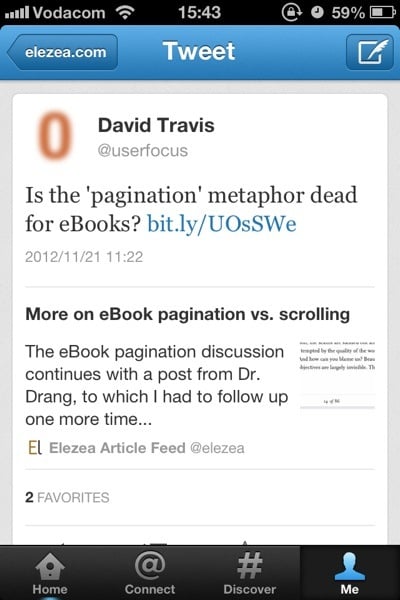
So this is where Twitter Cards come in. If someone tweets a link to sites that have implemented it, you can immediately see the source and a summary of the article to help you figure out if it’s really worth clicking through — even if a URL shortener is being used:

Twitter Cards

You also have to tap through to the tweet detail to click on the link; you can’t do it from the main stream. As I mentioned earlier, this extra tap used to annoy me, but I now think it’s a deliberate and important design decision. They are compromising immediate convenience for clarity of information. You might not agree with the decision, but it’s certainly not an oversight — I’m pretty sure it’s well thought through.

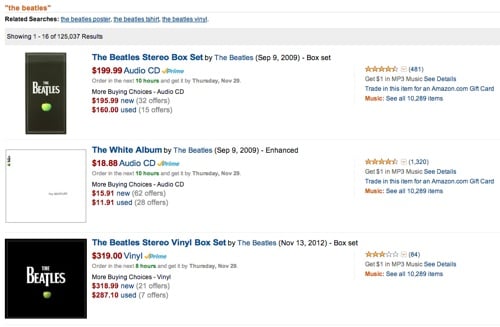
The implementation reminds me of the distinction between search results pages and product details pages on e-commerce sites. A search for “The Beatles” on Amazon doesn’t show you an “Add to cart” button on the search results page. You have to go to the product details page for that:

Amazon search

Twitter’s approach is similar. You have to view the summary before you can “commit”. The goal is to keep you inside the app until you’re absolutely sure you’re ready for the “purchase” — which in this case means clicking on a URL, emailing it to someone, sending it to Instapaper, etc. And now that the Discover tab is a much better customized version of photos and articles you might be interested in, the entire story is coming together really nicely.

There are still many features I miss in Twitter for iPhone. Having to poke around aimlessly for a while every time I’d like to see Tweets from a different list is probably the most frustrating issue at this point. But I have to say that Twitter Cards have made my experience so much more enjoyable and efficient that I’m going to stick with Twitter 5.1 for iPhone beyond my one-week experiment.

So what have we learned?

There are also some important product lessons to learn here. In his brilliant essay Subcompact Publishing Craig Mod sums it up nicely:

In product design, the simplest thought exercise is to make additions. It’s the easiest way to make an Old Thing feel like a New Thing. The more difficult exercise is to reconsider the product in the context of now. A now which may be very different from the then in which the product was originally conceived.

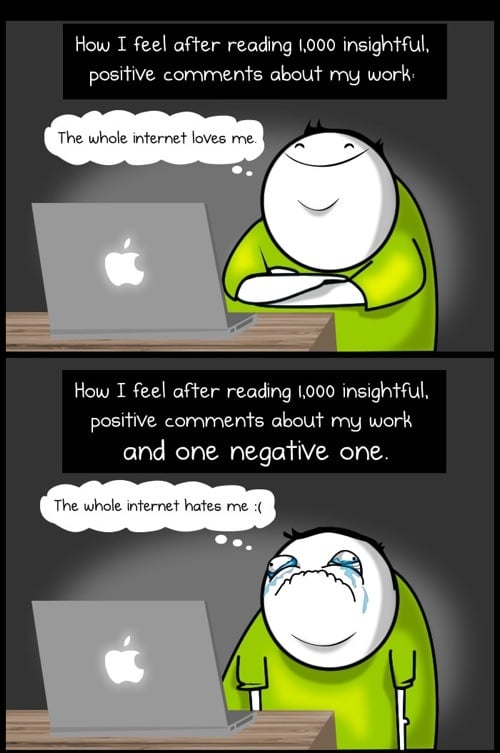
This is exactly what Twitter has done, starting with 4.0 almost a year ago. It was a gutsy move to rethink the entire experience — one they got a lot of ridicule for. And I’m sure the design team felt like this quite often:

Comments on the web

(Source: The Oatmeal)

But to their credit, they stuck to their guns. They knew where they were going, and instead of surrendering to the extremely vocal complainers, they kept their eyes on the vision and went for it. That’s good product management. And now, almost a year later, I think they are finally seeing the tide turning as we’re getting a better sense of the end game.3

So, uh, I believe an apology is in order. I’m sorry, Twitter. I see where you’re going with this. And I like it.


  1. Oh, the irony. 

  2. Not a typo. You need to leave 20 characters for the URL, ok? 

  3. Yes, I know, there’s the API debacle as well, but I’m talking specifically about the Product design aspect here. 

Designing to improve lives

Meagan Fallone wrote a great article on social entrepreneurship for Fast Company. From Technology Is Useless If It Doesn’t Address A Human Need:

We in turn can teach Silicon Valley about the human link between the design function and the impact for a human being’s quality of life. We do not regard the users of technology as “customers,” but as human beings whose lives must be improved by the demystification of and access to technology. Otherwise, technology has no place in the basic human needs we see in the developing world. Sustainable design of technology must address real challenges; this is non-negotiable for us. Social enterprise stands alone in its responsibility to ensuring sustainability and impact in every possible aspect of our work.

There is much we can learn from this approach. Even in the consumer space, we need to replace some “customer” thinking with “human” thinking and look for ways to improve people’s lives, not just get more money from them.

In another great article on social entrepreneurship, David Bornstein quotes Sally Osberg, president and chief executive of the Skoll Foundation:

“I’ve come to see how the ‘social’ that characterizes their purpose also characterizes their way of working. In other words, social entrepreneurs don’t just pursue a social end, they pursue that end in a fundamentally communal way.” This approach is badly needed at a time of extreme factionalism, she adds: “Regardless of whether you call it teamwork, collaboration or consensus-building, we need it, and we need it now.”

I’ve seen this first-hand in our work with Praekelt Foundation. Their passion for their work, clarity of purpose, and relentless pursuit of working together to create the best possible experience, is teaching me so much about how powerful design can be — in any context.

Why Google might just be right about responsive design in Africa

Phillip Kruger argues that responsive design shouldn’t be used in Africa in a Memeburn article called Why Google might just be wrong about responsive design in Africa. He lays out his argument in two parts. First:

Responsive design only works on smartphones. So by default you are already ignoring 80+% of users in Africa. You are also reaching the 20% of users that possibly have internet access at home or work.

This is an argument I see a lot, but it’s valid only in the context of target audience and use cases. If the target market for your service primarily uses low-end phones, then by all means don’t bother with responsive design. But let’s say you’re building a site to order take-out food and deliver in major cities, the situation changes dramatically. Now you’re most likely looking at a target market that sits squarely in the 20% of people who have smartphone access (and who don’t want to get off their couches and walk to their PCs to place an order).

This is why personas, scenarios, and use cases are so important. If you’re building a service for ALL THE PEOPLE (which isn’t advisable), then averages are appropriate. And those averages will rightly guide you to focusing on the 80% of people who do not have smartphones. But in most cases, the analytics that matter are not the averages of all users, but the specifics of the market you’re going after. Don’t dismiss responsive design in Africa because of averages. Dismiss it if it doesn’t make sense for your target market.

Phillip continues:

Responsive design is not lightweight. When using responsive design, the size of the download to the browser is still very big (in fact it’s very similar to what the webpage would be). All the HTML is still being downloaded (even parts that are hidden on a smartphone if you use media queries to set display:none in your CSS). Sure, you can have rules to download separate images for separate display sizes and that should help a bit.

Tim Lind wrote a comment on the article that addresses the problem with this logic:

Responsive design does not mean you can’t do server side optimisations. In fact it can help you to do these, and encourages a more efficient design process. You can design the content for the feature phones, and responsive media queries allows you to upgrade the design with a single stylesheet file for the smartphone or desktop (which server side optimisation could exclude).

One of the many good things about responsive design is that it forces designers and developers to spend a lot of time on optimisation to ensure light, fast pages. This is just good practice for web development in general — not just for mobile. Page bloat is a huge problem, with the average web page now being more than 1 MB big.

Page speed optimisation is just good web citizenship, and it should be a requirement regardless of whether or not a responsive design approach is taken. The other point to remember is that mobile networks already do a lot of compression on served images (see How should we handle responsive images?).

What worries me about this debate is that there appears to be no room for nuance. Responsive design is either the answer to all of Africa’s problems, or we shouldn’t do it at all. But as with most things, the appropriate approach is to say “it depends.” A mobile strategy shouldn’t be a decision between a native app or a separate mobile site. A mobile strategy should form part of a larger web strategy, and it needs to include a discussion about the appropriateness of responsive design. It might not be the right thing for your project, but it should be on the table.

I keep reminding myself of Ben Callahan’s statement in The Responsive Dip: “Just because you can’t, doesn’t mean you shouldn’t.” Just because this is a difficult problem that we haven’t quite figured out, doesn’t mean we should throw it away and go back to how we’ve always done things. What we need to do now is push through and find elegant ways to apply responsive design in Africa. Where it makes sense, of course.

Update 2012/11/26: Phillip responded to all the feedback on his Memeburn post. See Google might be wrong - part 2. It’s good to get additional clarification on the Google talk that formed the backdrop for his original post. This isn’t the last discussion we’ll have about RWD in Africa, and that’s a good thing. We need to figure this out…