Menu

Posts tagged “product management”

Job stories are great, but personas aren't dead

I’m a big fan of the recent move away from user stories to job stories to design better products. Alan Klement provides a good overview in Designing Features Using Job Stories. That said, I’m worried that personas are on the verge of extinction as collateral damage of this evolution. We can’t let that happen. Alan explains his issue with personas as follows:

The biggest and most pertinent problem with Personas is this: Personas are imaginary customers defined by attributes that don’t acknowledge causality.

These attributes, generally in the form of demographics, do not bring a team closer to understanding a customer’s consumption, or non-consumption, of a product. The characteristics of a Persona (someone’s age, sex, race, and weekend habits) does not explain why they ate that Snickers bar; having 30 seconds to buy and eat something which will stave off hunger for 30 minutes does explain why.

The problem with this argument is that it refers to marketing personas, which are generally not very useful for design. Marketing personas are usually based on segmentation data, and ends up being mostly about demographics that cluster similar groups of users together.

But we shouldn’t confuse marketing personas with design personas, which are specifically created to guide the development of product features. How are they different? Well, first and foremost, design personas are based on needs, goals, and dimensions that have a direct impact on their interaction with the product. In other words, they incorporate causality, which takes care of Alan’s gripe.

For example, below is a design persona for a short-term loan company. There are a few things to note:

  • There’s very little demographic detail — just enough to help us get to know this persona. Most of the persona is focused on their goals and needs, and what they want to accomplish.
  • Note how causality is all over the story and the goals — Monde needs a loan now for an urgent need. This is very different from someone who just wants some money for a new TV.
  • The key to these types of personas are the dimensions, or in this particular case, the loan drivers. Note that for Monde, the monthly instalment is not important. What’s important is that she gets the amount she needs to pay for her travel. For the persona that just wants a TV or some new shoes, this is different. For that persona the amount is less important — what’s most important is whether or not they can afford the monthly instalment.
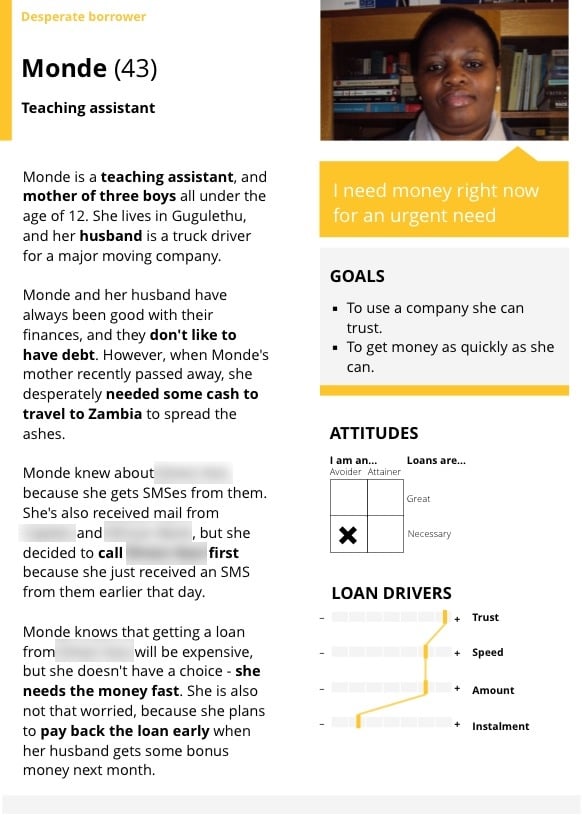
Design Persona

My point isn’t that job stories aren’t necessary. On the contrary, I think job stories are much better than user stories for product design. But job stories are a valuable augmentation to design personas, not a replacement for them. There is still a huge amount of value in personas. They have names and faces, so the whole team can picture them. As opposed to a mythical “average” user, they are solid people we can imagine using our product to achieve their goals. This is helpful because by focusing on individuals that are closer to the edges of the experience, instead of the average, we’re able to cater design for a larger portion of the user base.

In the documentary Objectified, Dan Formosa from Smart Design says, “What we need to do to design is to look at the extremes. The middle will take care of itself.” As an example, he talks about how they once designed garden shears specifically to cater for people with arthritis. They knew that if the shears worked for that “user”, it would work well for everyone. That’s the power of personas.

I understand and agree with the concern that personas can sometimes be oversimplified caricatures of users that don’t take specific situations and actions in consideration. Without proper research personas also tend to be be shallow and not very useful. But those are dangers that are easy to avoid. Remember that personas aren’t prescriptive, they’re descriptive. You can’t identify a persona and then try to predict people’s behavior off it. But with solid research and analysis you can use personas effectively to help focus development efforts on target users, and help define what features should be included in (and just as importantly, excluded from) the product.

As a side note, in addition to the job story format I also sometimes like to use what I call problem stories. These are like user stories, except that they incorporate “triggers”, which takes causality into consideration. The format I use for problem stories are:

User has problem when trigger.

For example, a Product Manager on a financial services product might have a problem story that states, “Investors are not able to submit supporting documents online when they need to make changes to client portfolios.” That becomes a statement of the problem that needs to be solved through product improvements, and a good way to develop features by focusing on user needs.

All this to say that job stories (and problem stories!) are great ways to guide product and feature development. But if we use them to replace design personas, we’ll be throwing tons of useful context and understanding out along with it.
Create a dedicated project news feed with Trello and Hipchat

I’m always looking for ways to make our workflows more efficient, often to the frustration of my colleagues. I admittedly make them test out way too many tools. But I think I finally found a winning integration that everyone can get behind. First, a bit of background.

We use HipChat as our group chat and IM tool. We have a general room where we all hang out (but I’ll be honest with you, it mostly contains gifs), and then we also set up dedicated project rooms where we discuss project-specific issues. We use Trello to track our tasks and progress on projects. I love Trello, but I wanted to find a way to turn HipChat into the canonical record of what happens on our projects. For that, I turned to a service called Zapier.

Zapier is a tool that connects the web apps you use on a daily basis, and move data between them. Think of it as If This Then That for business use. We have quite a few Zapier automations set up, but my favorites are the ones that post a message to HipChat whenever something specific happens in Trello.

The first step is to set up the connection between Trello and HipChat. To do that, start with this Zapier automation: Create HipChat Alert from new Trello Activity.

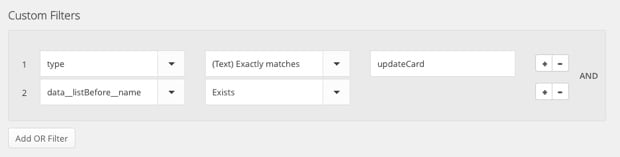
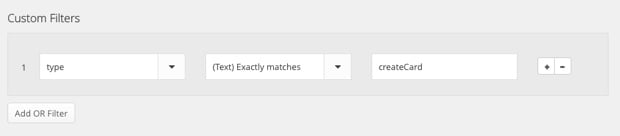
Now, the problem is that this default integration posts a message whenever anything happens in Trello, so it gets overwhelming really quickly. I only want to post a message to HipChat when (1) someone creates a new Trello card, or (2) when someone moves a card from one column (like To Do) to another (like Doing). Trello’s API documentation isn’t very clear, so it took quite a bit of playing around, but I eventually figured out how to make it work. The trick is that you have to create some custom filters to weed out the non-essential stuff. So, once you’ve set up the basic automation, here’s what to do.

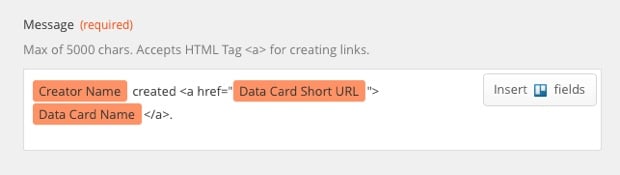
To send a message to HipChat when a new card is created in Trello, add the following custom filter:

Zapier Hipchat Trello

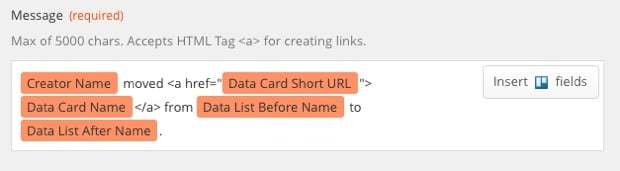
And then use the following variables for the HipChat message:

Zapier Hipchat Trello

To send a message to HipChat when a card is moved from one column to another, create the following custom filter:

Zapier Hipchat Trello

And use the following variables for the HipChat message:

Zapier Hipchat Trello

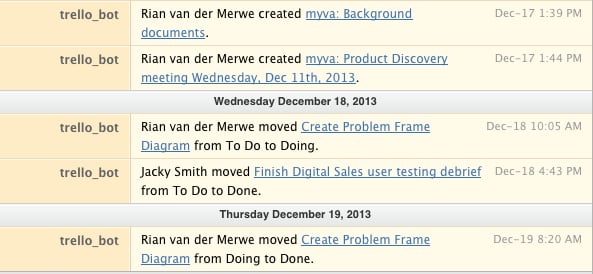
The result looks like this in HipChat:

Zapier Hipchat Trello

I like this message format because it lets you know who did what, and it also links directly to the Trello card if you’d like add a comment or look at other activity.

This integration basically turned HipChat into a dedicated project news feed, which I find extremely useful. If you only work on one project at a time this whole thing might seem like overkill, but we often have 3 or more projects on the go, so it’s great to enter a HipChat room and immediately be able to get a sense of what’s going on.

So, give Zapier a try. Even if you don’t use HipChat and Trello, I’m sure you’ll have fun playing around with the services you do use.

[Housekeeping] A new design, and some other things

I don’t write meta-posts often, but enough has happened this year that I wanted to give you a quick update on what’s going on. In an effort to make sure I don’t get too verbose, I’ll stick to a few short bullet points.

  • We recently made some slight updates to Elezea’s design. We removed the texture, cleaned up some things, switched to Droid Sans, and made the primary color a bit more orange. Most importantly, the site is now mobile-first and sports a fancy new off-canvas menu. Once again, I’m indebted to Alex Maughan for his amazing design and development work. High five, Alex.
  • This year I joined The Syndicate and AdPacks.com. I was quite worried about the response, but you guys have been awesome. It’s a testament to the quality of the audience (and the ads) that they are quite happy with the return they’re getting from advertising on Elezea. I have a love/hate relationship with ads, but I like the tasteful way these companies approach things, so it’s been a very good fit.
  • I’m currently finishing up a book on Product Management that will hopefully be published around March/April next year. If you’d like to get updates on what’s going on with that, you can sign up for the newsletter.
  • I’m quite impressed by Flipboard Magazines, and have recently started posting a lot of the articles that Elezea is based on (and things that don’t make it on here) to a companion magazine I imaginatively call Elezea Magazine. Please check it out, and share if you like it. It’s a really great platform.

I think that’s it. This has been a really cool year for Elezea, and I look forward to 2014. I feel privileged that you have chosen to take this hike with me. Thank you.

P.S. While we’re talking about other things, allow me to brag a little bit about where I live. I took this last week on an early morning run. If you haven’t been to Cape Town, you should definitely put it on your list.

Running in Stellenbosch

[Sponsor] Atlassian's agile guide

Thanks to Atlassian for sponsoring Elezea’s RSS feed this week!

What’s the point of an agile standup meeting?

Gone are the days of 30-minute status meetings where most people are half-asleep or pecking away on their laptops, oblivious to what’s being said. Agile standups are the leaner, more efficient cousin of status meetings where attendees actually stand up. On our feet, we’re more focused, attentive, and concise. It’s science!

Whether you need robust tools for planning and tracking projects, communicating with coworkers, deploying products, or just some general tips on how to run an agile shop (and how to run them Rong?), Atlassian is here to offer you the tools and advice you need to get the most out of your agile practice.

Sponsorship by The Syndicate.

When product enhancements are actually distractions

David Streitfeld takes an interesting look at the complicated relationship between digital and physical books in Out of Print, Maybe, but Not Out of Mind. This part jumped out at me, because it points to a mistake companies often make:

“A lot of these solutions were born out of a programmer’s ability to do something rather than the reader’s enthusiasm for things they need,” said Peter Meyers, author of “Breaking the Page,” a forthcoming look at the digital transformation of books. “We pursued distractions and called them enhancements.”

As Barbara Nelson points out in Who Needs Product Management?:

It is vastly easier to identify market problems and solve them with technology than it is to find buyers for your existing technology.

That’s the mistake that many ebook companies made. They let technology lead, where the better solution is to be led by user needs.

Healthcare.gov is all our projects

Healthcare.gov

So much has been written about the disastrous launch of healthcare.gov. But Sheryl Solberg and Michael Shear’s Inside the Race to Rescue a Health Care Site, and Obama hit especially close to home. Much of it reads like any number of software development projects I’ve been involved in over the years:

In Herndon, as engineers tried to come to grips with repeated crashes, a host of problems were becoming apparent: inadequate capacity in its data center and sloppy computer code, partly the result of rushed work amid the rapidly changing specifications issued by the government. […]

The website had barely been tested before it went live, so a large number of software and hardware defects had not been uncovered. Fixing the account creation software simply exposed other problems; people still could not register to buy insurance. A system intended to handle 50,000 simultaneous users was fundamentally unstable, unable to handle even a tiny fraction of that. As few as 500 users crippled it, according to people involved.

Rushed work amid rapidly changing specifications… No testing before going live…

Let him who has never experienced issues like that on a project cast the first negative blog post.

Conversions are not people

Andy Beaumont wrote a great piece about his popular Tab Closed; Didn’t Read Tumblr site, which documents websites that obscure their content behind modal overlays. His point on analytics in The Value of Content is spot on:

Analytics only tell you part of the story — if that’s all you bother to find out, and you have absolute faith in those numbers, then you’re going to end up putting a modal overlay on your site. Analytics will tell you that you got more “conversions”. Analytics will show you rising graphs and bigger numbers. You will show these to your boss or your client. They will falsely conclude that people love these modal overlays.

But they don’t. Nobody likes them. Conversions are not people. If you want the whole story here you should also be sat in a room testing this modal overlay with real people. Ask them questions.

Once again, this points to how important research triangulation is to make good decisions based on insights, not just data. Real insights are found at the intersection of different research methods. Not over in the corner with just one method.

Research triangulation

What is good design?

There are a few pieces on the topic of what makes a design good that jumped out at me recently. First, I like this approach from Uday Gajendar in What is good design?:

So what is “good design”? It’s an attitude of design-driven excellence (from strategy to delivery), a process of iteration and creativity, a mentality of enabling humanistic achievement for people, and a value system grounded in excellence of craft with a magnanimous bent towards what’s best for customers: appropriate, empowering, delightful.

Jon Bell talks about “Of Course” Design:

When people try to design magical interfaces, they’re often aspiring for the “wow” moment, but that’s the wrong focus. Designers should instead be focusing on “of course” moments, as in “of course it works like that.” Most product design should be so obvious it elicits no response.

Finally, Randy Hunt implores designers to Stop Trying To Be So Damned Clever:

During the design process, you can easily want to surprise and delight the user. So you create a design element — an interaction pattern, a naming scheme, a symbol, and so on — that is fresh and extremely inventive. However, the cleverness of your creation obscures the intent of the product. And the cleverness of that first impression doesn’t hold up over time — and I don’t mean over years; I mean over only the first few moments of use. After that first rush of newness, if the intended value of the product is not clear, or the functional intent isn’t obvious, the novel idea means nothing.

All three posts are worth reading in detail for their different points of view that point to similar definitions of good design.

The forces at work when choosing a product

The jobs-to-be-done framework isn’t new, but I’ve only recently started digging into it much more since it’s been gaining a lot of traction everywhere I look. For a nice primer on the topic see Eric Portelance’s recent article for Teehan+Lax called The Iceberg of Jobs-to-be-Done, in which he explains how crucial this framework is for good product design:

[Most successful products are created by] people who understand the importance of creating products that solve real customer problems, and have a set of tools and frameworks like jobs-to-be-done that they use to identify and validate the real human problems they’re trying to solve in the market.

The progress-making forces diagram has been particularly useful for me in client work, since it helps people understand how difficult it can be to change existing user behavior. I’m not a huge fan of the diagram on the JTBD site, so we made a new one:

Progress making forces diagram

The basic premise of the diagram is this. For someone to move from their existing behavior (a product they’re currently using) to new behavior (switching to a new product), there are two types of forces at work: progress-making forces, and progress-hindering forces.

Progress-making forces move people from their existing behavior to the new behavior, and consists of the push of the current situation (things they’re not happy with in the current product) and the pull of the new idea (things that sound appealing about the new product). Progress-hindering forces, on the other hand, hold people back from switching to new behavior. It consists of allegiance to the current behavior (things they really like about the current product) and the anxiety of the new solution (worries about learning curves and not being able to accomplish their goals with the new solution).

What this comes down to is that for someone to switch from an existing product to a new product, the progress-making forces have to be stronger than the progress-hindering forces. This might seem obvious, but applying this model to your product planning can inject an extremely healthy dose of reality. Is the product really that much better than a current solution? What does the new product have to do to overcome people’s allegiance to what they’re currently using?

In the context of product design this can be a crucial component to making a go/no-go decision on whether to go ahead with an idea, so it’s always a mental test I run with the teams when we’re working through our planning.

Slow down and refine

Slow coffee

I recently added a Hario Coffee Kettle to my favorite way to brew coffee at home (Chemex). And I realized that every tool I add to my coffee making routine makes it take a little longer, and taste a little better. I’ve been thinking about this for the past few days, wondering if there is a deeper lesson in there somewhere. And then Craig Mod published Pull back, which made it all fall into place:

I want them all to slow down. I want to whisper in their ears: pull back for a second. Just for a moment. Stop and refine. Refine and refine. […]

In refinement and iteration you finally get to know the thing you made. Really know it. Understand how bad it is. How great it could be. How much potential is still left unrealized. And within each iteration you move the thing forward; sometimes better, sometimes worse.

This is how it is with coffee, life, and yes — design. We can choose to make something and move on as soon as it’s done (Remember, The Biggest Lie in Corporate America Is Phase 2). Or we can choose to slow down, refine, and take the time to make things better. I think we should try to do more of the latter.