Menu

Posts tagged “product management”

Building a music discovery app (and what I learned about Product)

I miss liner notes. In the age of infinite streaming and algorithmic playlists I find myself longing for the days when you’d flip open a CD case and actually read about the music you were listening to. Who produced this? What’s the story behind the album? Why does this track feel different from everything else they’ve made?

Spotify and Apple Music are great at giving you more music. They’re less good at helping you understand why you might love something, or what to explore next. So I built my own solution—and then rebuilt it twice.

The problem I was trying to solve

My relationship with Last.fm goes back to 2007. In case you’re not familiar, Last.fm is a service that “scrobbles” (tracks) everything you listen to, building a comprehensive history of your musical life. It’s become a wonderful archive of my taste evolution over nearly two decades.

Last.fm is great at telling you what you listened to. It’s less useful for helping you understand why you might love something, or what else you should explore. Spotify and Apple Music’s algorithmic playlists are fine, but they often feel like they’re optimizing for engagement rather than genuine discovery.

I wanted a tool that would:

  • Show me context about the artists and albums in my listening history
  • Help me discover music through similarity and connection, not just popularity metrics
  • Give me that “liner notes” depth I was craving
  • Work with my existing Last.fm data (18 years of listening history is a lot to throw away)

So I started building, first by copy-pasting from GPT–4 (the olden days!), and most recently with Antigravity + Claude Opus 4.5 (we’ve come a long way since 2023). Here’s where it all stands today…

Listen To More: three iterations and counting

Listen To More is the core project—a music discovery platform that combines real-time listening data with AI-powered insights.

The first version was simple: a personal dashboard that pulled my Last.fm data and displayed it nicely. Functional, but limited. The second version added some AI summaries using OpenAI’s API. Better, but still rough around the edges.

The current version—iteration three—is a complete rebuild focused on speed and multi-user support. What started as “a thing I made for myself” is now something anyone can use. Sign in with your Last.fm account, and you get:

  • Rich album and artist pages with AI-generated summaries, complete with source citations (so you know the AI isn’t just making things up)
  • Your personal stats showing recent listening activity, top artists and albums over different time periods.
  • Weekly insights powered by AI that analyze your 7-day listening patterns and suggest albums you might love
  • Cross-platform streaming links for every album—Spotify, Apple Music, and more
  • A Discord bot so you can share music discoveries with friends

The tech stack is Hono on Cloudflare Workers, with D1 (SQLite) for the database and KV for caching. The whole thing is server-side rendered with vanilla JavaScript for progressive enhancement. Pages load in about 300ms, then AI summaries stream in asynchronously.

I chose this stack partly because I work at Cloudflare and wanted to understand our developer platform better. More on that later.

Extending the ecosystem with MCP servers

MCP stands for Model Context Protocol. In plain terms, it’s a standard that lets AI assistants (like Claude) connect to external data sources and tools. Think of it as giving an AI the ability to actually use personalized data rather than just answer questions based on pre-training.

I built two MCP servers to extend my music discovery ecosystem:

Last.fm MCP Server

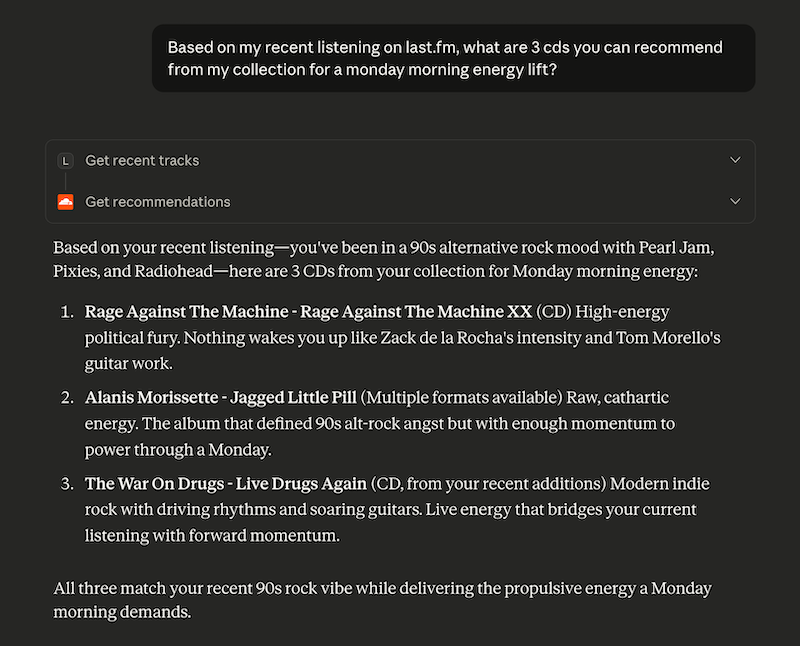
Available at lastfm-mcp.com, this server lets AI assistants access your Last.fm listening data. Once connected, you can have conversations like:

  • “When did I start listening to Led Zeppelin?”
  • “What was I obsessed with in summer 2023?”
  • “Show me how my music taste has evolved over the years”

The AI can pull your actual scrobble data, analyze trends, and give you personalized insights. It supports temporal queries (looking at specific time periods), similar artists discovery, and comprehensive listening statistics.

Discogs MCP Server

This one connects to Discogs—the massive music database and marketplace that’s especially popular with vinyl collectors. If you have a Discogs collection, the MCP server lets AI assistants:

  • Search your collection with intelligent mood mapping (“find something mellow for a Sunday evening”)
  • Get context-aware recommendations based on what you own
  • Provide collection analytics and insights

Both servers run on Cloudflare Workers and use OAuth for secure authentication. They’re open source if you want to poke around or deploy your own.

What I learned

I’m a Product Manager, not an engineer. But I’ve found that having more technical depth broadens the scope of things I am able to contextualize—and makes me more confident in my interactions with engineers. Here’s what building these projects reinforced for me:

  • Side projects are a low-stakes learning environment. When you’re building for yourself, there’s no pressure to ship by a deadline or meet someone else’s requirements. You can experiment, break things, and iterate freely. I tried approaches that would have been too risky to propose in a work context—some of them broke the site spectacularly, others worked beautifully.
  • There’s no substitute for using your own product. I use these tools every day. That constant exposure surfaces issues and opportunities that you’d never catch in a quarterly review or user interview. The feature prioritization becomes obvious when you’re feeling your own friction.
  • Building with your company’s tools is invaluable. I now have deep, practical knowledge of Cloudflare Workers, D1, KV, and the rest of our developer platform. When I’m talking to customers or evaluating feature requests, I’m drawing on real experience, not just documentation. I can empathize with the developer experience because I’ve lived it.
  • The fun matters. I keep coming back to these projects because I genuinely enjoy working on them. The satisfaction of solving a problem you personally care about is different from the satisfaction of shipping something at work. Both are valuable, but the former is what sustains a side project through the inevitable rough patches.

What’s next

I have a list of features I’d love to add—better recommendations, more sophisticated listening pattern analysis, maybe even integration with other music services. But I’m also learning to pace myself. These projects aren’t going anywhere, and part of the joy is the slow, steady improvement over time.

If you’re curious, you can check them out here:

And if you’re a PM thinking about starting a technical side project: do it. Pick something you personally care about, use tools you want to learn, and give yourself permission to build slowly. The lessons transfer in ways you won’t expect.

Measuring AI's Impact on Shipping Speed and Code Quality

Will Larson has a good post about how they’re adopting AI at his company. The process is interesting, but this is the part that jumped out at me:

My biggest fear for AI adoption is that they can focus on creating the impression of adopting AI, rather than focusing on creating additional productivity. Optics are a core part of any work, but almost all interesting work occurs where optics and reality intersect.

It’s really hard to figure out if AI tools are (1) helping teams ship faster (2) without sacrificing quality.

We’re working on figuring out this problem right now at Cloudflare. Our proposed approach sidesteps the problem of per-commit AI attribution (did Copilot write this line? did Claude?) by correlating team-level AI tool usage with team-level health metrics over time. If a team’s AI adoption increases by 30% and their change failure rate stays stable, that’s a useful signal. If AI usage spikes and incidents start trending up, that’s worth investigating.

The key insight is that you don’t need perfect attribution to get directionally useful data. Correlation isn’t causation, and teams adopting AI tools may already be more experimental or higher-performing. But at least you’re measuring something real instead of the something like “# of lines written by AI”, which leads straight to the Goodhart’s Law problem where metrics become targets.

How I Use AI for Product Work

Update! I wrote a follow-up post here: How My AI Product “Second Brain” Evolved.

I’ve been refining my approach to using LLMs for product work, and I figured it’s time to write up how I actually use them day-to-day.

The most valuable thing an AI assistant can do for product work is push back on weak reasoning, spot gaps you missed, and force you to articulate why your idea is good. A peer reviewer who shares your product philosophy, basically. With the right prompts, AI assistants are also good at producing background and framing documents: explainers that synthesize complex topics and summaries of technical concepts.

Here’s how I’ve set it up, what makes it work, and how you might build something similar.

The Philosophy: A Sparring Partner

I believe LLMs are most useful when you give them two things: context and constraints.

Context tells the model who you are, what you’re working on, and what “good” looks like in your world. Constraints keep it from drifting into generic advice or invented frameworks.

Every prompt I use is designed to provide both. They’re opinionated on purpose. I’d rather have an assistant that pushes back on bad ideas than one that says “Great idea!” to everything.

I don’t want AI writing presentations for me. I want a thinking partner that:

  • Challenges weak problem statements before I waste time on solutions
  • Spots missing success criteria I forgot to define
  • Asks “why?” when my reasoning gets hand-wavy
  • Points out when I’m jumping to solutions before understanding the problem
  • Helps me create background docs and explainers that set context for others

The Building Blocks

Here’s the folder structure I maintain, with a series of Markdown files organized by purpose:

llm-prompts/
├── prompts/           # System prompts for different use cases
│   ├── pm/            # Product management prompts
│   └── technical/     # Technical/engineering prompts
├── context/           # Personal context files (who I am, how I work)
├── reference/         # Syntax guides and reference docs
└── work/              # Saved feedback and refined docs

What makes this work is how you combine them.

Layer 1: System Prompts

These are the instructions that tell the AI how to behave for a specific task. I have different prompts for different jobs:

  • General PM sparring: A prompt that knows my product philosophy and pushes back on weak reasoning. I use this for thinking through tradeoffs, preparing for meetings, and sanity-checking my approach.
  • Document review: Prompts specifically designed to critique PRDs, OKRs, strategy docs, and other artifacts. These encode what “good” looks like and call out common anti-patterns.
  • Idea stress-testing: A prompt that I stole from my friend Stephen, which simulates a debate between an optimist and a skeptic to pressure-test new ideas before I get too attached to them.
  • Technical understanding: Prompts that help me understand systems, architectural decisions, and technical concepts well enough to lead effectively (I’m not an engineer, but I need to hold my own in architecture reviews).

Each one carries a specific point of view about what good work looks like.

Layer 2: Personal Context

I maintain files that describe:

  • Who I am: My role, my experience, my communication style
  • How I work: My product philosophy, my management approach, my values
  • What I’m working on: Current projects, team context, company priorities

When I start a conversation, I can pull in the relevant context files alongside my prompt. The model then has the background it needs to give me advice that fits my situation, instead of generic best practices from a blog post.

Layer 3: Reference Materials

Sometimes you need the model to follow specific formats or conventions. I keep reference files for things like wiki markup syntax, documentation templates, or internal style guides. These keep the output usable without a round of reformatting.

How I Actually Use This

I use Windsurf as my daily driver, and it has a feature that makes this whole system work: the @ mention. In the chat panel, I can reference any file by typing @ followed by the path. Windsurf then includes that file’s contents as context for the conversation.

This means I can compose my “assistant” on the fly by combining:

  1. A system prompt for the task at hand
  2. Relevant personal context files
  3. The document or code I’m working on

Example: Document Review

When I need feedback on a PRD before sharing it with stakeholders, I’ll start a conversation and reference my PRD review prompt plus my product philosophy context. Then I paste in the PRD and ask for critique.

The model comes back with feedback measured against my own standards. It’ll call out if my problem statement is vague, if my success metrics aren’t measurable, or if I’m jumping to solutions before properly framing the problem—the kind of pushback I’d want from a peer reviewer.

Example: Brainstorming Partner

For early-stage thinking, I use a more conversational prompt that knows how I like to explore ideas. I’ll describe what I’m thinking about and ask it to poke holes, suggest angles I haven’t considered, or help me articulate why something feels off.

This helps most before big meetings. I can rehearse my reasoning and get challenged on the weak spots before I’m in front of stakeholders.

Example: Technical Understanding

I’m not an engineer, but I work with technical teams. When I need to understand how a system works well enough to ask good questions or spot when something doesn’t add up, I use prompts designed for technical explanation.

The key is that these prompts know to explain things without condescension but also without assuming I know the jargon. They cite specific files and line numbers when relevant, and they explain the “why” behind design decisions.

Connecting to Real Data

MCP (Model Context Protocol) servers connect the AI to external data sources: internal wikis, documentation sites, code repositories, APIs. So it can answer from real information instead of guessing from training data.

In my prompts, I tell the model which MCP servers are available and when to use them. For example, my technical prompts instruct the model to:

  • Search official documentation first to ground answers in verified information
  • Check internal wikis for known issues, edge cases, and workarounds
  • Look at code repositories when documentation is incomplete
  • Always cite sources with links so I can verify

Now the AI answers like someone with access to your company’s actual knowledge base, citing real docs and real code instead of best-practice boilerplate.

Keeping a Record

Save the conversation output somewhere useful.

I have a work/ folder organized by topic where I save feedback and refined thinking. When the model gives me good critique on a PRD, I’ll ask it to write a summary of the key issues to a Markdown file I can reference later. This keeps the insights from getting lost in chat history.

What I’ve Learned

  1. Context files are worth the investment. I have files that describe who I am, how I work, and what I value. Updating these takes time, but it pays off in every conversation.
  2. Pushback is the point. These prompts are designed to challenge bad thinking. If the model is pushing back on your approach, take it seriously: it might be right.
  3. Iterate on the prompts. I update these regularly based on what works and what doesn’t. If a prompt isn’t helping, change it.
  4. Less context is often more. Including too much context can dilute the signal. Start with the minimum you need, add more if the model seems confused.

The thinking is still mine

None of this does the thinking for me. It encodes my preferences and philosophies into something an LLM can use as a baseline for pushing back. I still write my own PRDs, OKRs, and strategy docs, because those represent my actual thinking. But I let AI help me create background documents, explainers, and context-setting materials. And I have a sparring partner that catches the gaps I miss and asks the uncomfortable questions before stakeholders do.

If you build something similar, I’d love to hear how it goes.

"Disagree and Let’s See"

I like this alternative to the “Disagree and Commit” saying:

“Disagree and let’s see” allows you to stay aligned with the team without forcing you to pretend you had conviction you didn’t have. It lets you walk into a room with your team and be honest:

“Here’s the path that was chosen. It wasn’t my first pick, but here’s the experiment we’re running, and here’s what we’re trying to learn.”

That’s a much more authentic stance for most leaders than repeating something with a tight smile and hoping no one notices your doubt.

Source: “Disagree and Let’s See”

The price of admission

Some tough love here about what it means to have “executive presence”.

When someone tells you that you need more business sense, or that you’re not ready for more scope, or that you need to level up, this is typically what they’re trying to communicate. That you’re more concerned with how work happens than with what work should happen in the first place.

Source: The price of admission

AI's "Just Ship it." problem

Here’s Leah Tharin with a good reminder of what it means to ship, and how AI can (and cannot) help. In short, building is only one part of creating valuable products. Shipping involves:

  • Ideation: There’s an idea
  • Development: You build the idea
  • Validation: You validate whether what you think the idea does is actually happening

Yes, vibe coding tools like Lovable et al. help you to ship things faster, but only as long as these ideas struggle with the “development” part and don’t need Ideation and Validation.

Source: AI’s “Just Ship it.” problem

The game you’ve never heard of that taught me a better way to build alignment

In South Africa we call this game (where the goal is to keep the rally going as long as possible) “Beach Ball” so I immediately got it. And despite my aversion to “Here’s what X taught me about B2B Sales” posts this one actually got to me. Because Gabrielle is right. The communication goal—especially in big corporations—is not to win, it’s to keep talking until you have a better way forward:

In tennis, you win by hitting shots your opponent can’t return. In Frescobol, you win by setting up your partner to succeed. One earns you points. The other builds momentum. When you default to tennis, every hard conversation becomes a match to win. You come in armed with tactics—rebuttals, logic, bulletproof clarity. But the more you prepare to win, the more you risk breaking the rhythm that makes change possible. Frescobol invites a different question: “What would I say differently if my goal were to extend the rally, not win the point?”

Source: The game you’ve never heard of that taught me a better way to build alignment

The Pragmatic Engineer 2025 Survey: What’s in your tech stack?

This was a very comprehensive survey about everything from AI tools to Terminal app preferences, CI/CD systems, and more. Very much worth the click to skim through the results. Gergely also has an interesting theory on why developers hate Jira so much:

But I wonder if the root problem is really with JIRA itself, or whether any project management tool idolized by managers would encounter the same push back? It is rare to find a dev who loves creating and updating tickets, and writing documentation. Those who do tend to develop into PMs or TPMs (Technical Program Managers), and do more of “higher-level”, organizational work, and less of the coding. Perhaps this in turn makes them biased to something like JIRA?

Source: The Pragmatic Engineer 2025 Survey: What’s in your tech stack?

Here is how I approach starting a new job

Elena Verna has some really good tips for ramping up in a new job in this post:

If you over-index on action, you’ll likely misfire because you’re missing context. But if you over-index on just learning, you’ll create anxiety and unmet expectations around you. It’s a tough balance to strike. Assuming you are learning at max velocity, here is how I deal with ‘take action’ part: start with protecting what’s already working, move onto quick wins, go after big bets, and finish with the strategy.

I am inclined to move the strategy piece up (see my post about product strategy) and work on that before “big bets” so that you can build confidence that you know what the product is, who the users are, and how it makes money. Small quibbles about the order of things aside, I agree with all the details!

Source: Here is how I approach starting a new job

You cannot survive poor management

Yes, amen to this.

As a manager, be honest to your executives and your reports. Given enough people in your team, there is no tactical decision that will make your engineers work faster. Your only real option is to admit early that your deadline is untenable, and replan by reducing features, or extending deadlines. Whipping your engineers to work harder has never worked, and will ruin their trust in you forever.

Source: You cannot survive poor management